Hello good people of the community, I have a trivial problem, I made a small list project but I can’t save the list made with a label using the “File” component, I recreated the same project in App Inventor 2 and it works, I was wondering, is there any difference between the platforms in the use of the “File” component? In App Inventor 2 I save the list and recall it for reading in Kodular but I can’t. Thanks in advance.v 
What have you tried in Kodular?
And where did you save the file?
Hi Ibrahim_Jamar, I’m just saying I want to save a list made up of a label (Multiline) to a file (Filename.*) and call it up when needed, that’s all, it works in AI2 but not in Kodular! I’d like to implement it with Kodular because I like it better.
Hi Gianluca Franco, I used the / character to save
How? Can you please show us how you are handling the blocks?
I can’t load the block.
I can’t load it, loading gets stuck when replying
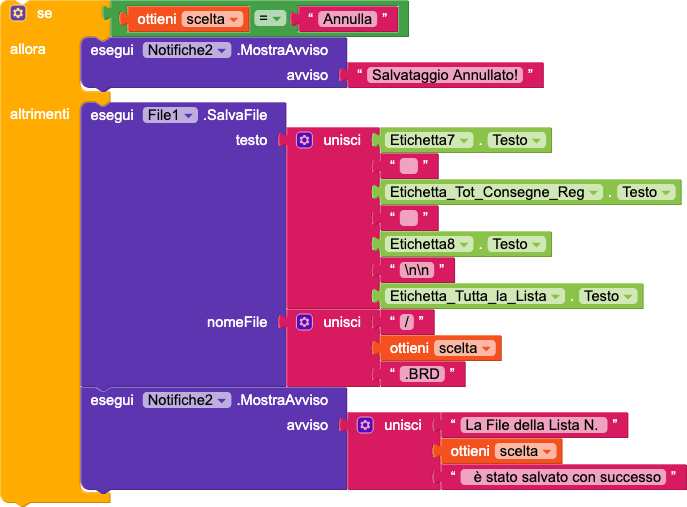

I used a Notification to name the File to save with an extension to distinguish it…
I use a cell phone that does not have a microcard slot for extended memory.
I ask you to set the language to English when you publish your blocks so that everyone can clearly understand which blocks you are referencing.
Do you have a way to check with a file manager if the file is at least being created?
The way you’re saving the file is fine, you can also remove the initial /, and the file will be saved in the app’s main folder.
Thanks for your advice on publishing the blocks in English. I’ll soon change the language in the portal settings. However, I couldn’t find the file I created with my device’s File Manager. I’ll also try removing the “/” character.
I’ll try these things. Thanks so much.
storage/emulated/0/Android/data/your.package.name/files
or with companion
storage/emulated/0/Android/data/io.makeroid.companion/files
thanks 
Good morning my friend, listen, I can’t find the path you told me in your last post
Hi Gianluca,
What do you mean by
In regular file managers, you can directly access the internal storage starting from Android >> data, where you’ll find all the folders of the apps you’ve installed.
Inside, there should be io.makeroid.companion or your.package.name, and in one of these folders, you should find your file.
try this
1 Like
Set the language to English and post a simple test aia, that reproduces the issue. And post the relevant blocks as well.
Try to connect your device via USB and find that folder while accessing your device from your computer or try total commander
Taifun
Hi everyone, first of all, a big thank you to everyone for your help. I managed to find in Android/data some apps I have and regularly use that were developed with KODULAR.
Now I’ll reinstall my app where I “save” files and check if my saved file exists. Thank you.
Thanks to RaYzZz
who recommended I download an app called “CX FILE EXPLORER.”
1 Like
Nope, guys, I did some tests and it doesn’t save the file I created by naming it!
The error is:
Error 2021: File 421.BRD could not be found
