 App Shortcut & Quick Actions Manager (Extension for App Inventor / Kodular)

 Description
App Shortcut & Quick Actions Manager is a lightweight native component for App Inventor and its distributions (Kodular & others.) that enables you to create Dynamic App Shortcuts on the Android home screen.
When users long-press your app icon, they get quick access to key features—such as “Scan QR”, “Open Chat”, or “Settings”. Built purely on Android’s native ShortcutManager API, it adds no heavy external libraries to your project.
 Key Features
 Instant Access: Create and remove shortcuts dynamically at runtime.
 Native Integration: Built on official Android 7.1+ APIs (API 25+).
 Smart Navigation: Retrieve launch
ActionandData URIto navigate users directly to specific screens. Reliable: Features device compatibility checks and error handling.
 Blocks Reference & Parameters
1. call AppShortcut.AddDynamicShortcut
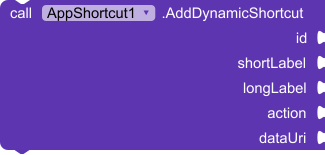
Creates a new dynamic shortcut or updates an existing one.
- Parameters:
id(String) : Unique identifier for the shortcut.- Example:
"scan_shortcut"
- Example:
shortLabel(String) : Short title displayed in the popup menu (up to 10–12 characters).- Example:
"Scanner"
- Example:
longLabel(String) : Longer description used when pinned to the home screen.- Example:
"Open QR Scanner"
- Example:
action(String) : A unique action string used to determine which screen to launch.- Example:
"open_scanner"
- Example:
dataUri(String) : Extra data or URI scheme (optional, can be left blank"").- Example:
"app://data/123"
- Example:
2. call AppShortcut.GetStartAction (Function / Returns String)

Returns the action string that launched the application.
- Usage: Best called inside
when Screen1.Initialize. - Return Value: Action string (e.g.,
"open_scanner") or empty string""if launched normally.
3. call AppShortcut.GetStartData (Function / Returns String)

Returns the extra dataUri string passed when launching via shortcut.
- Return Value: Data string or
"".
4. call AppShortcut.RemoveDynamicShortcut

Removes a specific shortcut by its id .
- Parameters:
id(String) : The ID of the shortcut to remove.- Example:
"scan_shortcut"
- Example:
5. call AppShortcut.RemoveAllDynamicShortcuts

Removes all dynamic shortcuts created by the app.
6. AppShortcut.IsSupported (Property / Returns Boolean)

Checks whether the user’s device supports App Shortcuts (Android 7.1 / API 25+).
- Return Value:
trueorfalse.
7. call AppShortcut.GetMaxShortcutCount (Function / Returns Number)

Returns the maximum number of dynamic shortcuts allowed by the system launcher (typically 4).
8. when AppShortcut.ErrorOccurred (Event)
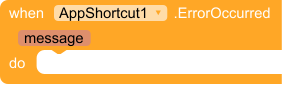
Triggered when an error occurs (e.g., when exceeding maximum shortcut limits).
- Parameter:
message(String) — Error description.
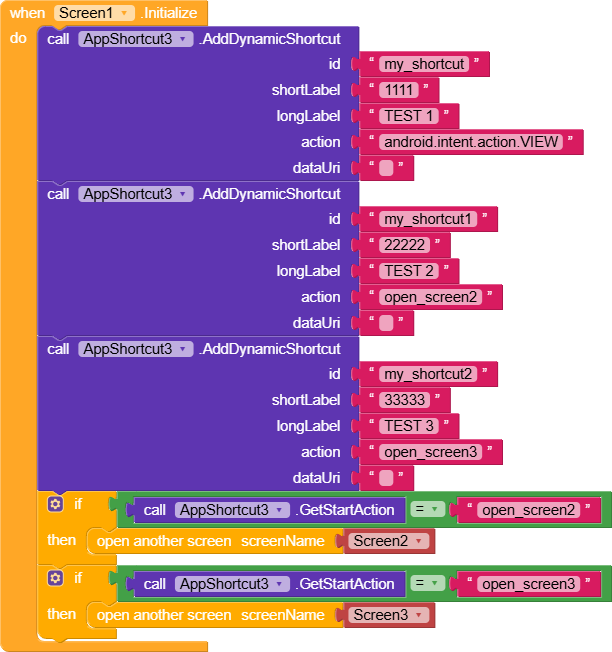
 Blocks Usage Example (Screen Navigation)
Step 1. Registering a Shortcut (e.g., in Screen1.Initialize):
id:"shortcut_scan"shortLabel:"Scanner"longLabel:"Open Scanner"action:"open_scanner"dataUri:""
Step 2. Handling Shortcut Launch in when Screen1.Initialize:
Plaintextif (AppShortcut1.GetStartAction == "open_scanner") then open another screen (screenName: "ScannerScreen")
com.appshortcut.aix (8.3 KB)
Расширение было создано с помощью: FAST