Hi everyone,
I am a beginner learning Kodular, and I am currently working on an app where security and user experience are very important to me.
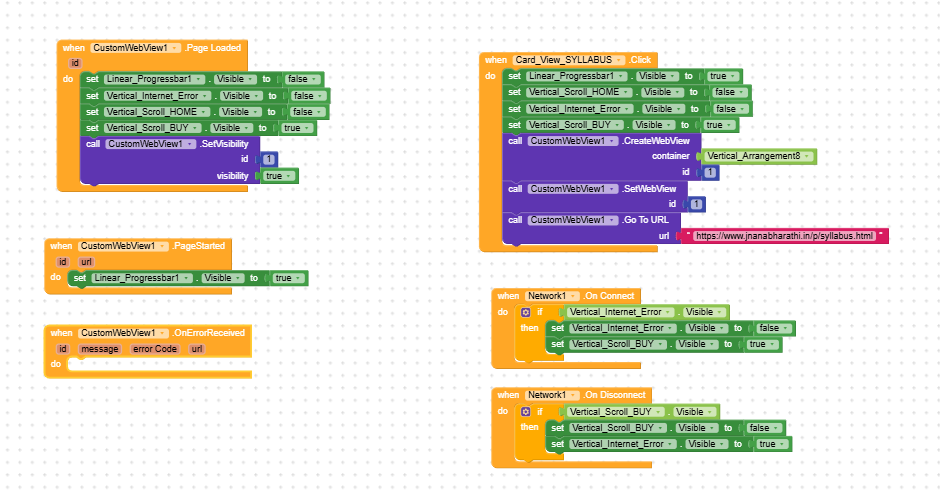
I am facing an issue with my Custom WebView setup where the standard Android “Webpage not available” error screen appears under specific network conditions, accidentally exposing my internal website links to the user.
My Current Setup: I have built logic to check for an active internet connection. If there is no internet, the app successfully redirects the user to my custom Internet Error Screen.
The Problem:
- When there is no internet: Works perfectly (shows my custom error screen).
- When internet is ON but extremely slow OR the user has an active connection but an expired data pack: My blocks pass the initial network check, but the WebView fails to load the page. Instead of showing my custom error screen, it displays the default Android “Webpage not available” screen, which unfortunately exposes my backend links.
What I want to achieve: I want to completely block or intercept that default Android error page and force the app to show my custom error screen instead, even when the failure is caused by a timeout, slow speed, or an expired data pack.
Questions:
- Is there a specific event block in the Custom WebView component (like
OnErrorOccurredorReceivedError) that I should use to catch this? - What are the exact error codes (e.g.,
-2forERROR_HOST_LOOKUPor-8forERROR_TIMEOUT) or logic I need to implement to handle this safely?
Since I am a beginner, if you could provide clear explanations or block screenshots for the solution, it would be highly appreciated!
Thank you in advance for helping me learn.