EqualizerView — colorful animated music equalizers

 Specifications
 Package: com.equalizerview
 Size: 37,01 KB
 Minimum API Level: 14
 Updated On: 2026-10-31T21:00:00Z
 Built & documented using: FAST v7.7.0
Seven beautiful, ready-to-use audio visualizers (3 circular + 4 horizontal) that move to the beat of your music.
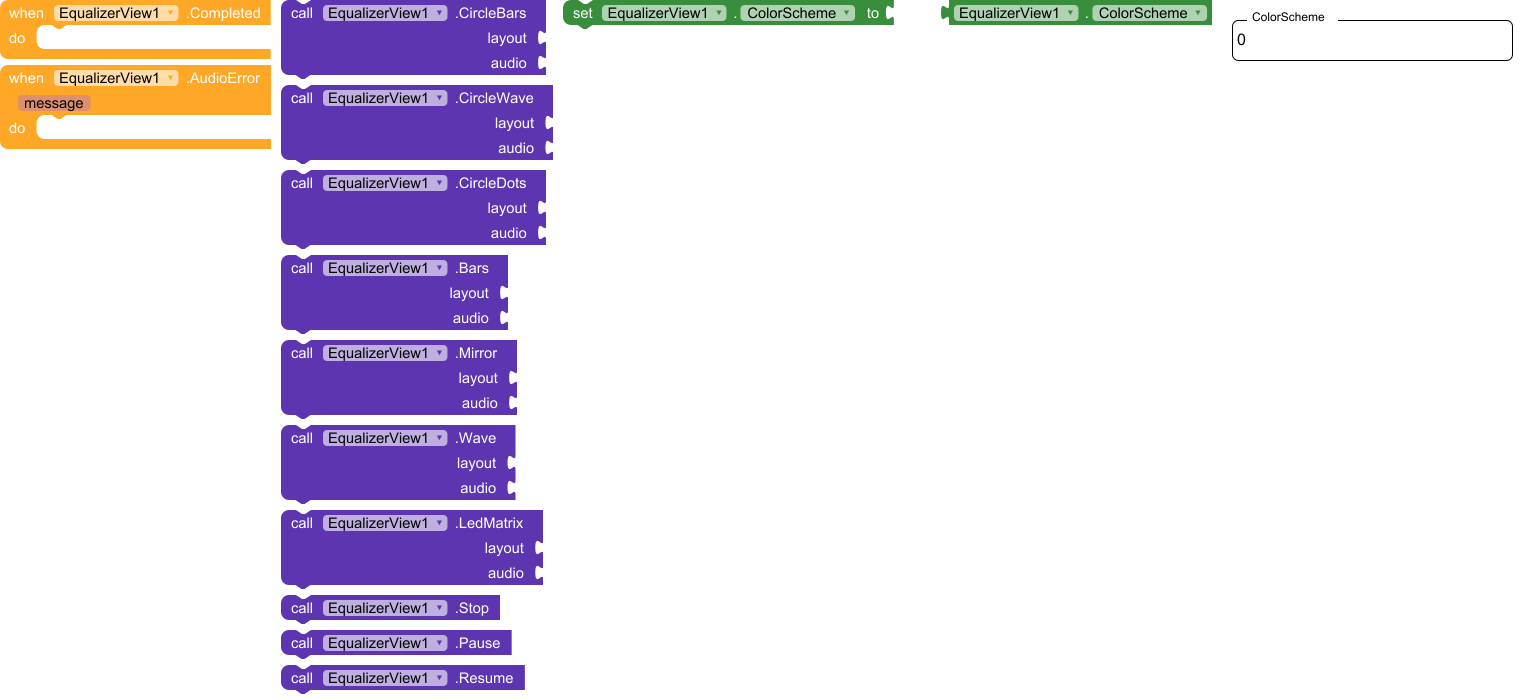
One purple block per equalizer, two sockets: where to draw and what to play. That’s it.
| Extension | EqualizerView |
| Package | com.equalizerview |
| Version | 2 |
| Author | vakha |
| Works with | MIT App Inventor, Kodular and other builders |
| Messages language | Follows the phone language (Russian / English) |
Features
- 7 equalizer styles: 3 circular and 4 horizontal
- 4 color schemes: Rainbow, Neon, Fire, Aurora
- Plays audio from Assets or from a link, or visualizes the sound of any other player in your app
- Reacts to the real sound (FFT analysis); if the microphone permission isn’t granted yet, it switches to a smooth simulation automatically
- Several equalizers at once, in different layouts, all synced to the same music
- Background glow, smooth falling bars, peak caps, bass pulse, slow rotation on circular styles
Blocks
Every equalizer block has the same two sockets:
| Socket | Type | Description |
|---|---|---|
layout |
VerticalArrangement / HorizontalArrangement | The place where the equalizer is drawn. It fills the whole arrangement. |
audio |
Text | An Assets file name (song.mp3), a direct link (https://site.com/song.mp3), or an empty text "" to react to the sound of any other player. |
Circular equalizers
CircleBars(layout, audio)
Glowing rays around a pulsing ring. The ring and the center circle breathe with the bass.
call EqualizerView1.CircleBars layout: VerticalArrangement1 audio: "song.mp3"
CircleWave(layout, audio)
A smooth, colorful wave ring that slowly rotates. The inner circle pulses with the kick drum.
call EqualizerView1.CircleWave layout: VerticalArrangement1 audio: "https://example.com/music.mp3"
CircleDots(layout, audio)
Rings of dots that light up from the center outwards, like a spinning neon disc.
call EqualizerView1.CircleDots layout: VerticalArrangement1 audio: ""
Horizontal equalizers
Bars(layout, audio)
Classic rounded bars with glow and falling white peak caps.
call EqualizerView1.Bars layout: HorizontalArrangement1 audio: "song.mp3"
Mirror(layout, audio)
Bars grow up and down from the center line, with a soft reflection below.
call EqualizerView1.Mirror layout: VerticalArrangement2 audio: "song.mp3"
Wave(layout, audio)
Two layered, filled waves with a color gradient and a glowing edge.
call EqualizerView1.Wave layout: VerticalArrangement2 audio: "song.mp3"
LedMatrix(layout, audio)
A retro LED matrix: green → yellow → red in Rainbow mode, with floating peak dots.
call EqualizerView1.LedMatrix layout: VerticalArrangement2 audio: "song.mp3"
Control blocks
| Block | Description |
|---|---|
Stop() |
Stops the sound and removes all equalizers from the screen. |
Pause() |
Pauses the audio started by this extension. Bars smoothly fall down. |
Resume() |
Continues the audio after Pause. |
Calling an equalizer block again with the same audio does not restart the song. It just changes the style, so you can switch styles on the fly.
Properties
| Property | Type | Description |
|---|---|---|
ColorScheme |
Number | 0 Rainbow, 1 Neon (cyan → magenta), 2 Fire (red → yellow), 3 Aurora (green → violet). Works in Designer and in Blocks. |
Events
| Event | Description |
|---|---|
Completed() |
The track has finished playing. |
AudioError(message) |
Something went wrong (wrong file name, no internet, unsupported format…). The message is in the phone language. |
Examples
1. Play a song and show an equalizer
when Screen1.Initialize
    call EqualizerView1.CircleBars
        layout   VerticalArrangement1
        audio    "song.mp3"
2. Play from the internet
when ButtonPlay.Click
    call EqualizerView1.Wave
        layout   VerticalArrangement1
        audio    "https://example.com/music.mp3"
3. Switch styles with buttons (the song keeps playing)
when ButtonCircle.Click
    call EqualizerView1.CircleWave   layout: VerticalArrangement1   audio: "song.mp3"

when ButtonBars.Click
    call EqualizerView1.Bars         layout: VerticalArrangement1   audio: "song.mp3"

when ButtonLed.Click
    call EqualizerView1.LedMatrix    layout: VerticalArrangement1   audio: "song.mp3"
4. Change colors
when ButtonNeon.Click
    set EqualizerView1.ColorScheme to 1

when ButtonFire.Click
    set EqualizerView1.ColorScheme to 2
5. Use it together with another player
Start your own player (MediaPlayer, Player, any extension) and pass an empty text as audio.
The equalizer will react to whatever sound is playing in your app.
when ButtonPlay.Click
    call Player1.Start
    call EqualizerView1.CircleDots
        layout   VerticalArrangement1
        audio    ""
6. Two equalizers at the same time
call EqualizerView1.CircleBars  layout: VerticalArrangement1  audio: "song.mp3"
call EqualizerView1.Bars        layout: HorizontalArrangement1  audio: "song.mp3"
7. Pause, resume and stop
when ButtonPause.Click    →  call EqualizerView1.Pause
when ButtonResume.Click   →  call EqualizerView1.Resume
when ButtonStop.Click     →  call EqualizerView1.Stop
8. Handle the end of the track and errors
when EqualizerView1.Completed
    do  set LabelStatus.Text to "Track finished"

when EqualizerView1.AudioError
    message
    do  set LabelStatus.Text to get message
Tips
- Give your arrangement a fixed height (for example 200 px) for the best look. Circular styles look best in a square area.
- The
layoutsocket accepts VerticalArrangement and HorizontalArrangement. - Put audio files into Media (Assets) and use the exact file name, including the extension.
- On first start Android asks for the microphone permission. It is only used by the system audio analyzer to read the music, not your voice. Without it, the equalizer still works in smooth simulation mode.
- Use
""asaudioif your music is played by another component or extension.
Permissions
RECORD_AUDIO (audio analyzer), MODIFY_AUDIO_SETTINGS, INTERNET (playing from links).
Feedback, ideas and new styles are welcome. Enjoy the music!
com.equalizerview.aix (40.1 KB)