Correct! and I was aware that firebase’s sdk will stop working soon 

This approach utilizes the Web component for handling database operations.
 Core Logic
1. Dynamic Request Builder
A procedure (test_Firebase) dynamically:
- Constructs the Firebase URL using:
- Bucket (Project Path)
- Tag
- Appends
.jsonto match Firebase REST format - Chooses the request type based on a Type parameter:
1 → GET2 → PUT (Store)3 → PATCH (Update)4 → DELETE
2. CRUD Operations
- GET → Retrieves data from Firebase
- PUT → Stores new data or overwrites existing data
- PATCH (simulated via PUT) → Updates existing data
- DELETE → Removes a specific tag
3. Response Handling
- Checks
responseCode = 200for success - Handles responses based on request type:
- GET
- If data exists → JSON decoded and displayed
- If
null→ shows no data
- PUT → “Data saved successfully”
- PATCH → “Data updated successfully”
- DELETE
null→ success- otherwise → failure
- GET
- Displays errors when request fails
4. User Interface Flow
- Separate buttons for:
- Get
- Store
- Delete
- Inputs:
- Bucket (database path)
- Tag (key)
- Value (for storing/updating)
- Screen switching system:
- Toggles between Get / Put / Delete views
- Clears inputs when switching screens
5. Data Handling
- Ensures Firebase-compatible format:
- Uses JSON encoding/decoding
- Prevents crashes by:
- Checking for
"null"responses before decoding
- Checking for
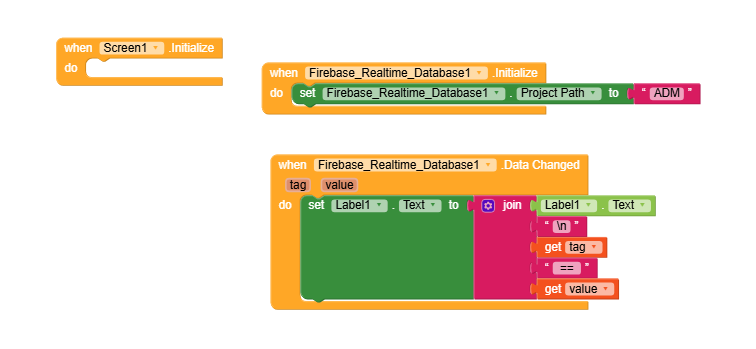
test.aia (2.7 KB)
@Diego Please check why not working new firebase component also i use google-services.json,but not working.
I’m also getting errors in my project. Even after deleting and recreating the project, the Firebase database connection cannot be established. I’ve also added my JSON file to the project.
They’re developing the app, it’s great, but they’re not explaining how to use it.
I want to warn users about using this extension: if Firebase Realtime Database requires authentication, this extension will not work. It only works in case of public access. It does not support token-based access issued from Firebase Authentication either.
To be clear: it’s fine to share extensions for users to use. But this extension is NOT a drop-in replacement for all the users who were using Firebase Database / Firebase Realtime Database components. There are many limitatations regarding authentication. Having a public Firebase RTDB is a security issue.
3 Likes
we don’t want to rely on extensions, they are not stable. Also tell us the progress about firebase component how much time it will take?
1 Like
He replied that he will try to find a solution today. I also really hope it will be resolved soon. In fact, the issue only occurs in the Companion, while everything else is working normally.
1 Like
The component is already available. The missing issue is on Companion, but you can test by building the APK and installing it to your device.
Refer to this:
When I install the application as an .apk file on my phone, I get the error “Runtime Error invalid Firebase Database path: https://xxxxx-s54sf-xxxxxx.firebasedatabase.app Firebase Database paths must not contain ‘.’, ‘#’,‘$’,‘[’,or ‘]’”. I copied and pasted the firebase_url I use from the json file and the firebase console. Even if I remove the ‘/’ character at the end of the URL, the error persists.
Firebase is a very important component and database for Kodular, how is it possible that it no longer works. What database should we rely on now? The further we go, the worse things get, something like this is unacceptable. We have all been working with Firebase for many years. What do we do now?
1 Like
@Diego  Correct, the extension is not a permanent solution for Authntication used projects but it can solve the issue which caused their apps DEAD with the rules I already provided using which database can be accessed but cannot be deleted & I think there is no need to warn anybody, if someone is using Firebase RTDB with authentication then they will get ‘Permission Denied’ error itself. I think more than 80% app devs here are not using Authentication/Token Based Firebase RTDB Operations, Yes, Not at all, because firebase has rules playground to set as per requirements, some are using just Read=true, Write=false which is more secure than Authentication/token system and this extension is 100% convenient and secure with that, and with newDataexist rule. The main point is, a person has to face this critical situation where his/her app got dead even no authentication/token used in his app, such can use the extension not just for today, I recommend them to use for forever
For Authentication Based Database, Data cannot be deleted, It’s a temporary solution until you get permanent fix by Kodular:
{
“rules”: {
“.read”: true,
“.write”: “newData.exists()”
}
}
If your app has no write operations:
{
“rules”: {
“.read”: true,
“.write”: false
}
}
For paths, you only need to enter the value after the URL. For example, with
https://xxxxx-s54sf-xxxxxx.firebasedatabase.app.com/ADMIN/A/B/C
you only need to enter: /ADMIN/A/B/C.
Don’t use this, this is browser URL
Use the URL copied from here
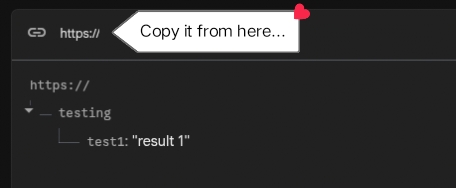
Note: Now there is no need to use the URL, you can just use the key node…
let’s say i am okay with open rules & want to use multiple database urls, Then the possible method is to find a similar extension like the previous kodular FDB component.
i am not making any changes in the current project and want an advice either to duplicate the old method using an extension or is there any chance of another update
1 Like
Have Open rules then you can use the extension bro
1 Like
Added an FAQ section with common issues observed so far:
Wouldn’t it be better, if this was in a new topic.
1 Like
yes as its like a whole new component than just an update