Hello Kodular Builders! 
Tired of slow Google Sheets, complex Firebase rules, or expensive server limits? Today, I am thrilled to introduce Cloudflare Database Extension (v2.0) for App Inventor, Kodular, and Niotron!
This extension directly connects your mobile apps to Cloudflare D1 (Cloudflare’s ultra-fast, serverless, globally distributed SQLite database) via high-performance Cloudflare Workers. Experience lightning-fast query execution, multi-table queries, column-level conditional updates/deletes, and concurrency-safe numeric increments with zero hassle!
 Key Features
-
 Blazing Fast Global Edge Performance: Powered by Cloudflare’s global edge network for sub-millisecond response times worldwide.
-
 Multi-Table Architecture: Manage multiple tables in a single D1 database. Fetch individual tables or all tables at once (
"all"). -
 Advanced Column-Based Operations: Update or Delete rows matching specific column values without needing row IDs (e.g.,
WHERE UserEmail = 'xyz'). -
 Multi-Column Bulk Updates: Update multiple columns simultaneously with a simple JSON object.
-
 Atomic Increment / Decrement: Concurrency-safe numeric updates (perfect for wallet balances, coin systems, view counts, and scores).
-
 Enterprise-Grade Security: Authenticated with Bearer API tokens and custom Cloudflare Worker endpoints.
-
 Built-in Device Security Check: One-time silent background activation via your registered Email and Item ID.
-
 100% Lifetime Free: Free for personal and commercial applications.
 Extension Specifications
-
Package:
com.abid.cloudflaredatabase -
 Version:
2.0 -
 Size:
34.42 KB(Ultra-lightweight) -
 Minimum API Level:
14+(Android 4.0+) -
 Companion Friendly: Yes (Auto-verified in live companion testing)
 Blocks Overview

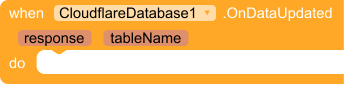
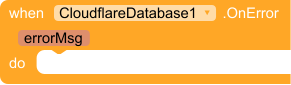
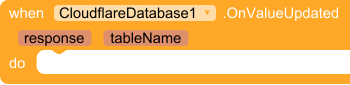
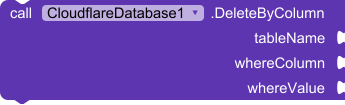





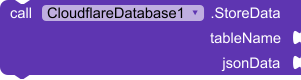
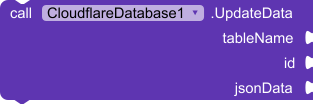
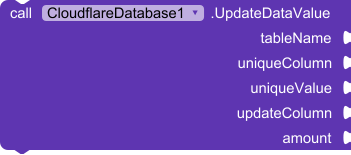
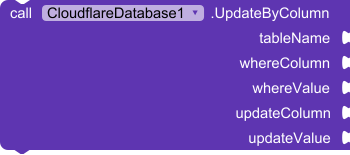


 Detailed Blocks & Documentation
Properties (Designer & Blocks)
| Property | Type | Description |
| :— | :— | :— |
| ApiUrl | Text | The HTTPS endpoint URL of your deployed Cloudflare Worker. |
| ApiSecret | Text | The secret Bearer authorization token used to authenticate requests. |
 CRUD & Database Methods
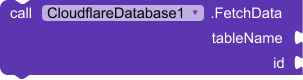
 FetchData (tableName, id):
Retrieves data from your D1 database. Pass "all" to fetch all tables at once, or provide a specific tableName. Set id to empty "" to retrieve all rows, or specify an ID for a single record.
-
Triggers:
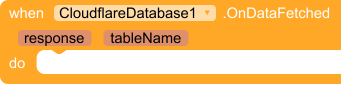
OnDataFetched(response, tableName) -
StoreData (tableName, jsonData):
Inserts a new row into the specified table using a JSON string.
-
Example:
{"name":"Ali", "email":"ali@example.com", "balance": 100} -
Triggers:
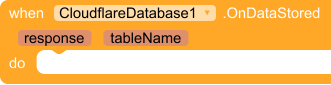
OnDataStored(response, tableName) -
 UpdateData (tableName, id, jsonData):
Updates a record matching the primary ID with the provided JSON payload.
-
Triggers:
OnDataUpdated(response, tableName) -
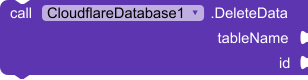
 DeleteData (tableName, id):
Deletes a record matching the primary ID.
- Triggers:
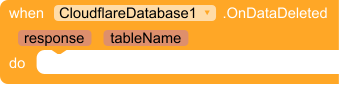
OnDataDeleted(response, tableName)
Advanced Column-Level Methods
 UpdateByColumn (tableName, whereColumn, whereValue, updateColumn, updateValue):
Updates a specific column where another column matches a value.
-
Example: Set
PaymentStatus="Paid"whereTransactionID="TXN-98765". -
Triggers:
OnDataUpdated(response, tableName) -
 UpdateMultipleByColumn (tableName, whereColumn, whereValue, jsonUpdates):
Updates multiple columns at once using any unique column value.
-
Example: Where
UserEmail="ali@gmail.com", update Name, Phone, and City by passing{"Name":"Abid Ali", "Phone":"03449490070", "City":"Lahore"}. -
Triggers:
OnDataUpdated(response, tableName) -
 DeleteByColumn (tableName, whereColumn, whereValue):
Deletes rows where a target column matches a value.
-
Example: Delete from table
CartwhereUserEmail="user@test.com". -
Triggers:
OnDataDeleted(response, tableName) -
UpdateDataValue (tableName, uniqueColumn, uniqueValue, updateColumn, amount):
Atomically increments or decrements a numeric value in Cloudflare D1 without race conditions. Pass positive numbers (+10) to add, or negative (-5) to subtract.
-
Example: Add
50coins toWalletwhereUserID="U123". -
Triggers:
OnValueUpdated(response, tableName)
Security & Free Activation Blocks
| Method / Property | Return Type | Description |
| :— | :— | :— |
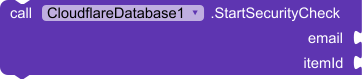
| StartSecurityCheck (email, itemId) | None | Silently validates activation in background. Call in Screen.Initialize. |
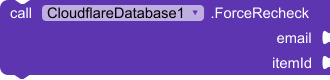
| ForceRecheck (email, itemId) | None | Clears cache and re-validates credentials with the server. |
| ResetSecurityData () | None | Resets local device verification cache (for developer testing). |
| UserEmail () | Text | Returns the currently verified email address. |
| ItemID () | Text | Returns the registered Item ID. |
| IsVerified () | Boolean | Returns true if device has completed verification. |
| IsAccessGranted () | Boolean | Returns true if activation was approved. |
| IsSessionVerified () | Boolean | Returns true if active session is verified. |
 Events
-
OnDataFetched (response, tableName): Returns fetched data array / JSON.
-
OnDataStored (response, tableName): Triggered after insertion completes.
-
OnDataUpdated (response, tableName): Triggered after standard or column updates.
-
OnDataDeleted (response, tableName): Triggered after row deletion.
-
OnValueUpdated (response, tableName): Triggered when a numeric value is incremented or decremented.
-
OnError (errorMsg): Fires when an error occurs during API execution.
-
AccessGranted (): Fires when free registration verification succeeds. Safely load your app data here!
-
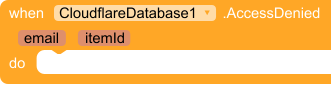
AccessDenied (email, itemId): Fires if verification fails or unverified credentials are used.
 Quick Start Guide
-
Deploy Cloudflare Worker: Deploy the worker script connected to your Cloudflare D1 database.
-
Add Component: Drop
CloudflareDatabaseinto your project and set yourApiUrlandApiSecret. -
Register & Verify: In
Screen1.Initialize, callStartSecurityCheckwith your registered email and free Item ID. -
Handle AccessGranted: Once
AccessGrantedfires, callFetchData("users", "")and bind your data to ListViews or Dynamic Components!
Download & Free Activation
This extension is 100% FREE for everyone. To activate it for lifetime use in your applications, simply register for a free Item ID on our official website.
- Download Extension (.aix):
com.abid.cloudflaredatabase.aix (35.7 KB)
(Note)There was a bug in it—specifically regarding a security check—which has now been fixed.
- Get Free Lifetime Item ID (Registration):
 Visit Our Official Website to Register Free
(Note: Safe, browser-based instant activation — no third-party APK app required).
- Example Project (.aia):
[Download Sample .aia Project](Coming Soon)
 Support & Feedback
If you encounter any bugs, have questions, or need assistance setting up your Cloudflare Worker, feel free to reply to this thread!
 If this extension powers up your apps, don’t forget to Like (
 ) this thread! Happy Coding!

