MediaPlayerPro: Description and Block Reference
Oct 25, 2026 ·
MediaPlayerPro inserts a video and audio player with a ready-made control panel into any App Inventor layout: links, phone files, YouTube, streams, and radio.
What It Is
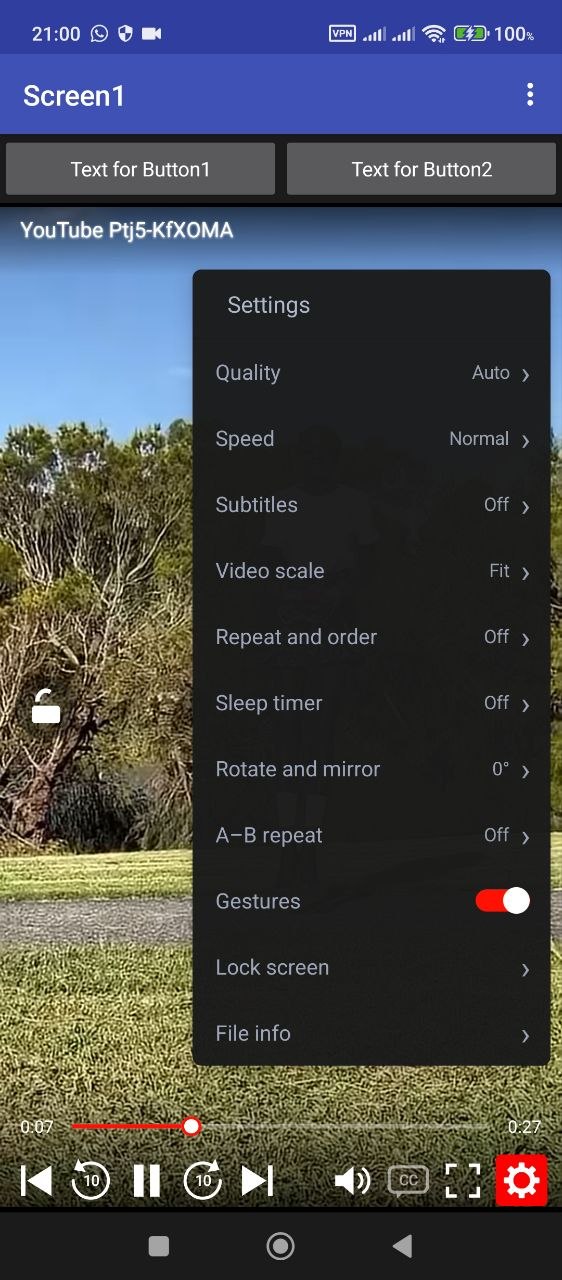
An invisible component: the player is inserted into any layout using the AttachTo block and takes up its entire space. The control panel, gear menu, and gestures are already built-in, drawn with code, and do not require images.
- Sources: link, file path, content://, YouTube link.
- YouTube: videos, playlists, shorts, live streams, channel broadcasts.
- Streams: HLS (with quality selection), DASH, FLV, RTSP, ICQ internet radio.
- Queue, repeat (one/all), shuffle, M3U/PLS, RSS podcasts.
- Phone files: music and video scanning, system file picker, cover art, frames, file information.
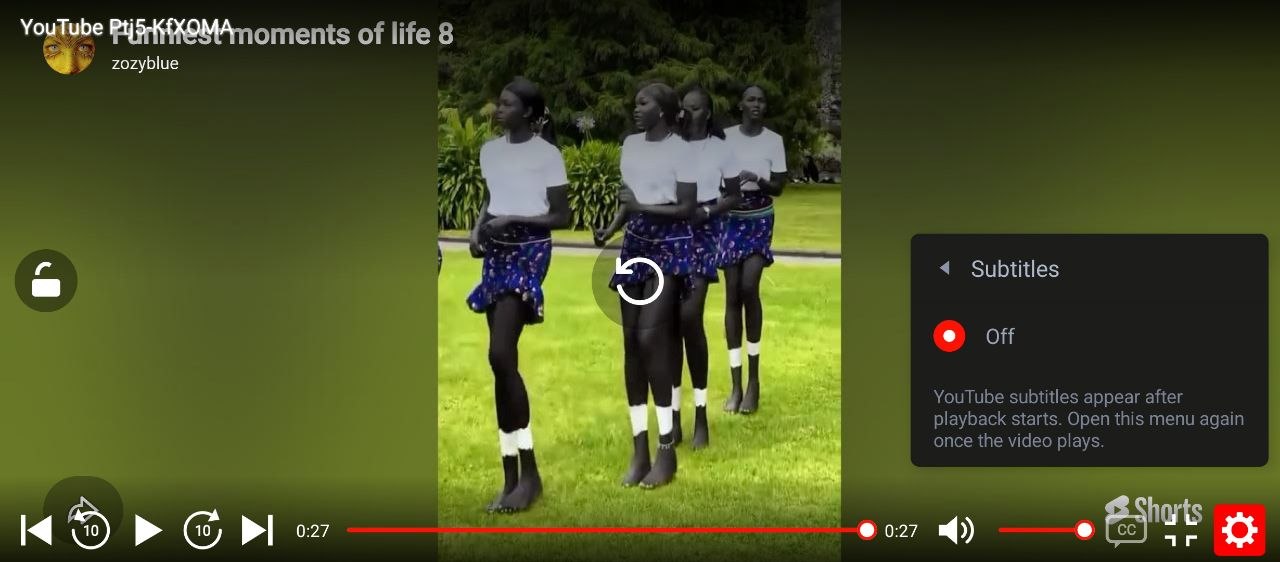
- Subtitles SRT, VTT, A S S, SSA and LRC lyrics; embedded and YouTube; offset and styling.
- Speed 0.1–4.0, channel balance, equalizer, bass, volume boost above 100%, headphone and Bluetooth profiles.
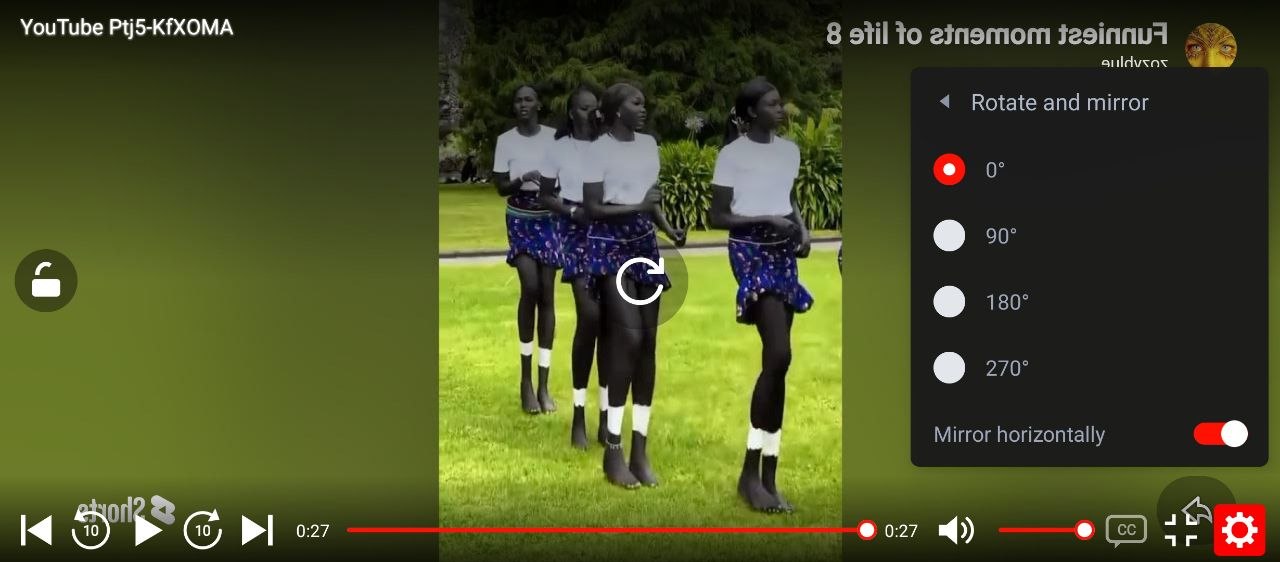
- A–B segment repeat, intro skip, frame-by-frame viewing, rotation, mirror, zoom, frame capture.
- Gestures: double tap, brightness, volume, rewinding, long press x2, touch lock.
- Resume playback from the stop position for each file, sleep timer, low battery pause, mobile network warning, background playback.
- The player’s interface language matches the phone’s language (Russian or English).
Formats and Sources
The Android system player opens everything the phone supports; network files that it cannot handle are automatically attempted in the built-in web player (hls.js, dash.js, flv.js, network required). The list inside the player itself is returned by the GetSupportedFormats block.
| Type |
Formats |
| Audio |
mp3, aac, m4a, flac, wav, ogg, oga, opus, amr, awb, mid, midi, mka, ts |
| Video |
mp4, m4v, 3gp, 3g2, mkv, webm, ts, mov; avi only if the system has a codec; flv and DASH (mpd) via the web player |
| Streams |
HLS m3u8 (quality selection), DASH mpd, FLV, RTSP, icy:// and http internet radio, YouTube live streams |
| YouTube |
youtube.com links, youtu.be, shorts, embed, live, playlists (list=), channel streams youtube.com/channel/UC…/live |
| Playlists |
m3u, m3u8 (file list), pls, RSS podcast |
| Subtitles |
srt, vtt, a s s, ssa, lrc, embedded in the file, YouTube subtitles; a file next to the video with the same name (also .ru, .en, .rus, .eng) is picked up automatically |
Suitable sources include: http/https/rtsp/icy links, full file paths, file://, content:// (result of PickFiles and ScanDevice), and YouTube links. Videos whose embedding has been disabled by the author are opened using the OpenExternal block.
Quick Start
- Place a layout (
VerticalArrangement) on the screen and set its height to a number or percentage, not “automatic”.
when Screen1.Initialize → call MediaPlayerPro1.AttachTo layout: VerticalArrangement1. If the layout height is “automatic”, use AttachToWithHeight and a height in dp.when Button1.Click → call MediaPlayerPro1.SetSource src: "[https://youtu.be/d_WKXYMRZWU](https://youtu.be/d_WKXYMRZWU)".
The player will start playing automatically (AutoPlay is true by default). Back button in fullscreen: when Screen1.BackPressed → if IsFullscreen then SetFullscreen false.
Settings
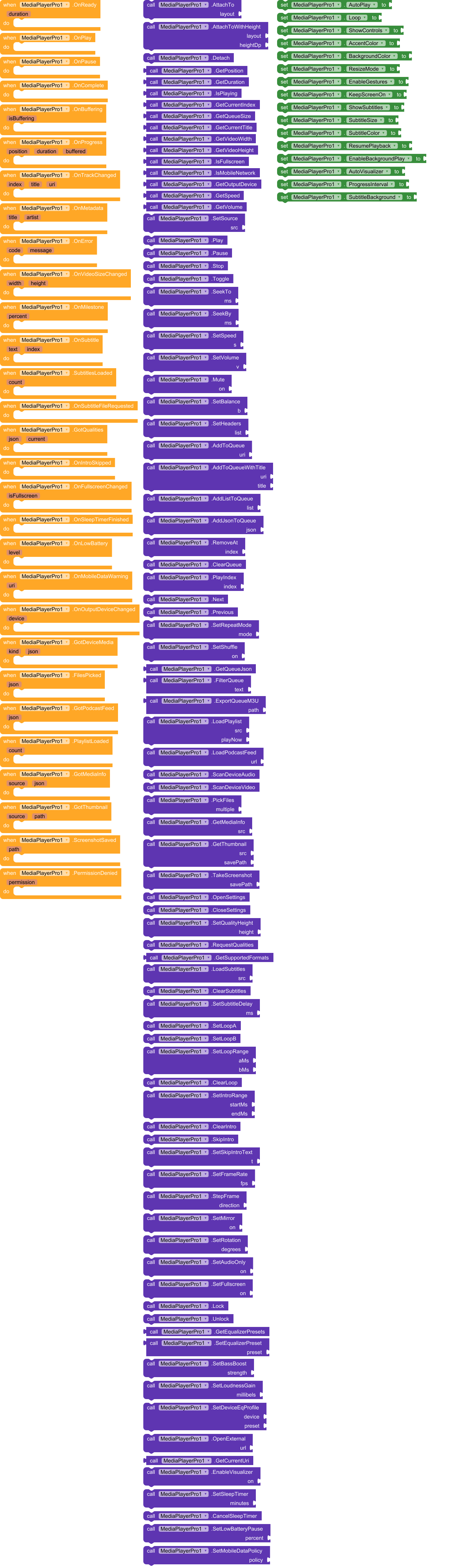
These are “set MediaPlayerPro.… to …” blocks (write-only). Place them in Screen.Initialize, before SetSource.
| Block |
What It Does |
Example |
| AutoPlay |
Start immediately after loading (true by default) |
set AutoPlay to false: the player waits for a Play block |
| Loop |
Repeat the current track |
set Loop to true |
| ShowControls |
Show the built-in panel (true) |
false: custom buttons on Play, Pause blocks |
| AccentColor |
Color of the slider, button, and visualizer |
set AccentColor to red |
| BackgroundColor |
Color behind the video |
set BackgroundColor to black |
| ResizeMode |
Scale: 0 fit, 1 fill with cropping, 2 stretch |
set ResizeMode to 1 |
| EnableGestures |
Gestures (true) |
false: disable swipes and double tap |
| KeepScreenOn |
Prevent screen from dimming during playback (true) |
false |
| ShowSubtitles |
Show subtitles and lyrics (true) |
false |
| SubtitleSize |
Subtitle text size 8–48 (16) |
set SubtitleSize to 22 |
| SubtitleColor |
Subtitle text color |
set SubtitleColor to yellow |
| SubtitleBackground |
Background: 0 none, 1 semi-transparent, 2 solid (1) |
set SubtitleBackground to 2 |
| ResumePlayback |
Remember the position of each file and link (true) |
false: always from the beginning |
| EnableBackgroundPlay |
Do not stop audio when minimized (true) |
false: pause when minimized |
| AutoVisualizer |
Enable visualizer on audio and ask for audio recording permission once; audio is not recorded (true) |
false: without permission prompt |
| ProgressInterval |
How often OnProgress arrives, ms, starting from 200 (1000) |
set ProgressInterval to 500 |
Blocks: Playback, Queue, Playlists
Insertion and State
| Block |
What It Does |
Example |
| AttachTo(layout) |
Inserts the player into the layout |
AttachTo VerticalArrangement1 |
| AttachToWithHeight(layout, heightDp) |
Same with height in dp |
AttachToWithHeight Arr1, 220 |
| Detach |
Removes the player from the screen, sound keeps playing |
“Hide” button |
| GetPosition / GetDuration |
Position and duration, ms (live streams have duration 0) |
Label.Text = GetPosition / 1000 |
| IsPlaying |
Whether playback is ongoing |
if IsPlaying then Pause |
| GetCurrentIndex / GetQueueSize |
Index of current track (zero-based) and queue size |
Label: GetCurrentIndex + 1 out of GetQueueSize |
| GetCurrentTitle / GetCurrentUri |
Title and address of the current track |
Label.Text = GetCurrentTitle |
| GetVideoWidth / GetVideoHeight |
Frame size, 0 for audio |
if GetVideoWidth = 0 then this is audio |
| IsFullscreen |
Whether fullscreen is enabled |
in Screen.BackPressed |
| IsMobileNetwork |
Whether a mobile network is connected |
warn about traffic |
| GetOutputDevice |
speaker, headphones, or bluetooth |
show icon |
| GetSpeed / GetVolume |
Speed and volume 0–100 |
Slider.Value = GetVolume |
Playback
| Block |
What It Does |
Example |
| SetSource(src) |
Replaces the entire queue with a single source and starts playback |
SetSource “https://radio.example/stream” |
| Play, Pause, Stop, Toggle |
Play, pause, stop and release, toggle |
Button.Click → Toggle |
| SeekTo(ms) |
Seek to position |
SeekTo 60000 |
| SeekBy(ms) |
Seek forward or backward |
SeekBy -10000 |
| SetSpeed(s) |
Speed 0.1–4.0 (for YouTube 0.25–2.0) |
SetSpeed 1.5 |
| SetVolume(v) |
Volume 0–100 |
SetVolume Slider.ThumbPosition |
| Mute(on) |
Mute or unmute sound |
Mute true |
| SetBalance(b) |
Balance from -1.0 (left) to 1.0 (right) |
SetBalance -1 to listen in the left ear |
| SetHeaders(list) |
Network request headers “Name: value” |
list of “User-Agent: MyApp” |
| OpenExternal(url) |
Open link in YouTube app or browser |
for videos with disabled embedding |
Queue and Playlists
| Block |
What It Does |
Example |
| AddToQueue(uri) |
Adds to the end of the queue |
AddToQueue “/sdcard/a.mp3” |
| AddToQueueWithTitle(uri, title) |
Same with a title |
AddToQueueWithTitle url, “Radio” |
| AddListToQueue(list) |
Adds a list of strings |
AddListToQueue global name |
| AddJsonToQueue(json) |
Adds from a JSON array [{uri or url, title}] |
result of FilesPicked or GotDeviceMedia |
| RemoveAt(index) |
Removes an item by index |
RemoveAt 2 |
| ClearQueue |
Clears the queue and stops |
“Clear” button |
| PlayIndex(index) |
Play a queue item |
ListView.AfterPicking → PlayIndex SelectionIndex - 1 |
| Next, Previous |
Next, previous; Previous returns to the beginning if playing longer than 3s |
  buttons; inside a YouTube playlist, it flips through its videos |
| SetRepeatMode(mode) |
0 off, 1 single track, 2 entire list |
SetRepeatMode 2 |
| SetShuffle(on) |
Shuffle order |
SetShuffle true |
| GetQueueJson |
Queue as JSON [{index, title, uri, current}] |
show in ListView via JSON blocks |
| FilterQueue(text) |
Same, but only matching items |
search through queue |
| ExportQueueM3U(path) |
Saves queue to M3U, returns true on success |
ExportQueueM3U “/sdcard/my.m3u” |
| LoadPlaylist(src, playNow) |
Loads M3U or PLS by link or from file; single m3u8 stream is added as a single item |
LoadPlaylist “https://site/list.m3u”, true |
| LoadPodcastFeed(url) |
Reads podcast RSS, result in GotPodcastFeed event |
LoadPodcastFeed rssUrl |
Blocks: Phone Files, Quality, Subtitles
Phone Files
| Block |
What It Does |
Example |
| ScanDeviceAudio |
Finds all music (requests permission), result in GotDeviceMedia |
“My Music” button |
| ScanDeviceVideo |
Finds all videos, result in GotDeviceMedia |
“My Videos” button |
| PickFiles(multiple) |
System audio and video picker dialog, result in FilesPicked |
PickFiles true |
| GetMediaInfo(src) |
Codecs, bitrate, resolution, tags, result in GotMediaInfo (JSON) |
GetMediaInfo GetCurrentUri |
| GetThumbnail(src, savePath) |
Cover art or frame as JPEG; empty path means app cache; path in GotThumbnail |
GetThumbnail uri, “” |
| TakeScreenshot(savePath) |
Saves current video frame (not for YouTube), path in ScreenshotSaved |
TakeScreenshot “/sdcard/shot.jpg” |
Quality and Formats
| Block |
What It Does |
Example |
| OpenSettings, CloseSettings |
Opens and closes the gear menu |
custom “Settings” button |
| SetQualityHeight(height) |
Closest quality to frame height, 0 means auto; HLS, DASH, YouTube |
SetQualityHeight 720 |
| RequestQualities |
List of qualities, result in GotQualities [{id, label, height}] |
populate ListView |
| GetSupportedFormats |
JSON {audio, video, streams, playlists, subtitles} |
show help |
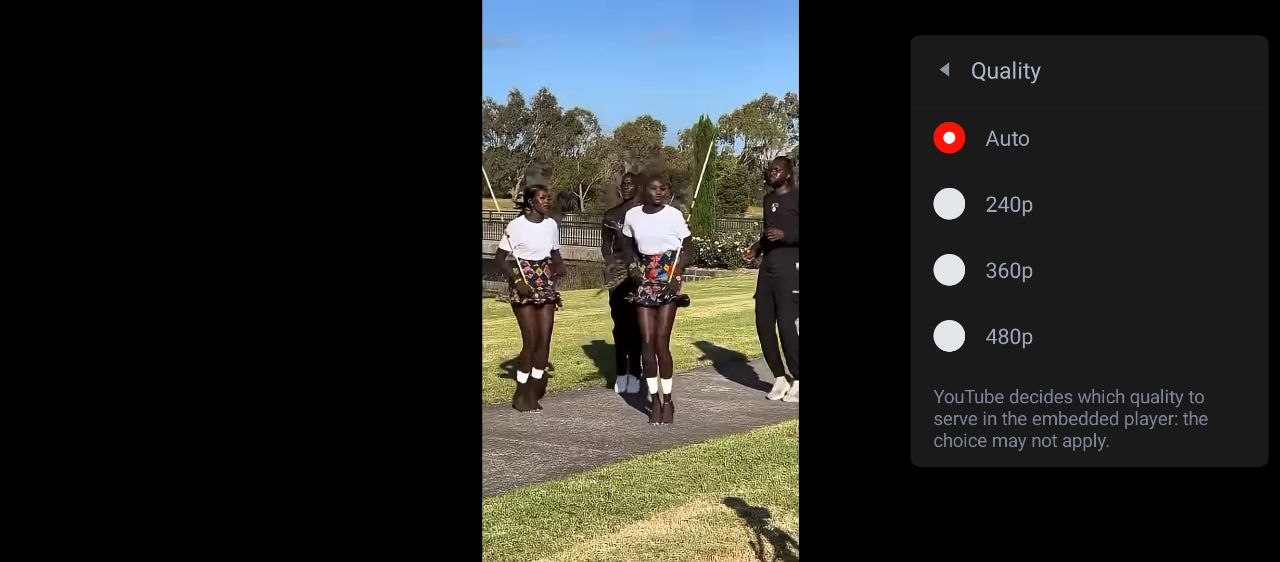
For YouTube, quality is applied by restarting the video from the same second; the built-in YouTube player may ignore the selection. Regular files have a single quality.
Subtitles
| Block |
What It Does |
Example |
| LoadSubtitles(src) |
Loads SRT, VTT, A S S, or LRC by link or from file |
LoadSubtitles “/sdcard/film.srt” |
| ClearSubtitles |
Removes subtitles |
“No Subtitles” button |
| SetSubtitleDelay(ms) |
Offset: positive shows later, negative shows earlier |
SetSubtitleDelay -500 |
The CC button on the panel enables and disables subtitles, including for YouTube. The “Load File…” item in the menu triggers the OnSubtitleFileRequested event: show the file picker and pass the result to LoadSubtitles.
Blocks: A–B, Intro, Screen, Audio, Savings
Segment Repeat, Intro, Frames, Rotation
| Block |
What It Does |
Example |
| SetLoopA, SetLoopB |
Points A and B at current position; then segment repeats |
SetLoopA, after some time SetLoopB |
| SetLoopRange(aMs, bMs) |
Segment manually |
SetLoopRange 30000, 45000 |
| ClearLoop |
Disables segment repeat |
“Reset” button |
| SetIntroRange(startMs, endMs) |
Intro: skip button appears during this interval |
SetIntroRange 0, 90000 |
| ClearIntro, SkipIntro |
Remove intro, skip now |
OnTrackChanged → SetIntroRange |
| SetSkipIntroText(t) |
Skip button text |
SetSkipIntroText “Skip” |
| SetFrameRate(fps) |
Frame rate for StepFrame (30) |
SetFrameRate 25 |
| StepFrame(direction) |
Frame forward (1) or backward (-1), pauses playback |
StepFrame 1 |
| SetMirror(on) |
Horizontal mirror |
SetMirror true |
| SetRotation(degrees) |
Rotation 0, 90, 180, or 270 |
SetRotation 90 |
| SetAudioOnly(on) |
Show cover art and visualizer instead of video; traffic is not reduced |
SetAudioOnly true |
Zoom, rotation, and mirroring work for regular video, YouTube, and the web player.
Screen
| Block |
What It Does |
Example |
| SetFullscreen(on) |
Fullscreen with rotation to landscape; exiting restores orientation |
SetFullscreen true |
| Lock, Unlock |
Touch lock, lock button remains visible |
Lock when watching with a child |
Audio and Effects
| Block |
What It Does |
Example |
| GetEqualizerPresets |
Device equalizer preset names (JSON), after track is loaded |
populate list |
| SetEqualizerPreset(preset) |
Preset by name or number; empty or off disables; returns true on success |
SetEqualizerPreset “Rock” |
| SetBassBoost(strength) |
Bass 0–1000 |
SetBassBoost 500 |
| SetLoudnessGain(millibels) |
Boost above 100%, 0–3000 mB; high values cause distortion |
SetLoudnessGain 600 (this is +6 dB) |
| SetDeviceEqProfile(device, preset) |
Preset for speaker, headphones, or bluetooth; applies automatically on device switch; empty preset removes rule |
SetDeviceEqProfile “bluetooth”, “Bass” |
| EnableVisualizer(on) |
Enables visualizer, requests audio recording permission (audio is not recorded) |
EnableVisualizer true |
| SetSleepTimer(minutes) |
Sleep timer, volume fades out gradually; 0 cancels |
SetSleepTimer 30 |
| CancelSleepTimer |
Cancels timer |
“Cancel” button |
Savings
| Block |
What It Does |
Example |
| SetLowBatteryPause(percent) |
Pause when battery is at or below percentage, if not charging; 0 disables |
SetLowBatteryPause 15 |
| SetMobileDataPolicy(policy) |
0 play normally; 1 do not start network links automatically and trigger OnMobileDataWarning |
SetMobileDataPolicy 1 |
Events
| Event |
When It Occurs |
Example |
| OnReady(duration) |
Source loaded, duration in ms |
show duration |
| OnPlay, OnPause |
Playback started; pause or stop |
change button icon |
| OnComplete |
Queue finished playing to the end |
show “End” |
| OnBuffering(isBuffering) |
Buffering started or ended |
loading indicator |
| OnProgress(position, duration, buffered) |
Periodically, frequency defined by ProgressInterval |
move custom slider |
| OnTrackChanged(index, title, uri) |
Track changed |
Label.Text = title |
| OnMetadata(title, artist) |
Title and artist obtained from file tags |
show artist |
| OnError(code, message) |
Error occurred, app does not close |
Notifier.ShowAlert message |
| OnVideoSizeChanged(width, height) |
Frame size changed |
adjust layout height |
| OnMilestone(percent) |
25, 50, 75, 100% viewed |
statistics |
| OnSubtitle(text, index) |
Subtitle or lyrics line changed, empty text means pause |
custom subtitle output, karaoke |
| SubtitlesLoaded(count) |
Subtitles loaded |
report line count |
| OnSubtitleFileRequested |
“Load File…” clicked in subtitle menu |
show file picker and LoadSubtitles |
| GotQualities(json, current) |
Response to RequestQualities |
populate quality list |
| OnIntroSkipped |
Intro skip button clicked |
record in statistics |
| OnFullscreenChanged(isFullscreen) |
Fullscreen enabled or disabled |
hide other elements |
| OnSleepTimerFinished |
Sleep timer triggered |
show message |
| OnLowBattery(level) |
Paused due to low battery |
show warning |
| OnMobileDataWarning(uri) |
Mobile network, startup postponed |
ask user, then Play |
| OnOutputDeviceChanged(device) |
Audio output device changed |
show headphones icon |
| GotDeviceMedia(kind, json) |
List of phone music or video [{uri, title, artist, album, duration}] |
AddJsonToQueue json |
| FilesPicked(json) |
Files selected by user [{uri, title}] |
AddJsonToQueue json, PlayIndex 0 |
| GotPodcastFeed(json) |
Podcast episodes {title, image, items:[{title, url, date, duration}]} |
parse with JSON blocks |
| PlaylistLoaded(count) |
Playlist added to queue |
report item count |
| GotMediaInfo(source, json) |
Response to GetMediaInfo |
show codecs |
| GotThumbnail(source, path) |
Path to saved cover art |
Image.Picture = path |
| ScreenshotSaved(path) |
Video frame snapshot saved |
report path |
| PermissionDenied(permission) |
User denied permission |
explain why it is needed |
Ready-Made Scenarios
- Multiple videos with “next” buttons:
AddListToQueue with a list of links, then PlayIndex 0. Do not call SetSource in a loop: each call replaces the entire queue.
- Phone music:
ScanDeviceAudio → in GotDeviceMedia call AddJsonToQueue json, then PlayIndex 0, SetShuffle true.
- User file selection:
PickFiles true → in FilesPicked call AddJsonToQueue json and PlayIndex 0.
- Internet radio:
SetSource "icy://host:port/stream" or regular http link. Streams have duration 0, and LIVE is displayed on the panel.
- Podcast:
LoadPodcastFeed rssUrl → in GotPodcastFeed parse items using JSON blocks, start the episode via SetSource url.
- Video with subtitles:
SetSource for the file and an .srt file nearby with the same name: subtitles will be picked up automatically. Otherwise, LoadSubtitles path.
- Stream quality:
RequestQualities → in GotQualities populate the list, upon selection call SetQualityHeight 720.
- Playback on mobile network:
SetMobileDataPolicy 1; in OnMobileDataWarning ask the user and upon consent call Play.
- Falling asleep to music:
SetSleepTimer 30; volume fades out before pausing, then OnSleepTimerFinished.
- Custom buttons instead of the panel:
ShowControls false, buttons bound to Toggle, Next, Previous, SeekBy, slider via OnProgress and SeekTo.
Error Codes and Limitations
| Code (OnError) |
Reason |
| 10 |
Failed to save M3U |
| 11 |
Failed to open source |
| 12, 13 |
Play error; speed not supported by device |
| 14 |
Visualizer unavailable (audio recording permission required) |
| 15, 16 |
Subtitle selection error; audio track selection error |
| 20 |
Failed to identify YouTube video by link |
| 31, 32, 33 |
Invalid JSON; playlist error; podcast error |
| 34, 35, 36, 37 |
File picker, cover art, frame snapshot, subtitles |
| 40, 41 |
Player insertion; opening external link |
| 100 + code |
YouTube error: 102 invalid id, 105 player error, 200 hidden, 201/250/252 embedding disabled, 253 request blocked |
| 120 |
Web player failed to play stream |
Limitations:
- YouTube quality in the built-in player depends on YouTube and may not be applied.
- YouTube speed is limited to 0.25–2.0; frame snapshot is not available for YouTube.
- DASH, FLV, and YouTube require a network connection; codec details for them are unavailable.
- The system visualizer requires audio recording permission; audio is not recorded, and fallback animation plays without permission.
- Background playback works until the system closes the app.
- The layout containing the player needs a specified height; otherwise, use
AttachToWithHeight.
com.mediaplayerpro.aix (217.4 KB)
Расширение было создано с помощью:  FAST