NamazTime — prayer times, notifications and a beautiful theme
What it does. Reads prayer times (from a link, a file, or text), shows the next prayer and the time remaining. A background service sends notifications even when the app is closed and after the phone is rebooted. NamazView draws a ready-made theme inside any Arrangement: crescent moon, stars, countdown, progress bar, date and Hijri date. Built-in text languages: Russian, English, Arabic, Turkish.
Two components, both non-visual:
- NamazTime — data, background service, notifications.
- NamazView — the theme.
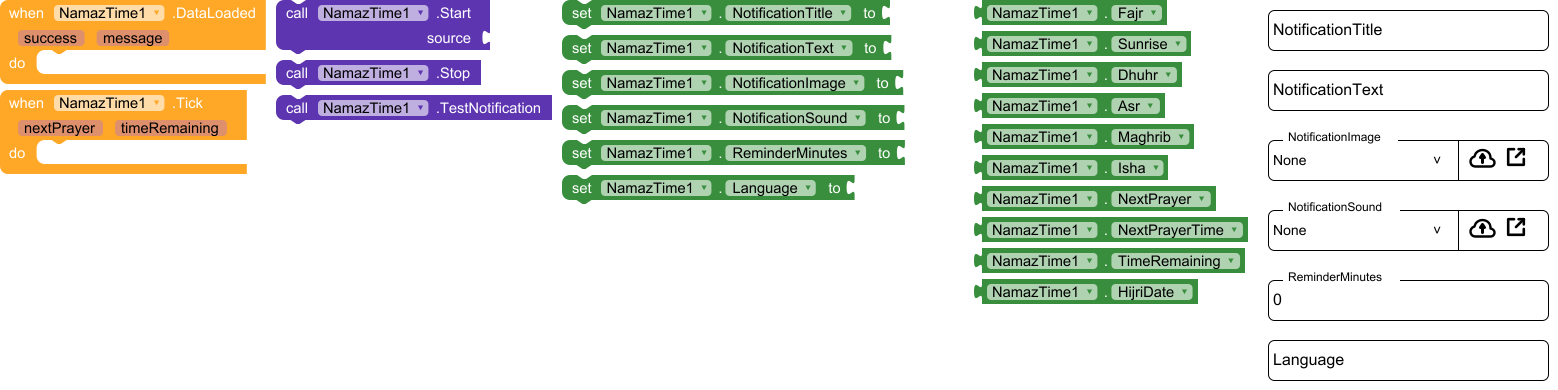
NamazTime blocks
Start(source)
The main block. Loads the data, starts the background service, asks for notification permission on Android 13+, and asks once to disable battery optimization. Call it once, for example in Screen.Initialize.
source accepts:
- A link (http:// or https://) to a JSON API or to a txt/csv file. With a link, the data refreshes itself at the start of a new month.
- A file path: /storage/emulated/0/namaz.txt, or a file name from the assets.
- The text itself (JSON, CSV or TXT).
- An empty string: the service starts with the data that is already loaded.
The format is detected automatically. Data is stored by day of the month, so one month is enough.
Example link (JSON API):
https://api.aladhan.com/v1/calendarByCity?city=Grozny&country=Russia&method=2
Use your own city, country and method.
TXT / CSV. One row = day of the month + 6 times: Fajr, Sunrise, Dhuhr, Asr, Maghrib, Isha. Separator: space, tab, ; or ,. Quotes are allowed. Rows that don’t start with a number (headers) are skipped.
1 05:12 06:48 12:03 14:55 17:08 18:40
2 05:13 06:49 12:03 14:54 17:06 18:39
1;05:12;06:48;12:03;14:55;17:08;18:40
2;05:13;06:49;12:03;14:54;17:06;18:39
If a row has 8 values, the 3rd column (between Sunrise and Dhuhr, often --:--) is treated as extra:
1 05:12 06:48 --:-- 12:03 14:55 17:08 18:40
JSON. Any JSON works as long as it contains the fields Fajr, Sunrise, Dhuhr, Asr, Maghrib, Isha (case-insensitive). They can be at the top level of the object or inside timings. Nesting and arrays can be arbitrary; the needed places are found automatically. The day number is taken from day or from date.gregorian.day. Extra text after a time is discarded: 05:12 (MSK) is read as 05:12.
aladhan format:
json
{"data":[
 {"timings":{"Fajr":"05:12 (MSK)","Sunrise":"06:48 (MSK)","Dhuhr":"12:03 (MSK)",
  "Asr":"14:55 (MSK)","Maghrib":"17:08 (MSK)","Isha":"18:40 (MSK)"},
  "date":{"gregorian":{"day":"27"}}}
]}
Simple array:
json
[
 {"day":1,"fajr":"05:12","sunrise":"06:48","dhuhr":"12:03","asr":"14:55","maghrib":"17:08","isha":"18:40"},
 {"day":2,"fajr":"05:13","sunrise":"06:49","dhuhr":"12:03","asr":"14:54","maghrib":"17:06","isha":"18:39"}
]
Accepted field names: fajr/fajar/imsak, sunrise/shuruq, dhuhr/zuhr/duhr/zuhur, asr, maghrib/magrib/maghreb, isha/esha. In JSON, the day number must be inside the day’s object, otherwise all entries will be assigned to today’s date.
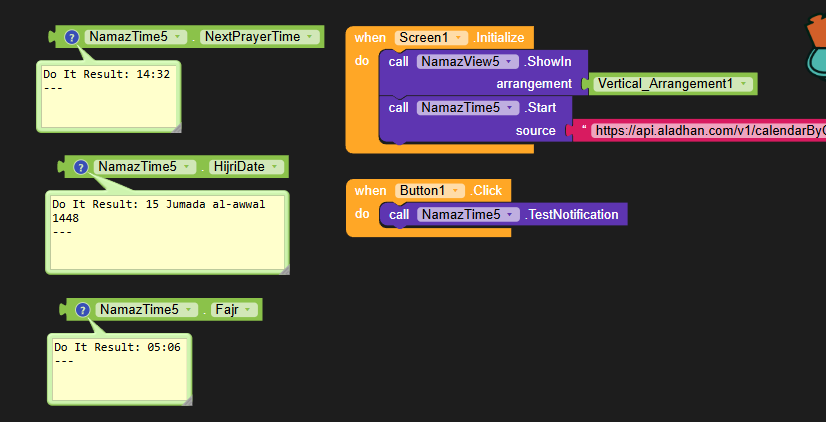
Example blocks:
when Screen1.Initialize
  call NamazTime1.Start  source: "https://api.aladhan.com/v1/calendarByCity?city=Grozny&country=Russia&method=2"
  call NamazView1.ShowIn  arrangement: VerticalArrangement1
Stop
Stops the service and disables autostart after reboot.
TestNotification
Sends a test notification with your title, text, image and sound.
when Button1.Click → call NamazTime1.TestNotification
DataLoaded(success, message) event
Fires after data is loaded from Start. success = true/false, message = OK: N days or an error text.
when NamazTime1.DataLoaded (success, message)
  if not success → set Label1.Text to message
Tick(nextPrayer, timeRemaining) event
Every second while the app is open. Use it for your own labels.
when NamazTime1.Tick (nextPrayer, timeRemaining)
  set Label1.Text to join(nextPrayer, "  ", timeRemaining)
Value blocks (read-only)
| Block | What it returns |
|---|---|
| Fajr, Sunrise, Dhuhr, Asr, Maghrib, Isha | today’s time, HH:MM (--:-- if no data) |
| NextPrayer | name of the next prayer |
| NextPrayerTime | its time, HH:MM |
| TimeRemaining | time left, HH:MM:SS |
| HijriDate | today’s Hijri date, e.g. 15 Jumada al-Ula 1448 |
The Hijri date is calculated and may differ by one day from the date based on moon sighting.
set Label_Fajr.Text to NamazTime1.Fajr
set Label_Hijri.Text to NamazTime1.HijriDate
Settings (in the designer)
| Property | What it does |
|---|---|
| NotificationTitle | notification title; empty = prayer name; {prayer} and {time} can be used |
| NotificationText | notification text; empty = default; {prayer} and {time} can be used |
| NotificationImage | image in the notification (asset name or full path) |
| NotificationSound | mp3/wav sound (asset name or full path); empty = system sound |
| ReminderMinutes | silent reminder N minutes before the prayer (“Asr in 15 min”); 0 = off |
| Language | ru, en, ar, tr; empty = phone language |
Example: title Prayer time: {prayer}, text Now it is {time}.
The notification has buttons: “Silence” (mutes the sound) and “Later 10 min” (repeats in 10 minutes).
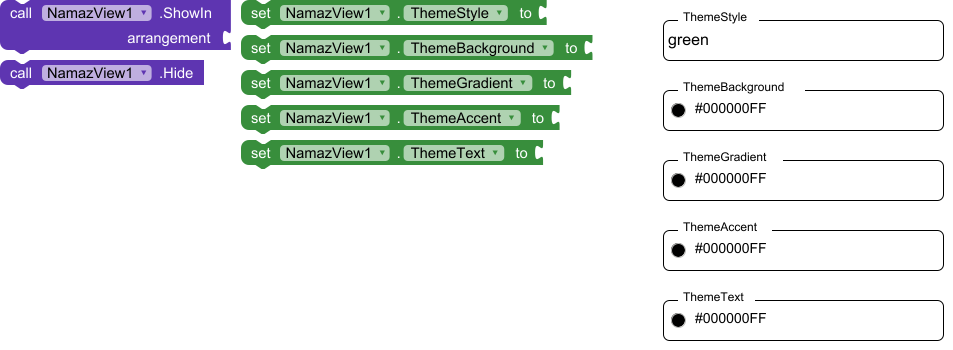
NamazView blocks
ShowIn(arrangement)
Draws the theme inside the specified arrangement. Set the arrangement’s Width and Height to “Fill parent”. Data comes from NamazTime, so call Start there first.
call NamazView1.ShowIn arrangement: VerticalArrangement1
Hide
Removes the theme from the arrangement.
ThemeStyle (designer)
A ready-made color scheme: green (default), blue, black, purple.
Custom colors (designer or set blocks)
- ThemeBackground — top of the background
- ThemeGradient — bottom of the background (if not set, darker than the top)
- ThemeAccent — crescent, pattern, highlight of the next prayer
- ThemeText — text color
They are transparent by default, in which case the ThemeStyle colors are used. Any color you choose overrides the style.
What the theme shows
The next prayer and countdown; a progress bar from the previous prayer to the next; the date and Hijri date; a list of the six times, with the next one highlighted and the current period marked with a stripe on the left; and when there is no data, the hint “Call NamazTime.Start with a link or file”.
Minimal setup
when Screen1.Initialize
  call NamazTime1.Start  source: <link, path or text>
  call NamazView1.ShowIn  arrangement: VerticalArrangement1
Everything else is set in the designer.
The app keeps playing in the background, even if you close it from recents. It stays active until you stop it
com.namaztime.aix (60.3 KB)
Расширение было создано с помощью:  FAST
com.namaztime v2.aix (81.7 KB)