Hi!
I purchased the previous version of the extension from you, and you told me that I would receive the next 2 versions. How can I receive them?
Also, are you planning to add Gemini Live API to the extension if possible?
Or is there another way to stream the generated audio to avoid the delay between creating text and reading it?
Many thanks!
Ok, send me your payment id and I will check it and then send it for you ,
Also There is no simple direct way to add streaming API of Gemini using just extension, it’s complicated,
Also if you only want the live streaming audio there are already extension using chatGPT extension you can generate text using Gemini and streaming audio using chat gpt tts API
How do I change the link from OPENAI to GEMINI in that plugin?
I mean use both extensions , the Gemini API generate text and after finishing you pass the text to GPT API to start streaming audio , the idea of streaming audio is that the audio starts immediately after request tts as chunks of audio ,
Not waiting for the whole tts generated and then send the the whole audio , how ever the chat gpt extension has both of them and using them based on what you will use them for !
Yes, I understand, but how do you actually perform the migration from the GEMINI API to the GPT API? Can you explain it in blocks? Thanks!
New Update _gemini.aix
- Two old blocks of “single block response & streaming response” merged into this single block with new argument of
isStreaming: boolean

- Two blocks were added to make it easy and fast to ask the model one single question without continuous chat, unlike the previous function
GenerateGeminiContentblock that enables you to create continuous chat :

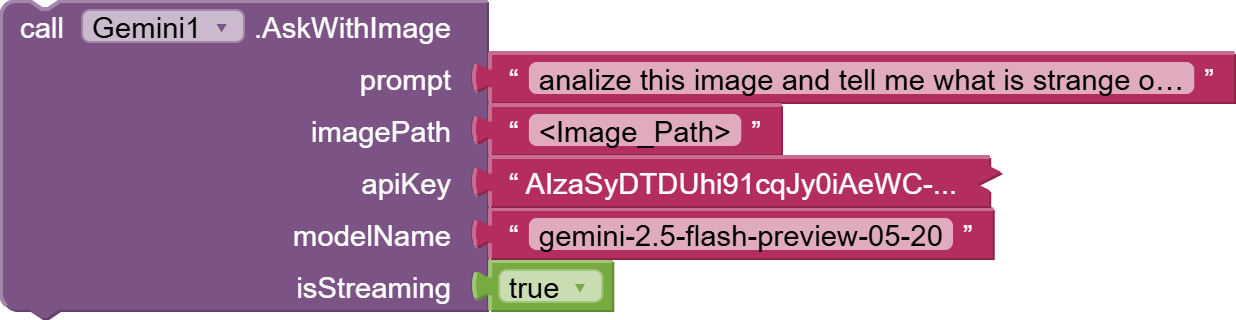
how ever @_Ahmed there is some issue related to displaying full response, please try to fix it tho.

This is because the default Maxtokens count,
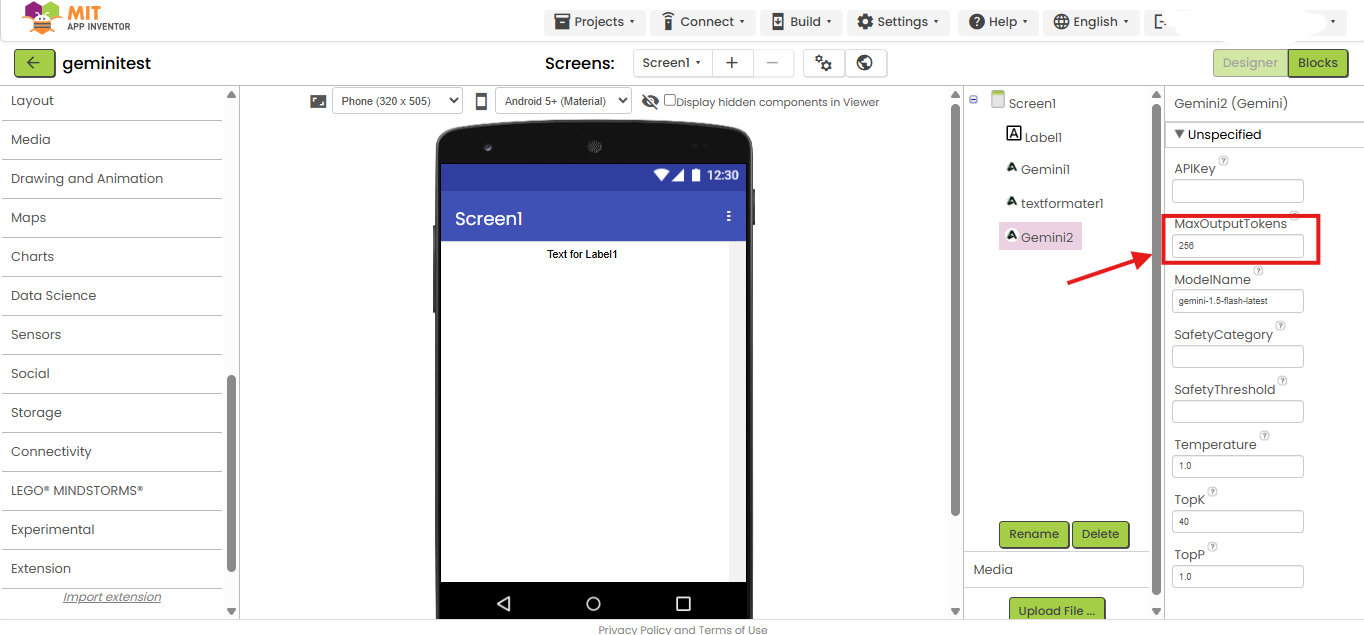
try to make it higher to cover the whole output like
2000
1 Like
Yes, but that doesn’t seem to be a nice way. A limit would be more useful if it applied to the response size rather than the text already provided by Gemini.
I see your point, but limiting the output is actually smarter here. It keeps API costs predictable, encourages better-crafted prompts, and ensures the extension works reliably across all cases. The current design is intentional—and it’s a solid approach for working with Gemini
1 Like
This usually happens for a few technical reasons:
- Token/Character Limit in the Extension
– The extension might be set to stop after a certain number of tokens or characters, so even if Gemini sends more text, it gets truncated.
– This is common if the developer put an upper bound to avoid excessive API usage or memory issues. - Streaming Response Timeout
– If the extension is using a streaming method, it may have a time limit on how long it listens before closing the connection.
– Slow responses from Gemini can make the tail of the answer disappear. - Buffer Size Restriction
– The variable or component storing the AI’s output may have a maximum size. If the text exceeds that, it gets cut. - Post-processing Trim
– Sometimes, devs trim or format the text to remove certain characters (like Markdown) and accidentally cut content mid-sentence. - API Parameter Misconfiguration
– Gemini API has parameters likemaxOutputTokens. If it’s set too low, the AI simply stops outputting text at that point.

I’m excited to share a major update to the Gemini extension!
We’ve just added a powerful new feature: Image Editing . To celebrate, we are also introducing our most powerful and a-peeling model yet: the Nano Bananana AKA gemini-2.5-flash-image-preview model!
Now you can perform powerful image edits directly within your App Inventor projects. Take a look:
We are very excited to see what you can create with this new functionality.
Happy Inventing
1 Like
Any one who recently purchased the extension tried the new nano banana image editing feature.

Major Update: Function Calling & Files API Integration! 
Hello App Inventors!
We are thrilled to announce a game-changing update for the Gemini extension. This version transforms Gemini from a simple chatbot into a powerful AI Agent capable of controlling your app, while also giving you massive upgrades in file and image handling.
What’s New?
Demo :
1. Function Calling: Turn Gemini into an Android Agent 
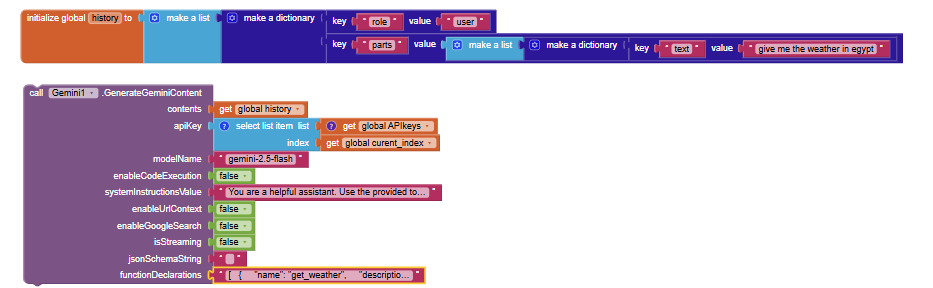
The biggest feature in this update is Function Calling. You can now teach Gemini how to use tools within your app!
Instead of just returning text, Gemini can intelligently decide to trigger events in your app based on the user’s conversation.
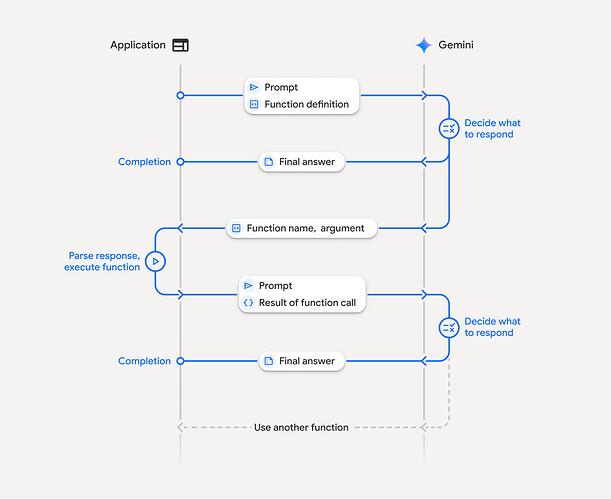
How it Works (The Tool Loop):
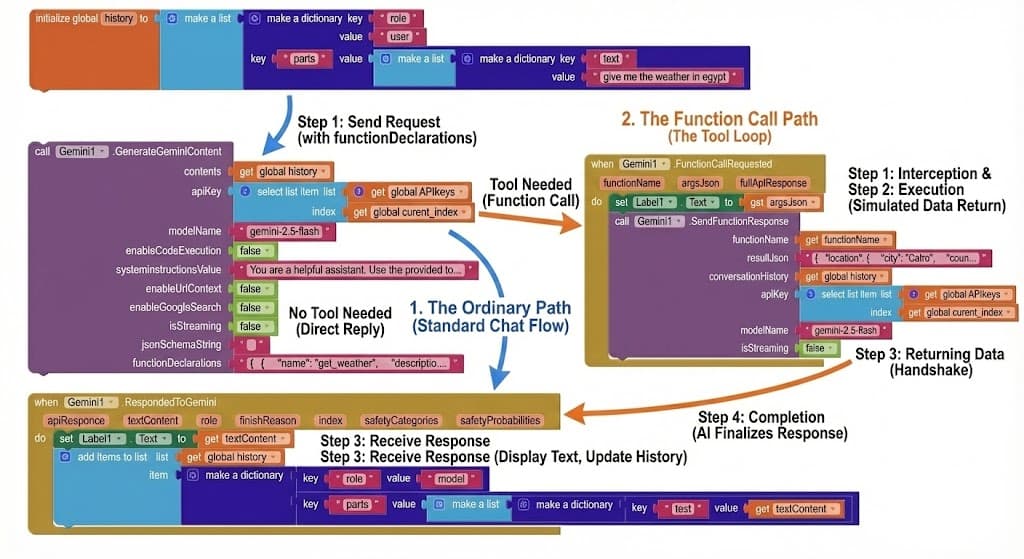
- Send Request: You provide a prompt (“Give me the weather in Egypt”) and a list of tools your app has.
- Tool Needed: Gemini realizes it can’t answer directly, so it asks you to run the
get_weathertool. - Execution: Your app runs the function (e.g., gets data from a weather API).
- Returning Data: You send the result (e.g., “30°C, Sunny”) back to Gemini using SendFunctionResponse.
- Completion: Gemini uses that data to give a final natural language answer: “The weather in Egypt is 30°C and Sunny.”
Example Declaration: Here is how you define a function for Gemini using the functionDeclarations parameter:
[

{

"name": "get_weather",

"description": "this function job to get weather status for specific location",

"parameters": {

"type": "object",

"properties": {

"location": {

"type": "string"

}

},

"required": [

"location"

],

"propertyOrdering": [

"location"

]

}

}

]
Key Blocks:
- DeclareFunctions: Define the available tools (like the JSON above).
- FunctionCallRequested (Event): Fires when Gemini wants to perform an action.
- SendFunctionResponse: Return the action’s result back to the model.
2. Files API & Hybrid Image Engine 
We’ve completely overhauled how files and images are handled to eliminate size limits and boost performance.
 Hybrid Image Engine
- Smart Switching: Small images (< 4MB) are processed instantly. Large images (> 4MB) automatically use the Files API.
- No More Limits: Send full-resolution 20MB+ raw photos without crashing your app!
 Full Files API Control
Manage your AI’s knowledge base dynamically:
- UploadFile: Upload PDFs, Audio, Video, or Images to Gemini’s cloud storage.
- ListUploadedFiles: View what’s stored in your project.
- AskWithFile / AskWithUploadedFiles: “Read this PDF” or “Watch this video” and answer questions about it.
- DeleteFile: Manage your storage quota programmatically.
(Add a screenshot here of the new file management blocks)
Why Update?
- Build Agents: Create smart home assistants, personal schedulers, or data analysis bots that actually do things.
- Stable & Fast: The new image engine prevents “Payload Too Large” and Out-Of-Memory errors.
- Multimodal Power: Analyze huge documents and long videos with ease.
PAID_file
Price: 5.99$ not
7$for limited period
Purchase: PayPal Link or You can pay HERE using your credit card or You can pay HERE using your credit card
In both cases, you will be redirected to the download page after successful payment. Contact me for issues.
Happy Coding! 
Hi everyone,
I’m working on v2 of the Gemini Extension, and I want to make sure it covers your specific use cases.
Instead of just asking for features, I want to know: What kind of AI app are you trying to build right now?
- Are you building a chatbot assistant?
- An educational app for homework help?
- A tool to generate marketing text?
If you tell me what you are building, I can add the specific blocks or parameters to make that easier for you. Let me know in the comments!
It will be free?  or you’re asking those who use it
Thanks for the interest! I understand that free extensions are always preferred. However, integrating the Gemini API and keeping it updated with Google’s frequent changes requires a massive amount of development time and ongoing maintenance.
By keeping this a paid extension, I can guarantee that I will be available to fix bugs, offer support, and add the new features you guys are asking for. It allows me to dedicate the necessary time to make this the most stable option for your apps.
I’m creating an AI voice assistant app. Since there’s currently no LIVE API option, I’m forced to use simple TTS and STT. I’d love it if you added this capability.
Nice ! I will add this alor create new extension splited from this to provide live API capabilities.
It will be available soon
If you have limited time you can count on live streaming tts from chat GPT too
Here the extension
1 Like