it return null always. there is new way to get running app
2 Likes
Hello, I have recently tried the Open App block, only that when I export my app, install it and test it, it does not work. What I don’t understand is that it works correctly from Companion but not in my application as such. It just doesn’t do anything. The smartphone I use has Android 11. Could it be that?
Post test apk.
@vknow360 can you add a method to get the app main activity class name
to make the open app from package name work in the code there must be a way to get it
or maybe just a way to read manifest file as string and i can parse it my self
@vknow360 can you please look into it i have tested in android studio working below code
import android.content.Context;
import android.content.Intent;

public class test {
    public static String getMainActivityClass(Context context, String pkgName){
        Intent it = context.getPackageManager().getLaunchIntentForPackage(pkgName);
        return it.getComponent().toString();
    }
}
in manifest
<uses-permission android:name="android.permission.QUERY_ALL_PACKAGES" />
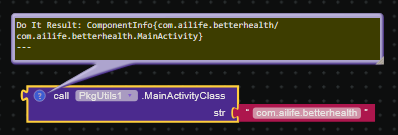
    @SimpleFunction(description = "Returns launcher activity for the app")
    public String MainActivityClass(String str) {
        Intent launchIntentForPackage;
        try {
            if (!IsAppInstalled(str) || (launchIntentForPackage = this.context.getPackageManager().getLaunchIntentForPackage(str)) == null) {
                return "ERROR";
            }
            return launchIntentForPackage.getComponent().toString();
        } catch (Exception e) {
            e.printStackTrace();
            return "ERROR";
        }
    }
PkgUtils(1).aix (16.4 KB)
i have sucessfully added, please update in main, i have no way to make PR
1 Like
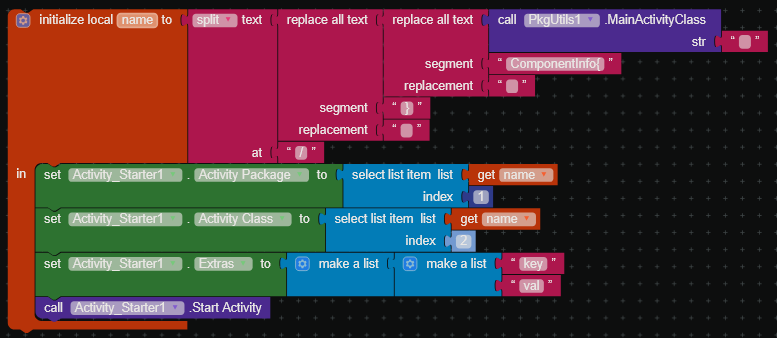
Can you provide some blocks how the result of the new method can be used?
Taifun
i my case, i need to generate a file for another automation app to start activity, the class name is needed
for general use, you can start the app with extra which isnt possible with built in launch app block
1 Like
i dont understand why but the QUERY_ALL_PACKAGES permission is not added in manifest in this extension
it is not dangerous permission do not need to be granted by user it is auto grant at install
without it the app list do nothing on compiled apk
here i have added and everything start working again
PkgUtilsQuerry.aix (16.4 KB)
also i have found a problem, app icon for most app is 0b, only very few is working, i dont know why, plus it create a mess at asd, should have contained it in a folder
using the built in component package utilities the icon is working
built in component save the image in private dir data/data/pkg-name/files/Kodular-App-Icons
Because If you publish your app on Google Play, your app’s use of this permission is subject to approval based on this policy.
Taifun
1 Like
As alternative you might be interested in App Inventor Extensions: Package Manager | Pura Vida Apps
Taifun
1 Like
i only need the apk so i can use whatever permission i need
i need package name to app label too which isnt available in your extension(i need it before scanning entire list), i have seen it, it do app list async which is very good but i have async extension for other thing anyways
Not everyone using this extension requires this permission.
Add QUERY_ALL_PACKAGES permission and it will start working.
i added, now the app list can get all app insted of just 5 system app, but the icon still only get a few app, ill try again later