1. Core Purpose of the Component
ReadMark is a non-visible component for App Inventor and compatible builders (such as Kodular) that turns a standard container (like VerticalArrangement) into a rich-text reader. It supports advanced formatting, searching, rule-based text styling, and text-to-speech (TTS) playback with real-time word highlighting.
1. Properties (Get / Set)
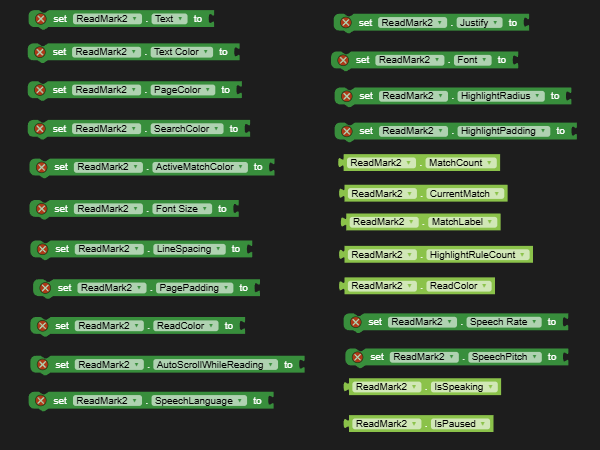
Properties let you retrieve (get) current configuration values or modify (set) them.
Text- Purpose: Sets or gets the main text content for display and reading.
- Value: Text string (
String).
TextColor- Purpose: The default text color.
- Value: Color integer (
int, e.g.,0xFF1F2937).
PageColor- Purpose: Background color of the reading container.
- Value: Color integer (
int).
SearchColor- Purpose: Highlight color for search matches.
- Value: Color integer (
int).
ActiveMatchColor- Purpose: Highlight color for the currently selected search match.
- Value: Color integer (
int).
TextSize- Purpose: Font size of the text.
- Value:
floatvalue in sp (minimum6).
LineSpacing- Purpose: Line spacing multiplier.
- Value:
floatvalue (e.g.,1.35, minimum0.8).
PagePadding- Purpose: Inner padding around the text content.
- Value: Integer in dp (e.g.,
20).
Justify- Purpose: Enables or disables full text justification.
- Value: Boolean (
True/False).
Font- Purpose: System font family name.
- Value: String (
Default,Sans,SansLight,SansMedium,SansCondensed,SansBlack,Serif,SerifMono,Monospace,Casual,Cursive).
HighlightRadius- Purpose: Corner rounding radius for highlights (search, rules, text-to-speech).
0for sharp corners, high values (e.g.,50) create pill-shaped highlights. - Value:
floatin dp.
- Purpose: Corner rounding radius for highlights (search, rules, text-to-speech).
HighlightPadding- Purpose: Extra horizontal spacing on the left and right of highlights.
- Value:
floatin dp (e.g.,2or4).
MatchCount(Read-only)- Purpose: Returns the total number of search matches found.
- Value: Integer (
int).
CurrentMatch(Read-only)- Purpose: Index of the currently selected match (1-based), or
0if none. - Value: Integer (
int).
- Purpose: Index of the currently selected match (1-based), or
MatchLabel(Read-only)- Purpose: Formatted status string like “3 of 12” or “Not found” for UI display.
- Value: String (
String).
HighlightRuleCount(Read-only)- Purpose: Total number of active user-defined styling rules.
- Value: Integer (
int).
ReadColor- Purpose: Highlight color for the word currently being read aloud.
- Value: Color integer (
int).
AutoScrollWhileReading- Purpose: Automatically scrolls text to follow the speech engine cursor.
- Value: Boolean (
True/False).
SpeechLanguage- Purpose: Language code for text-to-speech (e.g.,
"ru","en-US"). Blank for default device language. - Value: String (
String).
- Purpose: Language code for text-to-speech (e.g.,
SpeechRate- Purpose: Speed of speech synthesis.
- Value: Float from
0.1to4(1is normal speed).
SpeechPitch- Purpose: Voice pitch/tone.
- Value: Float from
0.5to2(1is normal pitch).
IsSpeaking(Read-only)- Purpose: Checks if text-to-speech is currently active.
- Value: Boolean (
True/False).
IsPaused(Read-only)- Purpose: Checks if speech synthesis is paused.
- Value: Boolean (
True/False).
2. Methods (Functions / Commands)
Actions that can be invoked within blocks logic.
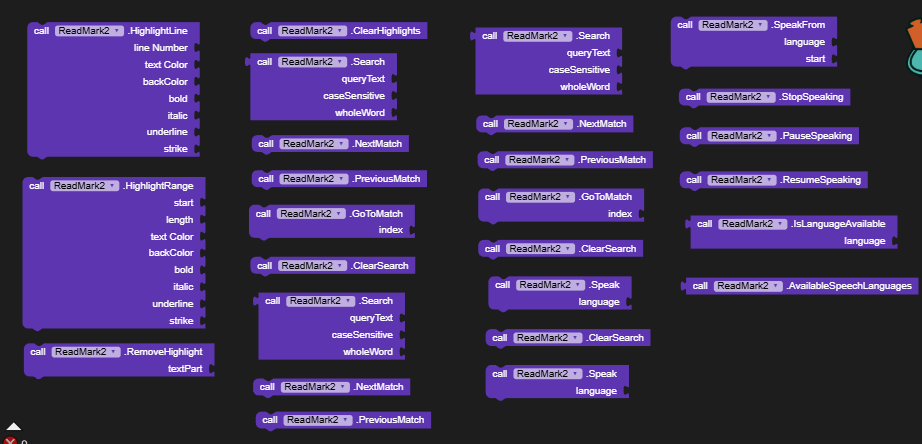
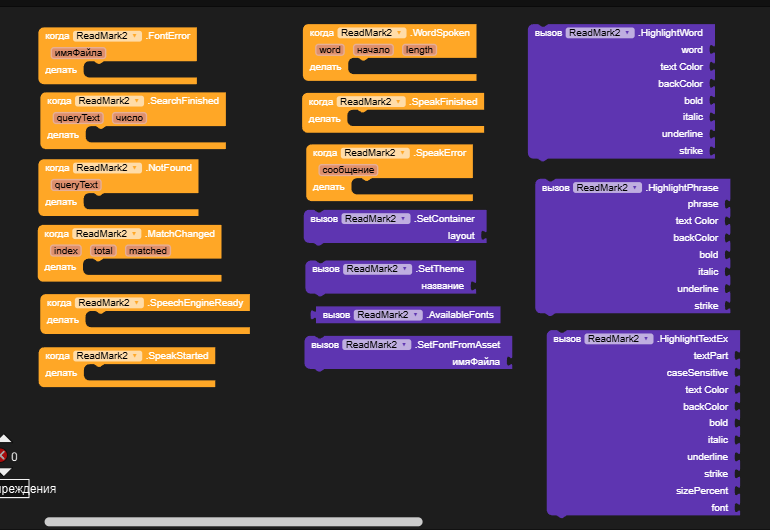
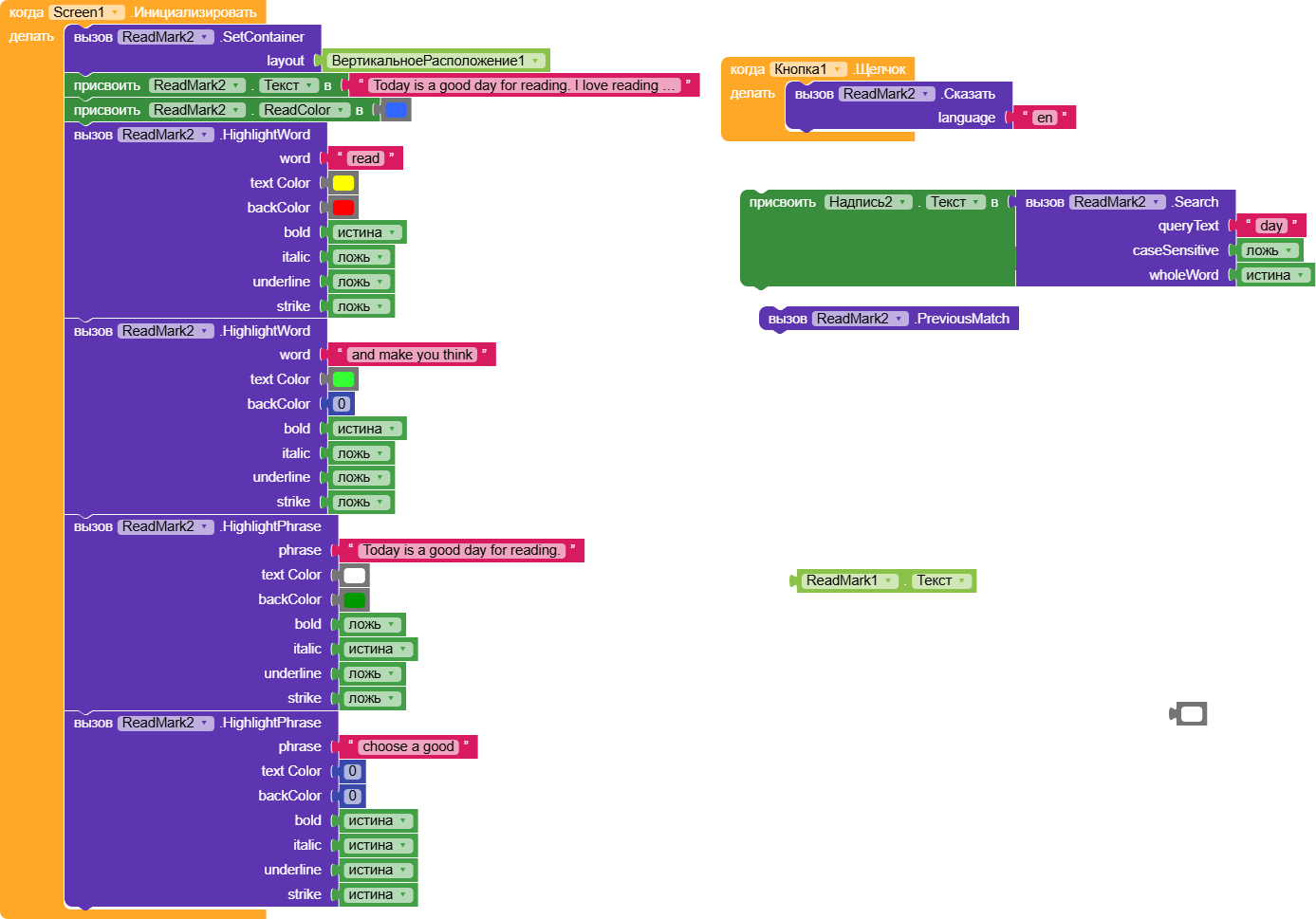
SetContainer(layout)— Binds the reader to a visual layout component (e.g.,VerticalArrangement). Parameters: container component.SetTheme(name)— Applies a built-in visual theme. Parameters: string name ("light","paper","sepia","dark","night","forest","ocean").AvailableFonts()— Returns a comma-separated list of built-in font names.SetFontFromAsset(fileName)— Loads a custom font from project assets. Parameters: file name string (e.g.,"Lora.ttf").HighlightWord(word, textColor, backColor, bold, italic, underline, strike)— Styles all occurrences of a word. Parameters: word (String), text color (int), background color (int), style flags (boolean).HighlightPhrase(phrase, textColor, backColor, bold, italic, underline, strike)— Styles any arbitrary phrase or text fragment.HighlightTextEx(textPart, caseSensitive, textColor, backColor, bold, italic, underline, strike, sizePercent, font)— Advanced text styling rule supporting case sensitivity, size percentage (100= unchanged), and font name.HighlightLine(lineNumber, textColor, backColor, bold, italic, underline, strike)— Styles a specific line by its line number (1-based).HighlightRange(start, length, textColor, backColor, bold, italic, underline, strike)— Styles a character range by start index and length. Parameters:start(1-based),length.RemoveHighlight(textPart)— Removes custom styling rules for a specific word or phrase.ClearHighlights()— Clears all custom style rules.Search(queryText, caseSensitive, wholeWord)— Performs a search, highlights matches, jumps to the first match, and returns match count (int).NextMatch()— Jumps to the next search match.PreviousMatch()— Jumps to the previous search match.GoToMatch(index)— Jumps to a specific search match by index (1-based).ClearSearch()— Clears search results and highlights.Speak(language)— Starts reading text aloud. Parameters: language code ("ru","en", or""for auto).SpeakFrom(language, start)— Reads text starting from character indexstart(1-based).StopSpeaking()— Stops speech playback completely.PauseSpeaking()— Pauses speech playback while preserving the current word highlight.ResumeSpeaking()— Resumes speech playback from the paused position.IsLanguageAvailable(language)— Checks if a speech language is supported. Returnsboolean.AvailableSpeechLanguages()— Returns a comma-separated list of device TTS languages (e.g.,ru-RU,en-US).
3. Events
Triggered automatically when specific component actions occur.
FontError(fileName)— Triggered if a custom font fails to load from assets. Arguments: file name (String).SearchFinished(queryText, count)— Search complete. Arguments: query (String), total count (int).NotFound(queryText)— Search returned no matches. Arguments: query (String).MatchChanged(index, total, matched)— Current search match changed. Arguments: current index (int), total (int), matched text fragment (String).SpeechEngineReady()— TTS engine is fully initialized and ready.SpeakStarted()— Speech playback has started.WordSpoken(word, start, length)— Triggered in real-time as each word is spoken. Arguments: word (String), 1-based start index (int), length (int).SpeakFinished()— Speech playback reached the end of the text.SpeakError(message)— Speech error occurred (missing data, engine failure, etc.). Arguments: error message (String).
com.readmark.aix (40.0 KB)
The extension was created with the help of:
 FAST