ok , thank you
1 Like
A post was merged into an existing topic: Please help! error creating extension?
You need to prioritize JDK 1.8 in the system Path environment variable.
- In System Variables, find and edit
Path. - Reorder the JDK paths:
- Move this to the top:
C:\Program Files\Java\jdk1.8.0_202\bin
- Remove or move down:
C:\Program Files\Common Files\Oracle\Java\javapath
C:\Program Files\Microsoft\jdk-11.0.23.9-hotspot\bin
You need to prioritize JDK 1.8 in the system Path environment variable.
- In System Variables, find and edit
Path. - Reorder the JDK paths:
- Move this to the top:
C:\Program Files\Java\jdk1.8.0_202\bin
- Remove or move down:
Eg :
C:\Program Files\Common Files\Oracle\Java\javapath
C:\Program Files\Microsoft\jdk-11.0.23.9-hotspot\bin
I’m trying to build the FetchDownloader extension using Rush, but I’m encountering several compilation errors related to Android 13 (API 33) constants and permissions. Specifically, the build fails with errors like:
cannot find symbol: variable TIRAMISU in Build.VERSION_CODEScannot find symbol: variable POST_NOTIFICATIONS in Manifest.permissionincompatible types: Object cannot be converted to FetchNotificationManager
I have ensured that my rush.yml file includes min_sdk: 33 and that the Android SDK Platform 33 is installed on my system.
However, the build process still does not recognize these API 33 constants, which suggests that the compiler classpath might not be correctly referencing the android.jar for API 33.
Could you please advise how to properly configure Rush and the build environment to compile against Android SDK 33, so these symbols are recognized? Any guidance on setting up the classpath or modifying the build scripts would be greatly appreciated.
You can upgrade android.jar by replacing it with the same JAR from SDK 33 in %appdata%/rush/dev-deps/ (assuming you’re on Windows) directory. You can find the android.jar for SDK 33 inside the platforms sub-directory in your system’s Android SDK directory.
That being said, I’ll recommend you to move on to some other alternative to build your extension. Rush hasn’t been upgraded in years and is very likely missing a lot of things, largely because of lack of motivation and, to some extent, time from my side. My apologies for that.
I’d recommend extension-template. Even though the official repo hasn’t been updated in some time, you should be able to upgrade it locally with the latest changes in the App Inventor sources by running the upgradation scripts given in the repo. Of course, it lacks things like rush.yml and direct support for Android manifest, but since those are mostly abstractions over App Inventor’s annotations, there’s really not a lot that would hold you back from building extensions that you’d otherwise be able to build with Rush. Also, since its based on Ant, you can customize it to all your needs simple by making changes to the build.xml file. If you use Kotlin, you can add support for that yourself by referring to this PR.
There has also been a new tool recently, very similar to Rush, called Fast. But since its NOT open-source I highly doubt its authenticity and can’t really trust it. I believe very dev tools should be open-source. Also FWIW, you need to buy a premium (subscription?) to use some of its features. But that just my opinion, everyone is free to choose what they use.
5 Likes
I suggest you open a pull request instead.
1 Like
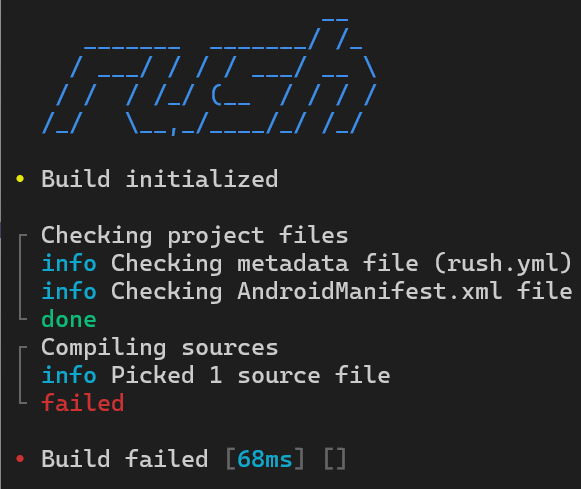
Can you please sho the rest error?
I think that this error wasn’t built, because I have JDK 8, but now I have JDK 25/17
Will this fix? @Shreyash
(BUT WE ARE ALL HAVING THIS ERROR LIKE ALL OF THESE…)
we all know how to fix this, maybe…
AND THIS ERROR TOO…
      _______  _______/ /_
    / ___/ / / / ___/ __ \
   / /  / /_/ (__  / / / /
  /_/   \__,_/____/_/ /_/

• Build initialized

┌ Checking project files
│ erro Metadata file (rush.yml) not found
└ failed

• Build failed [4ms] [1 error]
The project is invalid, or the rush.yml file, which is mandatory, might have been deleted.
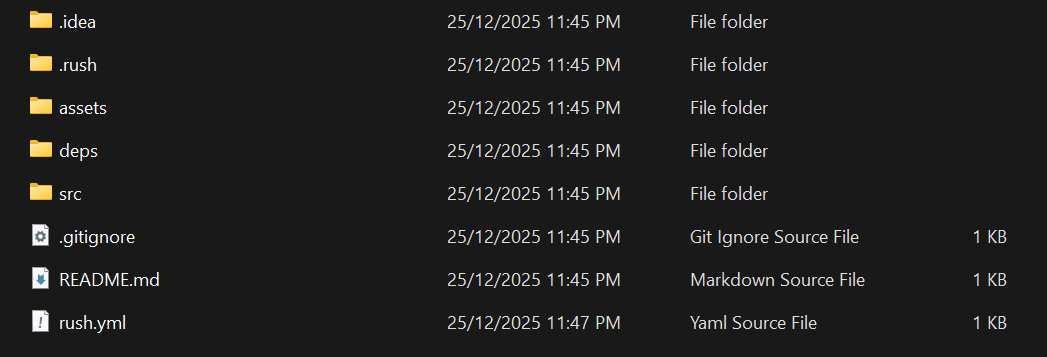
Can you share the project, if you don’t mind 