I am building an app,
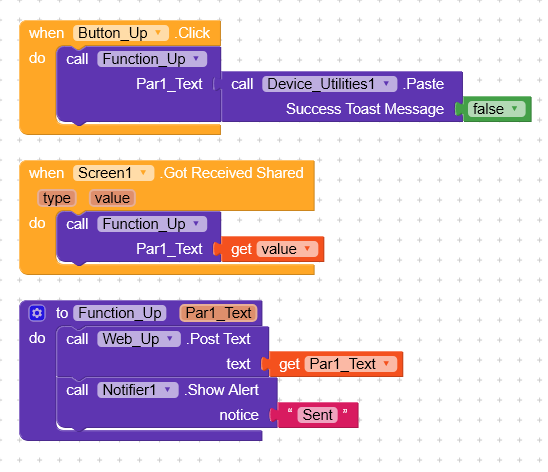
and 2 buttons in that app need to call the same code, but with a different parameter.
So I created a Procedure that gets 1 parameter,
put the code inside it,
and then made a call to that procedure from each of the 2 buttons.
The 2 buttons and the procedure all work very well,
but there’s only 1 problem:
When I run my app, for some reason the procedure is automatically called,
eventho I did not tap any button yet,
and eventho I did not create a Screen_Initialize event..
How can I fix that?
The procedure should only run when it is called, from the 2 buttons..
And not automatically when the program starts to run..
It would really help if you provided a screenshot your relevant blocks, so we can see what you are trying to do, and where the problem may be.
To get an image of your blocks, right click in the Blocks Editor and select “Download Blocks as Image”. You might want to use an image editor to crop etc. if required. Then post it here in the community.
The condition I used, which is what you wrote, works.
Currently, the If-block is:
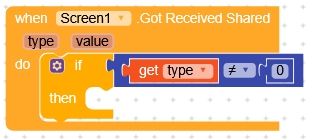
If type != 0 Then (PerformTheOperations)
Can I change the logic to be the opposite?
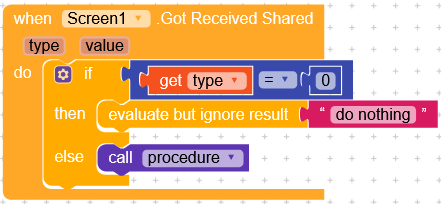
If type == 0 Then ExitTheEventHandler ------------ (and now the code that needs to be performed - we only get here if type was not 0) (PerformTheOperations)
Is that possible in Kodular?
I need to “break” out of the event handler,
but not outof the whole app.
The idea was that if you receive data type 1-2-3-4 it does something, while if it’s 0 the condition is ignored.
By doing if type = 0 inside the condition, you need to specify a behavior; in this case, the app was opened without receiving any shared data.
Yes, I know,
and that’s what I did with my code, exactly as you showed in your sscreenshot..
But my wish is to have the code do: If type = 0, Then break out of the Event Handler
and then, after it, I will have all my commands for the ReceivedShared event handler.
The behavior with the second way is the same as yours - we still don’t do anything for type = 0,
and only do the commands for type != 0,
but the code is just arranged differently..
That’s my question.
In any case, I opened a separate thread for that If-block question,
to see if it’s possible to do it.
If type = 0, nothing happens, precisely because it isn’t included in the condition type != 0.
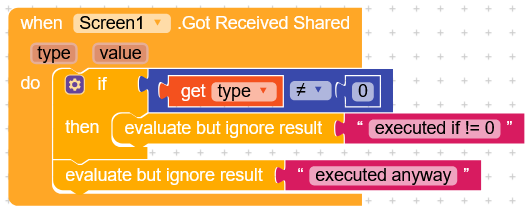
The code is executed only if it is not equal to 0.
Of course, the code must be inside the condition, otherwise it will be executed anyway.
To achieve what I want, the screenshot you gave does this:
Function EventHandler_ScreenReceivedShared()
{
_ if (type != 0)
_ {
___ commands
___ commands
___ commands
_ }
}
This indeed works, and it is what I am currently using.
But I would like to change the writing style, to a different style (for the If part),
while still achieving the same behavior - not changing the behavior.
How:
Like this:
Function EventHandler_ScreenReceivedShared()
{
_ if (type = 0) return //This will exit the EventHandler
_ //so the next code will only run when type != 0
_ commands
_ commands
_ commands
}
You see what I mean?
Those are 2 options, to write code that achieves the same result.
The only difference between them is that
the first options (yours) puts the “good” commands (to run) inside the if block,
where in the second option the if only “breaks” out of the current function,
which then enables the “Good” commands to be outside the If-block,
without the indentation.
I hope you now see what I mean..
So to achieve this,
the only thing I am missing is some block in Kodular, that “Returns”/“Breaks” out of the current “Function”,
which in this case, is the EventHandler for ScreenReceivedShared.
I’m really sorry, but I don’t understand, I can’t get my head around this logic
Why would you need to specify if type = 0 to exit the event?
This case is already handled with != 0, which automatically exit the event as soon as it detects 0.
The only thing I can think of is this,
if it detects a 0, it doesn’t do anything and therefore exits the condition, but that doesn’t make much sense.
I guess there’s no “Return” block in Kodular (yet),
so the second way cannot be implemented.
So as you guys said, I will stick with the current one.
BTW,
If you’re curious why I am so inclined towards the 2nd writing style and not the first one,
the answer is:
When writing code, If you can make the If do a “return”/“break” right on the start,
and then put the commands after it, without indentation,
it’s always better than having an indentation.
Now you wonder: Why? Why is it so better?
I’ll tell you.
When you have 1 If-block,
the difference between style 1 and style 2 is not that pronounce.
but when you have several If blocks,
then writing style #1 gets you indentation inside indentation inside indentation,
which makes the code harder to read.
and on the other hand writing style #2 gives you 0 indentation.
If you still don’t understand what I mean,
then don’t worry about it.
Thank you for all your help.
BTW:
Would’ve been nice If Kodular had a “Return” block, that can be used in both these Function types:
Now I understand perfectly, thank you very much for the explanation.
Anyway, I think it would be more correct to call it a guard clause or early return.
But i’m sorry that it isn’t applicable to your situation