AdMob Ads Not Showing in Play Store Release + AD_ID Permission Warning

Hello everyone,

I am facing an issue with AdMob ads in my Kodular app.

My setup:

  • AdMob App ID is configured correctly.
  • Banner and Interstitial Ad Unit IDs are configured correctly.
  • AdMob app status is “Ready”.
  • Ad serving is enabled.
  • Google Play Console Advertising ID declaration is set to “Yes” and “Advertising or marketing” is selected.
  • Target SDK: Android 15 (API 35).

Problem:

  • Test ads work correctly.
  • Original AdMob ads also worked during testing.
  • After publishing the app on Google Play Store, banner ads show only a blank white space.
  • Interstitial ads do not appear.
  • AdMob reports show very few or no requests.

Google Play Console Warning:
“A manifest file in one of your active artifacts doesn’t include the com.google.android.gms.permission.AD_ID permission.”

Questions:

  1. Does Kodular automatically include the AD_ID permission?
  2. Is there any way to manually add AD_ID permission in Kodular?
  3. Could this warning be the reason why ads are not showing in the Play Store version?

Any help would be appreciated.

Thank you.

Edit the manifest and add the

to the manifest, you can send me your aia file if you don’t mind I can help you with that

Can an extension add the AD_ID permission automatically, or does the permission need to be added by Kodular itself when building the AAB?

“I am not a developer. My app is a Replit web app wrapped with Kodular. Is there any way to add AD_ID permission directly in Kodular without editing the manifest?”

thank you for your reply i cant share you aia file but please help me this by guiding me

Not at all

That may take me more time than doing it, all you need is to download apktool M, decompile the apk, edit ur manifest, isn’t easy as I said though :blush:

Is there any tutorial video on youtube for the same problem I am facing

Since I upload AAB files to Google Play, how can this be fixed for future updates? Is there any Kodular-supported solution instead of manually editing APKs?

Then you have to wait for update from kodular itself

It means I have to do it all manually as you have said can you please tell me the steps in detail how can I do this things I am begginer and this would be a last request from me please help me with this

My app is published on Google Play using AAB files generated by Kodular. If I manually edit an APK manifest, how will this help future Play Store releases? Is there a way to do the same for AAB builds?

Let me check if its possible

ok thank you please let me know how to do it

Extract universal apk from aab
Modify apk
Regenerate aab from universal apk

Do some searches on Google and ChatGPT to learn how.
It will be difficult but it’s worth to learn.

You are not beginner, you just don’t know how to search. :joy:

1 Like

Hello,

I am facing an AdMob issue in Kodular.

My AdMob App ID and Interstitial Ad Unit ID are correctly configured. The AD_ID permission issue in Google Play Console has already been resolved and the warning no longer appears.

The problem is:

  • Ads work correctly in Kodular Companion.
  • Ads do not work in exported APK/AAB builds.
  • I created a completely new blank test project with only:
    • Google AdMob Interstitial
    • Notifier
  • On app start, “Load Ad” is called.
  • “Ad Loaded” event never fires.
  • “Ad Failed To Load” event never fires.
  • “Ad Showed” event never fires.
  • Only the app startup notification appears.

I tested both my main app and a blank project and both show the same behavior.

Could this be a Kodular build/export issue or is there any known issue with AdMob in exported builds?

Thank you.

helow everybody i am very frustrated and helpless and i have a problem where i have purchased kodular monitization license in 17 dollars and after that my ad mob app was also approved and my app was in playstore it is live you can check name is studer ai and i integrated admob i also checked in companion the ads were been showed in kodular companion testing but when i export the apk or abb there were no ads getting showed please i am requesting anybody help me to solve this problem

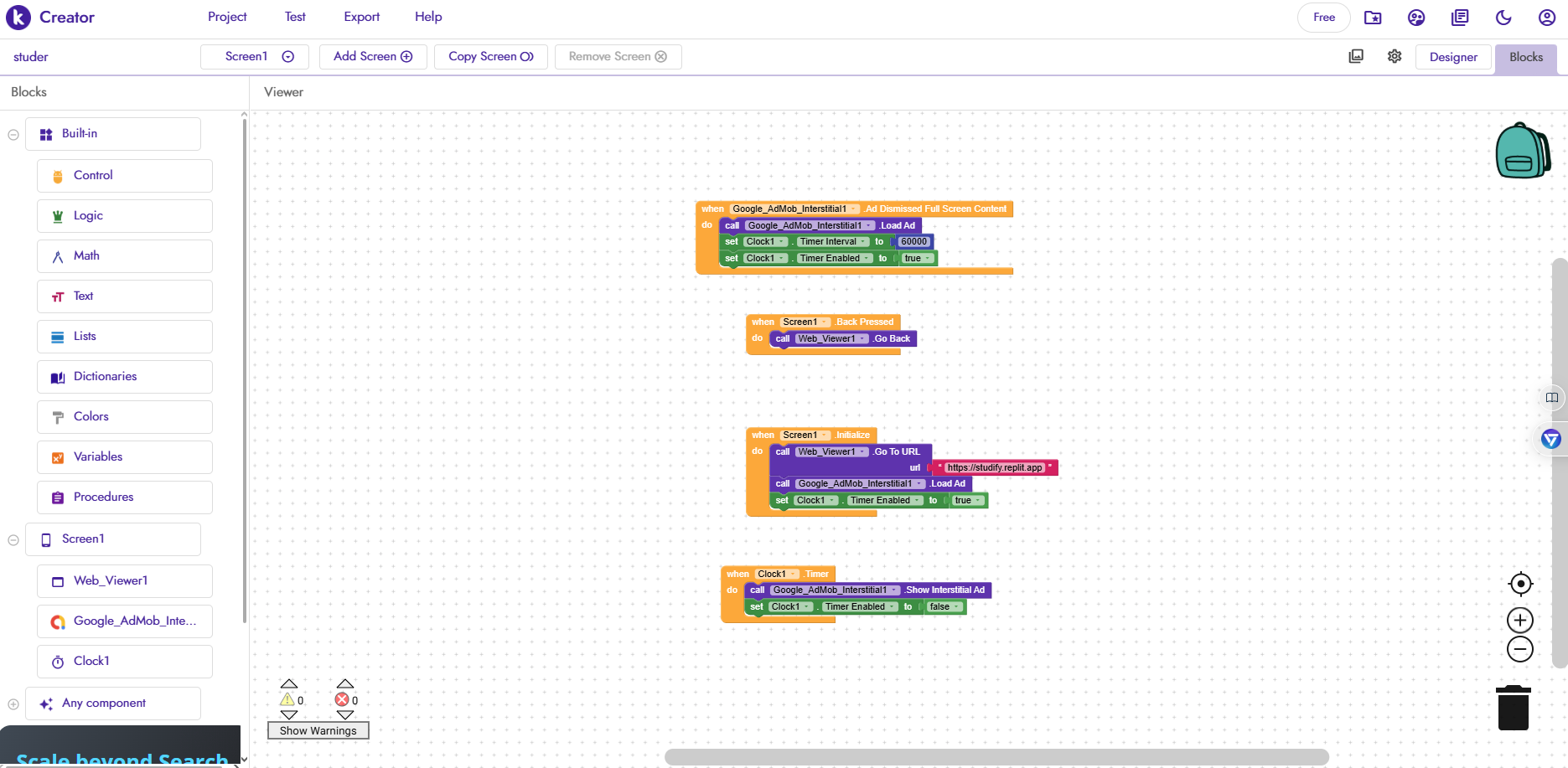
Drop your ads code here, because in the app you’re using WebView to load a website I think, so how are you handling user interaction?

ca-app-pub-8194850714506236/1955852136 see this is my ad code please help me

Was talking about your blocks


see this are my blocks