Short description
After Kodular’s Firebase Authentication Logout, the next Google sign-in logs in silently with the same account, because the phone remembers it. AuthReset clears that saved Google sign-in, so the account chooser shows again.
It clears only the Firebase and Google sign-in. It does not clear anything else: your app data, TinyDB, files, settings and permissions all stay untouched.
Blocks


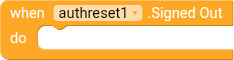
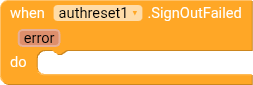
- SignOutAll() clears the Firebase and Google sign-in saved on the phone
- RevokeAccess() does the same and also removes the app’s access to the Google account
- Event SignedOut fires when it worked
- Event SignOutFailed(error) fires when it failed
How to use
Logout button:
- call Firebase_Authentication1.Logout
- open another screen: Login_screen
- close screen
Login screen only:
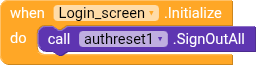
Put this on your login screen only. Each time the login screen opens, the saved Google sign-in is cleared, so the account chooser comes back.
Add the extension only to your login screen. That screen opens only when the user is signed out, so the account chooser comes back every time.
Notes
- Nothing else is cleared. Only the saved sign-in is removed.
- Works with Google sign-in. Keep the Firebase Authentication component in your app.
- Don’t call SignOutAll on a screen that logged-in users see, or it will log them out.
- Tested on a real phone, not the Companion.
- If it doesn’t work for you, please reply here and tell me your Android version and what the SignOutFailed error says, and I’ll try to help.

Download
authreset.aix (12.0 KB)