Background SuperChat Update (Free)

Send voice messages
Send media from the gallery
Photos and videos shared via a link appear directly in the chat
Photos, videos, and audio play in the chat
Edit messages
Delete messages
Copy messages
Reply to messages

Profile customization:
Change your avatar
Add a description
Set your gender and age
Add social media links
And more…
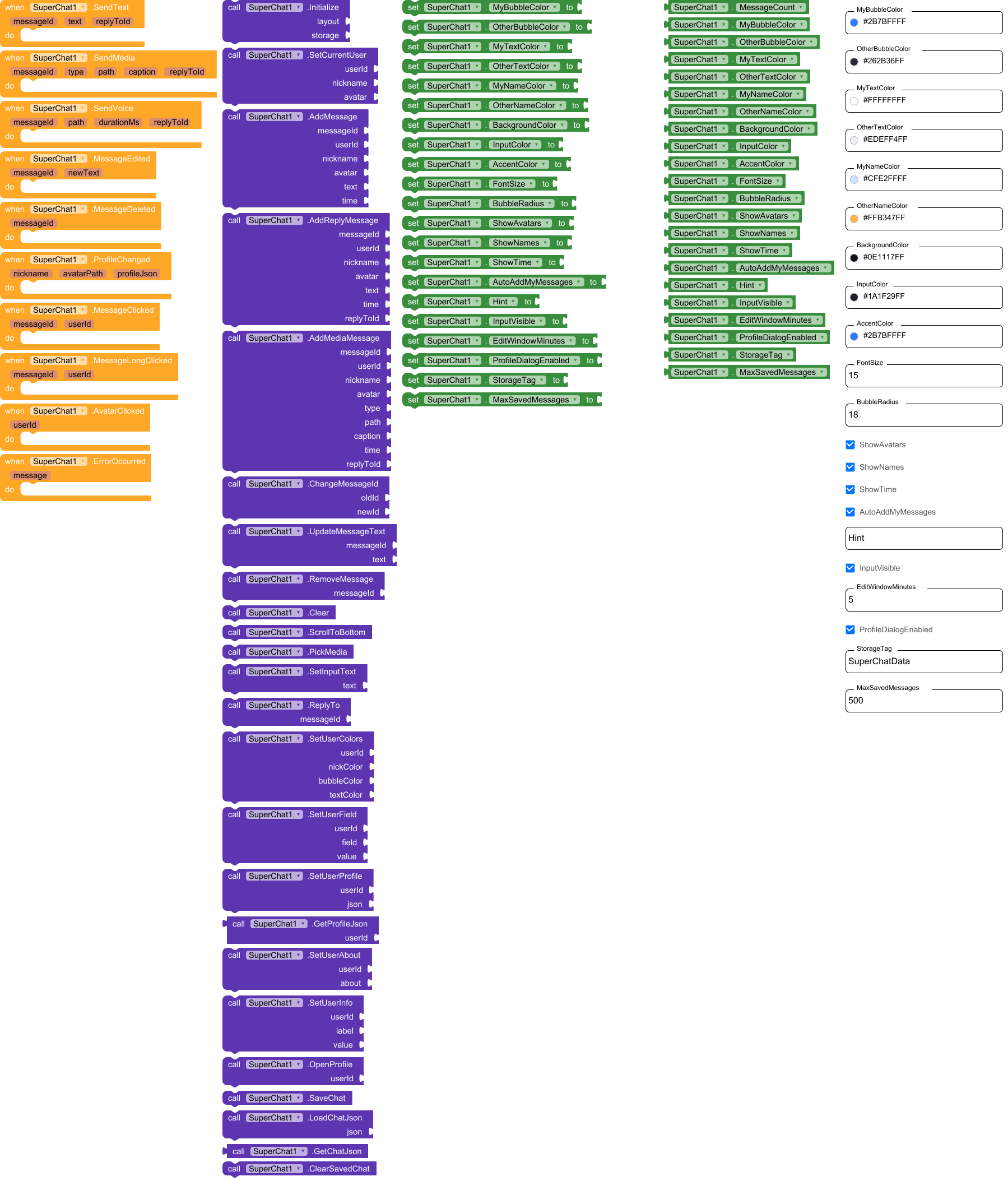
Events:

SuperChat has total 10 events.

1. SendText

User pressed send with text. replyToId is empty if it is not a reply. Send it to your server and (if AutoAddMyMessages is off) call AddMessage.

Parameter Type
messageId text
text text
replyToId text

2. SendMedia

User attached a file. type: image, video, audio or file. path: local file to upload.

Parameter Type
messageId text
type text
path text
caption text
replyToId text

3. SendVoice

User recorded a voice message. path: local .m4a file to upload.

Parameter Type
messageId text
path text
durationMs number
replyToId text

4. MessageEdited

The author edited his message (within the edit window). Update it on your server.

Parameter Type
messageId text
newText text

5. MessageDeleted

The author deleted his message. Delete it on your server.

Parameter Type
messageId text

6. ProfileChanged

The user changed his profile (nickname set once, new avatar file, status, age, interests…). avatarPath is a local file: upload it. profileJson: all profile fields as text; save it on your server and give it to others with SetUserProfile.

Parameter Type
nickname text
avatarPath text
profileJson text

7. MessageClicked

Message bubble was tapped.

Parameter Type
messageId text
userId text

8. MessageLongClicked

Message bubble was long-pressed.

Parameter Type
messageId text
userId text

9. AvatarClicked

Avatar was tapped (the profile window opens too if ProfileDialogEnabled).

Parameter Type
userId text

10. ErrorOccurred

Error (no permission, cannot read file, storage problem…).

Parameter Type
message text

Methods:

SuperChat has total 24 methods.

1. Initialize

Puts the chat into the given arrangement (its width is set to Fill parent; use a NON-scrollable arrangement with Fill parent height). storage: plug TinyDB1 (chat is restored automatically), or FirebaseDB / CloudDB (chat is saved there; in their GotValue event call LoadChatJson), or any text (e.g. “local”) to keep the chat in an internal file. Call it once in Screen.Initialize, after SetCurrentUser.

Parameter Type
layout component
storage any

2. SetCurrentUser

Who is ‘me’: messages with this userId are shown on the right as mine. avatar: url, file path or app asset name. If nickname is not empty it is locked (nickname can be set only once); if empty, the user is asked for a nickname in the profile window. A nickname / avatar the user set himself in the profile is restored from the saved chat.

Parameter Type
userId text
nickname text
avatar text

3. AddMessage

Adds a text message. A link to a photo / video / audio / YouTube in the text is shown as a player right in the bubble. time: any text, empty = current time; or a number of milliseconds since 1970 (then the time is formatted automatically and the edit window counts from it). avatar: url, file path or app asset name. A message with an id that already exists is ignored.

Parameter Type
messageId text
userId text
nickname text
avatar text
text text
time text

4. AddReplyMessage

Same as AddMessage, but the message answers another message (replyToId = id of that message): a quote is shown on top of the bubble.

Parameter Type
messageId text
userId text
nickname text
avatar text
text text
time text
replyToId text

5. AddMediaMessage

Adds a message with attachment. type: image, video, audio (voice) or file. path: url or file path. caption may be empty. replyToId may be empty. time: see AddMessage.

Parameter Type
messageId text
userId text
nickname text
avatar text
type text
path text
caption text
time text
replyToId text

6. ChangeMessageId

Changes the id of a message (for example when the server confirmed a message that was shown with a local id).

Parameter Type
oldId text
newId text

7. UpdateMessageText

Changes the text of a message (use it when somebody else edited a message).

Parameter Type
messageId text
text text

8. RemoveMessage

Removes a message by id.

Parameter Type
messageId text

9. Clear

Removes all messages from the screen (and from the saved chat).

10. ScrollToBottom

Scrolls the chat to the last message.

11. PickMedia

Opens the phone file picker (photo, video, audio, any file).

12. SetInputText

Puts text into the input field.

Parameter Type
text text

13. ReplyTo

Starts a reply to the message (same as the reply icon under it).

Parameter Type
messageId text

14. SetUserColors

Sets colors for one user (any color; use transparent/None to keep default): nickname color, bubble color, message text color.

Parameter Type
userId text
nickColor number
bubbleColor number
textColor number

15. SetUserField

Sets one profile field of a user. field: nick, avatar, status, about, age, gender (m / f), city, work, interests (comma separated), contacts.

Parameter Type
userId text
field text
value text

16. SetUserProfile

Sets the whole profile of a user from JSON (the same text that the ProfileChanged event gives you). Only the fields that are present are changed.

Parameter Type
userId text
json text

17. GetProfileJson

Returns the profile of a user as JSON text (to save it on your server).

  • Return type: text
Parameter Type
userId text

18. SetUserAbout

Sets the ‘About’ text shown in the user’s profile window.

Parameter Type
userId text
about text

19. SetUserInfo

Adds or changes an extra row in the user’s profile window (for example label ‘Car’, value ‘Lada’).

Parameter Type
userId text
label text
value text

20. OpenProfile

Opens the profile window of a user (same as tapping the avatar).

Parameter Type
userId text

21. SaveChat

Saves the chat right now (it is also saved automatically after every change).

22. LoadChatJson

Restores the chat from text. Use it in the GotValue event of FirebaseDB / CloudDB (check that the tag equals StorageTag) and with any text from your own server.

Parameter Type
json text

23. GetChatJson

Returns the whole chat (messages, profiles) as one text.

  • Return type: text

24. ClearSavedChat

Deletes the saved chat from the storage (messages on screen stay).

Designer:

SuperChat has total 21 designer properties.

1. MyBubbleColor

  • Input type: color
  • Default value: 2B7BFF

2. OtherBubbleColor

  • Input type: color
  • Default value: 262B36

3. MyTextColor

  • Input type: color
  • Default value: FFFFFF

4. OtherTextColor

  • Input type: color
  • Default value: EDEFF4

5. MyNameColor

  • Input type: color
  • Default value: CFE2FF

6. OtherNameColor

  • Input type: color
  • Default value: FFB347

7. BackgroundColor

  • Input type: color
  • Default value: 0E1117

8. InputColor

  • Input type: color
  • Default value: 1A1F29

9. AccentColor

  • Input type: color
  • Default value: 2B7BFF

10. FontSize

  • Input type: non_negative_float
  • Default value: 15

11. BubbleRadius

  • Input type: integer
  • Default value: 18

12. ShowAvatars

  • Input type: boolean
  • Default value: True

13. ShowNames

  • Input type: boolean
  • Default value: True

14. ShowTime

  • Input type: boolean
  • Default value: True

15. AutoAddMyMessages

  • Input type: boolean
  • Default value: True

16. Hint

  • Input type: string

17. InputVisible

  • Input type: boolean
  • Default value: True

18. EditWindowMinutes

  • Input type: integer
  • Default value: 5

19. ProfileDialogEnabled

  • Input type: boolean
  • Default value: True

20. StorageTag

  • Input type: string
  • Default value: SuperChatData

21. MaxSavedMessages

  • Input type: integer
  • Default value: 500

Setters:

SuperChat has total 21 setter properties.

1. MyBubbleColor

My bubble color.

  • Input type: number

2. OtherBubbleColor

Other users’ bubble color.

  • Input type: number

3. MyTextColor

My message text color.

  • Input type: number

4. OtherTextColor

Other users’ text color.

  • Input type: number

5. MyNameColor

My nickname color.

  • Input type: number

6. OtherNameColor

Other users’ nickname color.

  • Input type: number

7. BackgroundColor

Chat background color.

  • Input type: number

8. InputColor

Input field and dialogs color.

  • Input type: number

9. AccentColor

Accent color (send button, voice play button, profile banner).

  • Input type: number

10. FontSize

Message text size.

  • Input type: number

11. BubbleRadius

Bubble corner radius.

  • Input type: number

12. ShowAvatars

Show avatars.

  • Input type: boolean

13. ShowNames

Show nicknames.

  • Input type: boolean

14. ShowTime

Show message time.

  • Input type: boolean

15. AutoAddMyMessages

If true, my sent messages appear in the chat immediately. Turn off if you add them yourself after the server confirms.

  • Input type: boolean

16. Hint

Input field hint (empty = default).

  • Input type: text

17. InputVisible

Show the input bar (hide it for read-only chat).

  • Input type: boolean

18. EditWindowMinutes

How many minutes the author can edit his message.

  • Input type: number

19. ProfileDialogEnabled

Open the profile window when an avatar is tapped.

  • Input type: boolean

20. StorageTag

Tag (key) under which the chat is saved in the storage. Use a different tag for every chat / user.

  • Input type: text

21. MaxSavedMessages

How many last messages are kept in the saved chat.

  • Input type: number

Getters:

SuperChat has total 22 getter properties.

1. MessageCount

Number of messages in the chat.

  • Return type: number

2. MyBubbleColor

My bubble color.

  • Return type: number

3. OtherBubbleColor

Other users’ bubble color.

  • Return type: number

4. MyTextColor

My message text color.

  • Return type: number

5. OtherTextColor

Other users’ text color.

  • Return type: number

6. MyNameColor

My nickname color.

  • Return type: number

7. OtherNameColor

Other users’ nickname color.

  • Return type: number

8. BackgroundColor

Chat background color.

  • Return type: number

9. InputColor

Input field and dialogs color.

  • Return type: number

10. AccentColor

Accent color (send button, voice play button, profile banner).

  • Return type: number

11. FontSize

Message text size.

  • Return type: number

12. BubbleRadius

Bubble corner radius.

  • Return type: number

13. ShowAvatars

Show avatars.

  • Return type: boolean

14. ShowNames

Show nicknames.

  • Return type: boolean

15. ShowTime

Show message time.

  • Return type: boolean

16. AutoAddMyMessages

If true, my sent messages appear in the chat immediately. Turn off if you add them yourself after the server confirms.

  • Return type: boolean

17. Hint

Input field hint (empty = default).

  • Return type: text

18. InputVisible

Show the input bar (hide it for read-only chat).

  • Return type: boolean

19. EditWindowMinutes

How many minutes the author can edit his message.

  • Return type: number

20. ProfileDialogEnabled

Open the profile window when an avatar is tapped.

  • Return type: boolean

21. StorageTag

Tag (key) under which the chat is saved in the storage. Use a different tag for every chat / user.

  • Return type: text

22. MaxSavedMessages

How many last messages are kept in the saved chat.

  • Return type: number

The update will add the ability to run HTML code in the chat.
com.superchat.aix (128.2 KB)
The extension was created with the help of: :rocket: FAST

2 Likes

Yeah man great job :blush:

This is great.

By the way, if am using your extension will the profile layout auto created?

What’s new (soon)

Chat basics

  • Stylish message bubbles with avatar, nickname and time. Long text wraps across the full bubble width.
  • Nickname, bubble and text colors are set by the developer, including per-user colors.
  • Bubble styles: with a tail, flat, gradient. Light and dark theme, chat wallpaper, smooth appearance animation.

Messages and media

  • Photos, videos and files from the phone storage.
  • Voice messages: hold-to-record, waveform, 1x / 1.5x / 2x speed, listen before sending.
  • Links to photos, videos, audio and YouTube play right in the chat. Video opens in a window. Ordinary links get a preview card (image, title, description).
  • Full-screen photo gallery with swipe. Stickers and animated GIFs. Location and contact sharing.
  • Upload progress inside the bubble with a cancel button.

Message actions

  • Icons under every message: reply, save, copy, edit (5 minutes), delete.
  • Swipe right to reply, quote inside the bubble. Emoji reactions. @mentions.
  • Long press opens a menu. Multi-select: copy, forward, delete.
  • Chat search, pinned message.

Live chat

  • Load older messages when scrolling to the top.
  • Delivery status: sending, sent, delivered, read, failed with retry.
  • Date separators (“Today”, “Yesterday”), a “scroll down” button with an unread counter.
  • “Typing…” and “online” indicators.

Profiles and data

  • Social-network-style profile: status, age, gender, city, work, interests, contacts, about. Users change their own avatar, the nickname is set only once.
  • The chat and profiles are saved automatically to TinyDB, Firebase, CloudDB or an internal file, and restored at app start.
  • Added automatic phone language detection, and the chat will be in your device’s language.

com.superchat.aix (220.9 KB)

No further extension updates will be released.

The layout is created automatically; the user fills in their own data, avatar, description, etc.

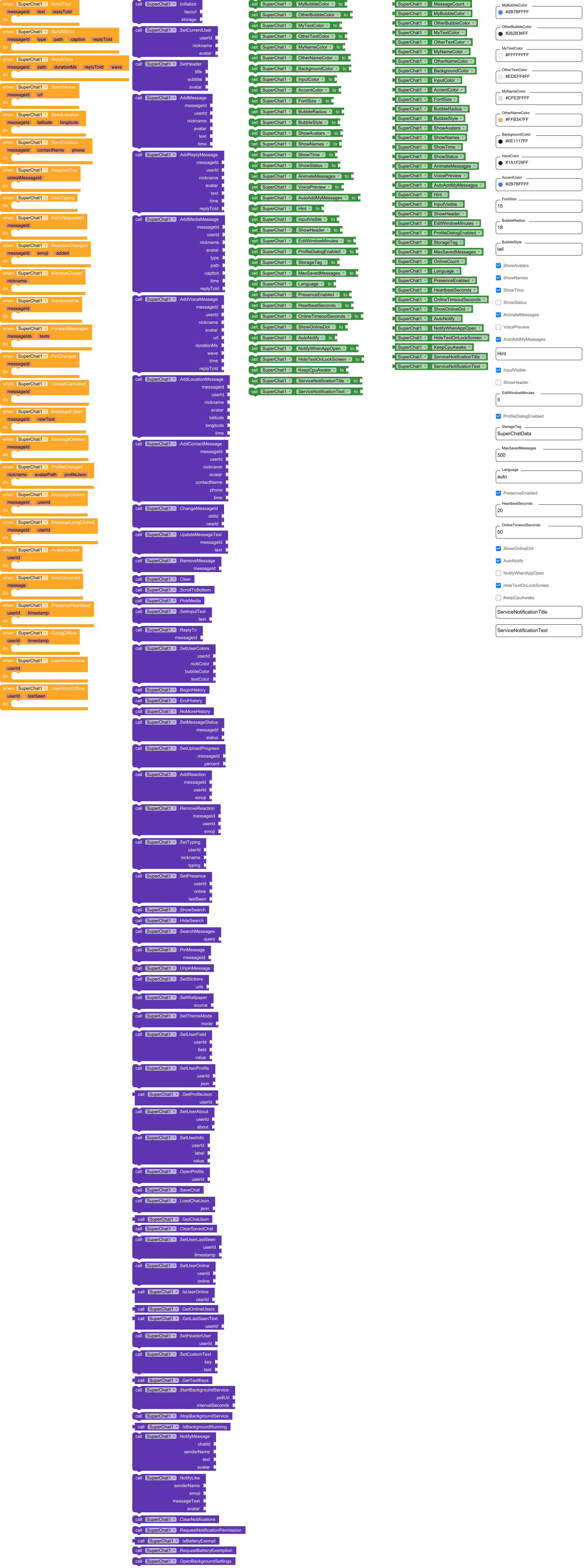
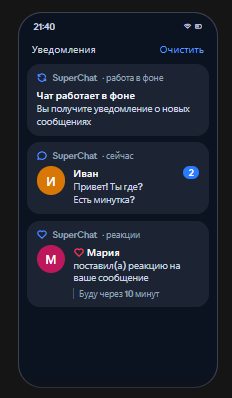
Update! The chat can now receive messages in the background, including reactions and messages from users.
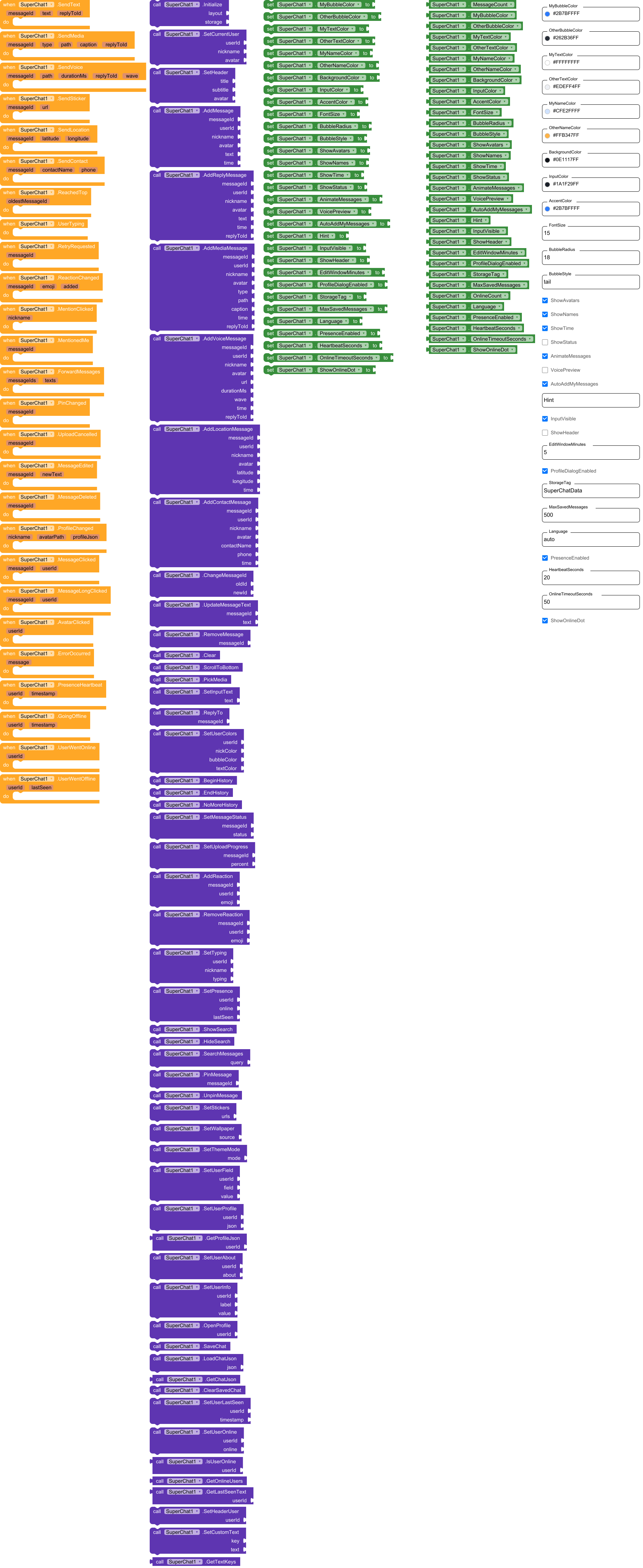
SuperChat has total 26 events.

1. SendText

User pressed send with text. replyToId is empty if it is not a reply. Send it to your server and (if AutoAddMyMessages is off) call AddMessage.

Parameter Type
messageId text
text text
replyToId text

2. SendMedia

User attached a file. type: image, video, audio or file. path: local file to upload.

Parameter Type
messageId text
type text
path text
caption text
replyToId text

3. SendVoice

User recorded a voice message. path: local .m4a file to upload. wave: waveform text - save it and give it to AddVoiceMessage.

Parameter Type
messageId text
path text
durationMs number
replyToId text
wave text

4. SendSticker

User sent a sticker (url of the picture).

Parameter Type
messageId text
url text

5. SendLocation

User sent his location.

Parameter Type
messageId text
latitude number
longitude number

6. SendContact

User sent a contact.

Parameter Type
messageId text
contactName text
phone text

7. ReachedTop

The user scrolled to the very top. Load older messages: call BeginHistory, add them (oldest first), call EndHistory. oldestMessageId = id of the first message now.

Parameter Type
oldestMessageId text

8. UserTyping

The user is typing (fires at most once every 3 seconds). Write ‘typing’ to your server so others can call SetTyping.

9. RetryRequested

The user tapped a message that failed to send. Send it again and call SetMessageStatus.

Parameter Type
messageId text

10. ReactionChanged

The user added (added = true) or removed his reaction.

Parameter Type
messageId text
emoji text
added boolean

11. MentionClicked

The user tapped

Parameter Type
nickname text

12. MentionedMe

A new message mentions my nickname (

Parameter Type
messageId text

13. ForwardMessages

The user wants to forward messages. messageIds: ids separated by commas; texts: their texts, one per line.

Parameter Type
messageIds text
texts text

14. PinChanged

The user pinned a message (messageId) or removed the pin (empty id).

Parameter Type
messageId text

15. UploadCancelled

The user pressed the cancel button of an upload in progress.

Parameter Type
messageId text

16. MessageEdited

The author edited his message (within the edit window). Update it on your server.

Parameter Type
messageId text
newText text

17. MessageDeleted

The author deleted his message. Delete it on your server.

Parameter Type
messageId text

18. ProfileChanged

The user changed his profile (nickname set once, new avatar file, status, age, interests…). avatarPath is a local file: upload it. profileJson: all profile fields as text; save it on your server and give it to others with SetUserProfile.

Parameter Type
nickname text
avatarPath text
profileJson text

19. MessageClicked

Message bubble was tapped.

Parameter Type
messageId text
userId text

20. MessageLongClicked

Message bubble was long-pressed (the menu opens too).

Parameter Type
messageId text
userId text

21. AvatarClicked

Avatar was tapped (the profile window opens too if ProfileDialogEnabled).

Parameter Type
userId text

22. ErrorOccurred

Error (no permission, cannot read file, storage problem…).

Parameter Type
message text

23. PresenceHeartbeat

Fires every HeartbeatSeconds while the app is open (and at once when it starts or comes back). Write ‘presence/ = timestamp’ to your database / server: the other phones read it and give it to SetUserLastSeen. timestamp is in milliseconds since 1970.

Parameter Type
userId text
timestamp text

24. GoingOffline

The app went to the background or closed: write ‘last seen = timestamp’ to your server. (If the phone loses the network the others will anyway see him offline after OnlineTimeoutSeconds.)

Parameter Type
userId text
timestamp text

25. UserWentOnline

Another user came online.

Parameter Type
userId text

26. UserWentOffline

Another user went offline. lastSeen: time of his last heartbeat in milliseconds.

Parameter Type
userId text
lastSeen text

Methods:

SuperChat has total 53 methods.

1. Initialize

Puts the chat into the given arrangement (its width is set to Fill parent; use a NON-scrollable arrangement with Fill parent height). storage: plug TinyDB1 (chat is restored automatically), or FirebaseDB / CloudDB (chat is saved there; in their GotValue event call LoadChatJson), or any text (e.g. “local”) to keep the chat in an internal file. Call it once in Screen.Initialize, after SetCurrentUser.

Parameter Type
layout component
storage any

2. SetCurrentUser

Who is ‘me’: messages with this userId are shown on the right as mine. avatar: url, file path or app asset name. If nickname is not empty it is locked (nickname can be set only once); if empty, the user is asked for a nickname in the profile window. A nickname / avatar the user set himself in the profile is restored from the saved chat.

Parameter Type
userId text
nickname text
avatar text

3. SetHeader

Shows a header bar with an avatar, a title and a subtitle (for example the chat name and ‘5 members, 2 online’). Needs ShowHeader = true.

Parameter Type
title text
subtitle text
avatar text

4. AddMessage

Adds a text message. A link to a photo / video / audio / YouTube in the text is shown as a player right in the bubble, an ordinary link gets a preview card. time: any text, empty = current time; or a number of milliseconds since 1970 (then the time, the date separators and the edit window use it). avatar: url, file path or app asset name. A message with an id that already exists is ignored.

Parameter Type
messageId text
userId text
nickname text
avatar text
text text
time text

5. AddReplyMessage

Same as AddMessage, but the message answers another message (replyToId = id of that message): a quote is shown on top of the bubble.

Parameter Type
messageId text
userId text
nickname text
avatar text
text text
time text
replyToId text

6. AddMediaMessage

Adds a message with attachment. type: image, video, audio, file or sticker. path: url or file path. caption may be empty. replyToId may be empty. time: see AddMessage.

Parameter Type
messageId text
userId text
nickname text
avatar text
type text
path text
caption text
time text
replyToId text

7. AddVoiceMessage

Adds a voice message. url: link or file path of the audio, durationMs: length, wave: waveform text from the SendVoice event (or empty).

Parameter Type
messageId text
userId text
nickname text
avatar text
url text
durationMs number
wave text
time text
replyToId text

8. AddLocationMessage

Adds a location message (shown as a card; tap opens the map).

Parameter Type
messageId text
userId text
nickname text
avatar text
latitude number
longitude number
time text

9. AddContactMessage

Adds a contact message (shown as a card; tap dials the number).

Parameter Type
messageId text
userId text
nickname text
avatar text
contactName text
phone text
time text

10. ChangeMessageId

Changes the id of a message (for example when the server confirmed a message that was shown with a local id).

Parameter Type
oldId text
newId text

11. UpdateMessageText

Changes the text of a message (use it when somebody else edited a message).

Parameter Type
messageId text
text text

12. RemoveMessage

Removes a message by id.

Parameter Type
messageId text

13. Clear

Removes all messages from the screen (and from the saved chat).

14. ScrollToBottom

Scrolls the chat to the last message.

15. PickMedia

Opens the phone file picker (photo, video, audio, any file).

16. SetInputText

Puts text into the input field.

Parameter Type
text text

17. ReplyTo

Starts a reply to the message (same as the reply icon under it).

Parameter Type
messageId text

18. SetUserColors

Sets colors for one user (any color; use transparent/None to keep default): nickname color, bubble color, message text color.

Parameter Type
userId text
nickColor number
bubbleColor number
textColor number

19. BeginHistory

Call it in the ReachedTop event before adding OLDER messages. Every AddMessage / AddReplyMessage / AddMediaMessage until EndHistory is put at the top (add them from the oldest to the newest) and the scroll position stays the same.

20. EndHistory

Call it after adding the older messages (also when there were none, or the ReachedTop event will not fire again).

21. NoMoreHistory

There are no more old messages: ReachedTop will not fire any more.

22. SetMessageStatus

Sets the delivery status of my message: sending, sent, delivered, read or failed (failed: the user can tap the message to retry). Needs ShowStatus = true.

Parameter Type
messageId text
status text

23. SetUploadProgress

Upload progress of my attachment in percent (0..99) - a progress bar with a cancel button appears in the bubble; 100 or -1 hides it.

Parameter Type
messageId text
percent number

24. AddReaction

Somebody reacted to a message with an emoji.

Parameter Type
messageId text
userId text
emoji text

25. RemoveReaction

Somebody removed his reaction.

Parameter Type
messageId text
userId text
emoji text

26. SetTyping

Shows / hides ‘… is typing’ above the input. It disappears by itself after 6 seconds, so call it again while the user keeps typing.

Parameter Type
userId text
nickname text
typing boolean

27. SetPresence

Sets the online status of a user BY HAND (it stays until you change it, or until SetUserLastSeen is called). lastSeen: any text shown when he is offline. Better use SetUserLastSeen with heartbeats: then everything works automatically.

Parameter Type
userId text
online boolean
lastSeen text

28. ShowSearch

Opens the search bar of the chat.

29. HideSearch

Closes the search bar.

30. SearchMessages

Searches the text in all messages and jumps to the newest match.

Parameter Type
query text

31. PinMessage

Pins a message at the top of the chat.

Parameter Type
messageId text

32. UnpinMessage

Removes the pinned message.

33. SetStickers

List of sticker pictures (links or asset names separated by commas). When it is not empty a sticker button appears in the input bar. GIF stickers are animated.

Parameter Type
urls text

34. SetWallpaper

Chat wallpaper: link, file path or app asset name. Empty = no wallpaper.

Parameter Type
source text

35. SetThemeMode

Ready color sets: ‘dark’ or ‘light’. Call it after Initialize; colors you set later override it.

Parameter Type
mode text

36. SetUserField

Sets one profile field of a user. field: nick, avatar, status, about, age, gender (m / f), city, work, interests (comma separated), contacts.

Parameter Type
userId text
field text
value text

37. SetUserProfile

Sets the whole profile of a user from JSON (the same text that the ProfileChanged event gives you). Only the fields that are present are changed.

Parameter Type
userId text
json text

38. GetProfileJson

Returns the profile of a user as JSON text (to save it on your server).

  • Return type: text
Parameter Type
userId text

39. SetUserAbout

Sets the ‘About’ text shown in the user’s profile window.

Parameter Type
userId text
about text

40. SetUserInfo

Adds or changes an extra row in the user’s profile window (for example label ‘Car’, value ‘Lada’).

Parameter Type
userId text
label text
value text

41. OpenProfile

Opens the profile window of a user (same as tapping the avatar).

Parameter Type
userId text

42. SaveChat

Saves the chat right now (it is also saved automatically after every change).

43. LoadChatJson

Restores the chat from text. Use it in the GotValue event of FirebaseDB / CloudDB (check that the tag equals StorageTag) and with any text from your own server.

Parameter Type
json text

44. GetChatJson

Returns the whole chat (messages, profiles) as one text.

  • Return type: text

45. ClearSavedChat

Deletes the saved chat from the storage (messages on screen stay).

46. SetUserLastSeen

Call it when you learn that a user is alive: for example when the PresenceHeartbeat event of ANOTHER phone arrives from your server, or when you read ‘presence/’ from the database. timestamp: time of his last heartbeat in milliseconds (or seconds) since 1970. He is shown as online while this time is younger than OnlineTimeoutSeconds; later ‘last seen …’ appears by itself.

Parameter Type
userId text
timestamp text

47. SetUserOnline

Sets ‘online’ / ‘offline’ of a user by hand (for example from Firebase onDisconnect). It stays until SetUserLastSeen is called for him.

Parameter Type
userId text
online boolean

48. IsUserOnline

True if the user is online in the chat right now.

  • Return type: boolean
Parameter Type
userId text

49. GetOnlineUsers

Ids of the other users who are online now, separated by commas.

  • Return type: text

50. GetLastSeenText

Text like ‘online’, ‘last seen 5 min ago’, ‘last seen yesterday at 21:40’ in the current language.

  • Return type: text
Parameter Type
userId text

51. SetHeaderUser

Binds the header bar to a user (private chat): the title is his nickname, the avatar is his avatar and the subtitle shows ‘online’ / ‘last seen …’ automatically.

Parameter Type
userId text

52. SetCustomText

Replaces one text of the chat (any language). key: see GetTextKeys, for example ‘reply’. Empty text = back to the standard one. Texts with %s / %d keep them.

Parameter Type
key text
text text

53. GetTextKeys

All text keys of the chat, separated by commas (for SetCustomText).

  • Return type: text

Designer:

SuperChat has total 31 designer properties.

1. MyBubbleColor

  • Input type: color
  • Default value: 2B7BFF

2. OtherBubbleColor

  • Input type: color
  • Default value: 262B36

3. MyTextColor

  • Input type: color
  • Default value: FFFFFF

4. OtherTextColor

  • Input type: color
  • Default value: EDEFF4

5. MyNameColor

  • Input type: color
  • Default value: CFE2FF

6. OtherNameColor

  • Input type: color
  • Default value: FFB347

7. BackgroundColor

  • Input type: color
  • Default value: 0E1117

8. InputColor

  • Input type: color
  • Default value: 1A1F29

9. AccentColor

  • Input type: color
  • Default value: 2B7BFF

10. FontSize

  • Input type: non_negative_float
  • Default value: 15

11. BubbleRadius

  • Input type: integer
  • Default value: 18

12. BubbleStyle

  • Input type: string
  • Default value: tail

13. ShowAvatars

  • Input type: boolean
  • Default value: True

14. ShowNames

  • Input type: boolean
  • Default value: True

15. ShowTime

  • Input type: boolean
  • Default value: True

16. ShowStatus

  • Input type: boolean
  • Default value: False

17. AnimateMessages

  • Input type: boolean
  • Default value: True

18. VoicePreview

  • Input type: boolean
  • Default value: False

19. AutoAddMyMessages

  • Input type: boolean
  • Default value: True

20. Hint

  • Input type: string

21. InputVisible

  • Input type: boolean
  • Default value: True

22. ShowHeader

  • Input type: boolean
  • Default value: False

23. EditWindowMinutes

  • Input type: integer
  • Default value: 5

24. ProfileDialogEnabled

  • Input type: boolean
  • Default value: True

25. StorageTag

  • Input type: string
  • Default value: SuperChatData

26. MaxSavedMessages

  • Input type: integer
  • Default value: 500

27. Language

  • Input type: string
  • Default value: auto

28. PresenceEnabled

  • Input type: boolean
  • Default value: True

29. HeartbeatSeconds

  • Input type: integer
  • Default value: 20

30. OnlineTimeoutSeconds

  • Input type: integer
  • Default value: 50

31. ShowOnlineDot

  • Input type: boolean
  • Default value: True

Setters:

SuperChat has total 31 setter properties.

1. MyBubbleColor

My bubble color.

  • Input type: number

2. OtherBubbleColor

Other users’ bubble color.

  • Input type: number

3. MyTextColor

My message text color.

  • Input type: number

4. OtherTextColor

Other users’ text color.

  • Input type: number

5. MyNameColor

My nickname color.

  • Input type: number

6. OtherNameColor

Other users’ nickname color.

  • Input type: number

7. BackgroundColor

Chat background color.

  • Input type: number

8. InputColor

Input field, bars and dialogs color.

  • Input type: number

9. AccentColor

Accent color (send button, voice play button, profile banner).

  • Input type: number

10. FontSize

Message text size.

  • Input type: number

11. BubbleRadius

Bubble corner radius.

  • Input type: number

12. BubbleStyle

Bubble style: tail (with a small corner), flat (all corners round) or gradient.

  • Input type: text

13. ShowAvatars

Show avatars.

  • Input type: boolean

14. ShowNames

Show nicknames.

  • Input type: boolean

15. ShowTime

Show message time.

  • Input type: boolean

16. ShowStatus

Show delivery status (clock, check marks, error) under my messages. My new messages start as ‘sending’: call SetMessageStatus when the server answers.

  • Input type: boolean

17. AnimateMessages

Smooth appearance of new messages.

  • Input type: boolean

18. VoicePreview

After recording a voice message show a player to listen to it before sending (with delete and send buttons).

  • Input type: boolean

19. AutoAddMyMessages

If true, my sent messages appear in the chat immediately. Turn off if you add them yourself after the server confirms.

  • Input type: boolean

20. Hint

Input field hint (empty = default).

  • Input type: text

21. InputVisible

Show the input bar (hide it for read-only chat).

  • Input type: boolean

22. ShowHeader

Show the header bar (fill it with SetHeader).

  • Input type: boolean

23. EditWindowMinutes

How many minutes the author can edit his message.

  • Input type: number

24. ProfileDialogEnabled

Open the profile window when an avatar is tapped.

  • Input type: boolean

25. StorageTag

Tag (key) under which the chat is saved in the storage. Use a different tag for every chat / user.

  • Input type: text

26. MaxSavedMessages

How many last messages are kept in the saved chat.

  • Input type: number

27. Language

Language of the chat texts: auto (follows the phone language: Russian phone → Russian, others → English), ru or en.

  • Input type: text

28. PresenceEnabled

Turns the online system on: heartbeats of this user and automatic online / last seen status of the others.

  • Input type: boolean

29. HeartbeatSeconds

How often (seconds) the PresenceHeartbeat event fires.

  • Input type: number

30. OnlineTimeoutSeconds

A user without a new heartbeat for this many seconds is shown as offline. Make it more than 2 x HeartbeatSeconds.

  • Input type: number

31. ShowOnlineDot

Green dot on the avatar of the users who are online.

  • Input type: boolean

Getters:

SuperChat has total 33 getter properties.

1. MessageCount

Number of messages in the chat.

  • Return type: number

2. MyBubbleColor

My bubble color.

  • Return type: number

3. OtherBubbleColor

Other users’ bubble color.

  • Return type: number

4. MyTextColor

My message text color.

  • Return type: number

5. OtherTextColor

Other users’ text color.

  • Return type: number

6. MyNameColor

My nickname color.

  • Return type: number

7. OtherNameColor

Other users’ nickname color.

  • Return type: number

8. BackgroundColor

Chat background color.

  • Return type: number

9. InputColor

Input field, bars and dialogs color.

  • Return type: number

10. AccentColor

Accent color (send button, voice play button, profile banner).

  • Return type: number

11. FontSize

Message text size.

  • Return type: number

12. BubbleRadius

Bubble corner radius.

  • Return type: number

13. BubbleStyle

Bubble style: tail (with a small corner), flat (all corners round) or gradient.

  • Return type: text

14. ShowAvatars

Show avatars.

  • Return type: boolean

15. ShowNames

Show nicknames.

  • Return type: boolean

16. ShowTime

Show message time.

  • Return type: boolean

17. ShowStatus

Show delivery status (clock, check marks, error) under my messages. My new messages start as ‘sending’: call SetMessageStatus when the server answers.

  • Return type: boolean

18. AnimateMessages

Smooth appearance of new messages.

  • Return type: boolean

19. VoicePreview

After recording a voice message show a player to listen to it before sending (with delete and send buttons).

  • Return type: boolean

20. AutoAddMyMessages

If true, my sent messages appear in the chat immediately. Turn off if you add them yourself after the server confirms.

  • Return type: boolean

21. Hint

Input field hint (empty = default).

  • Return type: text

22. InputVisible

Show the input bar (hide it for read-only chat).

  • Return type: boolean

23. ShowHeader

Show the header bar (fill it with SetHeader).

  • Return type: boolean

24. EditWindowMinutes

How many minutes the author can edit his message.

  • Return type: number

25. ProfileDialogEnabled

Open the profile window when an avatar is tapped.

  • Return type: boolean

26. StorageTag

Tag (key) under which the chat is saved in the storage. Use a different tag for every chat / user.

  • Return type: text

27. MaxSavedMessages

How many last messages are kept in the saved chat.

  • Return type: number

28. OnlineCount

How many other users are online now.

  • Return type: number

29. Language

Language of the chat texts: auto (follows the phone language: Russian phone → Russian, others → English), ru or en.

  • Return type: text

30. PresenceEnabled

Turns the online system on: heartbeats of this user and automatic online / last seen status of the others.

  • Return type: boolean

31. HeartbeatSeconds

How often (seconds) the PresenceHeartbeat event fires.

  • Return type: number

32. OnlineTimeoutSeconds

A user without a new heartbeat for this many seconds is shown as offline. Make it more than 2 x HeartbeatSeconds.

  • Return type: number

33. ShowOnlineDot

Green dot on the avatar of the users who are online.

  • Return type: boolean

com.superchat.aix (250.7 KB)