I have also created the issue on GitHub:
opened 10:35AM - 08 May 26 UTC
bug
### Contact Details
Please discuss it here.
### What happened?
There is no is… sue with `Connect to Companion`, but the `Connect to USB` is failing.
And also the `starter.kodular.io` is able to detect the phone and the app.
So the issue is clearly with the `creator.kodular.io`
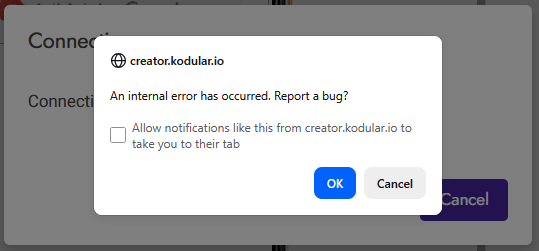
It keeps saying,
```
Connecting...
Connecting via USB Cable
```
And then an alert pops up
```
An internal error has occurred. Report a bug?
```
### Version
[2026.05](https://docs.kodular.io/release-notes/)
### What browsers are you seeing the problem on?
Mozilla Firefox 150
Google Chrome 148
### Relevant log output
From the browser dev console.
```js
Fri May 08 12:51:12 GMT+700 2026 com.google.appinventor.client.properties.Properties
WARNING: java.lang.IllegalStateException: no such property: ProjectColors line 9 > injectedScript:1:13658
```
```js
Fri May 08 12:51:12 GMT+700 2026 com.google.appinventor.client.properties.Properties
WARNING: java.lang.IllegalStateException: no such property: GooglePlayGamesAppId 2 line 9 > injectedScript:1:13658
```
```js
XHRGET
http://localhost:8004/ucheck/
[HTTP/1.1 200 OK 277ms]
```
```js
Local Network Access permission required: top-level site “https://creator.kodular.io/#196887433058303970”, initiator “https://creator.kodular.io/#196887433058303970”, attempting to access target “http://localhost:8004/ucheck/” (127.0.0.1:8004) via xhr. Secure context: True
0 u() ["https://creator.kodular.io/ line 9 > injectedScript":48:18996]
creator.kodular.io
```
```js
Local Network Access detected: top-level site “https://creator.kodular.io/#196887433058303970”, initiator “https://creator.kodular.io/#196887433058303970”, accessing target “http://localhost:8004/ucheck/” (127.0.0.1:8004) via xhr. Secure context: True, prompt action: auto_allow
0 u() ["https://creator.kodular.io/ line 9 > injectedScript":48:18996]
creator.kodular.io
```
```js
ReplMgr: set device = 4100c7a9c2a7c3f3 line 9 > injectedScript:48:18310
```
```js
Sun May 10 12:10:52 GMT+700 2026 com.google.appinventor.client.Ode
SEVERE: Unexpected exception
java.lang.ClassCastException
at Unknown.bB(https://creator.kodular.io/ line 9 > injectedScript)
at Unknown.eB(https://creator.kodular.io/ line 9 > injectedScript)
at Unknown.u2b(https://creator.kodular.io/ line 9 > injectedScript)
at Unknown.jwd(https://creator.kodular.io/ line 9 > injectedScript)
at Unknown.dmc(https://creator.kodular.io/ line 9 > injectedScript)
at Unknown.eX(https://creator.kodular.io/ line 9 > injectedScript)
at Unknown.V8b(https://creator.kodular.io/ line 9 > injectedScript)
at Unknown.Y8b(https://creator.kodular.io/ line 9 > injectedScript)
at Unknown.X8b/<(https://creator.kodular.io/ line 9 > injectedScript)
at Unknown.setContent(https://creator.kodular.io/ line 9 > injectedScript)
at Unknown.u(https://creator.kodular.io/ line 9 > injectedScript)
at Unknown.ReplMgr.startAdbDevice(https://creator.kodular.io/ line 9 > injectedScript)
at Unknown.ReplMgr.startRepl(https://creator.kodular.io/ line 9 > injectedScript)
at Unknown.bX(https://creator.kodular.io/ line 9 > injectedScript)
at Unknown.XY(https://creator.kodular.io/ line 9 > injectedScript)
at Unknown.mv(https://creator.kodular.io/ line 9 > injectedScript)
at Unknown.zw(https://creator.kodular.io/ line 9 > injectedScript)
at Unknown.kwb(https://creator.kodular.io/ line 9 > injectedScript)
at Unknown.Udc(https://creator.kodular.io/ line 9 > injectedScript)
at Unknown.Vgc(https://creator.kodular.io/ line 9 > injectedScript)
at Unknown.Ngc(https://creator.kodular.io/ line 9 > injectedScript)
at Unknown.Ec(https://creator.kodular.io/ line 9 > injectedScript)
at Unknown.Oc(https://creator.kodular.io/ line 9 > injectedScript)
at Unknown.Bdc(https://creator.kodular.io/ line 9 > injectedScript)
at Unknown.Gc(https://creator.kodular.io/ line 9 > injectedScript)
at Unknown.Sc(https://creator.kodular.io/ line 9 > injectedScript)
at Unknown.I$c(https://creator.kodular.io/ line 9 > injectedScript)
at Unknown.H0c(https://creator.kodular.io/ line 9 > injectedScript)
at Unknown.V8b(https://creator.kodular.io/ line 9 > injectedScript)
at Unknown.Y8b(https://creator.kodular.io/ line 9 > injectedScript)
at Unknown.X8b/<(https://creator.kodular.io/ line 9 > injectedScript)
at Unknown.anonymous(Unknown)
line 9 > injectedScript:1:13615
zVc https://creator.kodular.io/ line 9 > injectedScript:1
qvd https://creator.kodular.io/ line 9 > injectedScript:60
vvd https://creator.kodular.io/ line 9 > injectedScript:97
is https://creator.kodular.io/ line 9 > injectedScript:1
a9b https://creator.kodular.io/ line 9 > injectedScript:287
Y8b https://creator.kodular.io/ line 9 > injectedScript:93
X8b https://creator.kodular.io/ line 9 > injectedScript:14
setContent https://creator.kodular.io/ line 9 > injectedScript:44
u https://creator.kodular.io/ line 9 > injectedScript:48
(Async: setInterval handler)
startAdbDevice https://creator.kodular.io/ line 9 > injectedScript:48
startRepl https://creator.kodular.io/ line 9 > injectedScript:48
bX https://creator.kodular.io/ line 9 > injectedScript:436
XY https://creator.kodular.io/ line 9 > injectedScript:1
mv https://creator.kodular.io/ line 9 > injectedScript:114
zw https://creator.kodular.io/ line 9 > injectedScript:1
kwb https://creator.kodular.io/ line 9 > injectedScript:1
Udc https://creator.kodular.io/ line 9 > injectedScript:1
Vgc https://creator.kodular.io/ line 9 > injectedScript:21
Ngc https://creator.kodular.io/ line 9 > injectedScript:123
Ec https://creator.kodular.io/ line 9 > injectedScript:511
Oc https://creator.kodular.io/ line 9 > injectedScript:1
Bdc https://creator.kodular.io/ line 9 > injectedScript:80
Gc https://creator.kodular.io/ line 9 > injectedScript:97
Sc https://creator.kodular.io/ line 9 > injectedScript:1
I$c https://creator.kodular.io/ line 9 > injectedScript:94
H0c https://creator.kodular.io/ line 9 > injectedScript:101
V8b https://creator.kodular.io/ line 9 > injectedScript:359
Y8b https://creator.kodular.io/ line 9 > injectedScript:93
X8b https://creator.kodular.io/ line 9 > injectedScript:14
```
### Code of Conduct
- [x] I agree to follow this project's Code of Conduct
Kodular Fenix (v1.5D.0) Bug Tracker before creating a new topic
There is no issue with Connect to Companion, but the Connect to USB is failing.
And also the starter.kodular.io is able to detect the phone and the app.creator.kodular.io
Start Kodular Starter
Open a creator.kodular.io project
Test > Connect to USB
I was able to see the compiled screen.
It keeps saying,
Connecting...
Connecting via USB Cable
And then an alert pops up
An internal error has occurred. Report a bug?
No blocks is suffice.
7.1.1
As explained in detail in the GitHub issue,
I believe it needs proper sanitization that GWT accepts.
    setContent: function(a) {
        if (this._dialog && $wnd.BlocklyPanel_setDialogContent) {
            try {
                $wnd.BlocklyPanel_setDialogContent(this._dialog, String(a));
            } catch (error) {
                $wnd.console.error("Error in `ob.Util.Dialog.setContent`: ", error, "Arguments: ", a);
            }
        }
    }
RaYzZz
May 14, 2026, 5:04pm
3
Hi dear,
Welcome to the
Confirmed,
Added to the Bugs Tracker
Wait, the issue that I am reporting is in the Kodular Creator (creator.kodular.io) and not the Desktop app of Kodular Starter or even starter.kodular.io.
The exception thrown could be seen in the console of browser dev tool.
RaYzZz
May 15, 2026, 8:02am
5
Good morning,
I know, it was to give some context to the topic title.
 odular community! and thank you for your report