I need aia file, I want to add English language and when I change it to English, when I re-open the app, it will remember the language and not ask me again.
In short, I want it to be able to remember the selection until I want to change it myself, please help me, thanks.
Have you already implemented the language option? If yes, then use tinyDB.
Try it in this way, after selected language calltinyDB store value, tag{anything else, or true (eg English) then on screen initialize check if the tinyDB got a tag and special value as needed. Then execute rest code.
1 Like
For example, when I select the American flag, it will go to my English-language screens where everything is the same, just the language is different, and I want it to remember that.
Hi dear,
I wouldn’t recommend creating a separate screen for each language.
It’s better to use an extension, or you can follow a guide I made some time ago
1 Like
Thanks for the information, but my application is 90% static, so I would prefer that when I select a flag, a new screen opens where I can easily copy the content and just change the language. I want it to remember this choice.
To let the app remember your choices, as Ibrahim explained, the most common method is TinyDB.
You save a tag and retrieve it the next time the app starts.
Keep in mind, though, that your app will always open on Screen1, so you should use it as a hub that then opens the correct screen based on the language.
1 Like
Thanks for your attention, you helped me before, I want an aia file where there will be 2 languages and it will remember the choice, then I will import this into my application, because at first I don’t know how to do this.
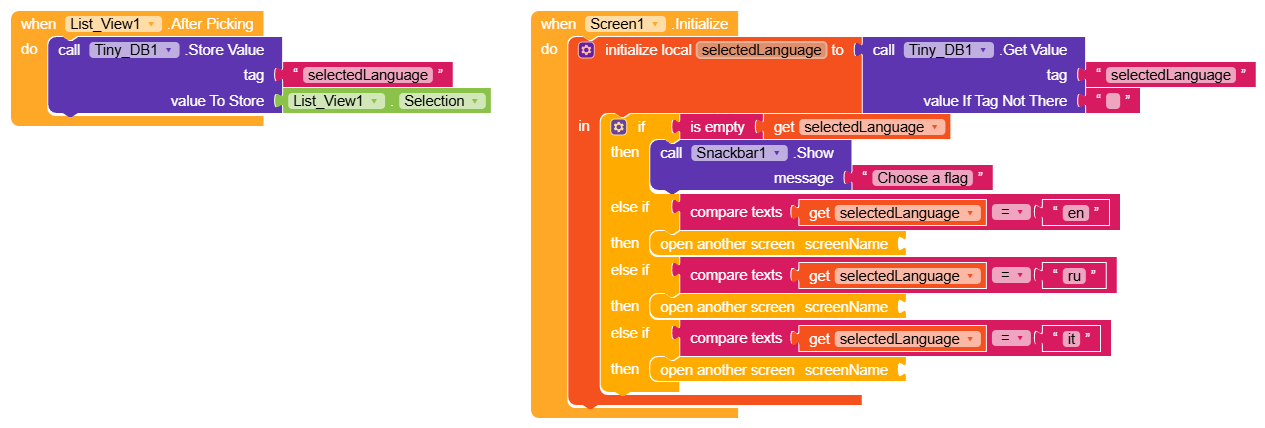
These blocks show how, after selecting an item from a ListView containing the elements en, it, and ru, it is saved in TinyDB under the tag selectedLanguage.
Screen.Initialize is the first event called in the app.
So, as soon as the app opens, it checks if there is any saved data in the tag.
If nothing is present (is empty), it shows a snackbar asking to choose a flag (although now that I think about it, that doesn’t make sense because the ListView only contains text  ).
).
If it finds text, it compares it in the various else cases and opens the correct screen.
2 Likes
If I do all this on the first screen, will it still ask me every time I log in? Because the first screen always opens, what’s the solution at this point? So even if it remembers the choices, it still won’t work?
No, if you follow from RayzZz example.
Done
1 Like
List_View commpnent Is it necessary to use it? Can I assign languages to buttons and have them act on them when clicked?
No, it was just a quick example to avoid creating every button
It’s up to you to choose, there are many options Buttons, CardView, Arrangements, ListView, ListPicker and others.
Yes, of course
1 Like
When you have free time, send me the blocks in 2 different languages, click on the button to open a new screen and save it. If of course it is possible
Here you go,
Screen1
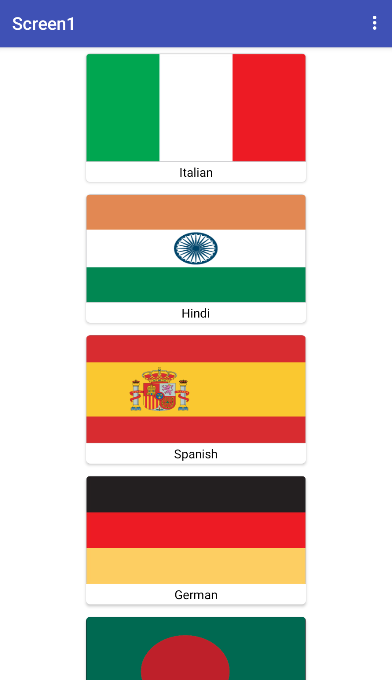
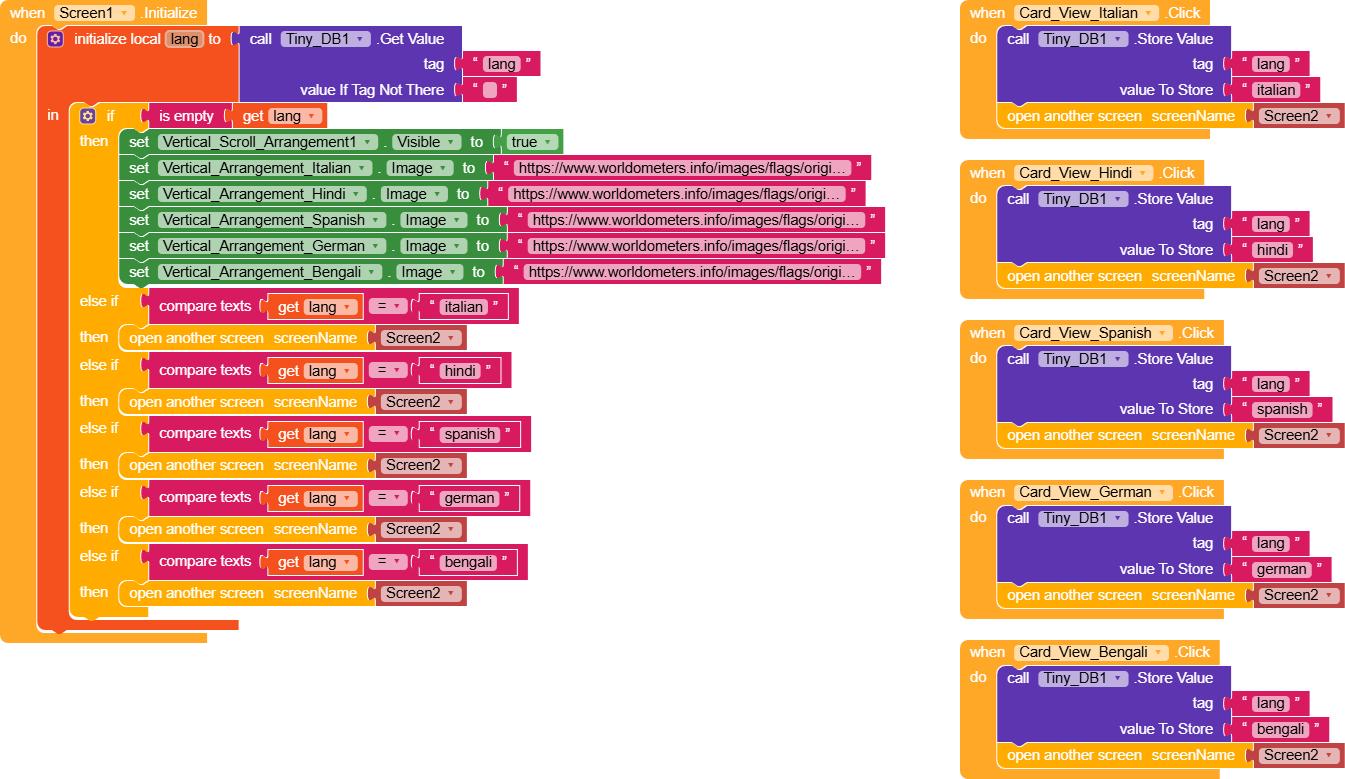
In Screen1 we have several CardViews, and for each one a different value is saved under the tag lang.
In Screen.Initialize, we check if a value is already saved. If there isn’t, we show the VerticalScrollArrangement containing the CardViews and set the various images from URLs (not necessary if they are saved in the assets).
If a value exists in lang, it opens Screen2; after that, it’s up to you to use multiple screens as needed.
Screen2
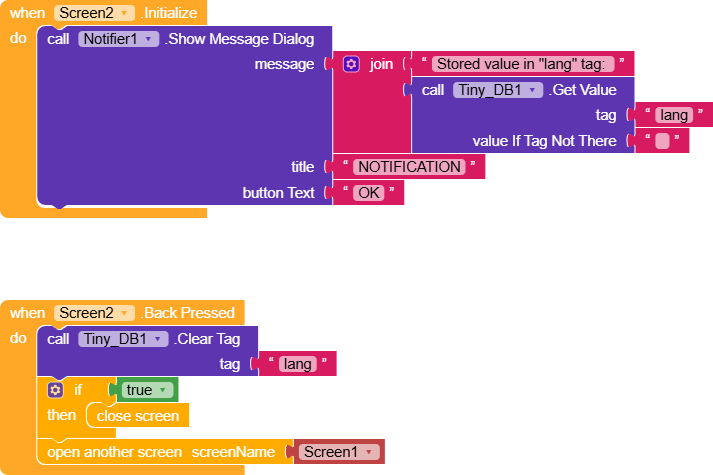
In Screen2, when
Screen.Initialize runs, we simply show a notification displaying what’s saved in the tag.Pressing Back clears the value from the tag and properly closes the screen, this avoids a loop where closing Screen2 would make Screen1 detect the saved value and reopen Screen2.
LanguageSelector.aia (6.3 KB)
can i use spinner component? Should I choose a language, open a new screen, and remember this action?
Thanks for your attention, what will the design of these blocks be? I don’t understand.
Where are you confused? Explain it,
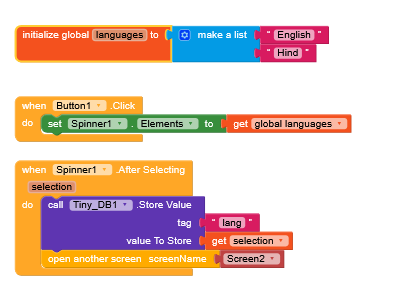
Mix with RayzZz method
2 Likes
The blocks are clear, I don’t understand the screen design. Can you show me the design? 2 small flags are enough, preferably in the form of a button, when you click on it, it opens a new screen and remembers this choice. Thanks
In my method, I used CardViews (FullClickable) containing an image and a label. Each CardView, when clicked, saves a value corresponding to the flag in TinyDB under the tag "lang" and opens the corresponding screen.
The same thing can be done with buttons or, as in Ibrahim’s example, with a spinner, but you can really use any other component.
The important thing to understand is that almost all components generate events like .Click, .AfterPicking, and many others. Based on the event triggered by the user’s selection, you decide what to do.
1 Like