
🧩 DeepLinkExt — Handle Deep Links Effortlessly from Any App State! [Android 13+ Supported] 🔗

:link: DeepLinkExt

:high_voltage: Advanced Deep Link Handler for Kodular & MIT App Inventor

Handle app deep links effortlessly with native support for cold starts, warm starts, and real-time URL interception


:red_question_mark: Why Use It?

Standard deep linking links frequently break or fail to pass data if your app is launched from a completely closed state (cold start).

DeepLinkExt solves this problem by using a native implementation that intercepts incoming URL paths instantly before your user interface fully initializes. This guarantees your routing parameters are captured safely every single time, whether the app is opening fresh, running in the background, or already active on screen.


:sparkles: Features

:envelope_with_arrow: Detect incoming deep links instantly
:rocket: Works perfectly even when the app launches from a fully closed state
:counterclockwise_arrows_button: Gracefully handles background warm-starts and already-open states
:bullseye: Built-in native state-clearing mechanics to prevent route looping
:high_voltage: Ultra-lightweight file footprint and performance-optimized code


:stop_sign: Prerequisites

  1. App Package Name

  2. android.keystore

  • Default keystore password : android
  1. Your own website


:puzzle_piece: Function Blocks

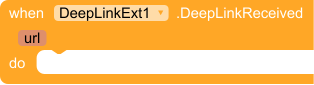
:small_blue_diamond: DeepLinkReceived

DeepLinkReceived

Automatically triggers whenever a valid deep link URL routing intent is captured by the operating system.

:small_blue_diamond: RegisterScreen

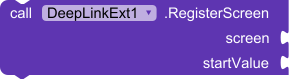
RegisterScreen

Registers the target screen framework along with its fallback data parameter.

:small_blue_diamond: IsOpenedByDeepLink

IsOpenedByDeepLink

Checks if the active application execution lifecycle was triggered by a deep link link shortcut.


:small_blue_diamond: GetDeepLinkUrl

GetDeepLinkUrl

Returns the full raw deep link text parameter passed over by the launching intent block.


:small_blue_diamond: ResetDeepLinkState

ResetDeepLinkState

Manually flushes the internal application deep link state cache.


:memo: Specifications


:package: Package: com.glich.deeplinkext
:date: Updated On: 2026-05-17T18:00:00Z
:package: Version: 1
:laptop: Built & documented using: FAST-CLI

Download Link :link:


Leave your Suggestions and If like , give :heart: for me

8 Likes

This is great,

Am just curious, how’s be done?
Screenshot 2026-05-18 at 10-02-34 🧩 DeepLinkExt — Handle Deep Links Effortlessly from Any App State! Android 13 Supported 🔗 - Extensions - Kodular Community
Screenshot 2026-05-18 at 10-01-47 DeepLink AIX & Assetlinks Generator
Does it compiled out of FAST, or still compiled by FAST

Thank you for your question!

I only compile my extension using FAST. However, deeplinking requires registration in the AndroidManifest. I registered your app’s package name and website URL in the app’s manifest file through my website. You do not need a compiler to edit the manifest.

Can you clarify as you stated here
Screenshot 2026-05-18 at 11-42-58 DeepLink AIX & Assetlinks Generator

Its like were submitting our property to your sever, then we will wait for you to compile the extension with our values, right?

Not at all! :shield: Your properties and keys never leave your computer.

This tool is built using a 100% client-side architecture. When you select your keystore file or input your deep link domains, everything is calculated directly inside your own web browser using local javascript micro-libraries (Forge and JSZip).

Here is exactly how it works under the hood without any server involvement:

  1. Local Unzipping: The tool takes the base extension file template right inside your browser memory cache.
  2. Local Modification: It modifies the component_build_infos.json manifest structure entirely in your browser sandbox using your custom package/host values.
  3. Local Re-packing: It compiles and packages the final modified .aix file right there on your local machine.

Since it runs entirely on GitHub Pages, there is no backend database or external server processing your files. You can even check the network tab in your browser’s inspect tool or view the source code to verify that zero data is transmitted anywhere. Your data privacy stays 100% secure in your own hands! :rocket:

1 Like

You’re a king, man! I’ll try it at the first opportunity and report back with perfect results. Great job, and thanks from the whole community for your contribution! :kodular: :100: :folded_hands:
OneSignal wasn’t working when using Firebase Aut; it would be great if this issue could be resolved.

2 Likes