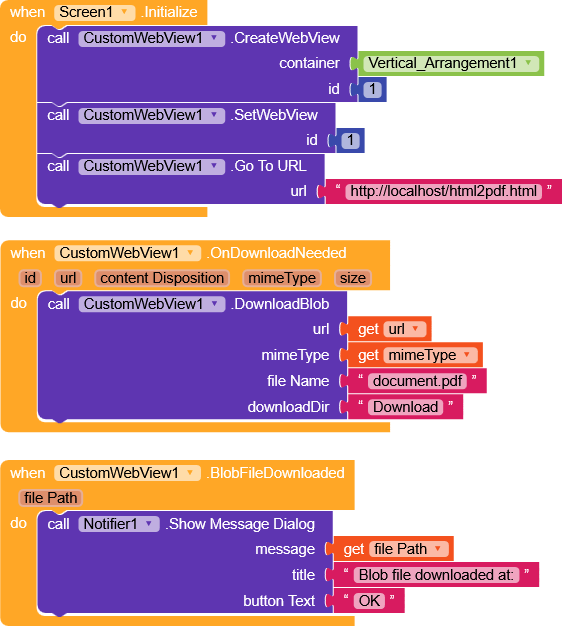
Hello
I have created an HTML page inside a WebViewer that generates a PDF file using JavaScript (jsPDF/html2pdf).
The PDF is generated successfully, but I am facing an issue downloading/saving the PDF file on Android devices when running inside Kodular WebViewer.
My Requirement
Generate PDF from HTML content
Download/Save PDF to device storage
Work inside Kodular Android App
Support Android 10, 11, 12, 13+
Current Issue
The PDF generation works, but the download button does not save the file or trigger a download in Kodular WebViewer.
Questions
What is the best way to download a PDF generated inside WebViewer?
Should I use WebViewString communication with Kodular?
Is there any JavaScript method that works reliably in Kodular?
How can I save the PDF directly to the Download folder?
Any sample blocks, extensions, or working examples would be greatly appreciated.
Thank you.
RaYzZz
June 15, 2026, 7:27pm
2
Hi dear,
I think the issue is with the Kodular WebViewer, which is a bit limited.CustomWebView should solve the problem.
Make sure you use the latest version 13CustomWebView : An extended form of Web Viewer - #723 by vknow360 - Extensions - MIT App Inventor Community
Below I leave you an example using eKoopmans/html2pdf.js
html2pdf.html
<!DOCTYPE html>
<html>
<head>
<meta charset="UTF-8">

<script src="https://cdnjs.cloudflare.com/ajax/libs/html2pdf.js/0.10.1/html2pdf.bundle.min.js"></script>

<style>
body { font-family: Arial; margin: 0; padding: 0; }
#content {
  padding: 20px;
  overflow: visible;
  height: auto;
}
img {
  max-width: 100%;
}
button {
  margin: 20px;
  padding: 10px;
}
</style>
</head>

<body>

<div id="content">
  <h2>PDF Example</h2>
  <p>This content will be exported to PDF using html2pdf.</p>
  <img src="https://avatars.githubusercontent.com/u/30081152?s=280&v=4">
</div>

<button onclick="downloadPDF()">Download PDF</button>

<script>
function downloadPDF() {
  const element = document.getElementById("content");

  html2pdf().set({
    margin: 10,
    filename: "document.pdf",
    image: { type: "jpeg", quality: 1 },
    html2canvas: {
      scale: 2,
      useCORS: true,
      scrollY: 0,
      windowWidth: document.body.scrollWidth,
      windowHeight: document.body.scrollHeight
    },
    jsPDF: {
      unit: "mm",
      format: "a4",
      orientation: "portrait"
    }
  }).from(element).save();
}
</script>

</body>
</html>
1 Like
Thank you for your response.
Unfortunately, the HTML code is not working on my device. I tested it in Kodular WebViewer, but the PDF is not being generated/downloaded correctly.
Could you please share the AIA project file as well? It would help me understand the complete setup, including the WebViewer configuration, required permissions, assets, and blocks used in the project.
If possible, please also share screenshots of the blocks.
Thank you for your help.
RaYzZz
June 16, 2026, 10:21am
4
Hi,
You need to use the CustomWebView extension.
Here is the AIA project.
RaYzZz:
html2pdf (1).aia (284.8 KB)
Gaston
June 16, 2026, 12:27pm
7
_kids_jollytv:
Thank you for your response.
Unfortunately, the HTML code is not working on my device. I tested it in Kodular WebViewer, but the PDF is not being generated/downloaded correctly.
Could you please share the AIA project file as well? It would help me understand the complete setup, including the WebViewer configuration, required permissions, assets, and blocks used in the project.
If possible, please also share screenshots of the blocks.
Thank you for your help.
Really? Do you need anything else? Dude, you’ve got the extension and an example. The next step is up to you.
2 Likes
RaYzZz
June 16, 2026, 1:50pm
8
This should work, but only by adding one file at a time.
html2pdfv2.aia (306.0 KB)
html pdf-lib
<!DOCTYPE html>
<html lang="en">
<head>
<meta charset="UTF-8">
<meta name="viewport" content="width=device-width, initial-scale=1.0">
<title>PDF Merge Pro</title>

<script src="https://cdnjs.cloudflare.com/ajax/libs/pdf-lib/1.17.1/pdf-lib.min.js"></script>

<style>
body {
    font-family: Arial, sans-serif;
    margin: 0;
    background: linear-gradient(135deg, #6a11cb, #2575fc);
    color: #fff;
}
.container {
    max-width: 900px;
    margin: 20px auto;
    padding: 20px;
}
.card {
    background: rgba(255, 255, 255, 0.15);
    backdrop-filter: blur(10px);
    border-radius: 20px;
    padding: 20px;
    box-shadow: 0 8px 25px rgba(0,0,0,.25);
}
h1 { text-align: center; }
input, button {
    width: 100%;
    padding: 14px;
    margin: 8px 0;
    border: none;
    border-radius: 12px;
    box-sizing: border-box;
}
button {
    background: #ff9800;
    color: white;
    font-size: 18px;
    font-weight: bold;
    cursor: pointer;
    transition: background 0.2s;
}
button:hover { background: #e68a00; }
.btn-clear { background: #f44336; margin-top: 5px; }
.btn-clear:hover { background: #d32f2f; }
#fileList {
    margin-top: 15px;
    background: rgba(255, 255, 255, 0.2);
    padding: 10px;
    border-radius: 12px;
    min-height: 50px;
}
.item {
    padding: 8px;
    margin: 5px 0;
    background: rgba(255, 255, 255, 0.2);
    border-radius: 10px;
    font-size: 14px;
    word-break: break-all;
}
.status {
    margin-top: 10px;
    font-weight: bold;
    text-align: center;
}
</style>
</head>
<body>

<div class="container">
    <div class="card">
        <h1>PDF Merge</h1>
        <input type="file" id="pdfFiles" accept="application/pdf" multiple>
        <div id="fileList">No file selected</div>
        <button onclick="mergePDFs()">Merge PDFs</button>
        <button class="btn-clear" onclick="clearList()">Clear List</button>
        <div class="status" id="status"></div>
    </div>
</div>

<script>
const pdfInput = document.getElementById("pdfFiles");
const fileList = document.getElementById("fileList");
const statusDiv = document.getElementById("status");

let uploadedFiles = [];

pdfInput.addEventListener("change", () => {
    const files = pdfInput.files;
    if (files.length === 0) return;

    for (let i = 0; i < files.length; i++) {
        if (files[i].type === "application/pdf" || files[i].name.toLowerCase().endsWith('.pdf')) {
            uploadedFiles.push(files[i]);
        }
    }
    renderFileList();
    pdfInput.value = "";
});

function renderFileList() {
    if (uploadedFiles.length === 0) {
        fileList.innerHTML = "No file selected";
        return;
    }
    fileList.innerHTML = "";
    uploadedFiles.forEach((file, i) => {
        const div = document.createElement("div");
        div.className = "item";
        div.innerText = (i + 1) + ". " + file.name;
        fileList.appendChild(div);
    });
}

function clearList() {
    uploadedFiles = [];
    renderFileList();
    statusDiv.innerText = "List cleared.";
}

async function mergePDFs() {
    if (uploadedFiles.length < 2) {
        alert("Select at least 2 PDF files");
        return;
    }

    statusDiv.innerText = "Merging...";

    try {
        const mergedPdf = await PDFLib.PDFDocument.create();

        for (const file of uploadedFiles) {
            const bytes = await file.arrayBuffer();
            const pdf = await PDFLib.PDFDocument.load(bytes);
            const pages = await mergedPdf.copyPages(pdf, pdf.getPageIndices());
            pages.forEach(p => mergedPdf.addPage(p));
        }

        const mergedBytes = await mergedPdf.save();

        if (!mergedBytes || mergedBytes.length === 0) {
            throw new Error("Error generating the PDF.");
        }

        const blob = new Blob([mergedBytes], { type: "application/pdf" });
        const blobUrl = URL.createObjectURL(blob);

        const a = document.createElement("a");
        a.href = blobUrl;
        a.download = "Merged_PDF.pdf";
        a.style.display = 'none';
        document.body.appendChild(a);

        a.click();

        setTimeout(() => {
            document.body.removeChild(a);
            URL.revokeObjectURL(blobUrl);
        }, 200);

        statusDiv.innerText = "PDFs merged successfully!";

    } catch (error) {
        console.error(error);
        statusDiv.innerText = "Error during merge.";
        alert("An error occurred: " + error.message);
    }
}
</script>

</body>
</html>
vknow360
June 16, 2026, 2:40pm
9
You should avoid spoon feeding.
I have seen more people ask for ready made solutions or fixing aia files, rather than trying something on their own. This has increased a lot in recent times, probably due to AI.
3 Likes
RaYzZz
June 16, 2026, 4:30pm
10
You’re absolutely right, Sunny…
But when I see a problem I could learn something from, I start experimenting, and then when I end up with a working project, it feels like a shame not to make it public
vknow360:
due to AI
Well, it definitely helps with research, so if used the right way, it’s not a bad thing