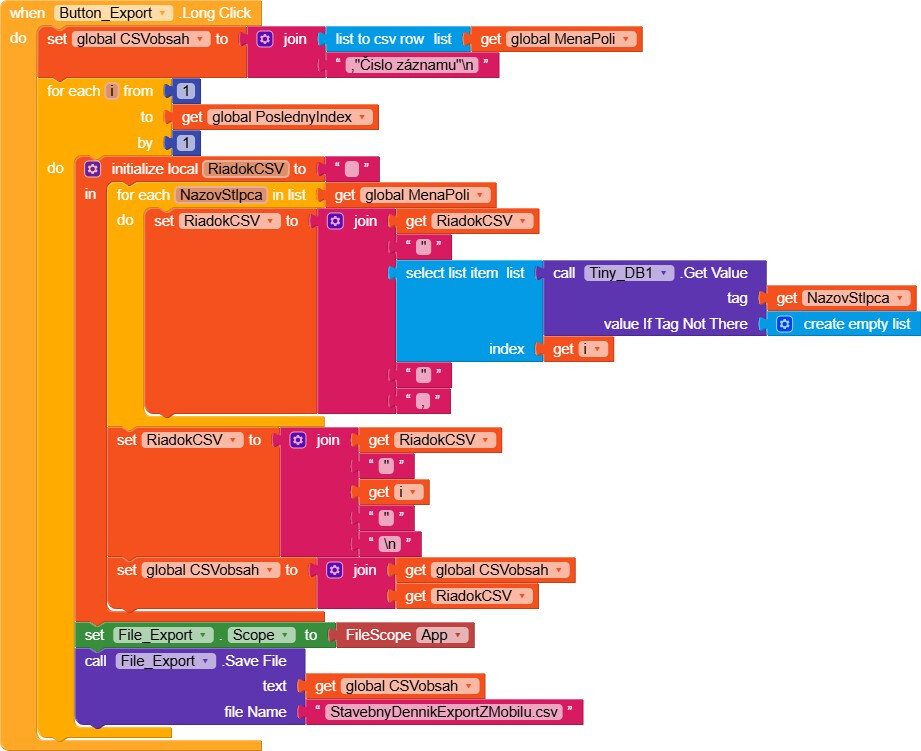
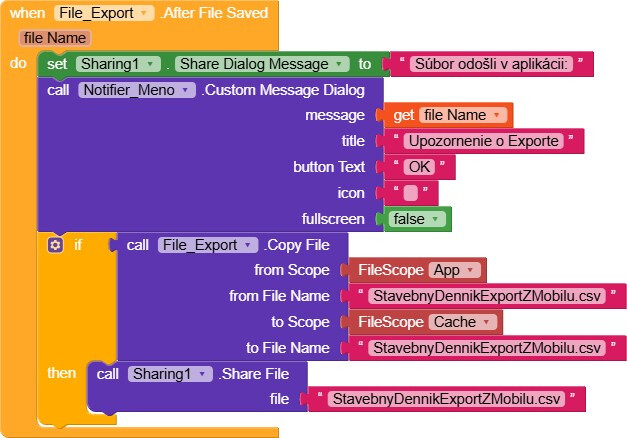
When I try to upload data to storage, it only works when setting the scope APP. That means it only goes to internal memory, inaccessible to other apps. When I try to upload it elsewhere and share it to send by email, I’ve ended up like this so far. But the sharing attempt ends with an error. I also tried it through the Activity component, but I was completely burned there because savfile did not accept the path from the activity and I couldn’t find any method for sharing with an email program for the activity element. I don’t know how to set it up so that I can send the *.csv file by email. It was translated from Slovak by Google, so sorry for the inaccuracy of the translation.
Hi Ivo,
Welcome to the Kodular community!
A few corrections:
- Sharing requires an absolute path or a full path.
absolute
/storage/emulated/0/Android/data/your.package.name/files/
full
file:///storage/emulated/0/Android/data/your.package.name/files/
Sharing - Kodular Docs - You placed the file saving inside a loop, so a file is saved on every iteration.
Try this
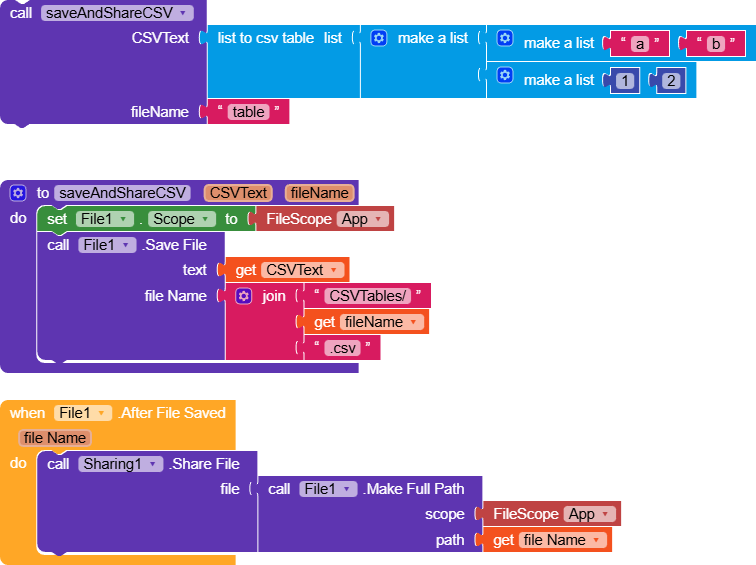
You can’t share a file from ASD, store it in shared storage and share it from there
To store a file in shared storage use File Scope Legacy and filename /Download/myFile.csv
Then use the Sharing component together with full or absolute path
Taifun
Hi Taifun,
Doesn’t the rule that an app can access its own files still apply?
I’m leaving you an AIA and the APK to test.
SaveAndShareCSV.aia (27.0 KB)
SaveAndShareCSV.apk (5.6 MB)
It works for me on two devices without any issues.
1 Like
Yes of course
But sharing means to use another app to share that file and that other app does not have access to the ASD of your app
At least this was my understanding up to now
Taifun
1 Like
Actually, that makes perfect sense.
However, I’d invite you to give it a try if you have the time, because I tried sharing to several different apps and none of them had file access issues (Android 14).
1 Like

I have translated and changed the Save block so many times that I am already crazy about it. The correct location is like this and this is how the StavebnyDennikExportZMobilu.csv file is created correctly
I will edit the sharing block and let you know how it turned out. I am designing the program for Android 11 for my work on my construction site. If it works, it may also be useful to other builders, fitters… The last time I programmed statics on Fortran 40 years ago and then TurboPascal from Borland and then 30 years ago my company information system on Superbase. So this on Android is a completely new philosophy of the programming concept for me - especially when my main profession is construction and programming is just fun on the side when I need something single-purpose for the company and there is no such software on the market anywhere… In 30 years the world of programming will be completely different… You are certainly all young guys here, so I guess with your help I will get it working..
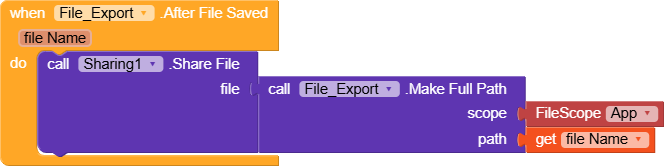
Thank you all for your willingness. Tajfun’s advice helped me and it’s working for me now. I can continue working on the app. I killed a week of time with that file export to email experimenting… Isn’t there any document that would explain to a veteran the philosophy of programming on Android with tools that don’t require the computing power of a computer that would have been enough to calculate all the problems in the world in my youth? Android studio completely stopped my computer and returned it to the times of Neanderthals. That’s why I got to Kodular. Only Kodular has very modest documentation that says nothing about the philosophy of the approach.
Sorry, I was looking at it wrong, that was a tip from RaYzZz Gianluca Franco, which I took advantage of. Sorry for my inattention. Thanks to you