Hi everyone,
Recently, I replied to a user who was looking for a way to read the response headers of a request using the Web component.
Since I couldn’t find anything really convenient, I thought that an extension could save a lot of headaches.
I would like to point out that the foundation of my project is App Inventor’s Web.Java source code, which is available on GitHub.
I have only added the response headers functionality, so, the rest of the code is not mine (Thanks AppInventor).
I had to comment out several lines to avoid conflicts (like Charts) with Kodular, but all of them are marked with (RaYzZz), so they are easy to identify.
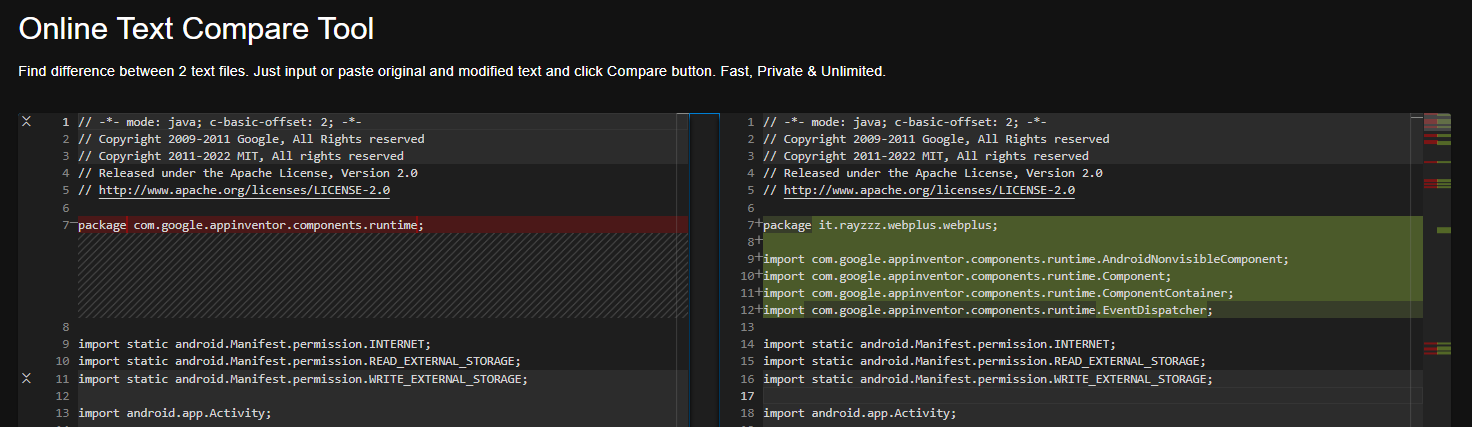
At the end of the topic, I will also show you a website that can be used to compare the original source code with my modified version.
🧩 WebPlus
An extension for MIT App Inventor 2 / Kodular.Non-visible component that provides functions for HTTP GET, POST, PUT, and DELETE requests.
Modified by RaYzZz using Fast.
This extension is based on the source code of the App Inventor Web component, with support for response headers added.
Since the Web component in App Inventor has several additional features compared to the one in Kodular, I thought it would be useful to mark them with
Meanwhile, what I added myself is marked with
 Specifications
 Package: it.rayzzz.webplus.aix (32.1 KB)
 Size: 32,13 KB
 Minimum API Level: 14
 Updated On: 2026-07-28T22:00:00Z
 Built & documented using: FAST v7.0.0
Events:
WebPlus has total 3 events.
1. GotText

Event indicating that a request has finished.
| Parameter | Type |
|---|---|
| url | text |
| responseCode | number |
| responseType | text |
responseHeaders  |
list |
| responseContent | text |
2. GotFile

Event indicating that a request has finished.
| Parameter | Type |
|---|---|
| url | text |
| responseCode | number |
| responseType | text |
| responseHeaders |
list |
| fileName | text |
Unmodified elements
3. TimedOut
Event indicating that a request has timed out.
Parameter Type url text
Methods:
WebPlus has total 21 methods.
6. PatchText 



Performs an HTTP PATCH request using the Url property and the specified text.
The characters of the text are encoded using UTF-8 encoding.
If the SaveResponse property is true, the response will be saved in a file and the GotFile event will be triggered. The responseFileName property can be used to specify the name of the file.
If the SaveResponse property is false, the GotText event will be triggered.
| Parameter | Type |
|---|---|
| text | text |
7. PatchTextWithEncoding
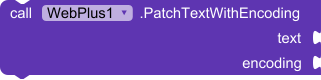
Performs an HTTP PATCH request using the Url property and the specified text.
The characters of the text are encoded using the given encoding.
If the SaveResponse property is true, the response will be saved in a file and the GotFile event will be triggered. The ResponseFileName property can be used to specify the name of the file.
If the SaveResponse property is false, the GotText event will be triggered.
| Parameter | Type |
|---|---|
| text | text |
| encoding | text |
8. PatchFile

Performs an HTTP PATCH request using the Url property and data from the specified file.
If the SaveResponse property is true, the response will be saved in a file and the GotFile event will be triggered. The ResponseFileName property can be used to specify the name of the file.
If the SaveResponse property is false, the GotText event will be triggered.
| Parameter | Type |
|---|---|
| path | text |
17. JsonTextDecodeWithDictionaries

Decodes the given JSON encoded value to produce a corresponding App Inventor value.
A JSON list [x, y, z] decodes to a list (x y z). A JSON Object with name A and value B,
denoted as {a: b} decodes to a dictionary with the key a and value b.
- Return type:
any
| Parameter | Type |
|---|---|
| jsonText | text |
18. JsonObjectEncode

Returns the value of a built-in type (i.e., boolean, number, text, list, dictionary)
in its JavaScript Object Notation representation. If the value cannot be
represented as JSON, the Screen’s ErrorOccurred event will be run, if any,
and the Web component will return the empty string.
- Return type:
text
| Parameter | Type |
|---|---|
| jsonObject | any |
19. XMLTextDecodeAsDictionary

Decodes the given XML into a set of nested dictionaries that capture the structure and data contained in the XML. See the help for more details.
- Return type:
any
| Parameter | Type |
|---|---|
| XmlText | text |
Unmodified elements
1. ClearCookies
Clears all cookies for this Web component.
2. Get
Performs an HTTP GET request using the Url property and retrieves the
response.If the SaveResponse property is true, the response will be saved in a file
and the GotFile event will be triggered. The ResponseFileName property
can be used to specify the name of the file.If the SaveResponse property is false, the GotText event will be
triggered.3. PostText
Performs an HTTP POST request using the Url property and the specified text.
The characters of the text are encoded using UTF-8 encoding.
If the SaveResponse property is true, the response will be saved in a file and the GotFile event will be triggered. The responseFileName property can be used to specify the name of the file.
If the SaveResponse property is false, the GotText event will be triggered.
Parameter Type text text 4. PostTextWithEncoding
Performs an HTTP POST request using the Url property and the specified text.
The characters of the text are encoded using the given encoding.
If the SaveResponse property is true, the response will be saved in a file and the GotFile event will be triggered. The ResponseFileName property can be used to specify the name of the file.
If the SaveResponse property is false, the GotText event will be triggered.
Parameter Type text text encoding text 5. PostFile
Performs an HTTP POST request using the Url property and data from the specified file.
If the SaveResponse property is true, the response will be saved in a file and the GotFile event will be triggered. The ResponseFileName property can be used to specify the name of the file.
If the SaveResponse property is false, the GotText event will be triggered.
Parameter Type path text 9. PutText
Performs an HTTP PUT request using the Url property and the specified text.
The characters of the text are encoded using UTF-8 encoding.
If the SaveResponse property is true, the response will be saved in a file and the GotFile event will be triggered. The responseFileName property can be used to specify the name of the file.
If the SaveResponse property is false, the GotText event will be triggered.
Parameter Type text text 10. PutTextWithEncoding
Performs an HTTP PUT request using the Url property and the specified text.
The characters of the text are encoded using the given encoding.
If the SaveResponse property is true, the response will be saved in a file and the GotFile event will be triggered. The ResponseFileName property can be used to specify the name of the file.
If the SaveResponse property is false, the GotText event will be triggered.
Parameter Type text text encoding text 11. PutFile
Performs an HTTP PUT request using the Url property and data from the specified file.
If the SaveResponse property is true, the response will be saved in a file and the GotFile event will be triggered. The ResponseFileName property can be used to specify the name of the file.
If the SaveResponse property is false, the GotText event will be triggered.
Parameter Type path text 12. Delete
Performs an HTTP DELETE request using the Url property and retrieves the
response.If the SaveResponse property is true, the response will be saved in a file
and the GotFile event will be triggered. The ResponseFileName property
can be used to specify the name of the file.If the SaveResponse property is false, the GotText event will be
triggered.13. BuildRequestData
Converts a list of two-element sublists, representing name and value pairs, to a
string formatted as application/x-www-form-urlencoded media type, suitable to pass to
PostText.
- Return type:
text
Parameter Type list list 14. UriEncode
Encodes the given text value so that it can be used in a URL.
- Return type:
text
Parameter Type text text 15. UriDecode
Decodes the encoded text value so that the values aren’t URL encoded anymore.
- Return type:
text
Parameter Type text text 16. JsonTextDecode
Decodes the given JSON encoded value to produce a corresponding AppInventor value.
A JSON list[x, y, z]decodes to a list(x y z), A JSON object with key A and value B,
(denoted as{A:B}) decodes to a list((A B)), that is, a list containing the two-element
list(A B).Use the method JsonTextDecodeWithDictionaries if you
would prefer to get back dictionary objects rather than lists-of-lists in the result.
- Return type:
any
Parameter Type jsonText text 20. XMLTextDecode
Decodes the given XML string to produce a dictionary structure. See the App Inventor documentation on “Other topics, notes, and details” for information.
- Return type:
any
Parameter Type XmlText text 21. HtmlTextDecode
Decodes the given HTML text value. HTML character entities such as
&,<,>,', and"are changed to &, <, >, ', and ". Entities such as &#xhhhh, and &#nnnn are changed to the appropriate characters.
- Return type:
text
Parameter Type htmlText text
Designer:
WebPlus has total 6 designer properties.
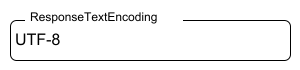
2. ResponseTextEncoding
- Input type:
string - Default value:
UTF-8
Unmodified elements
1. Url
- Input type:
string3. AllowCookies
- Input type:
boolean- Default value:
false4. SaveResponse
- Input type:
boolean- Default value:
false5. ResponseFileName
- Input type:
string6. Timeout
- Input type:
non_negative_integer- Default value:
0
Setters:
WebPlus has total 7 setter properties.
2. ResponseTextEncoding

User-specified character encoding for web response.
- Input type:
text
Unmodified elements
1. Url
The URL for the web request.
- Input type:
text3. RequestHeaders
The request headers, as a list of two-element sublists. The first element of each sublist represents the request header field name. The second element of each sublist represents the request header field values, either a single value or a list containing multiple values.
- Input type:
list4. AllowCookies
Whether the cookies from a response should be saved and used in subsequent requests. Cookies are only supported on Android version 2.3 or greater.
- Input type:
boolean5. SaveResponse
Whether the response should be saved in a file.
- Input type:
boolean6. ResponseFileName
The name of the file where the response should be saved. If SaveResponse is true and ResponseFileName is empty, then a new file name will be generated.
- Input type:
text7. Timeout
The number of milliseconds that a web request will wait for a response before giving up. If set to 0, then there is no time limit on how long the request will wait.
- Input type:
number
Getters:
WebPlus has total 8 getter properties.
2. ResponseTextEncoding

User-specified character encoding for web response.
- Return type:
text
7. ResponseHeaders

The response headers, as a list of two-element sublists. The first element of each sublist represents the response header field name. The second element of each sublist represents the response header field values, either a single value or a list containing multiple values.
- Return type:
list
Unmodified elements
1. Url
The URL for the web request.
- Return type:
text3. RequestHeaders
The request headers, as a list of two-element sublists. The first element of each sublist represents the request header field name. The second element of each sublist represents the request header field values, either a single value or a list containing multiple values.
- Return type:
list4. AllowCookies
Whether the cookies from a response should be saved and used in subsequent requests. Cookies are only supported on Android version 2.3 or greater.
- Return type:
boolean5. SaveResponse
Whether the response should be saved in a file.
- Return type:
boolean6. ResponseFileName
The name of the file where the response should be saved. If SaveResponse is true and ResponseFileName is empty, then a new file name will be generated.
- Return type:
text8. Timeout
The number of milliseconds that a web request will wait for a response before giving up. If set to 0, then there is no time limit on how long the request will wait.
- Return type:
number
Source code:
WebPlus.java (74.9 KB)
Compare AI2_Web.Java vs RaYzZz_WebPlus.Java:
Issues:
At the moment, I have found 1 (non blocking) “issue”, if we can call it that:
 The
The responseHeaders parameter, unlike the other parameters, does not have a space between “response” and “headers”.

In addition, the other parameters show “global”, while mine does not
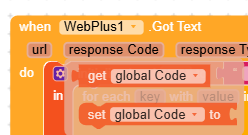
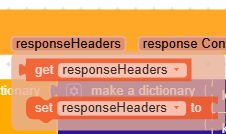
If someone with a bit more experience could explain why this happens or how to fix it, I would really appreciate it