Complete Blocks and Features Description for FileLoader
 Core Blocks (Functions & Events)
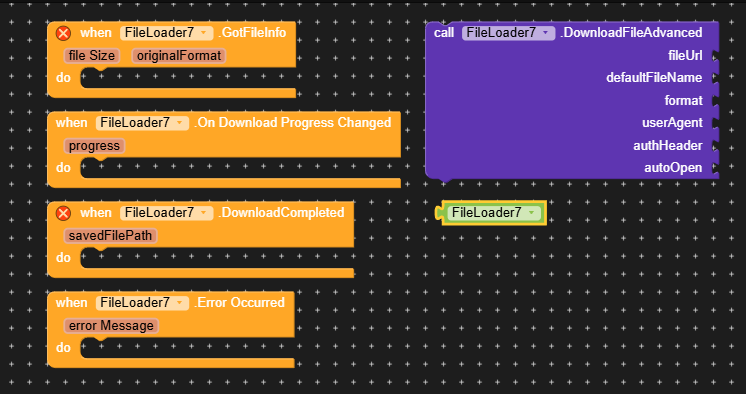
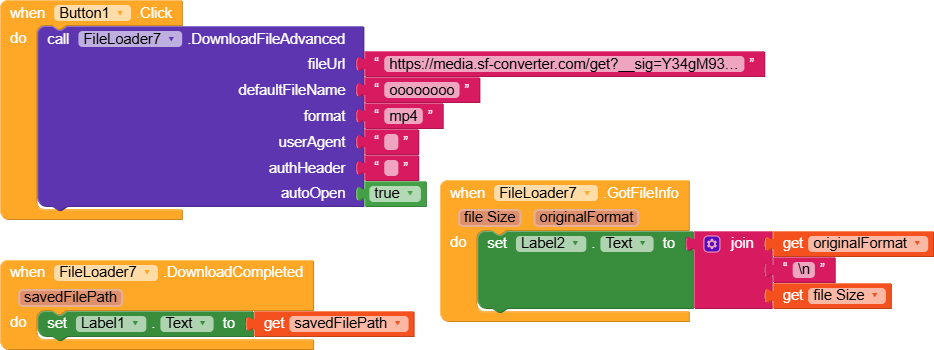
Call DownloadFileAdvanced(Function): The primary execution block. Accepts parameters:fileUrl,defaultFileName,format(e.g.,"mp4","pdf"),userAgent,authHeader, andautoOpen. Initiates server inspection, pops up a modern preview dialog with media thumbnails, folder selector, and background download.GotFileInfo(Event): Triggered once server metadata is fetched. ReturnsfileSize(in bytes) andoriginalFormat.DownloadProgress(Event): Reports real-time download progress percentages (0–100%).DownloadCompleted(Event): Fired upon successful completion, providing the absolute file path (savedFilePath).ErrorOccurred(Event): Triggered during network failures, server errors, or checksum mismatches, returningerrorMessage.
 Key Architectural Features
- Pause & Resume (
RangeSupport): Utilizes the HTTPRangeheader. If connection drops or the user pauses, downloads resume seamlessly from the exact byte stopped instead of restarting from scratch. - Notification Cancellation: Integrates
PendingIntentwithinNotification.Builderto let users cancel active tasks directly from the Android notification shade without opening the app UI. - Custom Headers & User-Agent: Passes custom security headers (
Authorizationtokens) andUser-Agentstrings to securely access protected servers, private APIs, or restricted media. - Segmented Range Download: Optimizes throughput for heavy files (videos, archives) via byte-range chunking on stable networks.
- Auto-Opening Files: Combines
MediaScannerConnectionwith a secureFileProvidersystemIntentto instantly open downloaded files in compatible native viewers. - Checksum Verification: Computes local file hashes and matches them against server
Content-MD5headers to guarantee corruption-free file delivery.
com.fileloader.aix (36.3 KB)
 Multi-Link Batch Download: Paste multiple links at once and process everything in one go.