Holmsync
May 12, 2024, 1:10pm
1
Hello Koders,
Gaston
May 12, 2024, 4:35pm
2
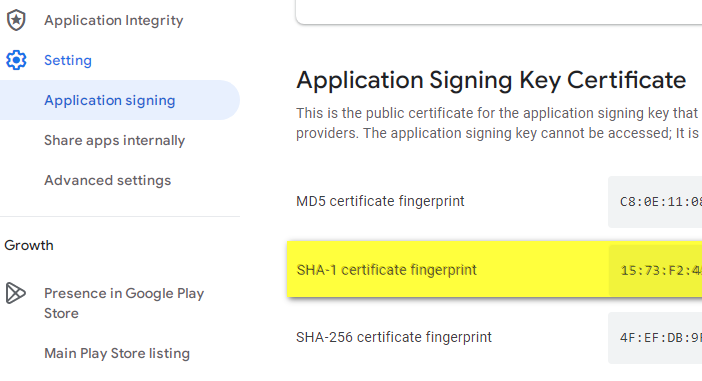
You must also add the playstore sha-1 key to firebase.
Holmsync
May 12, 2024, 4:39pm
3
How much time does it take to changes to take place ?
Gaston
May 12, 2024, 4:42pm
4
It should be immediate, you don’t need to update the AAB
Gaston
May 12, 2024, 5:11pm
7
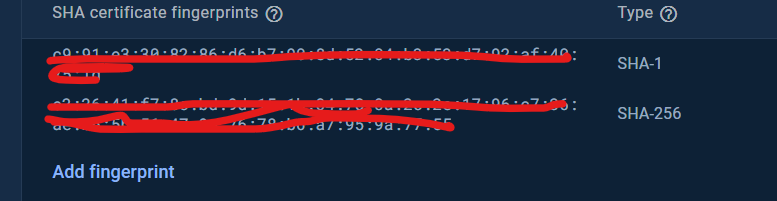
I told you SHA-1, and you put SHA-256
Holmsync
May 12, 2024, 5:12pm
8
I put both (should i remove 256 ?)
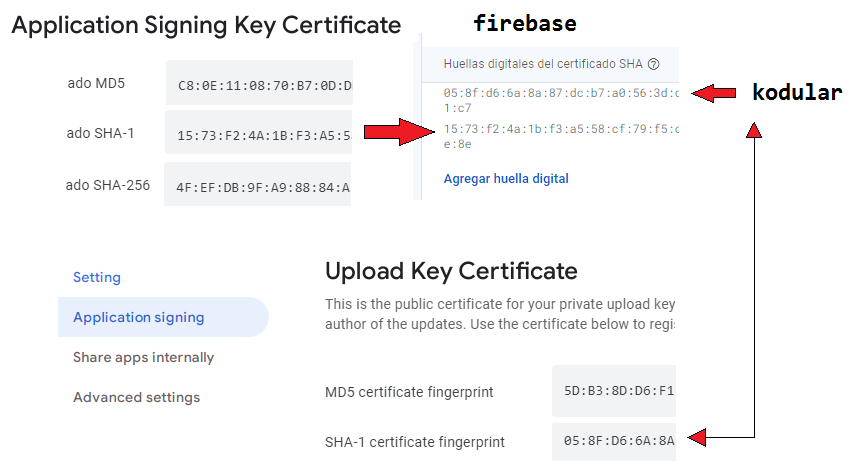
SHA1 key added in Firebase must be same from which the AAB is signed and also add another SHA1 key from Play Store as suggested above.
There must be 2 SHA1 keys, one from Kodular and one from Play Store.
Holmsync
May 12, 2024, 5:14pm
10
so i should put SHA1 key of Kodular & Play Store both (only SHA1) ?
1 Like
Holmsync
May 12, 2024, 5:22pm
11
still does not work. Reinstalled the App too
Then something is wrong with your setup, watch setup videos on youtube and try again.
Holmsync
May 13, 2024, 4:09pm
15
Yes, I figured out my mistake. Thank you
Gaston
May 13, 2024, 4:14pm
16
well done, could you tell us where the problem was?
1 Like
Holmsync
May 13, 2024, 4:16pm
17
I had two apps of different package linked to same project (ecosystem of apps) so I got confused & forgot to select the right package
system
June 12, 2024, 4:17pm
18
This topic was automatically closed 30 days after the last reply. New replies are no longer allowed.