ChatGPT Extension for Kodular Creator: A Comprehensive Guide
The ChatGPT extension is a versatile tool designed for use with the OpenAI’s ChatGPT API. This guide provides a detailed overview of its public methods, parameters, and the expected outputs.
 Índice
- Text & Chat Methods
- Image Generation & Editing
- Thread Management
- Message Management
- Speech & Audio
- Vision & Multimodal
- Fine-Tuning
- Embeddings
- Batch Processing
- Function Calling
- Moderation
- Utilities & Dialogs
- Events
- Helper Models/Enums
- Downloads
- Changelog
Text & Chat Methods
1. SendPrompt
- Description: Sends a prompt to ChatGPT and triggers a response. Supports latest models including GPT-4.1, GPT-4o, and reasoning models (o3, o4-mini).
- Parameters:
prompt(Text): The prompt to send to ChatGPT.model(Text): The model of ChatGPT to use (e.g.,gpt-4.1,gpt-4o,o3-mini).systemMsg(Text): System message to be included.temperature(Number): Determines the randomness in the response (0.0 to 2.0).maxTokens(Number): Maximum number of tokens in the response.topP(Number): Nucleus sampling parameter (0.0 to 1.0).frequencyPenalty(Number): Penalizes new tokens based on their frequency (-2.0 to 2.0).apiKey(Text): Your OpenAI API key.
- Returns: Triggers
ResponseReceivedevent with the response text orReportErrorif none.
2. JsonDecode
- Description: Extracts a value from a JSON text based on a specified key.
- Parameters:
jsonText(Text): The JSON text to be parsed.key(Text): The key for which the value is to be extracted.
- Returns: A Text representing the value associated with the key, or an error message if the key is not found.
Image Generation & Editing
3. GenerateImage
- Description: Generates an image based on a given prompt using GPT-Image models.
- Parameters:
prompt(Text): The prompt based on which the image is generated.numberOfImages(Number): The number of images to generate (1-10 for GPT-Image-2, 1-5 for GPT-Image-1).apiKey(Text): Your OpenAI API key.model(ImageModel): The image model to use (e.g.,GptImage2,GptImage15,GptImage1,GptImage1Mini).size(ImageSize): The size of the generated image (1024x1024, 1024x1792, 720x1280, 1792x1024).
- Returns: Triggers
ImageGenerationCompletedevent with image data orReportErrorif none.
4. EditImage
- Description: Edits an existing image using DALL-E 2 or GPT-Image models. Supports editing, variations, and inpainting.
- Parameters:
apiKey(Text): Your OpenAI API key.imagePath(Text): Path to the image file to edit.prompt(Text): Description of the desired edit.operation(ImageEditOptions): Type of operation (Edit,Variation,Inpaint).model(ImageEditModel): Model to use (DallE2orGptImage2).size(ImageSize): Output image size.numberOfImages(Number): Number of images to generate.maskPath(Text): Path to mask image (required for Inpaint operation).
- Returns: Triggers
ImageEditCompletedevent with image data orReportErrorif none.
5. GenerateVariation
- Description: Generates variations of an existing image using DALL-E 2.
- Parameters:
apiKey(Text): Your OpenAI API key.imagePath(Text): Path to the source image.model(ImageEditModel): Model to use.size(ImageSize): Output image size.numberOfImages(Number): Number of variations to generate.
- Returns: Triggers
ImageEditCompletedevent with image data orReportErrorif none.
6. InpaintImage
- Description: Replaces a masked area in an image with new content.
- Parameters:
apiKey(Text): Your OpenAI API key.imagePath(Text): Path to the image to edit.maskPath(Text): Path to the mask image (white areas indicate where to replace).prompt(Text): Description of the content to fill the masked area.model(ImageEditModel): Model to use.size(ImageSize): Output image size.numberOfImages(Number): Number of images to generate.
- Returns: Triggers
ImageEditCompletedevent with image data orReportErrorif none.
Thread Management
7. CreateThread
- Description: Creates a new thread for message interactions.
- Parameters:
apiKey(Text): Your OpenAI API key.
- Returns: Triggers
ThreadCreatedevent with thread data orReportErrorif none.
8. RetrieveThread
- Description: Retrieves an existing thread by its ID.
- Parameters:
apiKey(Text): Your OpenAI API key.threadId(Text): The ID of the thread to retrieve.
- Returns: Triggers
ThreadRetrievedevent with thread data orReportErrorif none.
9. ModifyThread
- Description: Modifies metadata of an existing thread.
- Parameters:
apiKey(Text): Your OpenAI API key.threadId(Text): The ID of the thread to modify.metadata(Text): New metadata for the thread (JSON format).
- Returns: Triggers
ThreadModifiedevent with updated thread data orReportErrorif none.
10. DeleteThread
- Description: Deletes an existing thread.
- Parameters:
apiKey(Text): Your OpenAI API key.threadId(Text): The ID of the thread to delete.
- Returns: Triggers
ThreadDeletedevent with deletion status orReportErrorif none.
Message Management
11. CreateMessage
- Description: Creates a message in a specified thread.
- Parameters:
apiKey(Text): Your OpenAI API key.threadId(Text): The ID of the thread where the message is to be created.messageContent(Text): The content of the message.
- Returns: Triggers
MessageCreatedevent with message data orReportErrorif none.
12. RetrieveMessage
- Description: Retrieves a specific message from a thread.
- Parameters:
apiKey(Text): Your OpenAI API key.threadId(Text): The ID of the thread containing the message.messageId(Text): The ID of the message to retrieve.
- Returns: Triggers
MessageRetrievedevent with message data orReportErrorif none.
13. ModifyMessage
- Description: Modifies metadata of a message in a thread.
- Parameters:
apiKey(Text): Your OpenAI API key.threadId(Text): The ID of the thread containing the message.messageId(Text): The ID of the message to modify.metadata(Text): New metadata for the message (JSON format).
- Returns: Triggers
MessageModifiedevent with updated message data orReportErrorif none.
14. ListMessages
- Description: Lists messages in a specified thread.
- Parameters:
apiKey(Text): Your OpenAI API key.threadId(Text): The ID of the thread whose messages are to be listed.
- Returns: Triggers
MessagesListedevent with a list of messages orReportErrorif none.
Speech & Audio
15. GenerateSpeech
- Description: Generates speech from text using latest TTS models.
- Parameters:
prompt(Text): The text to convert to speech.apiKey(Text): Your OpenAI API key.audioName(Text): Name for the output audio file.directoryName(Text): Directory to save the audio file.voice(VoiceModel): Voice to use (Alloy, Ash, Ballad, Coral, Echo, Fable, Marin, Nova, Onyx, Sage, Shimmer, Verse, Cedar).model(TextToSpeechModel): TTS model to use (Gpt4oMiniTts, Gpt4oMiniTts20251215, Tts1, Tts1Hd).outputFormat(AudioFormats): Audio format (Mp3, Opus, Aac, Flac).
- Returns: Triggers
SpeechGeneratedevent with the file path of the generated speech orReportErrorif none.
Vision & Multimodal
16. SendVisionRequest
- Description: Sends a vision request with an image URL or base64 data to a GPT model, allowing the AI to analyze the image and respond based on the provided text prompt.
- Parameters:
maxTokens(Number): Maximum number of tokens in the response.text(Text): The accompanying text prompt.model(VisionModel): The model to use (Gpt41, Gpt41Mini, Gpt41Nano, Gpt4o, Gpt4oMini, Gpt54, Gpt54Mini, Chatgpt4oLatest).imageData(Text): Image URL or base64-encoded image data.detail(DetailParameter): Image detail level (Low, High, Auto).apiKey(Text): Your OpenAI API key.
- Returns: Triggers
VisionResponseReceivedevent with the response orReportErrorif an error occurs.
Fine-Tuning
17. UploadTrainingFile
- Description: Uploads a JSONL file for use in fine-tuning.
- Parameters:
apiKey(Text): Your OpenAI API key.filePath(Text): Path to the JSONL file to upload.
- Returns: Triggers
FileUploadedevent with the file ID orReportErrorif an error occurs. - Note: OpenAI is phasing out fine-tuning for new users.
18. StartFineTuningJob
- Description: Starts a fine-tuning job using an uploaded JSONL file.
- Parameters:
apiKey(Text): Your OpenAI API key.trainingFileId(Text): The ID of the uploaded JSONL file.model(Text): The base model to fine-tune (e.g.,gpt-4o-miniorgpt-3.5-turbo).suffix(Text): Optional suffix to append to the fine-tuned model’s name.
- Returns: Triggers
FineTuningJobStartedevent with job details orReportErrorif an error occurs.
Embeddings
19. GenerateEmbedding
- Description: Generates an embedding for a given text input.
- Parameters:
inputText(Text): The text to generate an embedding for.apiKey(Text): Your OpenAI API key.model(EmbeddingModel): The embedding model to use (TextEmbedding3Large, TextEmbedding3Small, TextEmbeddingAda002).
- Returns: Triggers
EmbeddingGeneratedevent with the embedding data orReportErrorif none.
Batch Processing
20. CreateBatchJob
- Description: Creates a batch processing job with a JSONL file.
- Parameters:
apiKey(Text): Your OpenAI API key.inputFileId(Text): ID of the uploaded JSONL file.endpoint(BatchEndpoint): API endpoint to use (ChatCompletions, Completions, Embeddings).completionWindow(Number): Time window in seconds for completion (default 86400).customId(Text): Optional custom identifier for the batch.
- Returns: Triggers
BatchJobCreatedevent with job details orReportErrorif none.
21. RetrieveBatchJob
- Description: Retrieves a specific batch job by ID.
- Parameters:
apiKey(Text): Your OpenAI API key.batchId(Text): The ID of the batch job to retrieve.
- Returns: Triggers
BatchJobRetrievedevent with job details orReportErrorif none.
22. ListBatchJobs
- Description: Lists all batch jobs with optional filters.
- Parameters:
apiKey(Text): Your OpenAI API key.limit(Number): Maximum number of jobs to return (0 for default).after(Text): Cursor for pagination.
- Returns: Triggers
BatchJobsListedevent with list of jobs orReportErrorif none.
23. CancelBatchJob
- Description: Cancels a batch job.
- Parameters:
apiKey(Text): Your OpenAI API key.batchId(Text): The ID of the batch job to cancel.
- Returns: Triggers
BatchJobCancelledevent with cancellation status orReportErrorif none.
24. CheckBatchStatus
- Description: Checks the status of a batch job.
- Parameters:
apiKey(Text): Your OpenAI API key.batchId(Text): The ID of the batch job.
- Returns: Triggers
BatchJobRetrievedevent with status orReportErrorif none.
25. CreateBatchInput
- Description: Creates a JSONL string for batch processing.
- Parameters:
customId(Text): Unique identifier for the request.endpoint(Text): API endpoint to use.model(Text): Model to use.prompt(Text): The prompt to send.systemMessage(Text): Optional system message.
- Returns: JSON string for a batch request.
Function Calling
26. DefineFunction
- Description: Defines a function for the AI to call with full JSON schema.
- Parameters:
functionName(Text): Name of the function.description(Text): Description of what the function does.parametersJson(Text): JSON schema for function parameters.
- Returns: None (stores function definition).
27. DefineSimpleFunction
- Description: Defines a simple function with a single parameter.
- Parameters:
functionName(Text): Name of the function.description(Text): Description of what the function does.paramName(Text): Name of the parameter.paramType(FunctionType): Type of the parameter (String, Number, Boolean, Object, Array, Null).paramDescription(Text): Description of the parameter.required(Boolean): Whether the parameter is required.
- Returns: None (stores function definition).
28. SendPromptWithFunctions
- Description: Sends a prompt with function definitions to ChatGPT.
- Parameters:
prompt(Text): The prompt to send.model(Text): Model to use.systemMsg(Text): System message.temperature(Number): Temperature parameter.maxTokens(Number): Maximum tokens.topP(Number): Top P parameter.frequencyPenalty(Number): Frequency penalty.apiKey(Text): Your OpenAI API key.autoExecute(Boolean): Whether to automatically execute functions.
- Returns: Triggers
FunctionCalledevent for function calls orFunctionCallResponseReceivedfor responses.
29. ClearFunctions
- Description: Clears all defined functions.
- Parameters: None.
- Returns: None.
30. GetFunctionsList
- Description: Gets the list of defined functions as JSON.
- Parameters: None.
- Returns: JSON string of defined functions.
31. ExecuteFunction
- Description: Executes a function locally.
- Parameters:
functionName(Text): Name of the function to execute.argumentsJson(Text): Arguments in JSON format.apiKey(Text): Your OpenAI API key.model(Text): Model to use for continued conversation.
- Returns: Triggers
FunctionExecutedevent with results.
Moderation
32. ModerateContent
- Description: Moderates content for potential inappropriate or harmful content using the latest omni-moderation model.
- Parameters:
apiKey(Text): Your OpenAI API key.inputText(Text): The text to moderate.
- Returns: Triggers
ContentModerationCompletedevent with moderation results orReportErrorif none.
Utilities & Dialogs
33. ShowNativeAudioPlayerDialog
- Description: Shows a dialog with a native audio player.
- Parameters:
title(Text): The title of the dialog.audioFilePath(Text): The file path of the audio.titleColor(Number): Color of the dialog title.titleBackgroundColor(Number): Background color of the title.dialogBackgroundColor(Number): Background color of the dialog.
- Returns: A dialog with controls to play and pause the audio.
34. ShowTextInputDialog
- Description: Shows a dialog with a text input.
- Parameters: Various parameters to customize the dialog appearance and behavior.
- Returns: Triggers
TextEnteredevent with the entered text.
35. ShowListDialog
- Description: Displays a dialog with a list of selectable items.
- Parameters: Various parameters to customize the dialog and list items.
- Returns: Triggers
ListItemSelectedevent with the selected item.
Events
The extension triggers various events corresponding to the successful execution of the methods:
| Event | Description |
|---|---|
ResponseReceived |
Triggered when a text response is received from ChatGPT |
ImageGenerationCompleted |
Triggered when an image is successfully generated |
ImageEditCompleted |
Triggered when image editing is completed |
ThreadCreated |
Triggered when a thread is created |
ThreadRetrieved |
Triggered when a thread is retrieved |
ThreadModified |
Triggered when a thread is modified |
ThreadDeleted |
Triggered when a thread is deleted |
MessageCreated |
Triggered when a message is created |
MessageRetrieved |
Triggered when a message is retrieved |
MessageModified |
Triggered when a message is modified |
MessagesListed |
Triggered when messages are listed |
SpeechGenerated |
Triggered when speech is generated |
VisionResponseReceived |
Triggered when a vision response is received |
FileUploaded |
Triggered when a file is uploaded for fine-tuning |
FineTuningJobStarted |
Triggered when a fine-tuning job starts |
EmbeddingGenerated |
Triggered when an embedding is generated |
ContentModerationCompleted |
Triggered when content moderation is completed |
BatchJobCreated |
Triggered when a batch job is created |
BatchJobRetrieved |
Triggered when a batch job is retrieved |
BatchJobsListed |
Triggered when batch jobs are listed |
BatchJobCancelled |
Triggered when a batch job is cancelled |
FunctionCalled |
Triggered when a function is called by the AI |
FunctionExecuted |
Triggered when a function is executed |
FunctionCallResponseReceived |
Triggered when a function call response is received |
FunctionCallCompleted |
Triggered when a function call is completed |
TextEntered |
Triggered when text is entered in a dialog |
ListItemSelected |
Triggered when an item is selected from a list |
ReportError |
Triggered when an error occurs |
Helper Models/Enums
| Enum | Description | Values |
|---|---|---|
ImageModel |
Image generation models | GptImage2, GptImage15, GptImage1, GptImage1Mini |
ImageSize |
Image output sizes | Size1024x1024, Size1024x1792, Size720x1280, Size1792x1024 |
ImageEditOptions |
Image edit operations | Edit, Variation, Inpaint |
ImageEditModel |
Image edit models | DallE2, GptImage2 |
VisionModel |
Vision models | Gpt41, Gpt41Mini, Gpt41Nano, Gpt4o, Gpt4oMini, Gpt54, Gpt54Mini, Chatgpt4oLatest |
DetailParameter |
Image detail levels | Low, High, Auto |
TextToSpeechModel |
TTS models | Gpt4oMiniTts, Gpt4oMiniTts20251215, Tts1, Tts1Hd |
VoiceModel |
TTS voices | Alloy, Ash, Ballad, Coral, Echo, Fable, Marin, Nova, Onyx, Sage, Shimmer, Verse, Cedar |
AudioFormats |
Audio formats | Mp3, Opus, Aac, Flac |
EmbeddingModel |
Embedding models | TextEmbedding3Large, TextEmbedding3Small, TextEmbeddingAda002 |
BatchEndpoint |
Batch endpoints | ChatCompletions, Completions, Embeddings |
BatchStatus |
Batch job status | Validating, InProgress, Completed, Failed, Cancelled, Expired |
FunctionType |
Function parameter types | String, Number, Boolean, Object, Array, Null |
 Visual Blocks Gallery
GPTVision1 - Vision Response
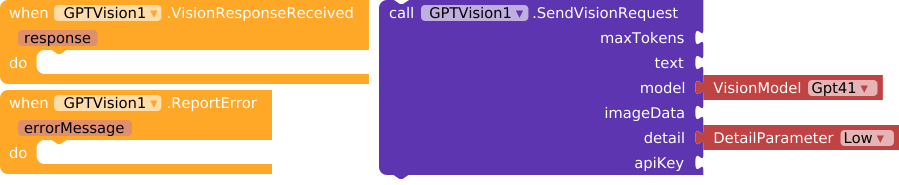
Event handlers for GPTVision1’s VisionResponseReceived and ReportError events, and a function call to send a vision request with specified parameters including text, model, image data, detail parameter, and API key.
GPTUtils1 - Dialogs & Utilities

Event handlers and function calls related to text input, audio player dialog, list dialog, and error reporting using a GPTUtils1 component.
GPTThreads1 - Thread Management
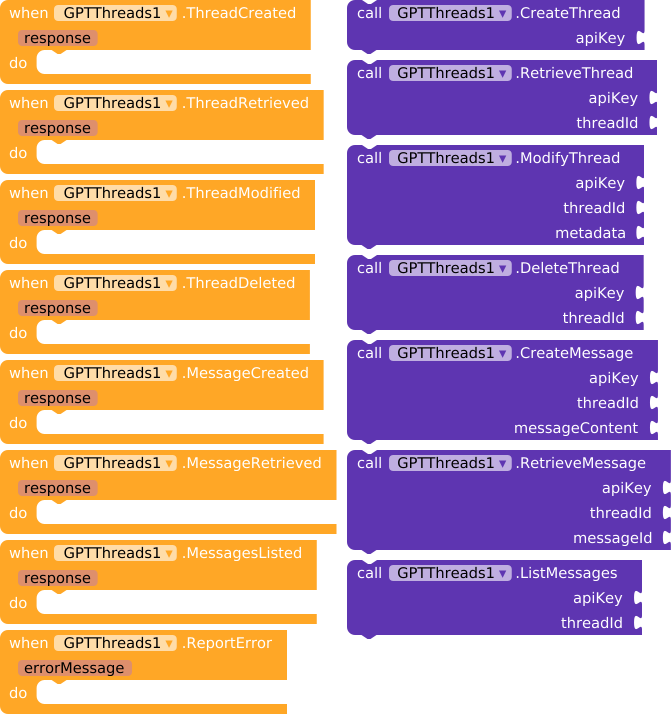
Visual programming interface with blocks representing events and function calls related to thread and message management in a GPTThreads module.
GPTText1 - Text Response & JSON Decode
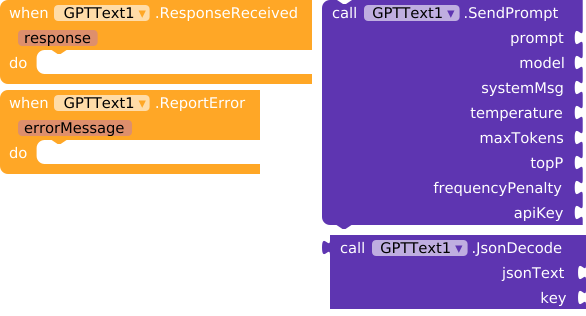
Visual programming interface showing event handlers for GPTText1’s ResponseReceived and ReportError events on the left, and function calls for GPTText1.SendPrompt and GPTText1.JsonDecode on the right.
GPTSpeech1 - Speech Generation
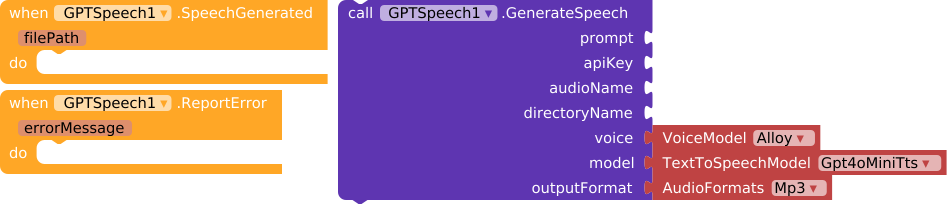
Visual programming interface with blocks for generating speech, handling speech generation events, and selecting voice model, text-to-speech model, and audio format parameters.
GPTModerate1 - Content Moderation
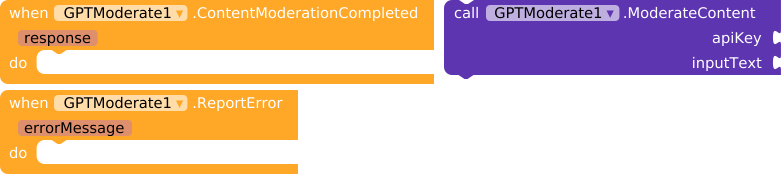
Block-based programming interface with two event handlers: one triggered when content moderation is completed and another when an error is reported, both related to a component named GPTModerate1.
GPTMessages1 - Message Management
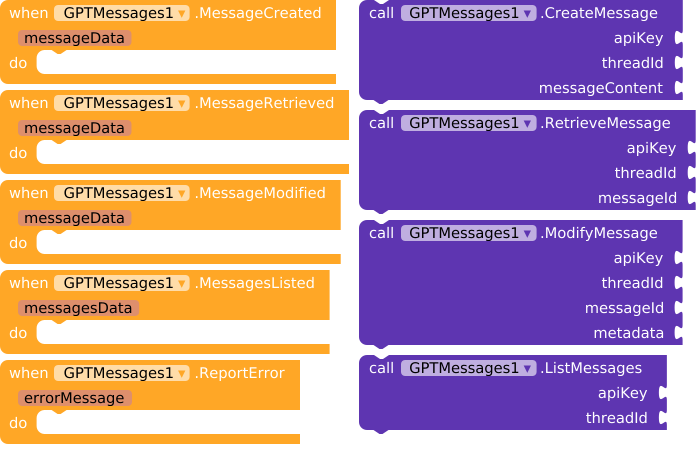
Visual code block interface showing event handlers for GPTMessages1 component with functions to create, retrieve, modify, list messages, and report errors using API keys and thread/message IDs.
GPTImageEdit1 - Image Editing (DALL-E 2)
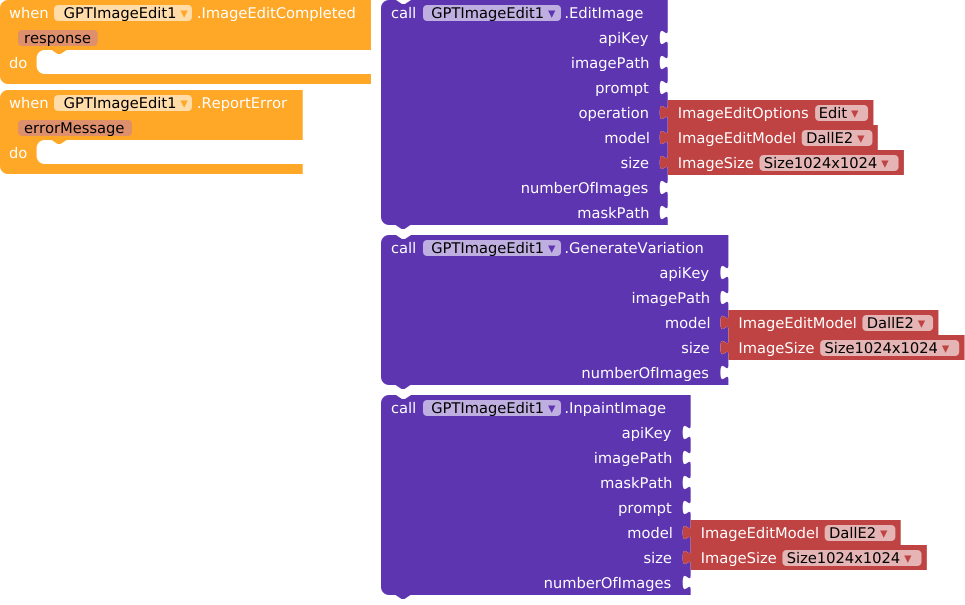
Graphical programming interface with blocks of code related to GPTImageEdit, including editing, error reporting, image editing, image variation, and inpainting functions using the DALL·E 2 model with specified image sizes.
GPTImage1 - Image Generation

Visual block programming interface showing event handlers for image generation completion and error reporting, alongside a function call to generate an image with specified parameters such as prompt, number of images, API key, model, and size.
GPTFunctionCalling1 - Function Calling
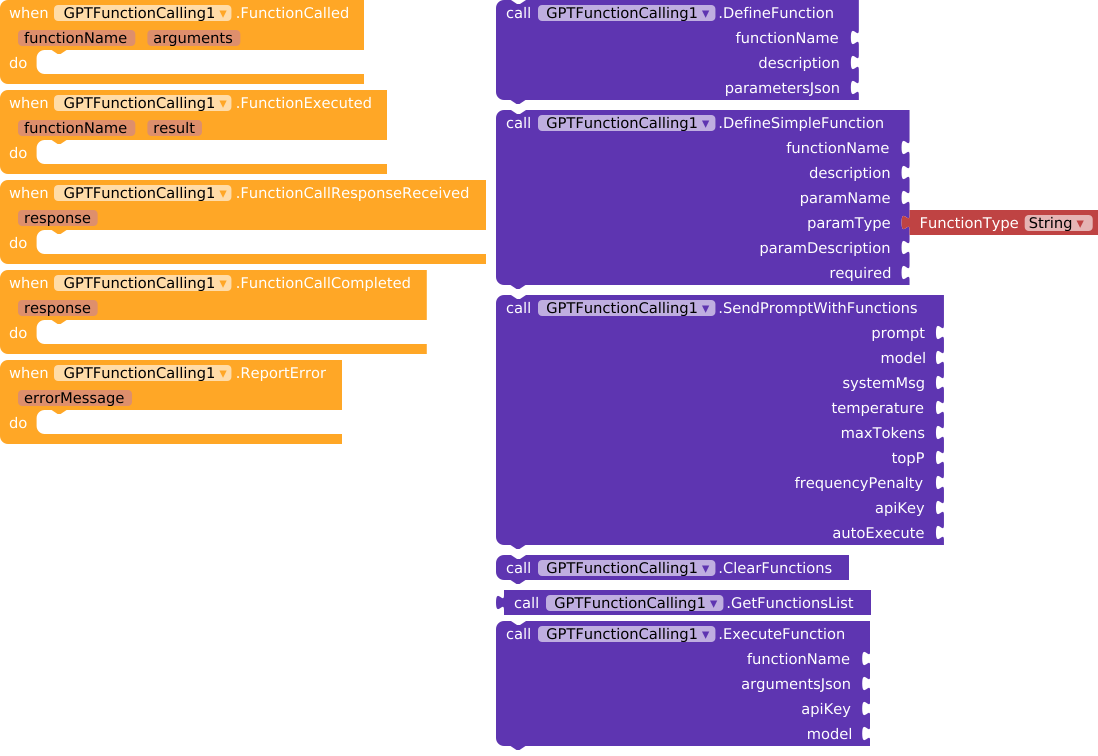
Colorful visual block-based programming interface showing various GPTFunctionCalling function definitions, calls, and event handlers organized on a canvas.
GPTFineTuning1 - Fine Tuning
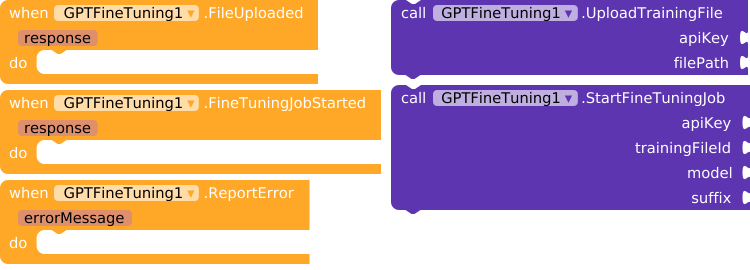
Visual programming interface showing functions and event handlers related to uploading a training file, starting a fine-tuning job, and reporting errors for a GPTFineTuning1 component.
GPTEmbedding1 - Text Embedding

Visual programming interface shows blocks for handling events and calling a function to generate text embeddings using the TextEmbedding3Large model with input text and an API key.
GPTBatch1 - Batch Processing
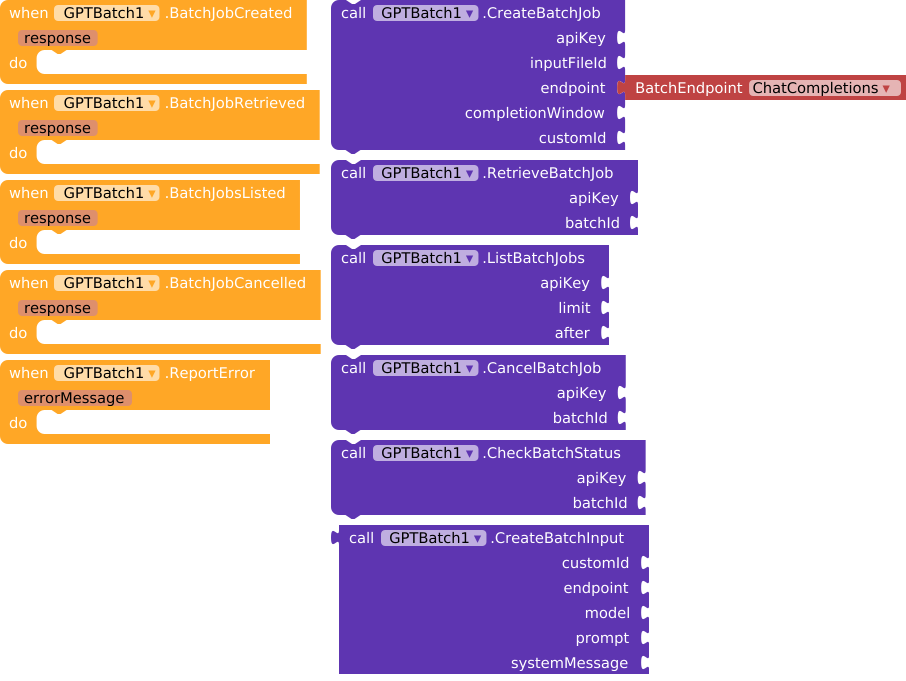
Block-based visual programming interface defining several functions and event handlers for creating, retrieving, listing, cancelling, and checking status of batch jobs using a ‘GPTBatch1’ API with associated parameters.
 Downloads
| Version | Features | Download | Size |
|---|---|---|---|
| Version 6 | Base functionality | com.bosonshiggs.chatgpt.aix | 55.4 KB |
| Version 7 | GPT Vision | com.bosonshiggs.chatgpt.aix | 62.3 KB |
| Version 8 | GPT Fine-Tuning | com.bosonshiggs.chatgpt.aix | 68.1 KB |
| Version 9 | GPT Embedding | com.bosonshiggs.chatgpt.aix | 72.8 KB |
| Version 10 | Image Edit, Batch, Function Calling | com.bosonshiggs.chatgpt.aix | 50.2 KB |
| Latest | All features (Image Edit, Batch, Function Calling, latest models) | com.bosonshiggs.chatgpt.aix | 93.1 KB |
Recomendação: Use sempre a versão Latest para ter acesso a todas as funcionalidades e modelos mais recentes da OpenAI.
 Feature Comparison Table
| Feature | v6 | v7 | v8 | v9 | v10 | Latest |
|---|---|---|---|---|---|---|
| Chat Completions |  |
|
|
|
|
|
| JSON Decode | |
|
|
|
|
|
| Image Generation | |
|
|
|
|
|
| Thread Management | |
|
|
|
|
|
| Message Management | |
|
|
|
|
|
| Speech Generation | |
|
|
|
|
|
| Utilities & Dialogs | |
|
|
|
|
|
| GPT Vision |  |
|
|
|
|
|
| Fine-Tuning | |
|
|
|
|
|
| Embeddings | |
|
|
|
|
|
| Image Edit | |
|
|
|
|
|
| Batch Processing | |
|
|
|
|
|
| Function Calling | |
|
|
|
|
|
| Latest Models (GPT-4.1, GPT-4o, etc.) | |
|
|
|
|
|
| New TTS Voices (13 vozes) | |
|
|
|
|
|
| Omni-Moderation | |
|
|
|
|
|
 Changelog
Latest (Version 11)
- Added GPT-Image-2 model support
- Added GPT-4.1, GPT-4.1-mini, GPT-4.1-nano models
- Added GPT-5.4, GPT-5.4-mini models
- Added 7 new TTS voices: Ash, Ballad, Coral, Marin, Sage, Verse, Cedar
- Added GPT-4o-mini-tts model
- Added omni-moderation-latest model
- Added Text-Embedding-3-Large model
- Updated all helper enums to PascalCase naming convention
- Fixed File class ambiguity issues
Version 10
- Added Image Edit functionality (Edit, Variation, Inpaint)
- Added Batch Processing
- Added Function Calling
- Added GPT-Image-1 and GPT-Image-1-mini models
Version 9
- Added Embedding support
- Added Text-Embedding-3-Small model
Version 8
- Added Fine-Tuning support
- Added file upload functionality
Version 7
- Added Vision support
- Added Vision models
Version 6
- Initial release
- Chat completions
- Image generation with DALL-E
- Thread and message management
- Speech generation
- Utilities and dialogs
 Links
Links
- GitHub: https://github.com/iagolirapasssos/chatGPTAndDallE
- Support Telegram: https://t.me/+qcJbp_LM2VZhZGRh
- Fast CLI: https://community.kodular.io/t/fast-an-efficient-way-to-build-extensions/275623
 Support
Click here and buy me a coffee.
 License
This extension is provided as-is for educational and development purposes. Use responsibly and in accordance with OpenAI’s usage policies.
Last Updated: July 2026
