Dynamic Buttons & Interactive Cards
[FREE] DynamicApp – Universal Extension for Creating Dynamic Buttons & Interactive Cards
Hello Kodular Community!
I am happy to share my very first extension, DynamicApp, which I developed to solve the issue of repetitive UI design and to support creating interactive UI components programmatically (Dynamically) at runtime without needing to manually design every single element on the screen.
 Introduction & Benefits of the Extension
If you are working on an app that displays dynamic lists (such as app stores, profile cards, or advanced settings screens), designing layouts manually becomes tedious and impractical.
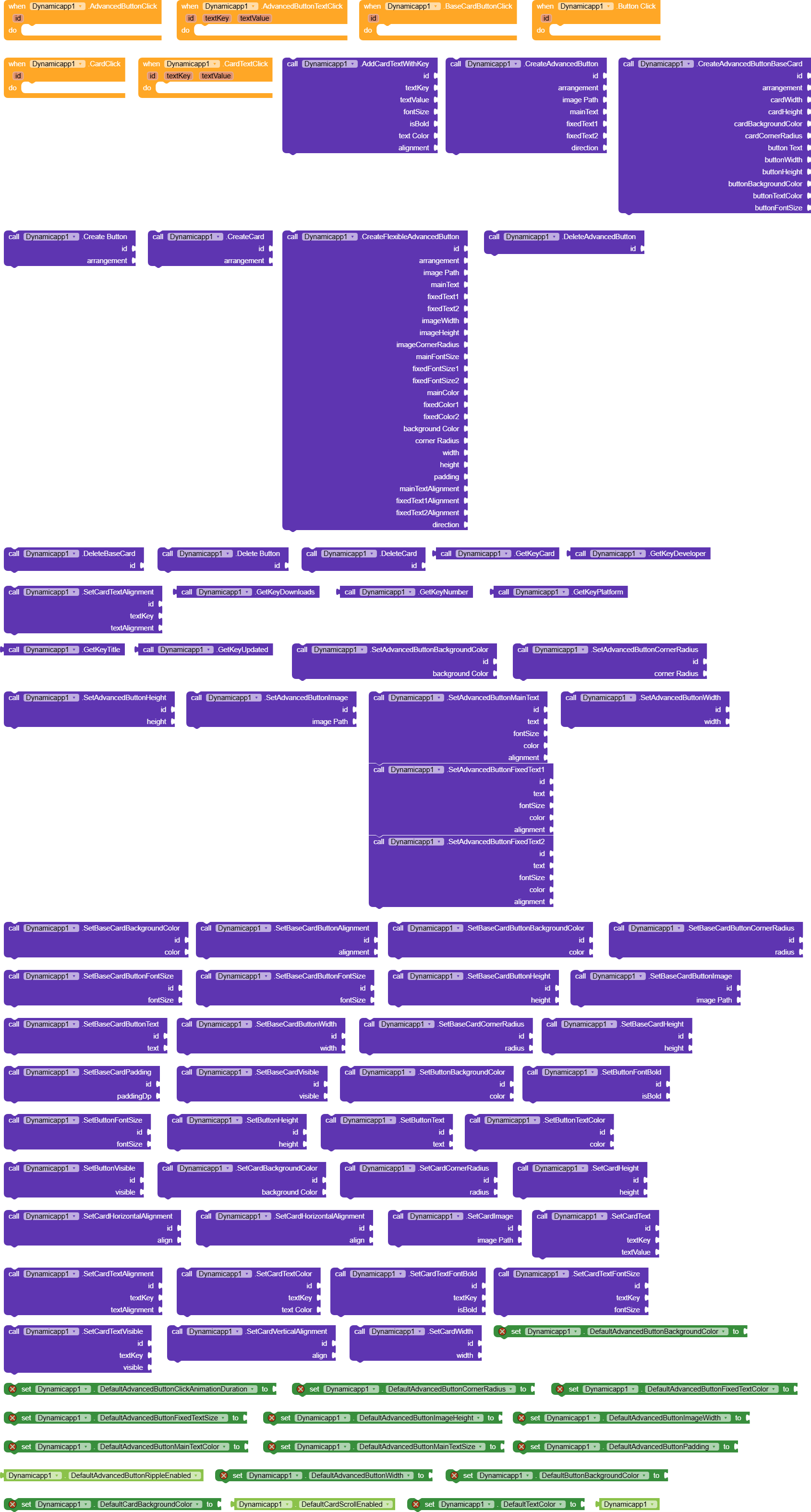
DynamicApp provides the ability to create advanced interactive buttons and cards instantly via Blocks, with total control over all details (images, rounded corners, dual text fields, colors, and alignment), as well as click responsiveness for sub-elements.
 Detailed Breakdown of Extension Components
- Advanced Dynamic Buttons
Allows you to create a custom button that looks like an interactive card containing an image and multiple text fields:
- Direction: Supports placing the image on the left and text on the right (Direction = 1) or vice versa (Direction = 2).
- Image Shapes: Ability to convert any image into a circle or clip its corners automatically using ViewOutlineProvider.
- Text Control: Supports a main text (Main Text) and two fixed subtext fields (Fixed Text 1 & 2) with the ability to modify the size, background, and color of each text independently.
- Dynamic Cards
Allows you to create custom cards for displaying database records:
- Contains pre-configured text keys (such as: title, developer, downloads, platform, and updated).
- Ability to add unlimited custom text keys via the AddCardTextWithKey function.
- Full control over vertical and horizontal alignment, card background color, and corner radius.
- Base Cards & Standard Buttons
Lightweight tools for creating quick buttons or simplified cards, as well as animating, hiding, or showing them based on user needs. - Animations & Events
- Click Animation Effect: Shrinks the button size by 5% and temporarily darkens the color upon pressing to give a real-time responsive feel.
- Separate Text Events: You can trigger an event when clicking only the subtext without tapping the rest of the button using AdvancedButtonTextClick.
 Main Events
 - AdvancedButtonClick(id): Triggered when an advanced button is clicked.
- AdvancedButtonTextClick(id, textKey, textValue): Triggered when a specific text inside an advanced button is clicked.
- ButtonClick(id): Triggered when a standard dynamic button is clicked.
- CardTextClick(id, textKey, textValue): Triggered when text inside a dynamic card is clicked.
- BaseCardButtonClick(id): Triggered when a button inside a base card is clicked.
Below are the extension file (.aix) and a test project file (.aia).
I would be glad to receive your feedback and suggestions for future updates!
Dynamicapp.aix (45.9 KB)
test.aia (70.4 KB)