Hello App Inventors & Kodular Builders!
Displaying long passages or continuous plain text inside mobile apps often requires tedious manual styling or complex setups. To eliminate manual HTML tagging and make text formatting completely effortless, I have built RichTextStyler—a lightweight, non-visible extension that formats text dynamically in a single call.
 Key Features
Universal Language Support: Seamlessly handles English, regional scripts, and all international Unicode text without breaking conjuncts, vowel marks, or syllables.
Smart First-Letter Styling: Automatically isolates the complete first letter or conjunct (syllable) and applies an independent size multiplier, custom typeface, and dedicated color.
Automated Interval Highlighting: Enlarges and bolds words at customizable intervals across your text.
Flexible Color Palette: Accepts either Kodular’s native Color blocks or custom Hex color codes (#HEX) in a standard list to cycle colors dynamically.
Integrated Text Shadow: Built-in controls for blur radius, offsets (dx, dy), and shadow color to ensure clear, readable text over any background.
Zero HTML Tags Required: Provide standard plain text—the background logic takes care of all styling and measurement automatically.
 Blocks & Usage
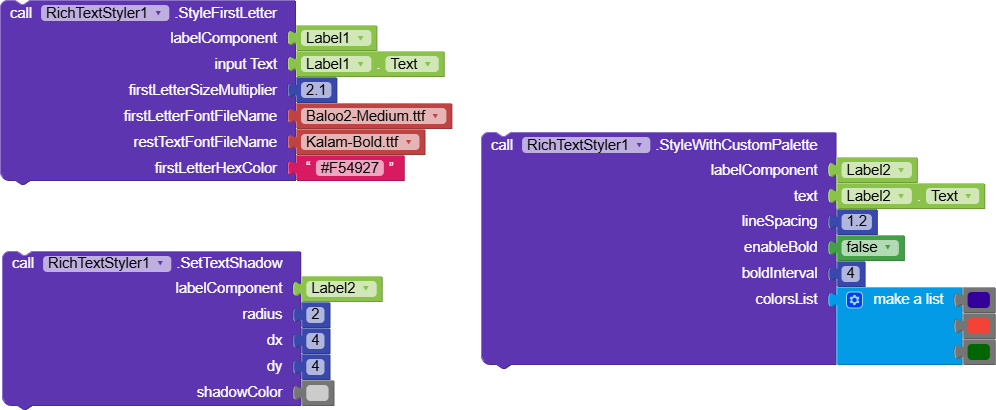
StyleFirstLetter
Targets the opening syllable or character of a text string and enhances it with a custom size multiplier (e.g., 1.5 or 2.0), a dedicated font asset, and a specific color. The remainder of the text is rendered in the secondary base font.
StyleWithCustomPalette
Applies alternating bold styling and dynamic font scaling across words based on a set interval (e.g., every 2 or 3 words), cycling through your custom color list with automatic center alignment and configurable line spacing.
SetTextShadow
Configures a clean drop shadow or soft outer blur by setting the shadow radius, horizontal/vertical offsets (dx, dy), and shadow color (Hex or native color block).
 Screenshots
Output

 Download
AIX:
com.supertech.richtextstyler.aix (9.9 KB)
