🧩 ImgBBHost
An extension for MIT App Inventor 2.Upload images to ImgBB. Prepares images from any source by copying them to app's private storage. No external storage write needed. Developed by Ibrahim Jamar using Fast.
 Specifications
 Package: com.imgbbhost.jamar.imgbbhost
 Size: 14.09 KB
 Minimum API Level: 14
 Updated On: 2026-03-08T18:30:00Z
 Built & documented using: FAST v5.6.0
Events:
ImgBBHost has total 3 events.
1. ImagePrepared
Image prepared successfully. Returns the internal file path ready for upload.
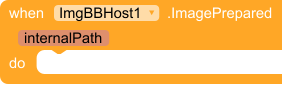
| Parameter | Type |
|---|---|
| internalPath | text |
2. ImageUploaded
Image uploaded successfully. Returns the image URL.

| Parameter | Type |
|---|---|
| imageUrl | text |
3. ErrorOccurred
An error occurred during prepare or upload. Returns the error message.

| Parameter | Type |
|---|---|
| errorMessage | text |
Methods:
ImgBBHost has total 2 methods.
1. PrepareImage
Copy an image from a URI or file path to app’s private storage. Fires ImagePrepared when done.

| Parameter | Type |
|---|---|
| source | text |
2. UploadImage
Upload an image from a file path inside app’s private storage (obtained from ImagePrepared).

| Parameter | Type |
|---|---|
| imagePath | text |
Designer:
ImgBBHost has total 2 designer properties.
1. ApiKey

- Input type:
string
2. Expiration

- Input type:
non_negative_integer - Default value:
600 (0 for unlimited time)
Setters:
ImgBBHost has total 2 setter properties.
1. ApiKey
The current ImgBB API key.

- Input type:
text
2. Expiration
The current expiration time in seconds.

- Input type:
number
Getters:
ImgBBHost has total 4 getter properties.
1. ApiKey
Returns the current ImgBB API key.

- Return type:
text
2. Expiration
Returns the current expiration time in seconds.

- Return type:
number
3. ImageUrl
Returns the URL of the last uploaded image (empty if none).

- Return type:
text
4. PreparedImagePath
Returns the internal path of the last prepared image (empty if none).

- Return type:
text
Get your API key here
Example usage

Downloads
com.imgbbhost.jamar.imgbbhost.aix (14.1 KB)
 I just tested it right away, its even generate blocks for different platforms. Soon you’ll tell us, hey guys, use
  just kidding, but your work is making things great.