
🧩 ShizukuAccess
An extension for MIT App Inventor 2.Shizuku Access Extension (Official Permission Way)
Bring real Android power into your Kodular projects.
This extension connects your app to Shizuku using a modern UserService architecture, enabling fast and reliable file operations in locations normally restricted on Android 11+.
Built specifically for Kodular developers who want advanced storage access without complex setup.
This is a production-ready, developer-focused extension designed for performance, stability, and clean integration.
 Why This Extension Matters
Android storage restrictions made advanced file operations difficult — especially inside protected directories.
This extension solves that by:
 Running operations through Shizuku privileged service
Using native Java file APIs (no shell hacks)
Providing real-time result events
Supporting protected storage paths
Working without root
You get system-level file control inside a drag-and-drop builder.
 Core Capabilities
 File Management
• Check if file or folder exists
• Copy files across storage locations
• Move files between directories
• Delete files securely
• Supported path /storage/emulated/0/.....
 Advanced Storage Support
• Internal shared storage
• App-specific directories
• Protected Android storage paths(Android/data/)
• Cross-directory operations
 Developer Experience
• Event-driven results
• Clean block interface
• Stable service connection handling
• Optimized performance
 Extension Blocks Overview
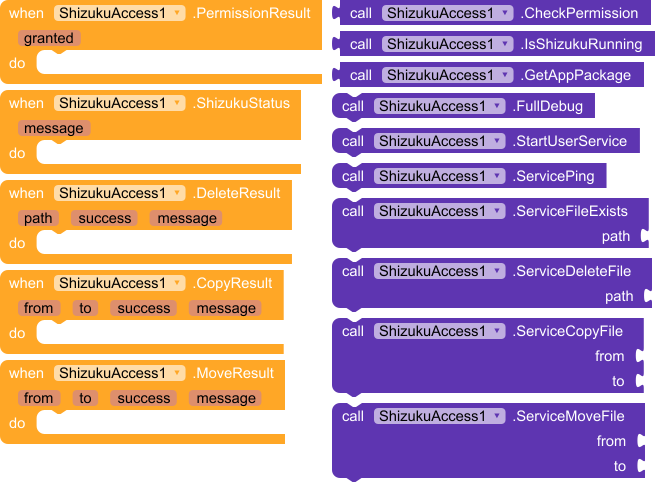
 Permission & Service Blocks
CheckPermission
Requests Shizuku authorization if needed.

IsShizukuRunning
Checks whether Shizuku service is active.

StartUserService
Starts the privileged service used for all operations.

 File Operation Blocks
ServiceFileExists(path)
Checks whether a file or directory exists.

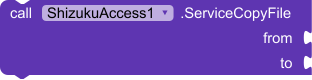
ServiceCopyFile(from, to)
Copies a file to a new location.
Event Returned:
• CopyResult(from, to, success, message)

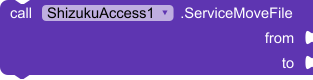
ServiceMoveFile(from, to)
Moves a file to a new path.
Event Returned:
• MoveResult(from, to, success, message)

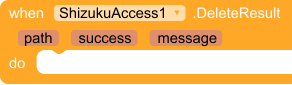
ServiceDeleteFile(path)
Deletes a file or folder.
Event Returned:
• DeleteResult(path, success, message)

 Status & Events
ShizukuStatus(message)
Returns service state and debug messages.

 Example Use Cases
Build a full file manager app
Backup or restore user data
Manage protected app folders
Automation and system utilities
Advanced storage tools
 Requirements
• Shizuku installed and running
• Shizuku permission granted
• Android 11 or higher recommended
 Specifications
Package: com.glich.shizukuaccess
 Size: 70.61 KB
 Minimum API Level: 24
 Updated On: 2026-02-14T18:00:00Z
 Built & documented using: FAST v5.5.0-premium
 Download Link :
Enter your main app package name to identiy your app to shizuku app
com.glich.ShizukuExt (It is not a direct download link  )
)
Apk for testing:
ShizukuFileAccess.apk (5.6 MB)
Guidence
- First install the apk, then open
- Then Start Shizuku service [Do not start Shizuku before app open]
If it is helpful, Leave a  for me.
 Does it need Shizuku app?
 oding.