ChatBot
An extension for Kodular, and Niotron.This extension is cloned from The MIT AI2's ChatBot Component, this is only for Niotron and Kodular.
 Specifications
 Package: com.ahmedislam.chatbot
 Size: 28.58 KB
 Minimum API Level: 14
 Updated On: 2026-02-08T22:00:00Z
 Built & documented using: FAST v5.4.0
Events:
ChatBot has total 3 events.
1. GotResponse
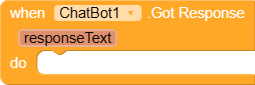
Event fired when the Chat Bot answers a question.
| Parameter | Type |
|---|---|
| responseText | text |
2. GotResponseWithImage
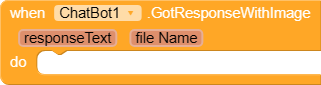
Event fired when the Chat Bot answers a question, with an image.
| Parameter | Type |
|---|---|
| responseText | text |
| fileName | text |
3. ErrorOccurred
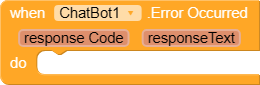
Event for ErrorOccurred
| Parameter | Type |
|---|---|
| responseCode | number |
| responseText | text |
Methods:
ChatBot has total 4 methods.
1. ResetConversation

Reset the current conversation, Chat bot will forget any previous conversation when responding in the future.
2. Converse

Ask a question of the Chat Bot. Successive calls will remember information from earlier in the conversation. Use the “ResetConversation” function to reset for a new conversation.
| Parameter | Type |
|---|---|
| question | text |
3. CreateImage

Create an Image. Note: Only Gemini is currently supported. Do not specify a model in order to get the most up-to-date model to use.
| Parameter | Type |
|---|---|
| description | text |
4. ConverseWithImage
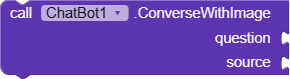
Ask a question of the Chat Bot using an Image. Successive calls will remember information from earlier in the conversation. Use the “ResetConversation” function to reset for a new conversation.
| Parameter | Type |
|---|---|
| question | text |
| source | any |
Designer:
ChatBot has total 5 designer properties.
1. System
- Input type:
textArea
2. Token

- Input type:
string
3. ApiKey (API Key)

- Input type:
string
(Note: To get API Key, you must go to “https://platform.openai.com/api-keys”)
4. Provider

- Input type:
string - Default value:
chatgpt
5. Model

- Input type:
string
Setters:
ChatBot has total 5 setter properties.
1. System

The “System” value given to ChatGPT. It is used to set the tone of a conversation. For example: “You are a funny person.”
- Input type:
text
2. Token

The MIT Access token to use. MIT App Inventor will automatically fill this value in. You should not need to change it.
- Input type:
text
3. ApiKey

A ChatGPT API Key. If provided, it will be used instead of the embedded APIKEY in the ChatBot proxy server
- Input type:
text
4. Provider

Set the name of the provider to use. See chatbot/imagebot for the current list of supported providers.
- Input type:
text
5. Model

Set the name of the model to use. See chatbot/imagebot for the current list of supported models. Leaving this blank will result in the default model set by the provider being used
- Input type:
text
Getters:
ChatBot has total 4 getter properties.
1. System

The “System” value given to ChatGPT. It is used to set the tone of a conversation. For example: “You are a funny person.”
- Return type:
text
2. ApiKey

A ChatGPT API Key. If provided, it will be used instead of the embedded APIKEY in the ChatBot proxy server
- Return type:
text
3. Provider

Set the name of the provider to use. See chatbot/imagebot for the current list of supported providers.
- Return type:
text
4. Model

Set the name of the model to use. See chatbot/imagebot for the current list of supported models. Leaving this blank will result in the default model set by the provider being used
- Return type:
text
List of AI Providers and models
Providers
- chatgpt
- gemini
- bedrock
- ollama
Models:
- chatgpt:gpt-4o-mini
- chatgpt:o1-preview
- chatgpt:o1-mini
- google:gemini
- google:gemini-1.0-pro
- google:gemini-1.5-pro
- google:gemini-2.0-flash
- google:gemini-2.5-flash
- google:gemini-2.0-flash-exp
- bedrock:anthropic.claude-sonnet-4-5-20250929-v1:0
- bedrock:meta.llama3-70b-instruct-v1:0
- bedrock:us.meta.llama3-3-70b-instruct-1:0
- bedrock:us.meta.llama4-maverick-17b-instruct-v1:0
- ollama:gemma2
- ollama:gemma2:2b
Downloads:
AIX: com.ahmedislam.chatbot.aix (28.6 KB)
AIA Example:
chatbot.aia (37.3 KB)