Hello Builders! 
Enhance your mobile applications with modern, clean, and dynamic visual styling. TargetView is a lightweight, non-visible UI extension designed to render concentric ripple layers, ambient glow pods, and smooth animated aura shapes directly behind any target component (Icons, Images, Labels, or Buttons) inside arrangements and cards without affecting existing background colors or layout setups.
 Features
Non-Destructive Background Overlay: Preserves the underlying layout background, gradient, or color while seamlessly overlaying visual layers on top.
Dynamic Target Alignment: Automatically detects and aligns coordinates with the exact center of any target element across any screen position.
Diverse Shape Styles: Includes Circles, Squares, Rounded Squares, Hexagons, Scalloped Badges, and Multi-Pointed Floral patterns.
Neu-Glass Ambient Glow Pod: Features a soft, feathered radial glow that smoothly blends and dissolves across card surfaces.
Dynamic Alpha Fade: Outermost concentric layers smoothly decrease in opacity to create depth.
Smooth Built-In Animations: Supports continuous pulsation, infinite expansion, and 360-degree rotation.
Contour & Radar Modes: Supports hollow, outlined stroke rings for radar, scanning, and audio-reactive aesthetics.
Dual Gradient Transitions: Enables multi-color blending from the core to the outer perimeter.
Color Flexibility: Fully compatible with App Inventor/Kodular native Color blocks as well as standard Hex strings.
 Blocks & Functions
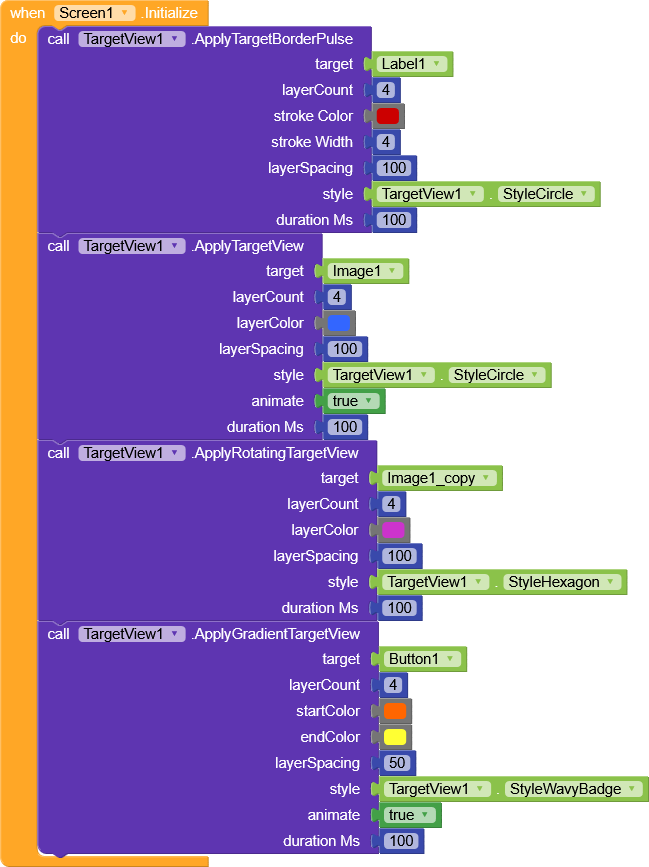
1. ApplyTargetView
Applies concentric layers behind the specified target component with a smooth fade-out effect.
target (AndroidViewComponent): The element to focus on.
layerCount (Number): Total number of concentric layers.
layerColor (Color/Text): Color block or Hex code string (e.g., #FFFFFF).
layerSpacing (Number): Radial step distance between layers (Recommended: 35 - 50).
style (Text/Property): Select from the available style properties.
animate (Boolean): Enables continuous pulse animation when set to true.
durationMs (Number): Animation cycle duration in milliseconds (e.g., 1600).
2. ApplyRotatingTargetView
Applies an automated, continuous 360-degree rotational animation for geometric and floral shapes.
target, layerCount, layerColor, layerSpacing, style, durationMs
3. ApplyTargetBorderPulse
Draws hollow, outlined contour rings without solid color fills.
target, layerCount, strokeColor, strokeWidth, layerSpacing, style, durationMs
4. ApplyGradientTargetView
Blends two distinct colors across expanding concentric layers.
target, layerCount, startColor, endColor, layerSpacing, style, animate, durationMs
5. StopAnimation
Cancels and releases active background value animators.

 Style Properties
Plug these directly into the style socket:
TargetView.StyleCircle: Standard concentric rings.
TargetView.StyleSquare: Geometric square ripple layers.
TargetView.StyleRoundedSquare: Smooth rounded square contours.
TargetView.StyleHexagon: 6-sided geometric polygon layers.
TargetView.StyleFlowerPoints: 4-pointed floral badge profile.
TargetView.StyleFloralBadge: 8-pointed lotus badge profile.
TargetView.StyleWavyBadge: 10-wave scalloped boundary.
TargetView.StyleGlowPod: Soft ambient radial glow pod with asymmetric fading.
 Download
AIX -
com.supertech.targetview.aix (27.2 KB)
Sample AIA:
Targetview.aia (39.3 KB)
Apk :
Targetview.apk (5.7 MB)
Big Thank Fast