Hi everyone 
Today I want to share with you an interesting discovery I recently made, which could open the door to a lot of ideas.
The core idea is to dynamically generate components with DynamicComponents inside a RecyclerList.
Don’t run away! It might actually make more sense than you think!
Look at the potential
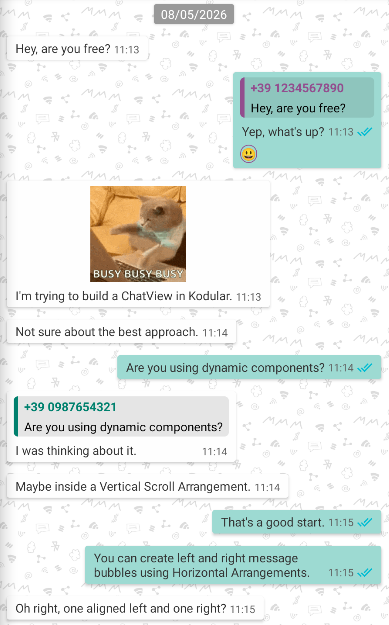
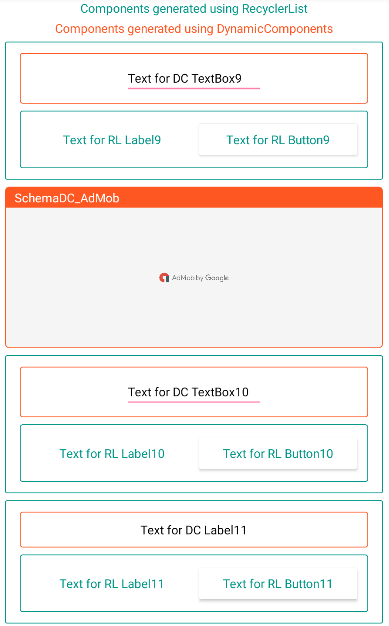
The first image is a ChatView entirely built with RecyclerList + DynamicComponents, and it’s 100% customizable.
The second image shows how to display ads while scrolling.
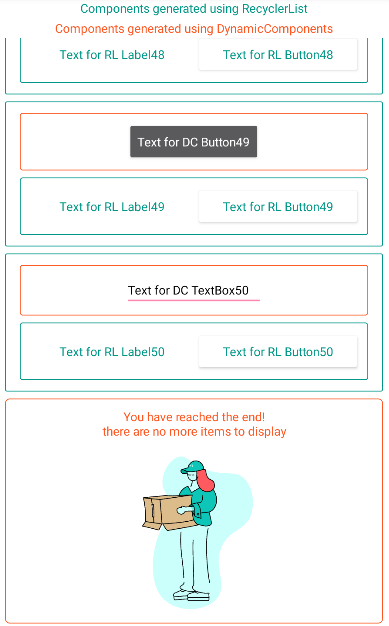
The third image shows how to add a layout at the end of a RecyclerList to indicate the end of the list.
Lottie by Ahmed Khaled


How RecyclerView works (by Gemini AI)
The RecyclerView (often colloquially referred to as
recyclerListby Android developers) is one of the most crucial components for displaying lists of data in an application.Its main strength is efficiency: unlike older systems (such as ListView), it doesn’t create a visual view (a list row) for every single item in your dataset. If you have 10,000 products to display, creating 10,000 views would instantly crash the phone’s memory.
Here is how it handles massive lists while consuming minimal memory:
The Secret: Recycling
The RecyclerView creates only the exact number of views needed to fill the screen, plus a couple of extra ones at the top and bottom for safety.
When the user scrolls the list (let’s say, downwards):
- The Exit: The item at the top leaves the screen. Instead of being destroyed, it is placed into a “recycling bin” (called the Scrap Heap).
- The Entry: A new item is about to enter from the bottom. Instead of creating a new view from scratch, the RecyclerView grabs an old view from the recycling bin, “pastes” the new data onto it, and displays it at the bottom.
Thanks to this process, the phone’s memory only ever handles about a dozen views at a time, even if your list is theoretically infinite.
The 3 Key Components
To make this mechanism work, the RecyclerView relies on three elements working together:
Component Main Role Metaphor ViewHolderHolds the visual references (text views, image views). It prevents the system from constantly having to perform expensive lookups to find UI elements. The empty “shell” or template of the row. AdapterThe actual director. It takes raw data (e.g., a list of names) and “binds” it inside the ViewHolders when needed. The worker who fills the shell with the correct data. LayoutManagerDecides how to position the items (vertically, horizontally, or in a grid). The architect who decides the layout structure.
The Workflow in a Nutshell
When the screen needs to display a row:
It asks the Adapter: “Hey, I need row number 5.”
The Adapter checks if there is a ViewHolder available to recycle. If there is, it takes that used shell, overwrites it with the data for row 5 (onBindViewHolder), and hands it to the LayoutManager, which positions it on the screen.
 Index
Index
1. Creating DCs inside RL views
2. Tracking created DCs
3. Removing DCs to prevent duplicates
4. Managing events of DCs
5. Tracking created Schemas
6. AIA
7. Creations
Creating DCs inside RL views
This step is quite straightforward.
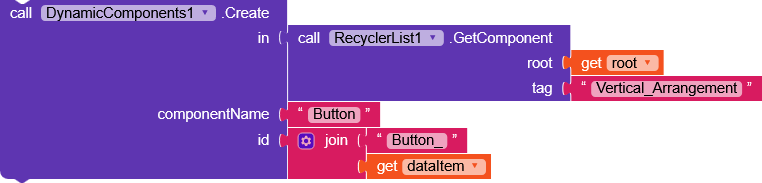
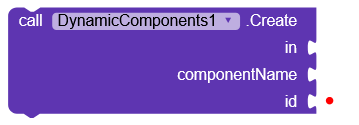
By using CreateComponent inside RL.GetComponent(root, tag), the DC will be created without any issues.
Tracking created DCs
Every DCs must be removed when their root is recycled otherwise, they would be carried over to the next bind, repeating themselves and causing errors.
For this reason, I created a roots variable, a dictionary structured as follows:
{
  "rootReference1": {
    "components": [
      "Button1_rootReference1",
      "Label1_rootReference1",
      "Image1_rootReference1"
    ],
    "key": "a1046104-27aa-4d9b-8ba1-936f346644a3"
  },
  "rootReference2": {
    "components": [
      "CheckBox_rootReference2"
    ],
    "key": "d2e846cf-bf70-4a58-8861-438d477f8053"
  }
}
Explanation of each field
rootReference(text) represents the reference name of therootcomponent (Vertical Arrangement)
componentsis a list containing all dynamic component IDs
These are the IDs that would be assigned in this field:
keyTo clarify,RecyclerList.Datais managed by passing it the keys ofRecyclerListData, a dictionary structured as follows:{ "a04ab4b4-ca2b-4c33-ac17-22fa40e04e59": { "position": 1, "componentCode": 1073741823, "textColor": 4292851220, "dynamicComponentName": "Radiobutton" }, "dc3f58a6-c7e7-470c-b093-6571939bf64f": { "position": 2, "componentCode": 1073741823, "textColor": 4291031633, "dynamicComponentName": "DatePicker" } }This structure is used as sample data to populate the RecyclerList.
Therefore, the keys of this dictionary are passed toRecyclerList.Data:(a04ab4b4-... dc3f58a6-... ...)The
keyvalues are stored inrootsso they can later be used in events such as.OnClick.

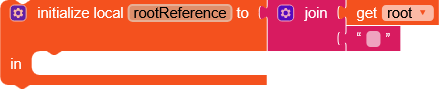
The dictionary is populated through a procedure called addComponentToRoots
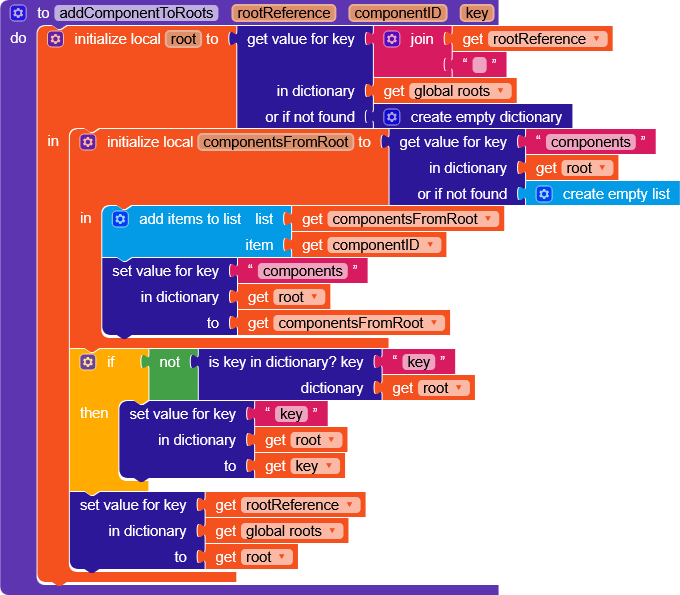
This function takes rootReference, key, and componentID as inputs and adds to roots.
componentIDis what gets inserted into thecomponentslist described in the “Explanation of each field” section
Removing DCs to prevent duplicates
This part is arguably even simpler than the first, as it is fully automated.
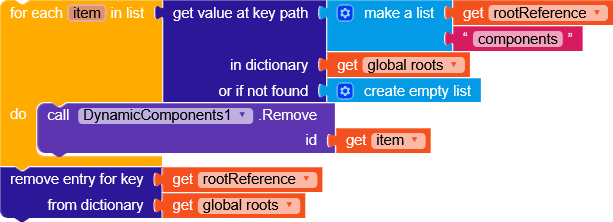
On every .OnBindView event, the view is cleared of DCs by iterating over the components list at rootReference -> components and removing each item using DC.Remove.
Finally, the entry associated with rootReference is deleted from roots.
Managing events of DCs
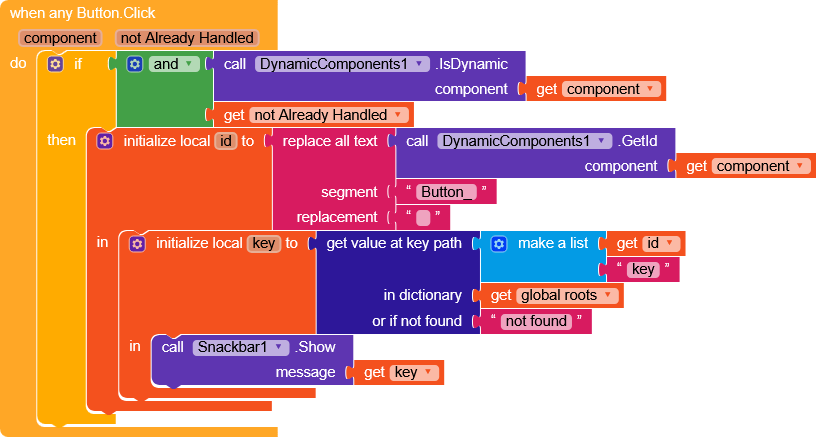
The process is practically identical to how we would normally handle it, except that to obtain the RecyclerListData key associated with the button, we need to retrieve it from roots, and it is done like this.
Tracking created Schemas
From the previous discovery to this one, the step is really short.
There is only one problem, for a single component it’s easy to store its componentID, but for all the components of a schema, how do you store them in roots?
Do I use addComponentToRoots for every single ID?
Absolutely not!
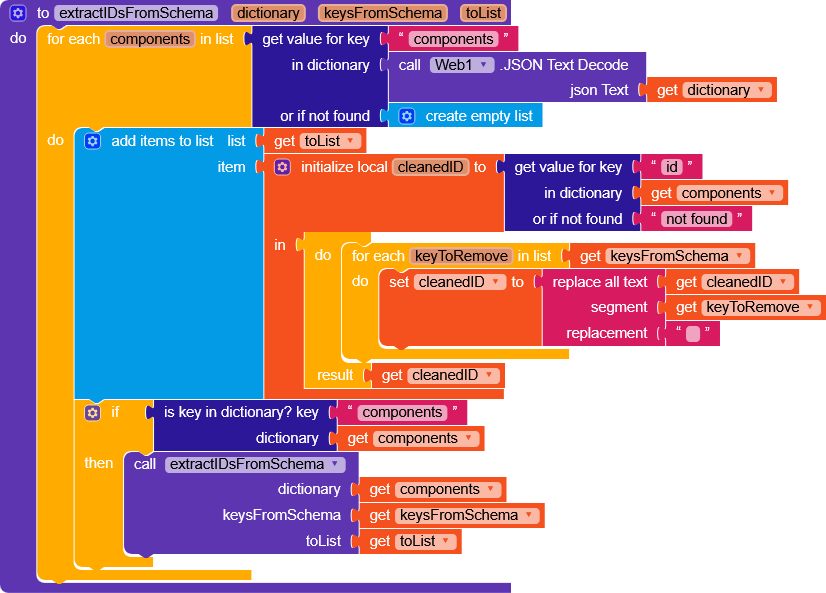
Here is a function that iterates through the schema and retrieves all component IDs by replacing with an empty string all the keys specified in keysFromSchema, turning something like Button1_{__counter__} into Button1_, and then stores them in a list specified in toList.
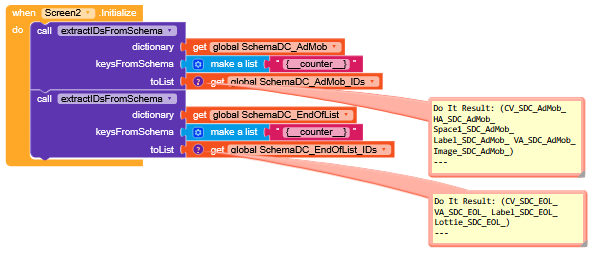
It could also be handled this way later on, although I don’t think the procedure has much impact, but you never know.
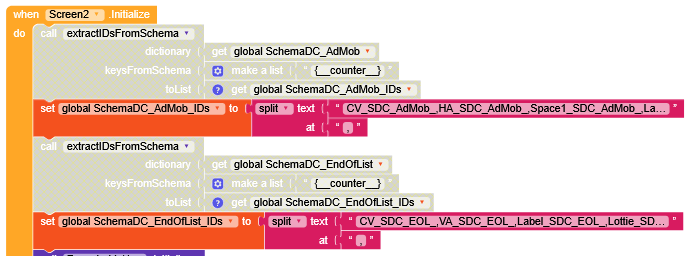
After that, I transformed addComponentToRoots into addSchemaToRoots

and we brought home this functionality as well !
AIA
Below is an AIA project split into 3 screens.
-
Screen1
generates random dynamic components in all RL views. -
Screen2
generates an AdMob schema every 9 RL views and an EndOfList schema at the end of the list. -
Screen3
combines all configurations and is mainly used to show how it behaves with a large number of elements.
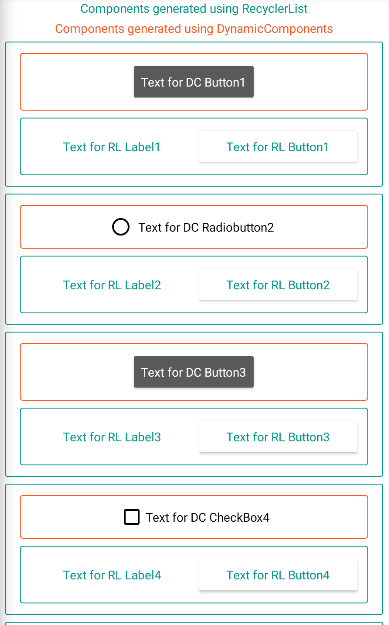
It’s also important to consider that overly complex schemas should be avoided if you want to prevent laggy performance on lower-end devices.
DCinRL.aia (209.3 KB)
Creations
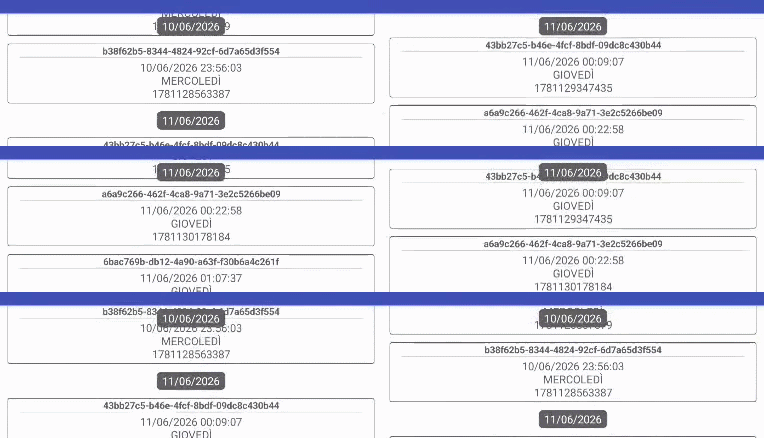
- Sticky headers
How to implement Sticky Headers in a RecyclerList
As always, I remain available for any clarification.
 oding
oding 
