Hi everyone,
Recently I created a very particular guide about building components with DynamicComponents inside a RecyclerList, and in the topic I said:
 …
… ………
……… ………
………
sticky headers 
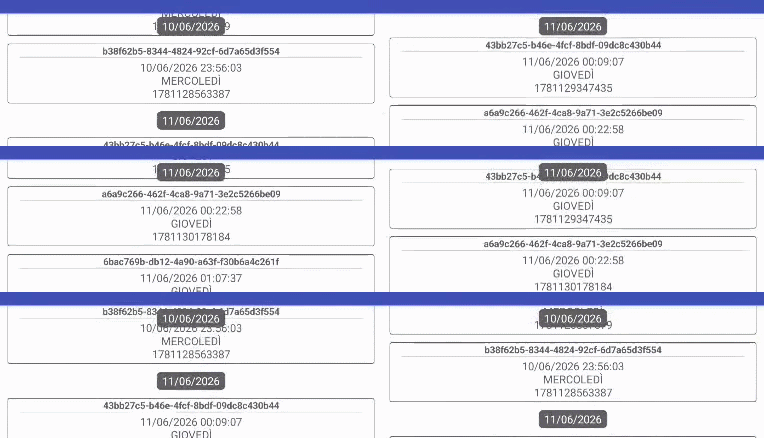
What is a sticky header? (by Gemini AI)
Sticky headers in Android are UI section headers that stay pinned to the top of a scrolling list.
As the user scrolls through a list of items, the current section’s header remains fixed at the top of the viewport until the user scrolls past that entire section, at which point it is smoothly pushed up and replaced by the next section’s header.Why Use Them?
- Improved Navigation: They give users constant context about where they are in a long list without needing to scroll back up.
- Clean Organization: They group related data (e.g., contacts alphabetically or messages by date) making the information easily scannable.
- Space Efficiency: They prevent the user from having to scroll past static, repetitive headers.
Premises
Since this is a resource and not a guide, I will not explain how it works in detail unless explicitly requested. However, the techniques we will use have already been partly covered in other guides I made, so I’m leaving the references here in case you want to explore further.
-
Creating dynamic components is essential because it allows us to create a component/schema inside a RecyclerList view.
Create DynamicComponents inside RecyclerList views -
Overlap allows us to always display the card view layout fixed at the top of the screen.
Overlap components (1)
Overlap components (2)
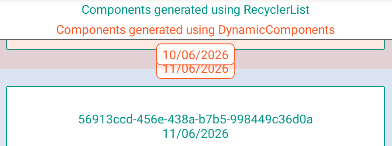
Here (Screen1) we can better see which components we are generating and which ones are generated by the RecyclerList.
We have a fixed layout in transparent orange placed above the RL using overlap, which contains a “date” schema that is generated during initialization.
The other “date” schemas are then generated inside the RL views during the OnBind event.
The oldest date remains fixed, and as soon as a more recent one surpasses it, it gets pushed off the screen using an overshoot (for now I found this solution to be the simplest
 )
)
AIA
In this project you will find 2 screens.
- Screen1 visually shows, using colors, the origin of the various components
- Screen2 is the version intended for the end user
DCinRL_Date.aia (209.3 KB)
 oding
oding 