Ok guys I finally figured that out, but it took me a lot of testing and I must admit, as a fresh Kodular user, I almost gave up and go to another tool to build Android apps, cuz I tought “hell, it’s such a basic thing, why is it so hard and undocumented?”. So, I will register here the solution for those that may pass the same trouble in the future.
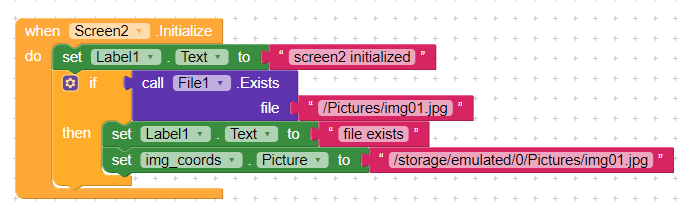
The key is that, for saving the file (at least using Companion) you just need to specify a “virtual” path like “/Pictures/filename.jpg” but to load it, you need to specify the whole path from the root, that in my case is “/storage/emulated/0/Pictures/filename.jpg”. Here are the blocks:
For the sake of information, I am testing using:
Companion 1.5.3 Fenix
Moto G5 Android 8.1 (Oreo)
Project using API for Android 8
Using internal storage (no SD card)
I hope this helps someone in the future. Thanks to all that contributed.