Dear Koders,
We are excited to announce the release of Kodular Creator 2026.05. This is the largest update we have shipped since our move to the new versioning scheme, with major changes across the Designer, Blocks Editor, and runtime components.
Designer Improvements
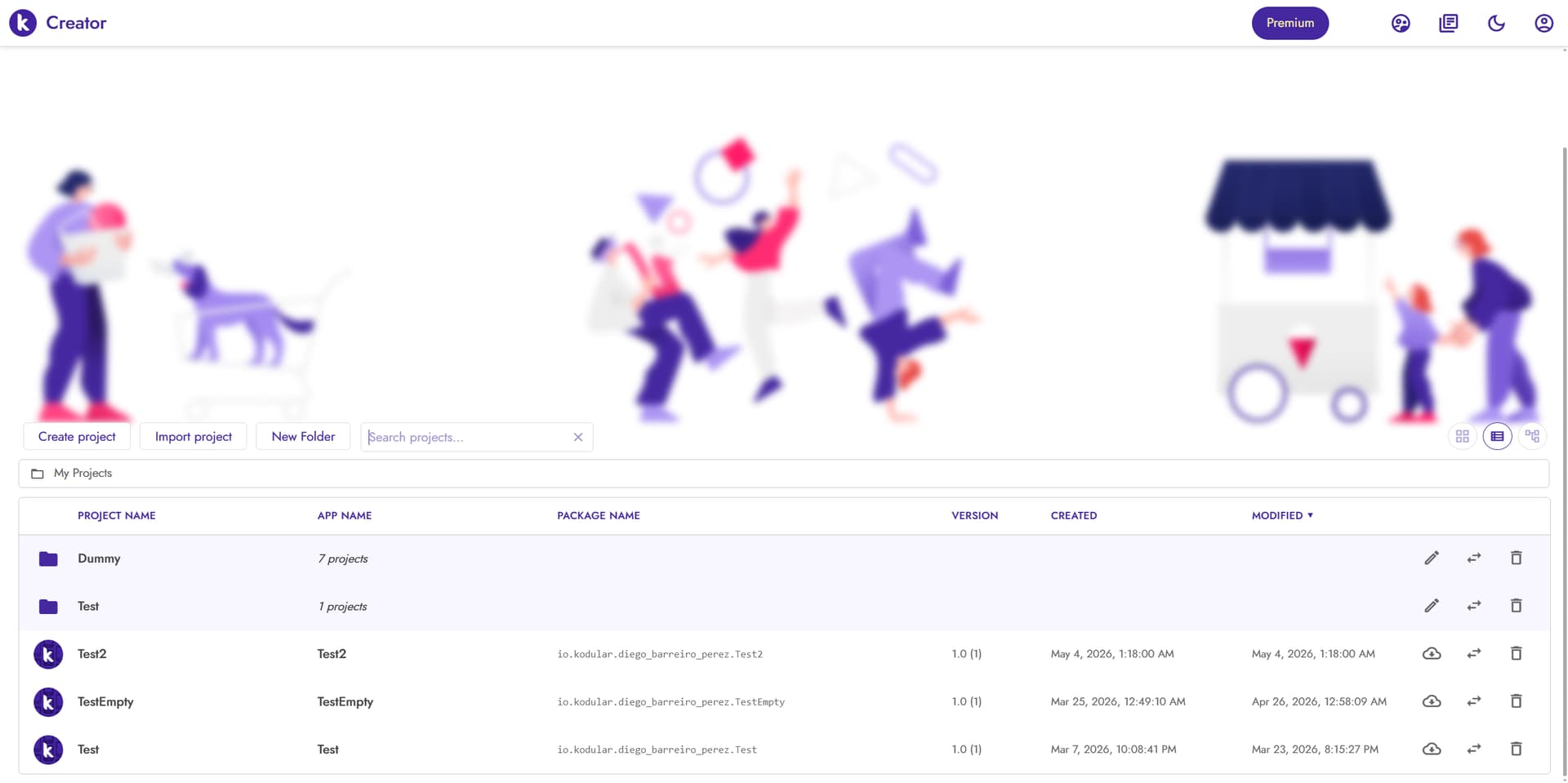
A big part of this release is focused on the Designer experience. Undo and Redo are now supported, so you can revert your last actions in the Designer using Ctrl+Z / Ctrl+Y (or ⌘+Z / ⌘+Y). The projects dashboard has been overhauled too: you can now organise your work into Project Folders, switch between the classic grid, a new Project List View, and a Project Tree View for navigating the folder hierarchy (your preference is remembered across sessions), and use Project Search in the toolbar to filter instantly by project name, app name, or package name. A new Reopen Last Project preference takes you straight to the project you were working on after sign-in.
Inside the Designer itself, Component Search in the palette has been improved, and the Screen Switcher and Asset Selector now show a filterable dropdown when there are more than five entries. The Extension Import Dialog has been redesigned with a unified upload flow and clearer status feedback, while the AIA Upload Dialog now previews the sanitized project name with inline validation before importing, and also accepts files whose names contain spaces (sanitized automatically).
We have also spent serious time profiling the Creator and tackling the slow parts. The UI is now responsive much earlier on project load: some large projects that previously took around 8 seconds to become interactive now take under 2 seconds. This comes from Cold Load Improvements that remove redundant refresh cycles during form load and editor initialisation, plus lazy property editors that are now created only when actually needed and skip expensive preferred-size calculations during initial load. The Blocks Editor itself has been tuned with throttled high-frequency pointer events during drag, cached block bounding boxes, and faster backpack hover detection, so dragging blocks is smoother and lighter on the CPU.
New Components
This release ships a long-requested set of new cloud and authentication components, available to all users at no additional cost:
- Firebase Cloud Messaging: receive push messages, foreground notifications (with image support), and notification clicks, with FCM token retrieval and topic subscribe/unsubscribe support.
- Cloud Firestore: Google’s serverless document database, with full CRUD, query builder, real-time listeners, batch writes, and transactions.
- Supabase Authentication, Supabase Database, and Supabase Storage: an open-source backend alternative covering email/password and magic-link auth, query building with filters and ordering, file uploads, and signed URLs.
- Biometric Prompt: fingerprint, face, and device-credential authentication built on AndroidX Biometric.
On the advertising side, this release also adds new monetisation options:
- Unity Ads is back, with three new components for Banner (Standard, Large, Rectangle), Interstitial, and Rewarded formats.
- Tapjoy Offerwall: load and show the Tapjoy offerwall, with virtual-currency awards, GDPR controls, and configurable placements.
- Start.io: completely refreshed with SDK 5.3.0, adding new Rewarded Video, MREC, Cover, and Native Ad Layout components, plus configurable interstitial types and customisable native ad image sizes.
These advertising components (Unity Ads, Tapjoy Offerwall, and Start.io) are only available through Kodular Monetize.
The AdMob components have also been renamed to Google AdMob, so all Google ad networks now group together in the Advertising palette.
Improvements to Existing Components
A few existing components have received notable upgrades.
The Image and ImageSprite components now play animated GIFs natively on Android 9 and newer, with no extra APK size cost. Older devices keep showing a static first frame as before. The Image component also applies EXIF orientation when loading photos, so portrait pictures taken with phone cameras no longer appear sideways.
The QrCode component has been completely overhauled. It now generates QR codes locally with zxing instead of calling an external service, working fully offline. A new Format property lets you choose the output image format between PNG, JPEG, and WebP.
Bug Fixes
This release ships an extensive list of fixes, many of them targeting Android 13, 14, 15, and 16 device compatibility. The most notable ones:
- Map component now follows the new OpenStreetMap tile-server redirects, finally putting the long-running blank-tiles issue to rest.
- Soft keyboard no longer overlaps text fields on Android 15.
READ_MEDIApermissions are no longer added to non-companion APKs (these were silently triggering Google Play rejections).- Texting notifications now work correctly on Android 13+ thanks to a proper notification channel and runtime permission.
- Firebase Authentication has been hardened against Google Sign-In crashes when used alongside other Firebase-using extensions.
coerce-to-dictionarynow parses JSON strings returned from the Web component, fixing the long-standingapply-to-argsruntime errors.Spinner.AfterSelectionnow fires correctly when the component is invisible.- Crashes on certain Android 16 devices in
QUtil.getExternalStorageDir()when external storage is unmounted.
A number of smaller Designer issues have also been addressed, including dark theme flashing, color picker positioning, screens ordering, and several mock components.
We have also removed the App Center integration from the Creator, since the underlying service was deprecated upstream and is no longer being maintained.
You can review the full changelog here:
Happy Koding!
 Kodular Team