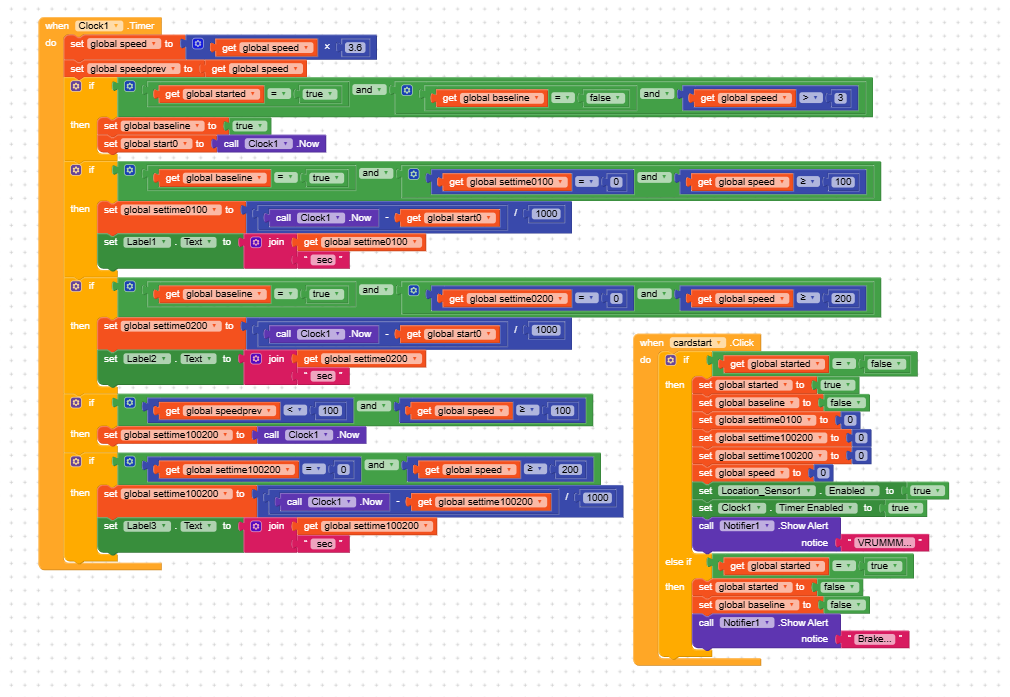
Hello guys! I’ve made progress with the application, but I still consider myself a beginner and I’m turning to you. I tried to make a mini dragy in a separate screen, but the seconds aren’t displayed. Do you have any idea what I did wrong? I tried debugging to see if it works at 3km/h and it doesn’t display the time.
Hi,
your blocks are working as you wrote them you only set & show the 0–100s value when speed >= 100 (and similarly for 0-200 when speed >= 200). So if you test at 3 km/h the 0-100 label will never be set (and stays empty) and if you test at low speed (3 km/h) the >=100 condition never becomes true and the Label remains unchanged.
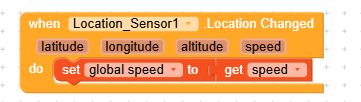
How are you getting the speed? Where does it come from? Also can you show us the all blocks from these started etc for easy understanding
The speed is obtained from the gps and I made a global variable for it, called speed. All the blocks are in the attached picture.
Do I understand that my logic is a bit wrong now? The label with the answer in seconds will only be displayed when the speed is >= 100? Can I delete the value 3 and leave only (started and baseline)?
Yes you understood it exactly right.
Let me explain clearly so you see why it behaves like this:
 1. Your current logic only shows seconds at ≥100 km/h
Your block says:
IF (baseline = true) AND (settime0100 = 0) AND (speed >= 100)
    → calculate seconds
    → show label
So YES the label will remain empty until speed reaches 100 km/h.
At 3 km/h, nothing happens → label stays blank.
That is why you see no seconds.
2. About the “speed > 3” condition for starting the timer
You currently start your timing only when:
started = true
baseline = false
speed > 3
This means:
- app waits until car starts rolling (more than 3 km/h)
- then sets baseline = true
- and records start time
 You can remove the “speed > 3” if you want
If you delete the speed > 3 condition and use only:
if started = true AND baseline = false
Then the moment you press START, the counter will begin immediately even if the car is not moving.
 But be careful:
- If you start counting immediately, your 0–100 timer will include the delay before the car begins moving.
- If you want real acceleration timing, keeping a small threshold (3–5 km/h) is better.
 Recommended
A. Starting Logic (Best Practice)
Use this:
IF started = true AND baseline = false AND speed > 3
    → start timer
This means timer starts when the car begins moving, not when button is pressed.
B. 0-100 display logic
Keep:
if baseline = true AND settime0100 = 0 AND speed >= 100
    → calculate 0–100 sec
    → show label
This is correct.
C. Optional: Add a LIVE TIMER (for debugging)
If you want to see seconds always increasing, add:
IF baseline = true
    set LabelLive.Text to (Clock.Now - start0)/1000
This way you SEE the timer even before reaching 100 km/h.
So KEEP this:
- started = true
- baseline = false
- speed > 3
DO NOT remove the 3 unless you want unrealistic acceleration readings.
I don’t see any GPS blocks, or any related blocks eg on LocationChanged. Can you please add the gps blocks on how you are handling the blocks from the start
@securebugs I advise you don’t use Artificial Intelligence when replying sometimes it make things more difficult, reply to what you exactly experienced with Kodular can be fast solution solve, eg providing blocks or solved topics if available because these networks only ready what’s available on Kodular documentation or on internet they have ever been here
1 Like
I did because there is many things unknown above in blocks and larger too, so I simply go with issue and I provide him solution.
BTW I’ll keep in mind for sure, but above explationation must solve his problem, if he follow step-y-step.
1 Like
I understand. I’ll keep >3km/h for something safer and set a label so the user can also see the live seconds. I’ll update.
Correct! and I’m Happy that solution worked.
1 Like
Hi dear,
there are a few small things I would like to point out, including one very important one
-
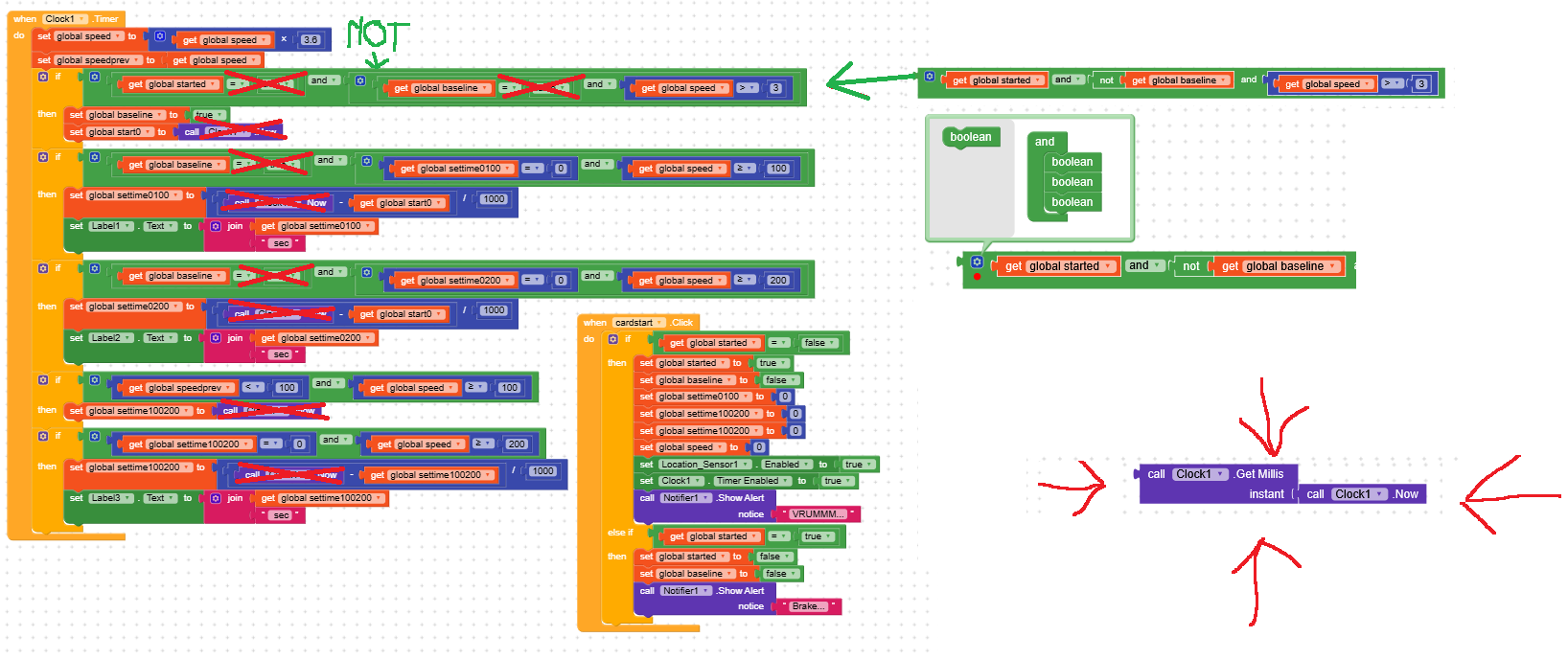
global started = trueand similar checks can be used without comparing them to true (see the image to understand better) -
same thing when you compare
global baseline = false, you can simply use anot -
to chain multiple
andconditions you can use the gear menu and add them directly from there -
IMPORTANT: You cannot add or subtract instants (Clock.Now) from each other, use
GetMillisinstead since it returns a number, and if you want you can convert it back to an instant usingMakeInstantFromMillis
3 Likes