I am making an app that shows images on low opacity and can be changed by users and a live camera to trace the image as the app is for glasses viewing , but there is no way possible to lower the opacity of image after selecting , how to solve it
U can Use an Arrangement Overlay (Most Common)
-
Put your Image component inside a Vertical/Horizontal Arrangement.
-
Set that arrangement’s background color to white with transparency, for example,
Use color → #80FFFFFF (50% opacity white)
- This creates a transparent layer on top of the image, making it appear faded.
If you need adjustable opacity,
Change the background color dynamically,
#AAFFFFFF (more fade)
#20FFFFFF (less fade), etc.
I don’t know if it’s possible as you expected
Extension can work, I just don’t know which one
Could you explain better what you are trying to achieve?
This extension creates a blur effect, but I’m not sure if that’s what you want.
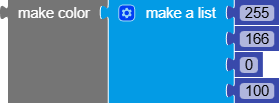
If by opacity you mean transparency, you can use make color with a list of 4 elements, where the 4th one is the transparency (the numbers in the list range from 0 to 255)
But assume I used a flower image on a surface view using overlay ,can I change the opacity of flower png
Do you need to change it dynamically?
If not, you can use a photo-editing program and add the transparency (make sure the background is transparent).
it should be adjusted by user through slider can you help me out ( my app is like you can view you face on camera , and you can select what glasses you want and can lower it opaciy to do as user wish )
This extension should suit your needs, give it a try.