Hello Builders! 
Dealing with file pickers on modern Android versions (Android 11, 12, 13, 14, 15, and 16+) has become a major headache due to Scoped Storage restrictions, content URI errors, and permission crashes.
Today, I am proud to present AnyFilePicker — a powerful, lightweight, and modern all-in-one File, Media, and Folder Picker extension designed specifically for Kodular, MIT App Inventor!
Whether you need to pick single files, bulk multiple files, custom MIME types, office documents, or entire directories via Storage Access Framework (SAF), AnyFilePicker handles everything smoothly without requiring dangerous storage permissions!
 Key Highlights & Features:
 Zero Dangerous Permissions: Fully compliant with Google Play Store policies. Uses the official Storage Access Framework (SAF /
 ACTION_GET_CONTENT/ACTION_OPEN_DOCUMENT). Full Android 7 to 16+ Support: Eliminates Scoped Storage read/write crashes once and for all.
 Auto-Caching Engine (
AutoCacheFile): Automatically copies picked content URIs into the app’s secure private directory and returns a clean, absolute local file path (/data/user/0/...) that works with all standard components (Image, Player, VideoPlayer, Uploaders). Single & Multiple File Picker: Pick one file or bulk select dozens of files simultaneously with
 EXTRA_ALLOW_MULTIPLE. SAF Folder Picker (
PickFolder): Allows users to select directories viaACTION_OPEN_DOCUMENT_TREE. Dedicated Category Pickers:
PickImage: Single or multiple photo selection.PickVideo: Single or multiple video selection.PickAudio: Single or multiple audio / music track selection.PickDocument: Filtered for PDF, DOC, DOCX, XLS, XLSX, PPT, PPTX, TXT, ZIP, and RAR.PickCustomFiles: Pass your own list of custom MIME types (e.g.application/pdf,image/png).
 Built-in File Metadata Helpers: Retrieve Display Name, real File Size (in bytes), Formatted File Size (e.g.,
 2.4 MB), MIME Type, File Extension, and check File Existence directly without extra extensions. Cache Management: Built-in background cache cleaner (
ClearCache) to prevent app bloat. Companion Friendly: Test seamlessly inside the Companion during development without restrictions.
 Specifications:
- Package:
com.abid.anyfilepicker - Version:
1.3(v9) - Size: ~39.8 KB (Super Lightweight)
- Minimum Android API: 24 (Android 7.0+)
- Target / Tested SDK: API 36+ (Android 7 to 16+ Ready)
 Blocks & Documentation:
 Properties:
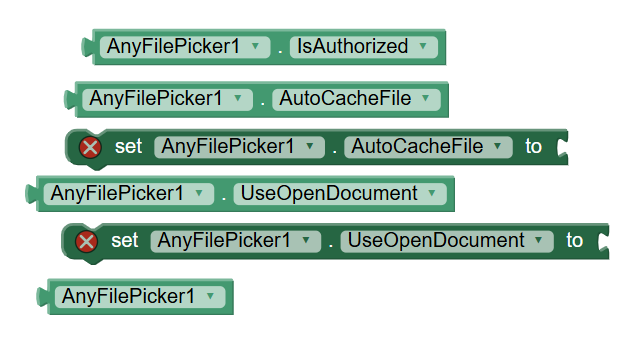
- AutoCacheFile (Boolean): (Designer & Blocks) When enabled (Default:
True), picked files are cached safely into the app’s internal directory so you get an instant local file path. - UseOpenDocument (Boolean): (Designer & Blocks) Toggle between
ACTION_GET_CONTENT(Default:False) andACTION_OPEN_DOCUMENT(SAF).
 Picker Methods:
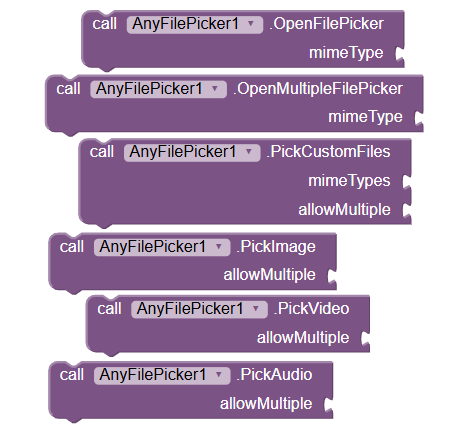
- OpenFilePicker(mimeType): Opens the native picker for a single file. (Default:
*/*or specify e.g.image/*,application/pdf). - OpenMultipleFilePicker(mimeType): Opens the picker allowing selection of multiple files.
- PickCustomFiles(mimeTypesList, allowMultiple): Pick files filtered by a list of MIME types (pass a Make a List block).
- PickImage(allowMultiple): Quick picker for images.
- PickVideo(allowMultiple): Quick picker for videos.
- PickAudio(allowMultiple): Quick picker for audio tracks.
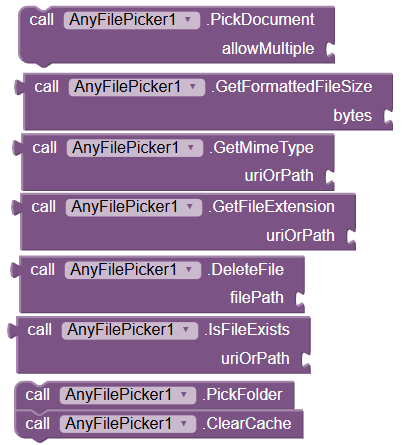
- PickDocument(allowMultiple): Quick picker for documents (PDF, Word, Excel, PowerPoint, Text, Zip, Rar).
- PickFolder(): Opens directory picker to select a folder.
 File Utility Methods:
- GetFileName(uriOrPath): Returns the actual filename (e.g.,
invoice.pdf). - GetFileSize(uriOrPath): Returns file size in bytes (as number).
- GetFormattedFileSize(bytes): Formats bytes to readable text (e.g.,
1.8 MB,450 KB). - GetMimeType(uriOrPath): Returns MIME type string (e.g.,
application/pdf). - GetFileExtension(uriOrPath): Returns file extension (e.g.,
pdf,png,zip). - IsFileExists(uriOrPath): Checks if the file path or URI exists and is accessible.
- DeleteFile(filePath): Deletes a local cached file.
- ClearCache(): Asynchronously clears all cached files created by AnyFilePicker to free storage.
 Activation & Security Methods:
- StartSecurityCheck(email, itemId): Silent, one-time verification using your registered Email & Item ID.
- UserEmail(): Returns currently verified email.
- ItemID(): Returns current Item ID.
- IsVerified(): Returns
Trueif extension has verified successfully. - IsAccessGranted(): Returns
Trueif active access is granted.
 Events:
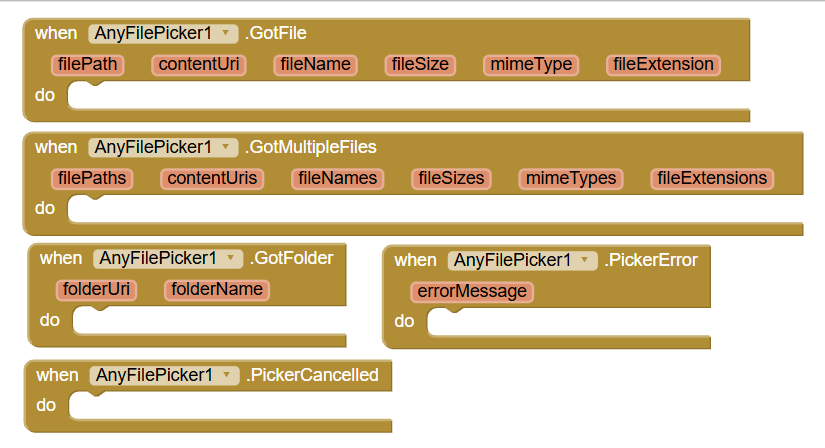
- GotFile(filePath, contentUri, fileName, fileSize, mimeType, fileExtension): Triggered when a single file is picked.
- GotMultipleFiles(filePaths, contentUris, fileNames, fileSizes, mimeTypes, fileExtensions): Triggered when multiple files are picked (returns YailLists).
- GotFolder(folderUri, folderName): Triggered when a folder is selected via
PickFolder. - PickerCancelled(): Triggered if the user cancels or closes the picker without selecting anything.
- PickerError(errorMessage): Triggered if any error occurs.
- AccessGranted(): Triggered when Email + Item ID authorization succeeds.
- AccessDenied(email, itemId): Triggered if license check fails.
How to Implement (Quick Guide):
- On
Screen1.Initialize, callStartSecurityCheckwith your registered Email and Item ID. - In the
AccessGrantedevent, you can proceed to use any picker function. - Call
PickDocument(True)orOpenMultipleFilePicker("*/*"). - In
GotMultipleFiles, you receive clean local file paths (filePaths), filenames, and sizes ready for ListViews or Uploaders!
(Note: During development in the Companion, the extension works without requiring activation).
 Pricing & How to Purchase:
This is a Premium Paid Extension with lifetime access and future updates.
 Price: $3 USD (900 PKR / ₹300 INR)
 Instant Buy & Activation: Visit Official Store Page
 Official Website: aixhub-store.pages.dev
 Direct Purchase via WhatsApp: Chat with Developer (+92 344 9490070)
 Direct Purchase via PM: Send a personal message directly here on the Community.
 Test Demo App:
Before purchasing, you can test the extension’s performance directly on your Android device:
 Download Demo APK: (Coming Soon)
 License & Terms:
- Single Developer License: Valid for use in all your personal and client apps.
- Free lifetime bug fixes and compatibility updates for future Android versions.
- Reselling, decompiling, or publicly redistributing the
.aixfile is strictly prohibited.
Feedback & Support:
Have questions, suggestions, or need custom MIME types? Feel free to reply to this thread or reach out via PM/WhatsApp!
Happy Building!