🧩 BVRecorder
An extension for MIT App Inventor 2.Developed by th using Fast. An Extension To Record Background Video Without Open Camera App, with Inclued video quality with including Background Recording on minimize app.
 Specifications
 Package: io.th.bvrecorder
 Size: 12.51 KB
 Version: 1.2
 Minimum API Level: 14
 Updated On: 2025-12-09T00:00:00Z
 Built & documented using: FAST v5.3.2
 Paid Price - 2 USD.
INR - 175rs.
 Telegram: here
Find more Extension here
More Info GitHub
 Pm here @TechHamara
 Tested Poco X6 Pro
- Android Version 15
Buy In PayPal
Buy on BuyMeCoffee
Blocks



















Documentation
Events:
BVRecorder has total 9 events.
1. FrontCameraSelected
Event triggered when front camera is selected.
2. BackCameraSelected
Event triggered when back camera is selected.
3. VideoRecordingPaused
Event triggered when video recording has been paused.
4. VideoRecordingResumed
Event triggered when video recording has been resumed.
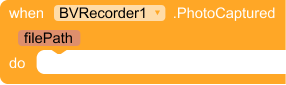
5. PhotoCaptured
Event triggered when a photo has been captured successfully.
| Parameter | Type |
|---|---|
| filePath | text |
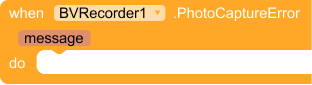
6. PhotoCaptureError
Event triggered when an error occurs during photo capture.
| Parameter | Type |
|---|---|
| message | text |
7. VideoRecordingStarted
Event triggered when video recording has successfully started.
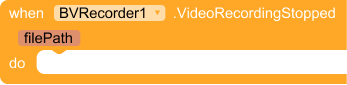
8. VideoRecordingStopped
Event triggered when video recording has been stopped. and filePath The file path where the video was saved
| Parameter | Type |
|---|---|
| filePath | text |
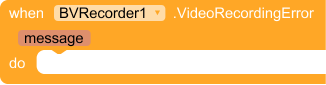
9. VideoRecordingError
Event triggered when an error occurs during video recording. and message A message describing the error.
| Parameter | Type |
|---|---|
| message | text |
Methods:
BVRecorder has total 15 methods.
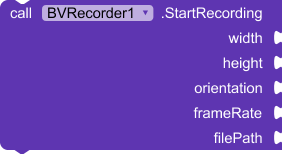
1. StartRecording
Starts video recording in the background with custom parameters and enhanced quality.
- height - The height (in pixels) of the video.
- width - The width (in pixels) of the video.
- orientation - The display orientation (e.g., 90 or 180).
- frameRate - The frame rate (e.g., 30 or 60).
- bitRate - The video bit rate (e.g., 2000000 (2mb lower bit rate) to 12000000 (12mb higher bit rate)).
- audioBitRate - The audio bit rate (e.g., 64000 (64kbps) to 320000 (320kbps)).
- filePath - The full path (including file name) where the recorded video will be saved.
| Parameter | Type |
|---|---|
| width | number |
| height | number |
| orientation | number |
| frameRate | number |
| filePath | text |
2. StopRecording
Stops background video recording.
3. FrontCamera
Sets the camera to use the front-facing camera if available.
4. BackCamera
Sets the camera to use the back-facing camera if available.
5. IsFrontCamera
Returns true if the front camera is currently selected.
- Return type:
boolean
6. StartRecordingFHD1080P
Starts high quality background video recording with preset parameters (1920x1080, 60 fps, 6Mbps video bitrate, 128Kbps audio bitrate).
- filePath - The full path (including file name) where the recorded video will be saved.
| Parameter | Type |
|---|---|
| filePath | text |
7. PauseRecording
Pauses video recording if supported (API level 24 and above).
8. ResumeRecording
Resumes video recording if supported (API level 24 and above).
9. IsRecording
Returns true if video recording is active, false otherwise.
- Return type:
boolean
10. RecordedFilePath
Returns the file path of the last recorded video.
- Return type:
text
11. CancelRecording
Cancels the current recording and cleans up resources.
12. CapturePhoto
Captures a photo and saves it to the provided file path.
| Parameter | Type |
|---|---|
| photoFilePath | text |
13. LastCapturedPhotoFilePath
Returns the file path of the last captured photo.
- Return type:
text
14. SetCameraOrientation
Sets the camera orientation (0, 90, 180, or 270 degrees)
| Parameter | Type |
|---|---|
| degrees | number |
15. GetCameraOrientation
Gets the current camera orientation in degrees
- Return type:
number
Demo uses on ai2 Community
Feel free to contact us any quarry or suggestions.
