Overview:
Google Map Pro is an enhanced Google Maps component developed by AEMO, It provides comprehensive mapping functionality with support for various overlays, gestures, animations, and customizations.
Size: 538 KB
Package Name: me.aemo.googlemappro
Version: 1.4
Author: AEMO
Price: 12$ # Contact with me on Telegram for buying # @AemoDev #
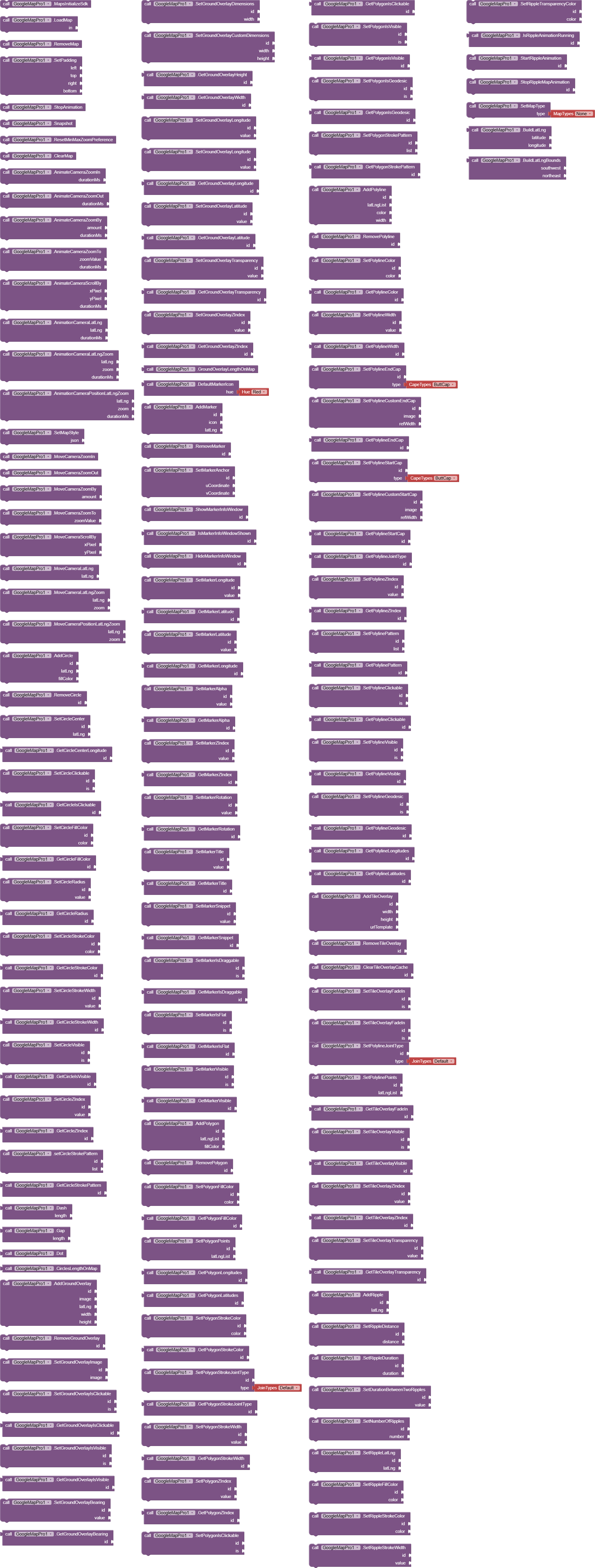
All the blocks
Events

Functions
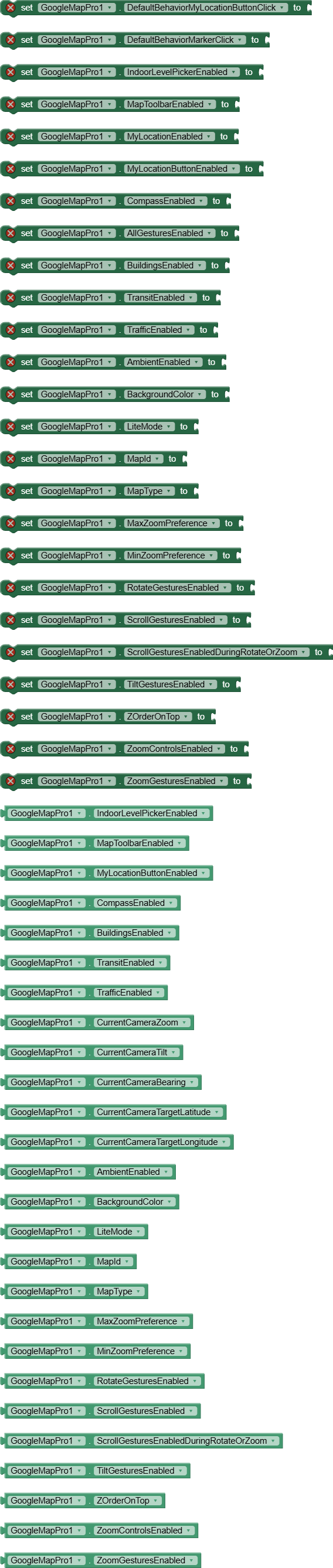
Properties
Document
Initialization & Lifecycle
MapsInitializeSdk()
Initializes the Google Maps SDK before loading the map.
Description: Must be called before any map operations. Triggers MapsSdkInitialized event when complete.
Example:
call GoogleMapPro1.MapsInitializeSdk
LoadMap(AndroidViewComponent in)
Loads and displays the map inside a specified container component.
Parameters:
in- The AndroidViewComponent (like HorizontalArrangement) where the map will be displayed
Events Triggered: OnMapReady when map is ready for use
Example:
call GoogleMapPro1.LoadMap HorizontalArrangement1
RemoveMap()
Removes the map from the screen and releases resources.
Example:
call GoogleMapPro1.RemoveMap
ClearMap()
Clears all overlays (circles, markers, polygons, etc.) from the map.
Example:
call GoogleMapPro1.ClearMap
Camera Controls
Animate Camera Functions
These functions provide smooth animated camera movements with completion and cancellation events.
AnimateCameraZoomIn(int durationMs)
Zooms in the camera with animation.
Parameters:
durationMs- Animation duration in milliseconds
Events: OnAnimateCameraZoomInCompleted , OnAnimateCameraZoomInCancelled
AnimateCameraZoomOut(int durationMs)
Zooms out the camera with animation.
AnimateCameraZoomBy(float amount, int durationMs)
Zooms by a specified amount.
Parameters:
amount- Zoom amount (positive for zoom in, negative for zoom out)durationMs- Animation duration
AnimateCameraZoomTo(float zoomValue, int durationMs)
Zooms to a specific zoom level.
Parameters:
zoomValue- Target zoom level (0-21)durationMs- Animation duration
AnimateCameraScrollBy(float xPixel, float yPixel, int durationMs)
Scrolls the camera by pixel amounts.
AnimationCameraLatLng(LatLng latLng, int durationMs)
Animates camera to center on a specific location.
Parameters:
latLng- Target locationdurationMs- Animation duration
AnimationCameraLatLngZoom(LatLng latLng, float zoom, int durationMs)
Animates camera to a location with specific zoom.
AnimationCameraPositionLatLngZoom(LatLng latLng, float zoom, int durationMs)
Animates camera to a position with zoom (alternative method).
Move Camera Functions
Immediate camera movements without animation.
MoveCameraZoomIn()
Instantly zooms in.
MoveCameraZoomOut()
Instantly zooms out.
MoveCameraZoomBy(float amount)
Instantly zooms by amount.
MoveCameraZoomTo(float zoomValue)
Instantly zooms to specific level.
MoveCameraScrollBy(float xPixel, float yPixel)
Instantly scrolls by pixels.
MoveCameraLatLng(LatLng latLng)
Instantly centers on location.
MoveCameraLatLngZoom(LatLng latLng, float zoom)
Instantly centers with zoom.
MoveCameraPositionLatLngZoom(LatLng latLng, float zoom)
Instantly positions with zoom.
Other Camera Functions
StopAnimation()
Stops any ongoing camera animation.
SetPadding(int left, int top, int right, int bottom)
Sets padding around the map (useful for UI elements).
Overlay Elements
Circles
AddCircle(Object id, LatLng latLng, int fillColor)
Adds a circle overlay to the map.
Parameters:
id- Unique identifier for the circlelatLng- Center locationfillColor- Fill color (use the “Make color” block)
Example:
call GoogleMapPro1.AddCircle id: "circle1" latLng: call
GoogleMapPro1.BuildLatLng 37.7749, -122.4194 fillColor: call MakeColor 255, 0, 0, 100
RemoveCircle(Object id)
Removes a specific circle.
SetCircleCenter(Object id, LatLng latLng)
Updates circle center position.
SetCircleRadius(Object id, double value)
Sets circle radius in meters.
SetCircleFillColor(Object id, int color)
Changes circle fill color.
SetCircleStrokeColor(Object id, int color)
Changes circle outline color.
SetCircleStrokeWidth(Object id, float value)
Sets outline thickness.
SetCircleVisible(Object id, boolean is)
Shows/hides the circle.
SetCircleClickable(Object id, boolean is)
Enables/disables click events for the circle.
SetCircleZIndex(Object id, float value)
Sets drawing order (higher values appear on top).
setCircleStrokePattern(Object id, YailList list)
Creates dashed/dotted outline pattern.
Pattern Items:
Dash(int length)- Creates a dashGap(int length)- Creates a gapDot()- Creates a dot
Example:
set pattern to make a list call GoogleMapPro1.Dash 30 call GoogleMapPro1.Gap 20 call GoogleMapPro1.Dot call GoogleMapPro1.setCircleStrokePattern "circle1" pattern
Getter Functions:
GetCircleCenterLatitude(id)GetCircleCenterLongitude(id)GetCircleIsClickable(id)GetCircleFillColor(id)GetCircleRadius(id)GetCircleStrokeColor(id)GetCircleStrokeWidth(id)GetCircleIsVisible(id)GetCircleZIndex(id)GetCircleStrokePattern(id)CirclesLengthOnMap()- Returns total number of circles
Ground Overlays
AddGroundOverlay(Object id, String image, LatLng latLng, int width, int height)
Adds an image overlay on the map.
Parameters:
id- Unique identifierimage- Path to image filelatLng- Center positionwidth- Width in metersheight- Height in meters
Example:
call GoogleMapPro1.AddGroundOverlay id: "overlay1" image: "logo.png" latLng: call GoogleMapPro1.BuildLatLng 37.7749, -122.4194 width: 100 height: 50
RemoveGroundOverlay(Object id)
Removes a ground overlay.
SetGroundOverlayImage(Object id, String image)
Changes the overlay image.
SetGroundOverlayIsClickable(Object id, boolean is)
Enables/disables click events.
SetGroundOverlayBearing(Object id, float value)
Sets rotation in degrees.
SetGroundOverlayDimensions(Object id, float width)
Sets width (height auto-calculated to maintain aspect ratio).
SetGroundOverlayCustomDimensions(Object id, float width, float height)
Sets both width and height.
SetGroundOverlayTransparency(Object id, float value)
Sets transparency (0.0 = opaque, 1.0 = transparent).
SetGroundOverlayZIndex(Object id, float value)
Sets drawing order.
Getter Functions:
GetGroundOverlayIsClickable(id)GetGroundOverlayIsVisible(id)GetGroundOverlayBearing(id)GetGroundOverlayHeight(id)GetGroundOverlayWidth(id)GetGroundOverlayLongitude(id)GetGroundOverlayLatitude(id)GetGroundOverlayTransparency(id)GetGroundOverlayZIndex(id)GroundOverlayLengthOnMap()
Markers
DefaultMarkerIcon(float hue)
Creates a default Google Maps marker with specified color.
Hue Options:
HUE_RED,HUE_ORANGE,HUE_YELLOW,HUE_GREEN,HUE_CYANHUE_AZURE,HUE_BLUE,HUE_VIOLET,HUE_MAGENTA,HUE_ROSE
Example:
set icon to call GoogleMapPro1.DefaultMarkerIcon GoogleMapPro1.HUE_RED
AddMarker(Object id, Object icon, LatLng latLng)
Adds a marker to the map.
Parameters:
id- Unique identifiericon- Either a hue value from DefaultMarkerIcon or a path to image filelatLng- Marker position
Example (with custom image):
blocks
call GoogleMapPro1.AddMarker id: “marker1” icon: “marker.png” latLng: call GoogleMapPro1.BuildLatLng 37.7749, -122.4194
RemoveMarker(Object id)
Removes a marker.
Marker Info Windows
ShowMarkerInfoWindow(Object id)
Shows the info window for a marker.
HideMarkerInfoWindow(Object id)
Hides the info window.
IsMarkerInfoWindowShown(Object id)
Checks if info window is visible.
SetMarkerTitle(Object id, String value)
Sets the title text for info window.
SetMarkerSnippet(Object id, String value)
Sets the description text for info window.
Marker Appearance
SetMarkerAnchor(Object id, float uCoordinate, float vCoordinate)
Sets the anchor point (where the marker image attaches to the map).
- (0,0) = top-left, (1,1) = bottom-right
SetMarkerAlpha(Object id, float value)
Sets transparency (0.0 = transparent, 1.0 = opaque).
SetMarkerRotation(Object id, float value)
Sets rotation in degrees.
SetMarkerIsFlat(Object id, boolean is)
If true, marker faces camera; if false, always faces screen.
SetMarkerVisible(Object id, boolean is)
Shows/hides marker.
SetMarkerZIndex(Object id, float value)
Sets drawing order.
Marker Position & Behavior
SetMarkerLatitude/Longitude
Updates marker position.
SetMarkerIsDraggable(Object id, boolean is)
Allows user to drag the marker.
Getter Functions:
GetMarkerAlpha(id)GetMarkerZIndex(id)GetMarkerRotation(id)GetMarkerTitle(id)GetMarkerSnippet(id)GetMarkerIsDraggable(id)GetMarkerIsFlat(id)GetMarkerVisible(id)GetMarkerLatitude(id)GetMarkerLongitude(id)
Polygons
AddPolygon(Object id, YailList latLngList, int fillColor)
Creates a filled polygon from a list of points.
Parameters:
id- Unique identifierlatLngList- List of LatLng points (use BuildLatLng for each point)fillColor- Fill color
Example:
set points to create empty list add items to list points call
GoogleMapPro1.BuildLatLng 37.7749, -122.4194 call
GoogleMapPro1.BuildLatLng 37.7750, -122.4195 call
GoogleMapPro1.BuildLatLng 37.7748, -122.4196 call
GoogleMapPro1.AddPolygon id: "polygon1" latLngList: points fillColor: call
MakeColor 0, 255, 0, 100
RemovePolygon(Object id)
Removes a polygon.
Polygon Properties
SetPolygonFillColor(Object id, int color)
Changes fill color.
SetPolygonStrokeColor(Object id, int color)
Changes outline color.
SetPolygonStrokeWidth(Object id, float value)
Sets outline thickness.
SetPolygonStrokeJointType(Object id, int type)
Sets how lines join at corners.
Join Types:
DEFAULT_STROKE_JOIN_TYPE(0)BEVEL_STROKE_JOIN_TYPE(1)ROUND_STROKE_JOIN_TYPE(2)
SetPolygonIsGeodesic(Object id, boolean is)
If true, edges follow great circle routes (curved on map).
SetPolygonStrokePattern(Object id, YailList list)
Creates dashed/dotted outline (same pattern system as circles).
Getter Functions:
GetPolygonFillColor(id)GetPolygonStrokeColor(id)GetPolygonStrokeWidth(id)GetPolygonStrokeJointType(id)GetPolygonZIndex(id)GetPolygonIsClickable(id)GetPolygonIsVisible(id)GetPolygonIsGeodesic(id)GetPolygonStrokePattern(id)GetPolygonLatitudes(id)- Returns list of all latitude pointsGetPolygonLongitudes(id)- Returns list of all longitude points
Polylines
AddPolyline(Object id, YailList latLngList, int color, int width)
Creates a line connecting multiple points.
Parameters:
id- Unique identifierlatLngList- List of LatLng pointscolor- Line colorwidth- Line thickness in pixels
Example:
set points to create empty list add items to list points call
GoogleMapPro1.BuildLatLng 37.7749, -122.4194 call
GoogleMapPro1.BuildLatLng 37.7750, -122.4195 call
GoogleMapPro1.BuildLatLng 37.7748, -122.4196 call
GoogleMapPro1.AddPolyline id: "route1" latLngList: points color: call
MakeColor 0, 0, 255, 255 width: 5
RemovePolyline(Object id)
Removes a polyline.
Polyline End Caps
SetPolylineEndCap(Object id, String type)
Sets the appearance at line end.
Cap Types:
"bc"- Butt Cap (square end)"rc"- Round Cap (rounded end)"sc"- Square Cap (extends beyond endpoint)
SetPolylineCustomEndCap(Object id, String image, int refWidth)
Creates custom end cap using an image.
SetPolylineStartCap(Object id, String type)
Sets the appearance at line start.
SetPolylineCustomStartCap(Object id, String image, int refWidth)
Creates custom start cap.
Polyline Joints
SetPolylineJointType(Object id, int type)
Sets how lines connect at vertices (same options as polygons).
SetPolylinePattern(Object id, YailList list)
Creates dashed/dotted line pattern.
Other Polyline Properties
SetPolylineColor(Object id, int color)
Changes line color.
SetPolylineWidth(Object id, float value)
Changes line thickness.
SetPolylineGeodesic(Object id, boolean is)
If true, follows great circle route.
SetPolylineZIndex(Object id, int value)
Sets drawing order.
SetPolylineClickable(Object id, boolean is)
Enables/disables click events.
Getter Functions:
GetPolylineColor(id)GetPolylineWidth(id)GetPolylineEndCap(id)GetPolylineStartCap(id)GetPolylineJointType(id)GetPolylineZIndex(id)GetPolylinePattern(id)GetPolylineClickable(id)GetPolylineVisible(id)GetPolylineGeodesic(id)GetPolylineLatitudes(id)GetPolylineLongitudes(id)
Tile Overlays
AddTileOverlay(Object id, int width, int height, String urlTemplate)
Adds a custom tile overlay (like custom map layers).
Parameters:
id- Unique identifierwidth- Tile width in pixelsheight- Tile height in pixelsurlTemplate- URL pattern with {x}, {y}, {z} placeholders
URL Template Example:
text
“https://tile.openstreetmap.org/{z}/{x}/{y}.png”
RemoveTileOverlay(Object id)
Removes a tile overlay.
ClearTileOverlayCache(Object id)
Clears cached tiles.
SetTileOverlayFadeIn(Object id, boolean is)
Enables/disables fade-in animation when tiles load.
SetTileOverlayVisible(Object id, boolean is)
Shows/hides the tile overlay.
SetTileOverlayZIndex(Object id, int value)
Sets drawing order.
SetTileOverlayTransparency(Object id, int value)
Sets transparency (0-255).
Getter Functions:
GetTileOverlayFadeIn(id)GetTileOverlayVisible(id)GetTileOverlayZIndex(id)GetTileOverlayTransparency(id)
Ripple Animations
Creates animated ripple effects on the map (like water ripples).
AddRipple(Object id, LatLng latLng)
Creates a new ripple animation at specified location.
SetRippleDistance(Object id, double distance)
Sets the maximum ripple radius in meters.
SetRippleDuration(Object id, long duration)
Sets animation duration in milliseconds.
SetDurationBetweenTwoRipples(Object id, long value)
Sets delay between multiple ripples.
SetNumberOfRipples(Object id, int number)
Sets how many concentric ripples appear.
SetRippleFillColor(Object id, int color)
Sets the fill color of ripples.
SetRippleStrokeColor(Object id, int color)
Sets the outline color.
SetRippleStrokeWidth(Object id, int value)
Sets outline thickness.
SetRippleTransparencyColor(Object id, int color)
Sets transparency effect.
StartRippleAnimation(Object id)
Begins the ripple animation.
StopRippleMapAnimation(Object id)
Stops the ripple animation.
IsRippleAnimationRunning(Object id)
Checks if animation is currently running.
Example:
call GoogleMapPro1.AddRipple id: "ripple1" latLng: call
GoogleMapPro1.BuildLatLng 37.7749, -122.4194 call
GoogleMapPro1.SetRippleDistance "ripple1" 500 call
GoogleMapPro1.SetRippleDuration "ripple1" 2000 call
GoogleMapPro1.SetRippleFillColor "ripple1" call MakeColor 0, 150, 255, 100
call GoogleMapPro1.StartRippleAnimation "ripple1"
Map Properties
UI Settings
IndoorLevelPickerEnabled(boolean enabled)
Shows/hides the indoor level picker (for buildings with multiple floors).
MapToolbarEnabled(boolean enabled)
Shows/hides the map toolbar (directions, open in Google Maps).
MyLocationEnabled(boolean enabled)
Enables/disables showing user’s current location (requires location permission).
MyLocationButtonEnabled(boolean enabled)
Shows/hides the “go to my location” button.
CompassEnabled(boolean enabled)
Shows/hides the compass when map is rotated.
AllGesturesEnabled(boolean enabled)
Enables/disables all map gestures (pan, zoom, rotate, tilt).
Map Features
BuildingsEnabled(boolean enabled)
Shows/hides 3D buildings where available.
TransitEnabled(boolean enabled)
Shows/hides public transit information.
TrafficEnabled(boolean enabled)
Shows/hides real-time traffic overlay.
SetMapType(int type)
Changes the base map type.
Map Types:
MAP_TYPE_NONE- Empty map (1)MAP_TYPE_NORMAL- Standard road map (2)MAP_TYPE_SATELLITE- Satellite imagery (3)MAP_TYPE_TERRAIN- Terrain with elevation (4)MAP_TYPE_HYBRID- Satellite with roads/labels (5)
SetMapStyle(String json)
Applies custom styling using JSON.
The official tool from Google for creating map styles.
URL: https://mapstyle.withgoogle.com/
Example:
call GoogleMapPro1.SetMapStyle "[ { \"featureType\": \"poi\", \"elementType\": \"labels\", \"stylers\": [{ \"visibility\": \"off\" }] } ]"
Camera Properties (Read-only)
CurrentCameraZoom()
Returns current zoom level (0-21).
CurrentCameraTilt()
Returns current tilt angle (0-90 degrees).
CurrentCameraBearing()
Returns current rotation (0-360 degrees).
CurrentCameraTargetLatitude()
Returns latitude of map center.
CurrentCameraTargetLongitude()
Returns longitude of map center.
Map Options
These properties must be set before calling LoadMap .
AmbientEnabled(boolean enabled)
Enables ambient mode for better battery life.
BackgroundColor(int bgColor)
Sets map background color (shows before tiles load).
LiteMode(boolean enabled)
Enables lite mode (lower memory usage, fewer features).
MapId(String id)
Sets custom map ID for advanced styling.
MaxZoomPreference(float maxZoom)
Sets maximum zoom level.
MinZoomPreference(float minZoom)
Sets minimum zoom level.
Gesture Controls
RotateGesturesEnabled(boolean enabled)ScrollGesturesEnabled(boolean enabled)ScrollGesturesEnabledDuringRotateOrZoom(boolean enabled)TiltGesturesEnabled(boolean enabled)ZoomControlsEnabled(boolean enabled)(on-screen +/- buttons)ZoomGesturesEnabled(boolean enabled)(pinch-to-zoom)
ZOrderOnTop(boolean enabled)
Controls whether map surface is on top of other views.
Events
Initialization Events
MapsSdkInitialized()
Triggered after SDK initialization.
OnMapReady()
Triggered when map is fully loaded and ready for use.
OnMapLoaded()
Triggered when map tiles have finished loading.
Camera Events
OnCameraIdle()
Triggered when camera stops moving.
OnCameraMove()
Triggered during camera movement.
OnCameraMoveStarted(int reason)
Triggered when camera starts moving.
REASON_GESTURE(1) - User interactionREASON_API_ANIMATION(2) - Programmatic animationREASON_DEVELOPER_ANIMATION(3) - Developer animation
OnCameraMoveCanceled()
Triggered when camera movement is interrupted.
Map Interaction Events
OnMapClick(double latitude, double longitude)
Triggered when user taps on map.
OnMapLongClick(double latitude, double longitude)
Triggered when user long-presses on map.
OnMyLocationButtonClick()
Triggered when user clicks the my-location button.
OnMyLocationClick(double latitude, double longitude, String locationInfos)
Triggered when user clicks on the blue dot (current location).
OnPointOfInterestClick(String name, String placeId, double latitude, double longitude)
Triggered when user clicks on a point of interest.
Overlay Events
OnCircleClick(Object id)
Triggered when a circle is clicked (must be clickable).
OnGroundOverlayClick(Object id)
Triggered when a ground overlay is clicked.
OnMarkerClick(Object id)
Triggered when a marker is clicked.
OnMarkerDrag(Object id)
Triggered during marker dragging.
OnMarkerDragEnd(Object id)
Triggered when marker drag ends.
OnMarkerDragStart(Object id)
Triggered when marker drag begins.
OnPolygonClick(Object id)
Triggered when a polygon is clicked.
OnPolylineClick(Object id)
Triggered when a polyline is clicked.
Info Window Events
OnInfoWindowClick(Object markerId)
Triggered when info window is clicked.
OnInfoWindowClose(Object markerId)
Triggered when info window is closed.
OnInfoWindowLongClick(Object markerId)
Triggered when info window is long-pressed.
Indoor Events
OnIndoorBuildingFocused()
Triggered when an indoor building is in view.
OnIndoorLevelActivated(int activeLevelIndex, int defaultLevelIndex, YailList levelsNames, YailList levelsShortNames, boolean isUnderground)
Triggered when indoor level changes.
Animation Events
Various animation completion/cancellation events:
OnAnimateCameraZoomInCompleted/CancelledOnAnimateCameraZoomOutCompleted/CancelledOnAnimateCameraZoomByCompleted/CancelledOnAnimateCameraZoomToCompleted/CancelledOnAnimateCameraScrollByCompleted/CancelledOnAnimationCameraLatLngCompleted/CancelledOnAnimationCameraLatLngZoomCompleted/CancelledOnAnimationCameraPositionLatLngZoomCompleted/Cancelled
Error Events
OnErrorOccurred(String errorMsg, String errorFrom)
Triggered when any error occurs.
Snapshot Events
OnSnapshotSuccess(String path)
Triggered when map snapshot is successfully saved.
Utility Functions
BuildLatLng(double latitude, double longitude)
Creates a LatLng object for use in other functions.
Example:
set location to call GoogleMapPro1.BuildLatLng 37.7749, -122.4194
BuildLatLngBounds(LatLng southwest, LatLng northeast)
Creates a bounds object (useful for camera positioning).
Snapshot()
Takes a screenshot of the current map view.
Events: OnSnapshotSuccess with file path when complete.
SetPadding(int left, int top, int right, int bottom)
Sets padding inside the map view.
ResetMinMaxZoomPreference()
Resets zoom limits to default.
DefaultBehaviorMyLocationButtonClick(boolean is)
Controls whether my-location button has default behavior (centering on location).

 odular community


