LocalAI Extension
Key Features:
- Fast Responses: Highly optimized for mobile processors to ensure lightning-fast generation and optimal response times (minimal delay).
- Real-time Typewriter UI: Built-in token streaming events let you easily create beautiful, character-by-character typing effects.
- 100% Free & Private: No API keys, no server costs, and no user data ever leaves the device.
- Modern Model Support: Compatible with any standard GGUF model (Llama, Gemma, Qwen, etc.).
1. Overview
Version: 1
Released: August 26, 2026
Last Updated: August 26, 2026
Permissions: android.permission.INTERNET (only required if you choose to download models from the web)
Aix Size: 40.16 KB
(Note: Requires dropping the native liblocalai.so binary file or zip into your project’s assets)
2. Blocks
3. Documentation
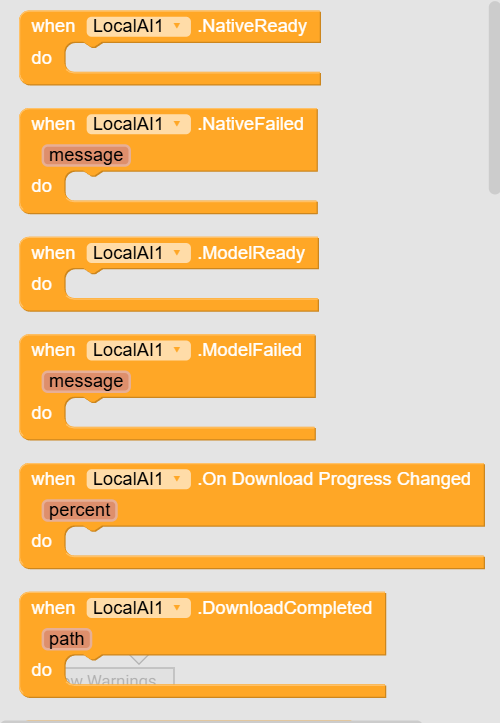
| NativeReady | Event raised when the native AI engine library (liblocalai.so) is successfully loaded and ready. |
| NativeFailed | Event raised when the native library fails to load. Returns the error message and device ABI info.message : text |
| ModelReady | Event raised when the GGUF model is fully loaded into memory and ready for text generation. |
| ModelFailed | Event raised when the GGUF model fails to load (e.g. invalid path, corrupt file, or insufficient memory).message : text |
| DownloadProgress | Event raised periodically during model download with current progress percentage (0 to 100).percent : number |
| DownloadCompleted | Event raised when the model file has finished downloading and is ready. Returns the absolute file path to be passed to LoadModel.path : text |
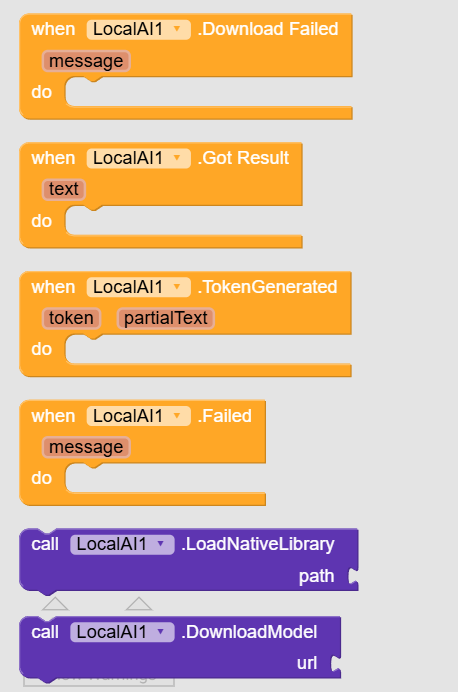
| DownloadFailed | Event raised when model download or extraction fails.message : text |
| GotResult | Event raised when text generation is complete. Returns the full generated response text.text : text |
| TokenGenerated | Event raised in real-time each time a new token is generated. Returns the newest 'token' and the accumulated 'partialText' for building streaming typewriter UI.token : textpartialText : text |
| Failed | Event raised when text generation fails, is cancelled, or encounters an error.message : text |
| LoadNativeLibrary | Loads the native inference engine (liblocalai.so). Accepts app asset paths ('//liblocalai.so' or '//liblocalai.zip'), absolute paths ('/storage/.../liblocalai.so'), or 'file://' URIs. Zip files are automatically extracted to private storage. Fires NativeReady or NativeFailed.path : text |
| DownloadModel | Downloads a GGUF model or a .zip containing a GGUF from a remote URL or copies it from local storage into app-specific private directory. Automatically skips download if the file already exists. Fires DownloadProgress, then DownloadCompleted or DownloadFailed.url : text |
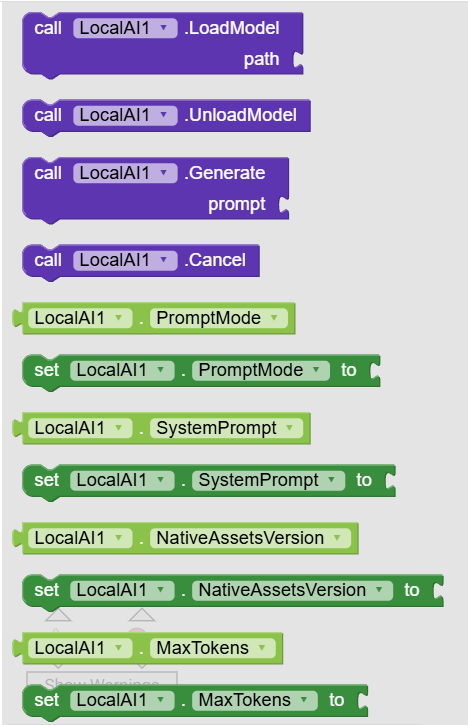
| LoadModel | Loads a GGUF model file into memory from an absolute path (e.g. returned by DownloadCompleted). Requires LoadNativeLibrary to be executed first. Fires ModelReady or ModelFailed.path : text |
| UnloadModel | Unloads the currently loaded GGUF model from memory to free up RAM. The native library remains loaded so another model can be loaded quickly. |
| Generate | Starts generating text asynchronously from the given prompt. Fires TokenGenerated in real-time as tokens arrive, GotResult when finished, or Failed if an error occurs.prompt : text |
| Cancel | Cancels an ongoing text generation or model download task immediately. |
| PromptMode | Sets the prompt formatting mode. Use 'Chat' (default) to format messages using the model's built-in chat template (System + User prompt), or 'Raw' for direct completion. Accepts: text |
| SystemPrompt | Sets the system instruction or persona for the AI in Chat mode (e.g. 'You are a helpful assistant.'). Accepts: text |
| NativeAssetsVersion | Version stamp for native library assets. Increment this value whenever you update the .so or .zip in app assets to force re-extraction. Accepts: text |
| MaxTokens | Sets the maximum number of tokens (words/sub-words) the model can generate in a single response. Accepts: number |
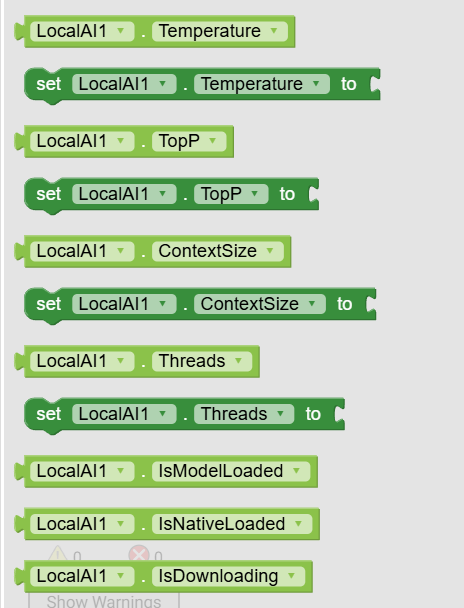
| Temperature | Sets the sampling temperature. Lower values (e.g. 0.2) make output focused and deterministic; higher values (e.g. 0.8) make it more creative. Accepts: number |
| TopP | Sets the Top-P (nucleus sampling) threshold (0.0 to 1.0). Only tokens comprising the top probability mass are considered. Accepts: number |
| ContextSize | Sets the context window size (number of tokens) allocated in memory. Default is 1024 (recommended for 4GB RAM devices). Accepts: number |
| Threads | Sets the number of CPU threads used for inference. Set to 0 for automatic detection based on available CPU cores. Accepts: number |
| IsModelLoaded | Returns true if a GGUF model is currently loaded in memory and ready for text generation. Accepts: boolean |
| IsNativeLoaded | Returns true if the native AI engine library (liblocalai.so) is loaded and initialized. Accepts: boolean |
| IsDownloading | Returns true while a model download or extraction is currently in progress. Accepts: boolean |
4. Example Usage
Step 1: Initialize the Native Engine Before you can do anything, you must load the native C++ library. Use the LoadNativeLibrary block and pass the asset path to your binary (e.g., //liblocalai.zip or //liblocalai.so). The extension will automatically extract and load the library. Important: Always wait for the NativeReady event to fire before attempting to download or load a model!
Step 2: Download a Model
Once the native engine is ready, you need a model to run. Use the DownloadModel block and provide a direct download URL to a .gguf file. The extension will download it safely to the app’s private storage (and skip downloading if it already exists).
Here are some highly recommended, mobile-friendly models you can use for testing:
- Qwen 2.5 (0.5B) - Tiny & Lightning Fast:
https://huggingface.co/Qwen/Qwen2.5-0.5B-Instruct-GGUF/resolve/main/qwen2.5-0.5b-instruct-q4_k_m.gguf - Llama 3.2 (1B) - Smart & Efficient:
https://huggingface.co/bartowski/Llama-3.2-1B-Instruct-GGUF/resolve/main/Llama-3.2-1B-Instruct-Q4_K_M.gguf - Phi-3 Mini (3.8B) - High Quality (Requires ~3GB RAM):
https://huggingface.co/microsoft/Phi-3-mini-4k-instruct-gguf/resolve/main/Phi-3-mini-4k-instruct-q4.gguf
Tip: You can use the DownloadProgress event to show a progress bar.
Step 3: Load the Model into Memory
When the download finishes, the DownloadCompleted event will fire and provide the local path to the file on the device. Pass this path directly into the LoadModel block. Wait for the ModelReady event to confirm the model is successfully loaded into RAM.
Step 4: Generate Text
Simply call the Generate block with your user’s query. Customization: Before generating, you can set the SystemPrompt property to give the AI a persona (e.g., “You are a helpful travel assistant”), and adjust properties like Temperature and MaxTokens to control the creativity and length of the response.
Step 5: Show Real-Time Streaming Responses
Use the TokenGenerated event to update your UI in real-time. This event fires every time the AI thinks of a new word. You can simply set your Label’s text to the partialText variable to create a beautiful, ChatGPT-style typewriter effect. Once generation is completely finished, the GotResult event will fire.

5. Demo Video
https://youtube.com/shorts/TD3xBtasOOg
6. Purchase Extension
UPI id: vknow360@apl
Thank you.
Hope it helps!