LocalVoice Extension
Bring true on-device voice capabilities directly to your app — 100% offline! This extension gives your Android apps both Speech-to-Text (Voice Recognition) and Text-to-Speech (Voice Synthesis) without requiring any internet connection. Build conversational voice assistants, voice typers, or talking apps without worrying about API keys, monthly cloud bills, or latency.
Key Features:
- 100% Offline & Private: Everything runs directly on the device CPU. Audio and microphone recordings never leave the user’s phone.
- Real-time Live Dictation: Speak into the microphone and receive instant words and partial transcriptions as you speak, with automatic speech pause detection.
- Audio File Recognition: Transcribe pre-recorded audio files (
.mp3,.m4a,.wav,.ogg,.flac) directly from assets or storage with live progress. - Natural-Sounding Voices: Speak any text out loud with fluid, natural human voices. Includes gapless streaming so speech starts playing almost instantly without long awkward pauses.
- Popular Model Support: Works with standard offline voice models including Whisper, Moonshine, SenseVoice, Piper, and Kokoro in multiple languages (English, Hindi, Spanish, French, German, Chinese, and more).
- Multi-Voice & Speed Control: Adjust voice speed and switch between different male/female character voice styles effortlessly.
Thanks to @Anke for the extension idea. 
1. Overview
Version: 1
Released: November 07, 2026
Permissions: android.permission.RECORD_AUDIO (for microphone speech recognition)
Aix Size: 108 KB
(Note: Requires adding liblocalvoice-arm64.zip or liblocalvoice.so into your project’s assets)
2. Blocks
3. Documentation
LocalVoice
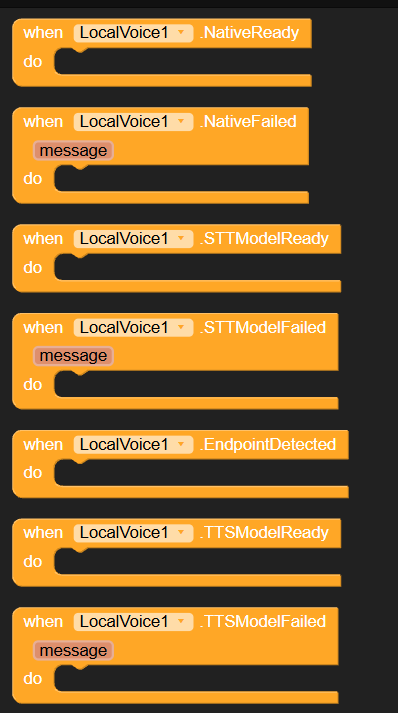
| NativeReady | Event raised when the native voice engine library has been loaded and initialized successfully. |
| NativeFailed | Event raised when loading or initializing the native voice engine library fails.message : text |
| STTModelReady | Event raised when the STT speech-to-text model is successfully loaded and ready for recognition. |
| STTModelFailed | Event raised when loading the STT model or speech recognition fails.message : text |
| EndpointDetected | Event raised when an endpoint (pause/end of utterance) is detected during live speech recognition. |
| TTSModelReady | Event raised when the TTS text-to-speech model is successfully loaded and ready for speech synthesis. |
| TTSModelFailed | Event raised when loading the TTS model fails.message : text |
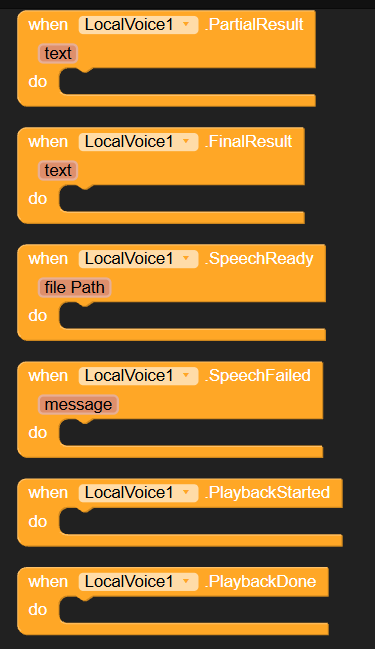
| PartialResult | Event raised during live recognition with real-time partial transcription text.text : text |
| FinalResult | Event raised when speech recognition is completed with the final recognized text.text : text |
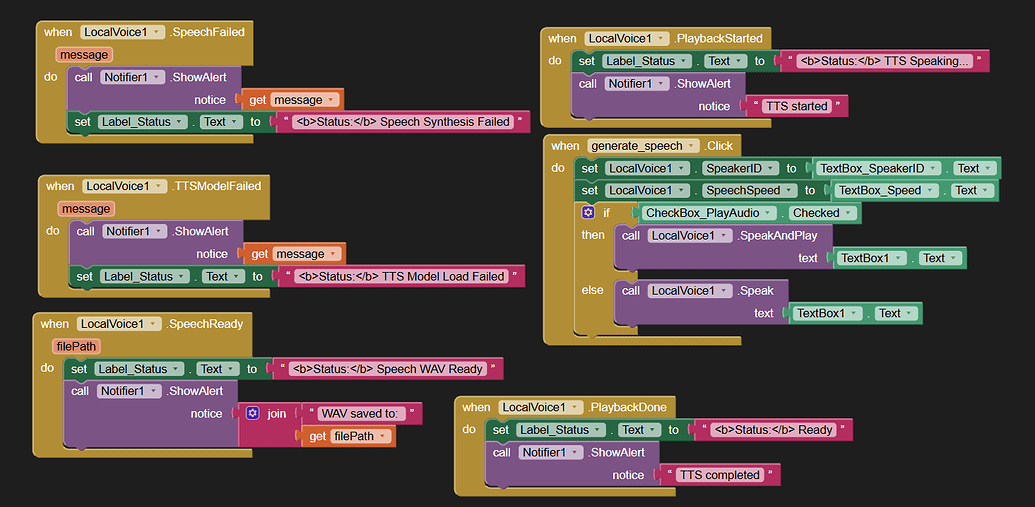
| SpeechReady | Event raised when Speak generates a speech audio WAV file successfully, providing the file path.filePath : text |
| SpeechFailed | Event raised when TTS speech synthesis or playback fails.message : text |
| PlaybackStarted | Event raised when SpeakAndPlay begins playing synthesized audio. |
| PlaybackDone | Event raised when SpeakAndPlay completes playing synthesized audio. |
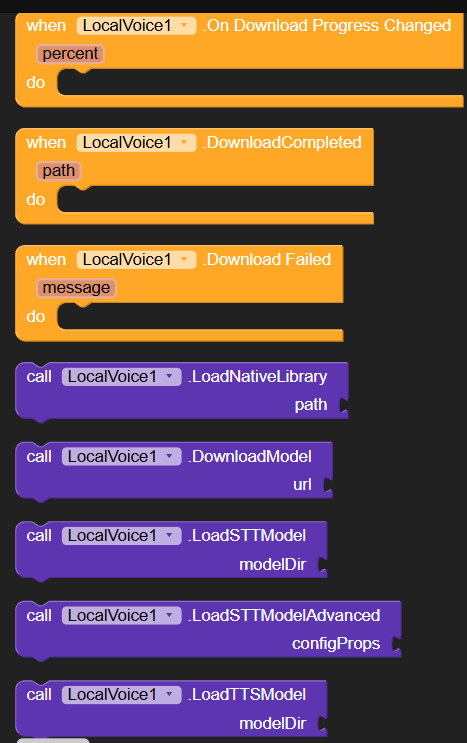
| DownloadProgress | Event raised periodically during model download with progress percentage (0-100). Negative value indicates KB downloaded when content length is unknown.percent : number |
| DownloadCompleted | Event raised when model archive download finishes and is extracted to the given directory path.path : text |
| DownloadFailed | Event raised when downloading or extracting the model archive fails.message : text |
| LoadNativeLibrary | Loads the native voice engine library from app assets (e.g. //liblocalvoice.so or //liblocalvoice-arm64-v8a.zip) or an absolute file path.path : text |
| DownloadModel | Downloads and extracts a model zip or tar archive from the specified URL into app storage.url : text |
| LoadSTTModel | Loads an offline STT model from the specified directory path. Supports Moonshine, Whisper, Zipformer, Paraformer, CTC, etc.modelDir : text |
| LoadSTTModelAdvanced | Loads an STT model using a custom key-value dictionary of Sherpa-ONNX configuration properties.configProps : dictionary |
| LoadTTSModel | Loads an offline TTS model from the specified directory path. Supports Piper (VITS) and Kokoro.modelDir : text |
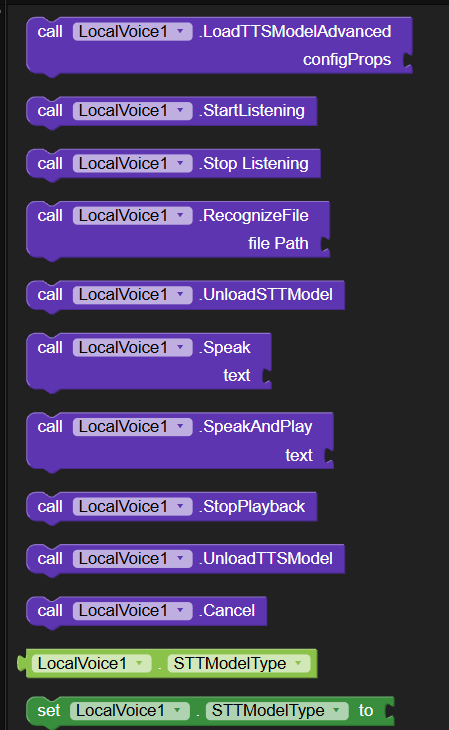
| LoadTTSModelAdvanced | Loads a TTS model using a custom key-value dictionary of Sherpa-ONNX configuration properties.configProps : dictionary |
| StartListening | Starts live microphone recording and real-time speech recognition. Make sure RECORD_AUDIO permission has been granted. |
| StopListening | Stops live microphone recording and triggers FinalResult with recognized speech text. |
| RecognizeFile | Performs speech recognition on an audio file (e.g. .wav, .mp3, .m4a, .ogg, .flac) from assets (//file.mp3), content URI, or file path. Raises PartialResult as recognition progresses, and FinalResult when complete.filePath : text |
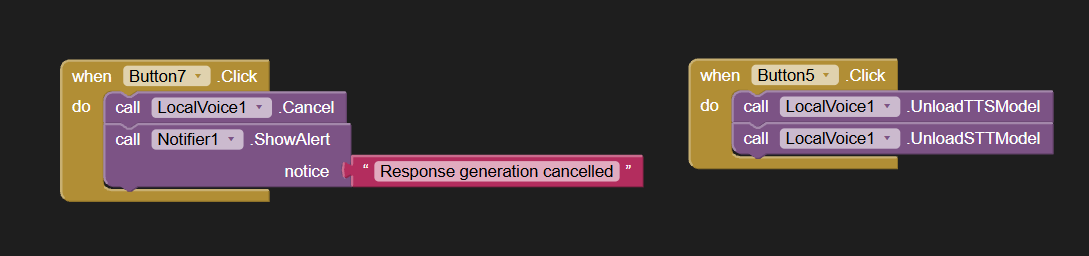
| UnloadSTTModel | Unloads the currently loaded STT model to free memory. |
| Speak | Synthesizes text into a speech WAV audio file asynchronously. Raises SpeechReady when finished.text : text |
| SpeakAndPlay | Synthesizes text to speech and plays the generated audio directly through the device speaker.text : text |
| StopPlayback | Stops active speech synthesis and audio playback immediately. |
| UnloadTTSModel | Unloads the currently loaded TTS model to free memory. |
| Cancel | Cancels active tasks including model downloads, live recording, and speech synthesis. |
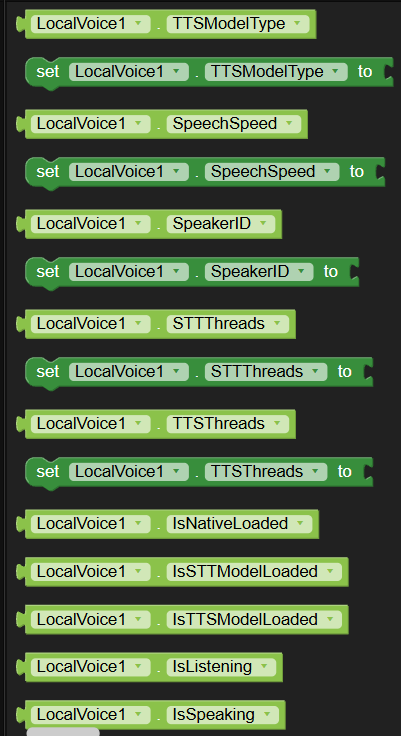
| STTModelType | Sets the STT model type manually (e.g. transducer, moonshine, whisper, paraformer, ctc, turing). If empty, auto-detected from model files. Accepts: text |
| TTSModelType | Sets the TTS model type manually (e.g. vits, piper, kokoro, matcha). If empty, auto-detected from model files. Accepts: text |
| SpeechSpeed | Sets the TTS speech synthesis speed factor (default: 1.0). Accepts: number |
| SpeakerID | Sets the multi-speaker voice ID for TTS models with multiple voices (default: 0). Accepts: number |
| STTThreads | Sets the number of CPU threads used for STT inference (0 for auto). Accepts: number |
| TTSThreads | Sets the number of CPU threads used for TTS synthesis (0 for auto). Accepts: number |
| IsNativeLoaded | Returns true if the native voice engine library is successfully loaded. Accepts: boolean |
| IsSTTModelLoaded | Returns true if an STT model is loaded and ready for recognition. Accepts: boolean |
| IsTTSModelLoaded | Returns true if a TTS model is loaded and ready for speech synthesis. Accepts: boolean |
| IsListening | Returns true if currently listening/recording audio for live STT. Accepts: boolean |
| IsSpeaking | Returns true if currently synthesizing or playing TTS audio. Accepts: boolean |
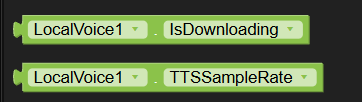
| IsDownloading | Returns true if a model download is in progress. Accepts: boolean |
| TTSSampleRate | Returns the native audio sample rate of the loaded TTS model in Hz. Accepts: number |
4. Example Usage
Step 1: Initialize the Native Engine
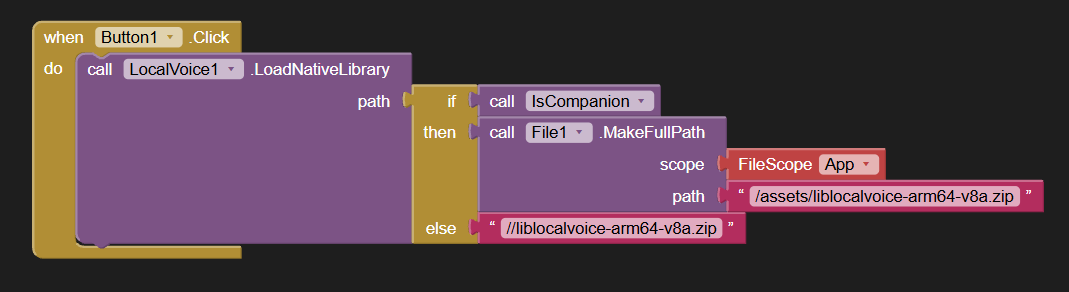
Before performing any voice operations, you must load the native engine library. Call the LoadNativeLibrary block and pass the asset path to your binary zip or library file (e.g., //liblocalvoice-arm64.zip or //liblocalvoice.so). The extension will automatically unpack and link the library in the app’s private storage.
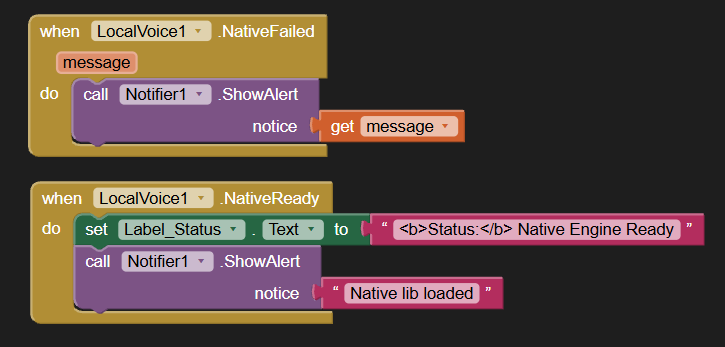
Important: Always wait for the NativeReady event to fire before attempting to download or load any voice model!
Step 2: Download a Voice Model (STT or TTS)
Once the native engine is ready, you need a model to run. Use the DownloadModel block with a direct URL to a .tar.bz2 or .zip model archive. The extension will automatically download and extract it into your app’s private directory (and skip downloading if the model folder already exists).
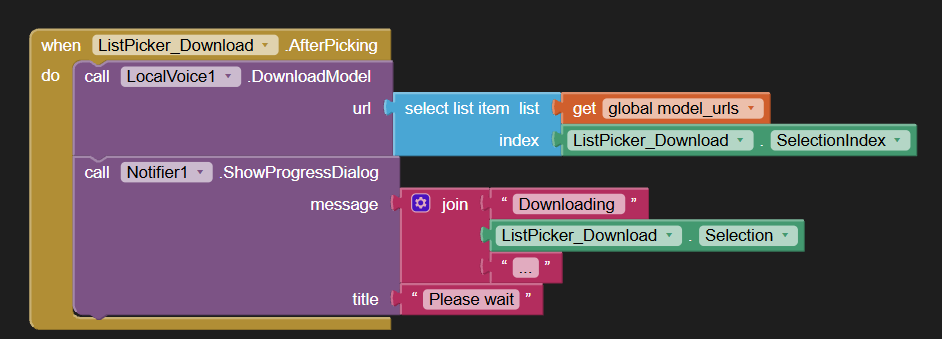
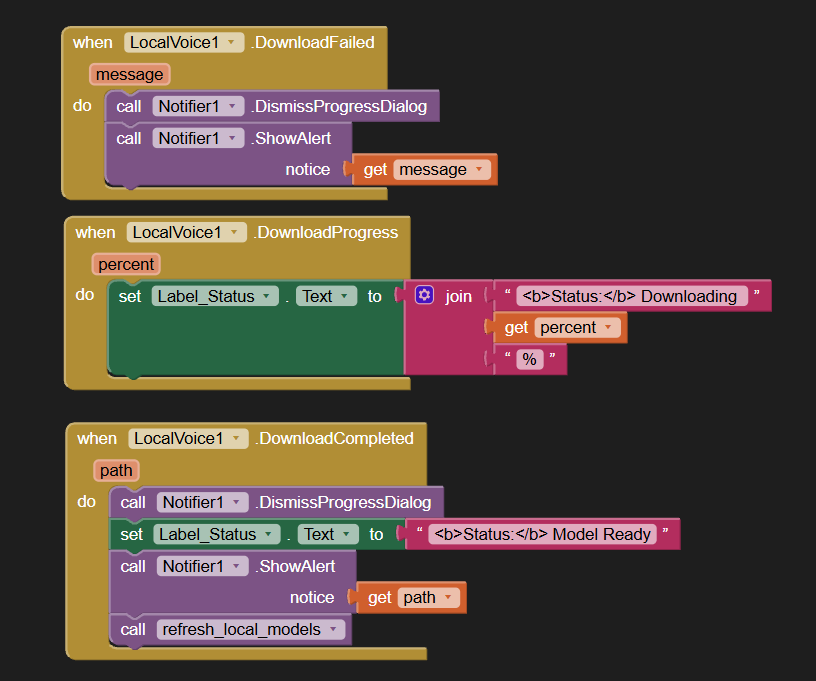
Use the DownloadProgress event to display a progress bar or percentage on your screen.
Step 3: Load the Model into Memory
When the model download and extraction finishes, the DownloadCompleted event will fire and provide the local directory path on the device.
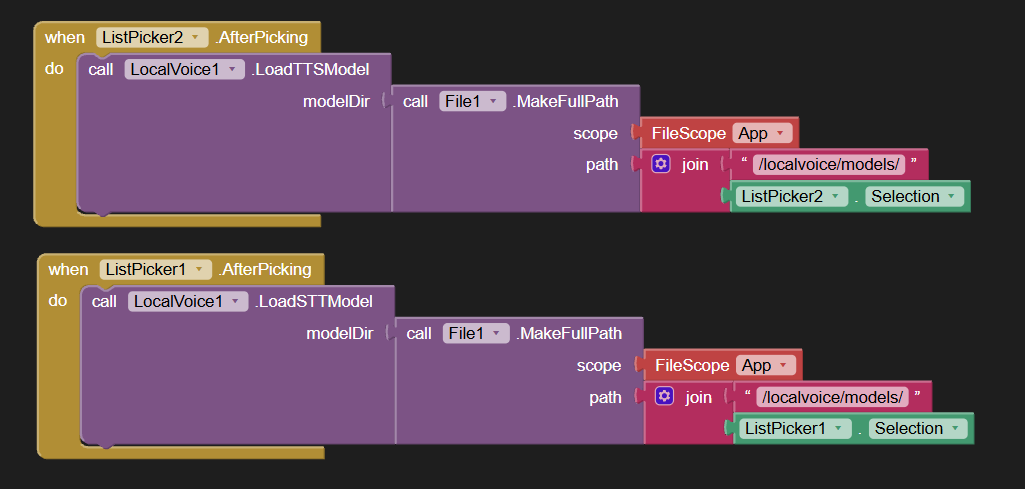
Pass this path directly to:
LoadSTTModelfor speech recognition models. Wait for theSTTModelReadyevent.LoadTTSModelfor text-to-speech voice models. Wait for theTTSModelReadyevent.
The extension automatically detects whether your model is Whisper, Moonshine, Zipformer, Piper, or Kokoro.
Step 4: Live Speech-to-Text & Audio Transcription
- Live Microphone Recognition:
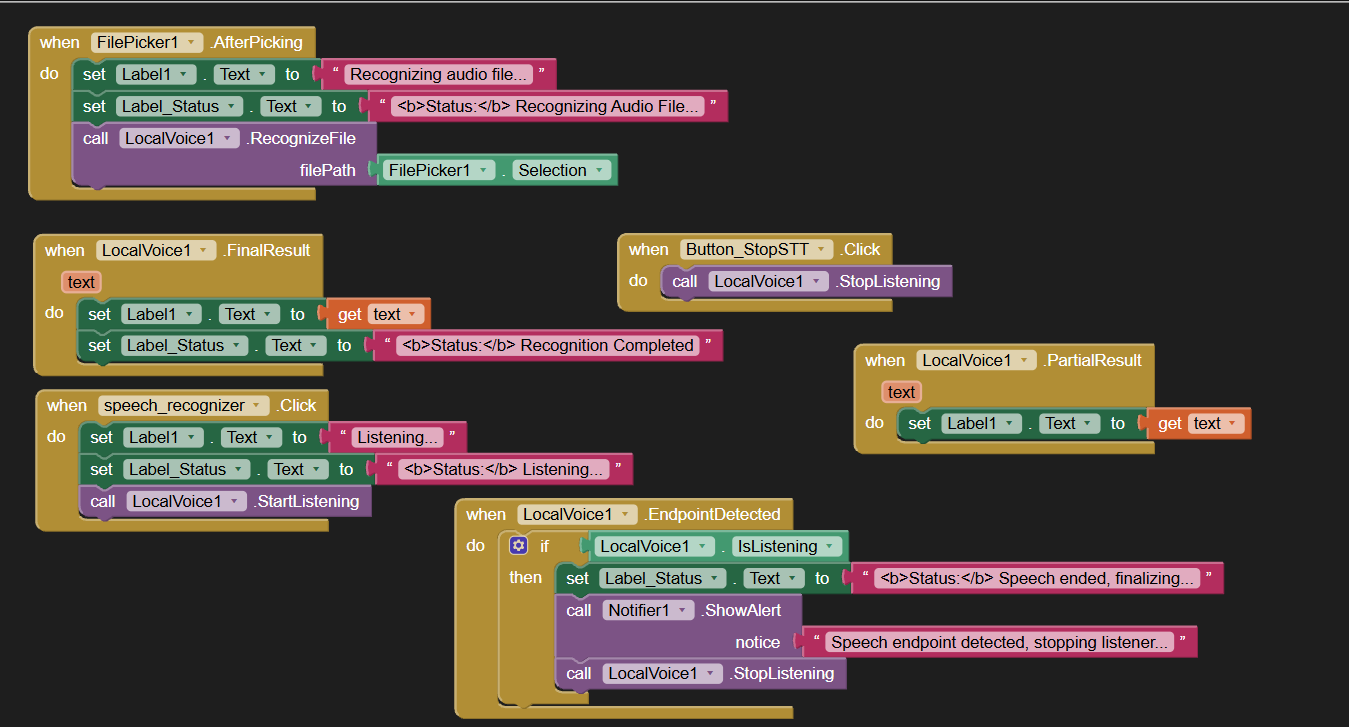
CallStartListeningto begin listening. As the user talks, thePartialResultevent fires continuously with live subtitles. When the user stops talking,EndpointDetectedfires, and callingStopListeningwill triggerFinalResultwith the complete transcribed sentence.
(Make sureRECORD_AUDIOpermission has been granted). - File Transcription:
Have an audio recording or voice memo? CallRecognizeFilewith an asset path (e.g.,//sample.mp3), file path, or content URI. The extension supports WAV, MP3, M4A, OGG, and FLAC, firingPartialResultas it transcribes andFinalResultwhen finished.
Step 5: Instant Text-to-Speech (TTS)
- Speak and Play Aloud:
CallSpeakAndPlaywith your text (e.g.,"Hello! How can I assist you today?"). The extension uses real-time clause streaming to begin playback through the device speaker with virtually zero latency.PlaybackStartedfires as soon as sound begins playing.PlaybackDonefires when playback finishes.
- Save Speech to File:
CallSpeakto synthesize the text into an offline.wavaudio file in app cache. When finished, theSpeechReadyevent returns the full file path. - Voice Customization:
- Set
SpeechSpeedto adjust playback rate (e.g.,0.85for slower,1.2for faster). - Set
SpeakerID(e.g.,0,1,2…) to choose different voices in multi-speaker models like Kokoro.
- Set
Step 6: Freeing Memory & Canceling
- Call
UnloadSTTModelorUnloadTTSModelwhen switching screens or tasks to immediately free device RAM. The native library stays loaded so you can quickly load another voice model. - Call
Cancelat any time to instantly cancel an active download, live listening session, or speech synthesis task.
5. Demo Video
https://youtube.com/shorts/iyYeNgKV6bc
6. Purchase Extension
UPI id: vknow360@apl
Thank you.
Hope it helps!