QuickSettings is an extension for MIT App Inventor and Kodular. It lets your app open Android system settings: notifications, battery, file access, network and many other screens, including hidden ones.
Features
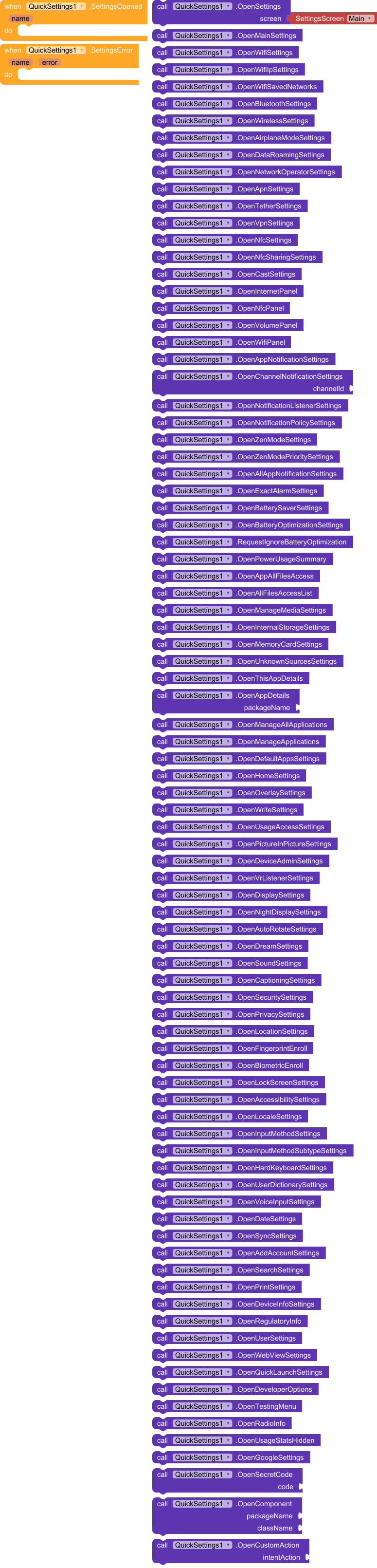
- Open settings screens. 87 blocks, one per screen. Drop a block straight into
when Button1.Click. - Pick a screen from a list. The
OpenSettingsblock has a dropdown with 61 screens. - Open hidden and engineering screens: developer options, Testing menu, Radio Info, usage statistics, Google Play services settings. These may not work on every firmware.
- Open any screen yourself.
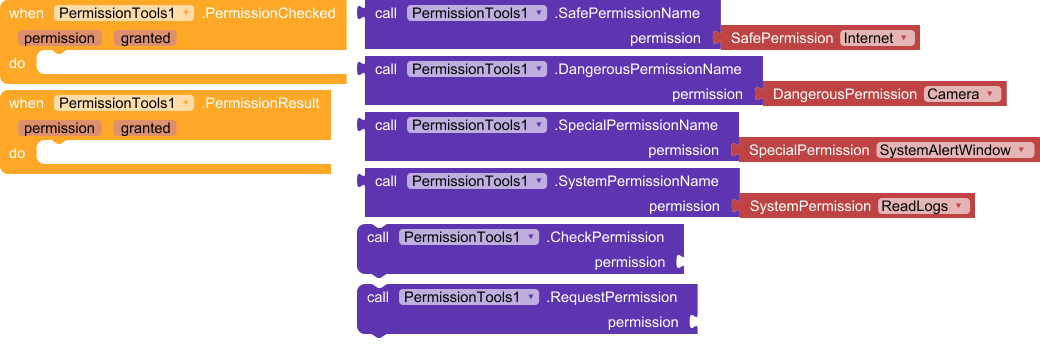
OpenComponenttakes a package and class,OpenCustomActiontakes an Intent action,OpenSecretCodeputs a secret code into the dialer. - Check and request permissions.
CheckPermissiontells you whether a permission is granted,RequestPermissionasks for it. - Get the result.
SettingsOpenedfires when the screen opens,SettingsErrorfires when it is not available on the device.
Screens included
| Section | Examples |
|---|---|
| Network | Wi-Fi, Bluetooth, airplane mode, APN, hotspot, VPN, NFC, Cast |
| Notifications | app notifications, channels, notification access, Do Not Disturb, exact alarms |
| Battery | battery saver, battery optimization, usage by app |
| Files | all files access, media, internal storage, SD card, unknown sources |
| Apps | app details, default apps, display over other apps, modify system settings |
| Display & sound | display, night light, auto-rotate, screen saver, sound, captions |
| Security | security, privacy, location, fingerprint, biometrics, screen lock |
| System | language, keyboards, date and time, sync, printing, About phone |
| Developer | developer options, Testing menu, Radio Info, secret codes |
Permissions: 123 in four dropdown lists
| List | Permissions | Description |
|---|---|---|
SafePermissionName |
33 | safe, granted at install (INTERNET, VIBRATE, NFC, etc.) |
DangerousPermissionName |
40 | dangerous, need user consent (CAMERA, READ_CONTACTS, ACCESS_FINE_LOCATION, etc.) |
SpecialPermissionName |
19 | special, granted on a separate settings screen (SYSTEM_ALERT_WINDOW, MANAGE_EXTERNAL_STORAGE, etc.) |
SystemPermissionName |
31 | system, unavailable to regular apps (listed for reference) |
Choose a permission in the list and the block returns its name, for example android.permission.CAMERA. Pass that name to CheckPermission or RequestPermission.
Summary
- Blocks: 93 (87 in QuickSettings, 6 in PermissionTools).
- Events: 4 (
SettingsOpened,SettingsError,PermissionChecked,PermissionResult). - Dropdown lists: 5 (61 screens and 4 permission lists).
- Required permissions: none, except
REQUEST_IGNORE_BATTERY_OPTIMIZATIONSfor theRequestIgnoreBatteryOptimizationblock.
Example
when Button1.Click do
    call QuickSettings1.OpenSettings  [Wifi ▾]

when Button2.Click do
    call QuickSettings1.OpenAppNotificationSettings

when QuickSettings1.SettingsError (name, error) do
    set Label1.Text to join("Could not open: ", name)
Notes
- Hidden and engineering screens depend on the manufacturer and Android version. If a screen is missing,
SettingsErrorfires and the app keeps running. - The extension does not bypass system protection: it only opens screens, and the user still has to change the settings.
 Package: com.quicksettings
 Size: 45,21 KB
 Minimum API Level: 14
 Updated On: 2026-10-31T21:00:00Z
 Built & documented using: FAST v7.7.0
com.quicksettings.aix (45.2 KB)