Hello
I am currently developing a movie and TV show streaming application. To improve the user experience, I wanted to implement a search system, but I’ve been struggling with the logic for several hours and can’t seem to get it right.
I have added a search icon to my homepage. When clicked, it opens a search screen/list with a TextBox. My goal is simple: when a user types a movie title (e.g., “Avengers”), the relevant results should filter and appear in the list below dynamically.
Despite numerous attempts and spending half my day on this, I’ve tried various block combinations, but I can’t identify where the error is.
Since I am on mobile, I couldn’t export the blocks as a PNG, but I have attached my .aia file below. If anyone has a moment to check my blocks and point out what I’m doing wrong, I would greatly appreciate it.
Thank you in advance for your help!
If the length of the text is greater than 1
Then ini local variable to empty list
Add itrms to this local variable list to (use match function to match text box text with item present in the global all data list )
Set recycler data to this list
When I type the movie title in the search bar, the movie appears, but when I go to the movie or series list, the images, titles, and other text don’t load; it just becomes a blank Cardview.
The details page opens but doesn’t load. Why? Please help.
Here is the Aia file. VIBEPro.aia (4).zip (989.4 KB)
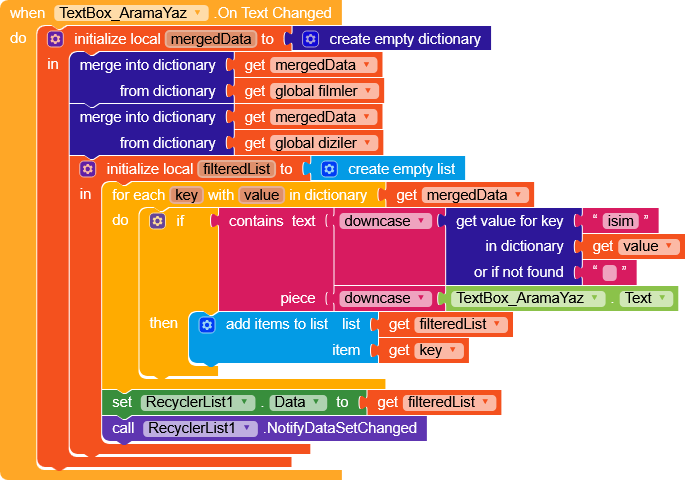
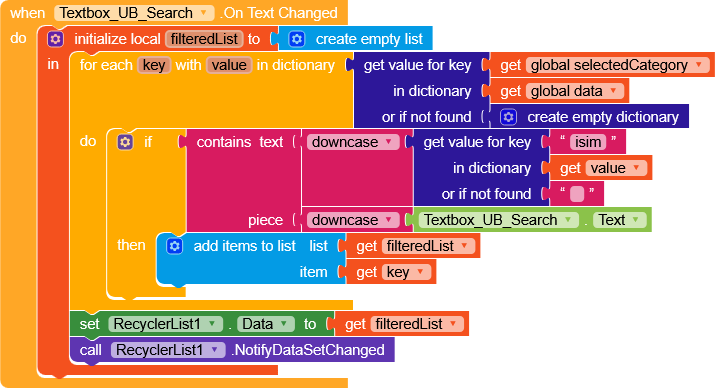
Basically, you merge the two dictionaries filmler and diziler into mergedData, then you loop through all the items and, if the isim key matches what’s in the textbox (all in lowercase), you add the key to a temporary list called filteredList.
This list is then set as RecyclerList.Data and the list is refreshed, so you’ll see both filtered movies and series.
However, this is not the most correct approach, since data filtering should happen on the server side rather than directly on the client.
Imagine having 150,000 items between movies and series every time a user accesses the app, they would have to download all the data and filter it locally.
As you can imagine, this is inefficient because it leads to unnecessary resource and bandwidth usage.
For this reason, I’d recommend moving to an SQL server, where you can run queries and directly get filtered data from the server. Keep in mind that this requires a deeper understanding of several additional concepts.
The search works, but images, text, etc. from the movie/series list don’t load; the Cardview remains blank, and the detail pages don’t load either. My AIA file is mentioned in my last message above.
Please help.
I don’t understand what I need to do right now. What do I need to do for the search operation? I’m very confused.
I don’t understand what I need to do, help
I’ll continue using the app for now, but as you said, even though I’m creating the blocks, it’s still not working. I don’t know if I’m doing something wrong.But it’s not working. If you have time, could you edit the AIA file for me?
I took a closer look at the project during my break and noticed quite a few small things to fix. Tonight I’ll try to rebuild the app entirely so you’ll have a solid base to start from.
If you want, send the blocks you added and I’ll take a look.
Since I’m on mobile, I can’t download the blocks as PNG. If you have time, I’ve included the AIA file below. Everything is working perfectly right now; the movie/series list is working, and the details page is working.
There’s only one main problem: When I type a movie or TV series name into the search bar and the movie/series appears, but…The photo title isn’t visible; the cardview is blank. When I click on it, the details page opens, but it’s still blank; nothing is visible.
Have you modified the blocks I pointed out to you?
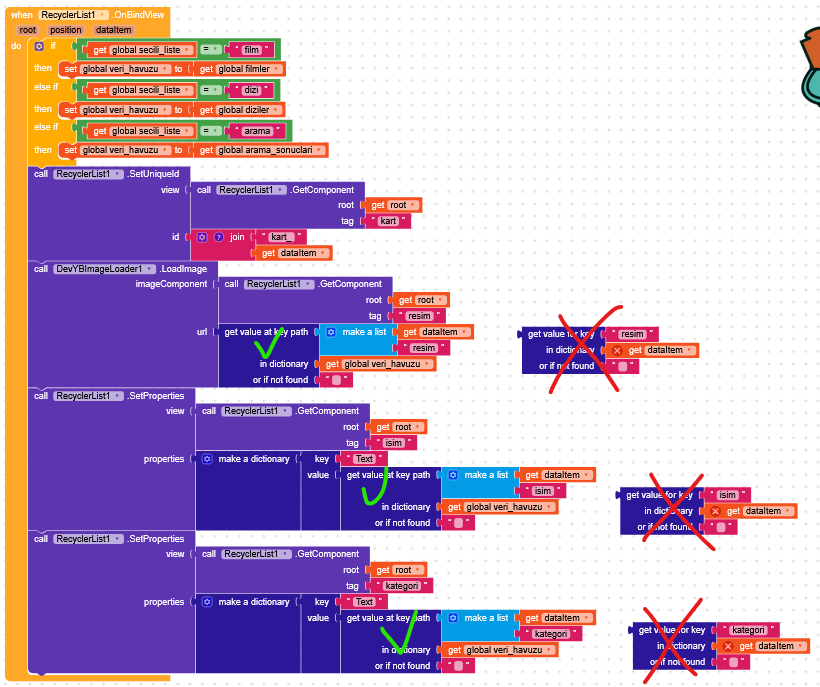
In RecyclerList.Data we passed the keys film1, film2, etc…
In the blocks you had shown, you were executing GetValueForKey(dataitem) where dataItem is film1, film2, etc…
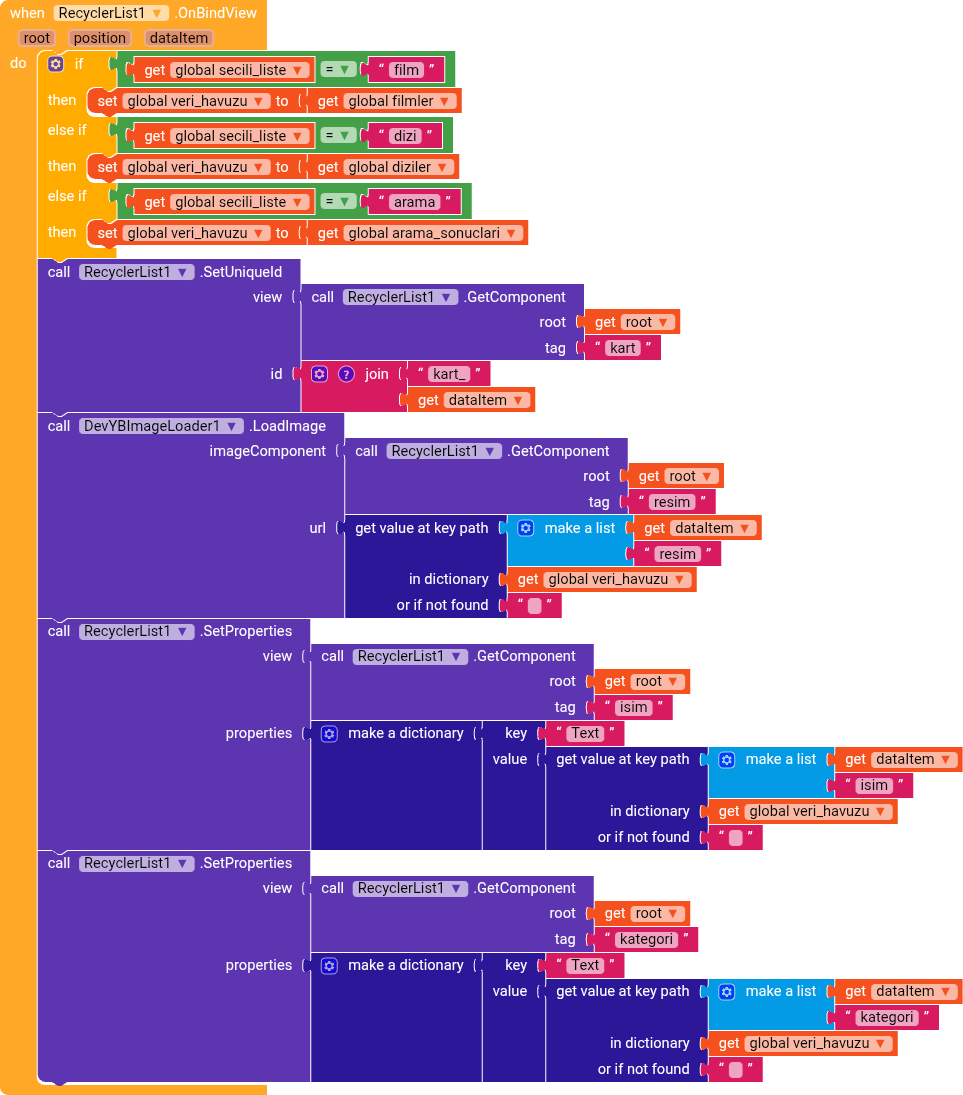
Fix it by using GetValueAtKeyPath as shown in the image
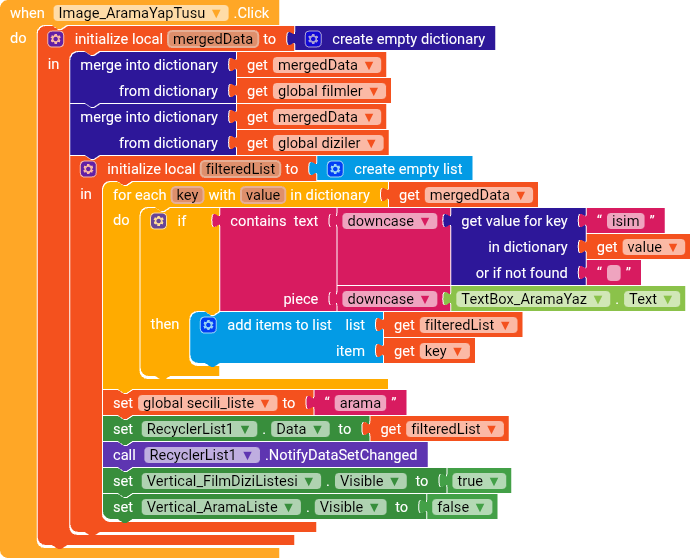
With a search bar, after selecting a category between movies and series, a list is created containing only the items that include the text entered in the textbox.
It’s very similar to the one already present in the topic, but it works in a different way.