Hello everyone,
My urban mobility app (similar to Uber) was rejected by Google Play due to the “Prominent Disclosure” policy regarding Location access.
According to Google: “The prominent disclosure in your app does not disclose the use of accessed or collected location data.”
Since it is a ride-hailing app, I need to access the user’s location to set the pickup point and track the ride, even when the app is in the background (minimized or screen locked).
I need help on how to correctly structure the Kodular blocks to:
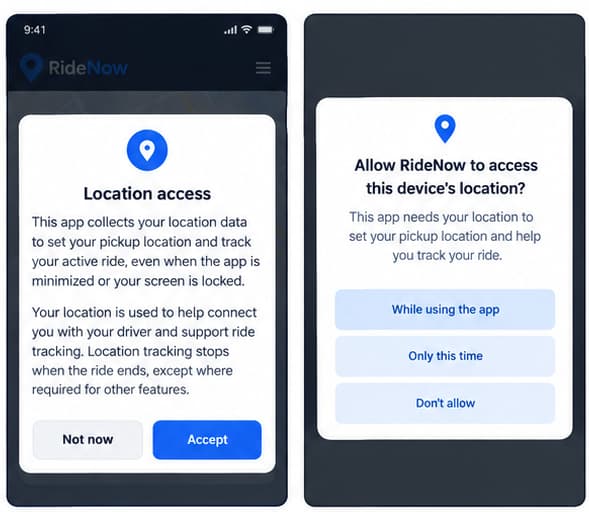
- Show a custom Notifier/Dialog (Prominent Disclosure) explaining the background location usage before requesting the system permission.
- Ensure the user clicks an explicit “Accept” button.
- Trigger the native Android permission after the acceptance.
If anyone has a working block structure or an image example for this specific background location workflow in Kodular, I would highly appreciate it.
Thank you!
The key to resolving this is to show a clear, app specific prominent disclosure first, obtain the user’s explicit consent, and only then request Android’s location permissions, you should also explain why location is needed while a ride is active, even when the app is minimized or the screen is locked.
About this is easy, you can create this yourself.
Make the disclosure name the exact data and purpose in plain words, for example that precise location is used to set the pickup point and track the active ride, including while the app is in the background, and state when that tracking stops. In Kodular, show that custom dialog first and only call the permission request from its Accept button, then request foreground location before asking separately for background location at the point the ride actually needs it. Finally, make sure the wording in the Play Console data safety and location declaration matches that on-screen text exactly, as a mismatch is a common reason for a repeat rejection.