🧩 SmartDevice — Complete Android Device Information & Monitoring Extension
FREE • Cross-Version Compatible (API 14-35+) • Built with FAST CLI
 Extension Information
| Property | Value |
|---|---|
| Package |
com.idriss.smartdevice.ma.smartdevice |
 Size Size |
33.87 KB |
 Version Version |
1.2.0 (Build 17) |
 Minimum API Level Minimum API Level |
14 (Android 4.0 Ice Cream Sandwich) |
 Release Date Release Date |
September 15, 2026 |
 Built With Built With |
FAST CLI v7.1.1 |
 Developer Developer |
Idriss Chrifi Alaoui |
 Overview
SmartDevice is a comprehensive, cross-version Android extension that provides 58 powerful methods for accessing device information, monitoring system resources, detecting hardware features, and checking security status.
Designed for MIT App Inventor 2, Kodular, and Niotron platforms, this extension works seamlessly across all Android versions from API 14 to API 35+ (Android 4.0 to Android 15).
Note: I’m updating and developing this Exts. See you close in the next update

 Key Highlights
 Security Detection — Root access, emulator, developer options, USB debugging
 System Monitoring — Battery, RAM, storage, CPU, network status
 Hardware Detection — 34 hardware features, 19 sensor types with helper blocks
 UI State — Dark mode, screen orientation, system locale
 Permission Helper — 30 permission options with red dropdown helper blocks
 Optimized — R8 + ProGuard optimized, only 33.87 KB
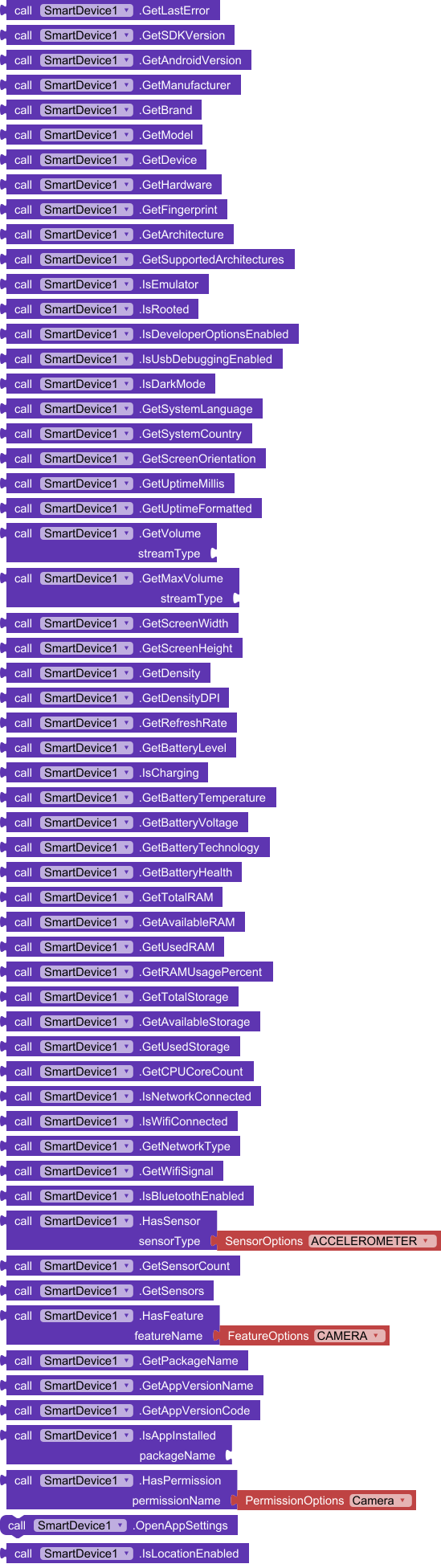
 PNG Blocks Generated — Visual block screenshots included for community posts
 Features by Category
Security & Developer Detection
| Method | Description | Return |
|---|---|---|
IsRooted |
Checks if the device has root access | boolean |
IsEmulator |
Detects if running on an emulator | boolean |
IsDeveloperOptionsEnabled |
Checks if Developer Options is enabled | boolean |
IsUsbDebuggingEnabled |
Checks if USB debugging (ADB) is enabled | boolean |
UI & System State
| Method | Description | Return |
|---|---|---|
IsDarkMode |
Returns true if Dark/Night mode is active | boolean |
GetSystemLanguage |
Returns system language ISO code (e.g., ‘en’, ‘fr’, ‘ar’) | text |
GetSystemCountry |
Returns system country/region ISO code (e.g., ‘US’, ‘MA’) | text |
GetScreenOrientation |
Returns ‘Portrait’ or ‘Landscape’ | text |
 System Time & Uptime
| Method | Description | Return |
|---|---|---|
GetUptimeMillis |
Device uptime in milliseconds | number |
GetUptimeFormatted |
Human-readable uptime (days, hours, minutes) | text |
 Audio & Volume Control
| Method | Description | Return |
|---|---|---|
GetVolume(streamType) |
Current volume for stream (music, ring, alarm, etc.) | number |
GetMaxVolume(streamType) |
Maximum volume for stream | number |
Device Information
| Method | Description | Return |
|---|---|---|
GetAndroidVersion |
Android version (e.g., “13”) | text |
GetSDKVersion |
SDK/API level (e.g., 33) | number |
GetManufacturer |
Device manufacturer | text |
GetBrand |
Device brand | text |
GetModel |
Device model | text |
GetDevice |
Device codename | text |
GetHardware |
Hardware name | text |
GetFingerprint |
Build fingerprint | text |
GetArchitecture |
CPU architecture | text |
GetSupportedArchitectures |
All supported CPU ABIs (comma-separated) | text |
Display & Screen
| Method | Description | Return |
|---|---|---|
GetScreenWidth |
Physical screen width in pixels | number |
GetScreenHeight |
Physical screen height in pixels | number |
GetDensity |
Screen density | number |
GetDensityDPI |
Screen DPI | number |
GetRefreshRate |
Display refresh rate in Hz | number |
 Battery Information
| Method | Description | Return |
|---|---|---|
GetBatteryLevel |
Battery percentage (0-100) | number |
IsCharging |
Charging status | boolean |
GetBatteryTemperature |
Temperature in Celsius | number |
GetBatteryVoltage |
Voltage in millivolts | number |
GetBatteryTechnology |
Battery technology type | text |
GetBatteryHealth |
Battery health status | text |
Memory (RAM) Monitoring
| Method | Description | Return |
|---|---|---|
GetTotalRAM |
Total RAM in bytes | number |
GetAvailableRAM |
Available RAM in bytes | number |
GetUsedRAM |
Used RAM in bytes | number |
GetRAMUsagePercent |
RAM usage percentage | number |
 Storage Monitoring
| Method | Description | Return |
|---|---|---|
GetTotalStorage |
Total internal storage in bytes | number |
GetAvailableStorage |
Available storage in bytes | number |
GetUsedStorage |
Used storage in bytes | number |
 CPU Information
| Method | Description | Return |
|---|---|---|
GetCPUCoreCount |
Number of CPU cores | number |
 Network & Connectivity
| Method | Description | Return |
|---|---|---|
IsNetworkConnected |
Active network connection status | boolean |
IsWifiConnected |
Wi-Fi connection status | boolean |
GetNetworkType |
Network type (‘WiFi’, ‘Mobile’, ‘Ethernet’, ‘None’, ‘Other’) | text |
GetWifiSignal |
Wi-Fi signal strength in dBm | number |
IsBluetoothEnabled |
Bluetooth status | boolean |
 Sensors (with Helper Blocks)
| Method | Description | Return |
|---|---|---|
HasSensor(sensorType) |
Check if sensor exists | boolean |
GetSensorCount |
Number of sensors | number |
GetSensors |
List of sensor names (newline-separated) | text |
 Helper Block: SensorOptions (19 types)
ACCELEROMETER, MAGNETIC_FIELD, GYROSCOPE, LIGHT, PRESSURE, PROXIMITY, GRAVITY, LINEAR_ACCELERATION, ROTATION_VECTOR, RELATIVE_HUMIDITY, AMBIENT_TEMPERATURE, GAME_ROTATION_VECTOR, GEOMAGNETIC_ROTATION_VECTOR, STEP_COUNTER, STEP_DETECTOR, HEART_RATE, STATIONARY_DETECT, MOTION_DETECT, LOW_LATENCY_OFFBODY_DETECT
Hardware Features (with Helper Blocks)
| Method | Description | Return |
|---|---|---|
HasFeature(featureName) |
Check hardware feature | boolean |
Helper Block: FeatureOptions (34 features)
CAMERA, CAMERA_FRONT, CAMERA_FLASH, CAMERA_ANY, BLUETOOTH, BLUETOOTH_LE, NFC, GPS, NETWORK_GPS, TELEPHONY, WIFI, WIFI_DIRECT, TOUCHSCREEN, TOUCHSCREEN_MULTITOUCH, MICROPHONE, SPEAKER, VIBRATOR, SENSOR_ACCELEROMETER, SENSOR_GYROSCOPE, SENSOR_COMPASS, SENSOR_LIGHT, SENSOR_PROXIMITY, SENSOR_BAROMETER, SENSOR_STEP_COUNTER, SENSOR_STEP_DETECTOR, SENSOR_HEART_RATE, SENSOR_HUMIDITY, AUDIO_LOW_LATENCY, USB_HOST, USB_ACCESSORY, GAMEPAD, SCREEN_PORTRAIT, SCREEN_LANDSCAPE, DISPLAY_HDR
Permissions (with Helper Blocks)
| Method | Description | Return |
|---|---|---|
HasPermission(permissionName) |
Check permission status | boolean |
OpenAppSettings |
Opens app settings screen | — |
Helper Block: PermissionOptions (30 permissions)
Camera, RecordAudio, ReadExternalStorage, WriteExternalStorage, ReadMediaImages, ReadMediaVideo, ReadMediaAudio, AccessFineLocation, AccessCoarseLocation, AccessBackgroundLocation, Internet, AccessNetworkState, AccessWifiState, Bluetooth, BluetoothAdmin, BluetoothConnect, BluetoothScan, ReadPhoneState, ReadContacts, WriteContacts, ReadCalendar, WriteCalendar, Vibrate, Flashlight, WakeLock, ReceiveBootCompleted, PostNotifications, ForegroundService, UseFingerprint, UseBiometric
App Information
| Method | Description | Return |
|---|---|---|
GetPackageName |
Current app package name | text |
GetAppVersionName |
App version name | text |
GetAppVersionCode |
App version code | number |
IsAppInstalled(packageName) |
Check if app is installed | boolean |
 Location
| Method | Description | Return |
|---|---|---|
IsLocationEnabled |
GPS or Network location enabled | boolean |
 Error Handling
| Method | Description | Return |
|---|---|---|
GetLastError |
Returns last error message | text |
Summary
| Total | Methods | Helper Block Enums |
|---|---|---|
| 58 | 58 | 3 (Permission, Feature, Sensor) |
| 83 total options across all enums |
 How to Use
Step 1: Import the Extension
- Download the
.aixfile from the link below - Go to MIT App Inventor / Kodular / Niotron
- Click Extensions → Import Extension (.aix)
- Select the downloaded file
Step 2: Add SmartDevice to Your App
- In the Palette, find SmartDevice under Extension category
- Click to add it to your app (it’s non-visible)
Step 3: Use the Methods
Drag blocks from the SmartDevice drawer and use them in your logic:
Example: Check Device Info
when Screen1.Initialize:
    labelManufacturer.Text = SmartDevice.GetManufacturer()
    labelModel.Text = SmartDevice.GetModel()
    labelAndroid.Text = SmartDevice.GetAndroidVersion()
    labelSDK.Text = SmartDevice.GetSDKVersion()
Example: Check Permissions with Helper Block
when ButtonCheckPermission.Click:
    if SmartDevice.HasPermission(PermissionOptions.Camera):
        labelResult.Text = "Camera permission granted!"
    else:
        labelResult.Text = "Camera permission denied!"
        SmartDevice.OpenAppSettings()
Example: Monitor Battery
when ClockBattery.Timer:
    labelBatteryLevel.Text = SmartDevice.GetBatteryLevel() + "%"
    labelBatteryTemp.Text = SmartDevice.GetBatteryTemperature() + "°C"
    if SmartDevice.IsCharging():
        labelCharging.Text = "⚡ Charging"
    else:
        labelCharging.Text = "🔋 Not charging"
Example: Security Check
when ButtonSecurity.Click:
    if SmartDevice.IsRooted():
        labelSecurity.Text = "⚠️ Device is rooted!"
    else if SmartDevice.IsEmulator():
        labelSecurity.Text = "⚠️ Running on emulator"
    else if SmartDevice.IsDeveloperOptionsEnabled():
        labelSecurity.Text = "⚠️ Developer options enabled"
    else:
        labelSecurity.Text = "✅ Device appears secure"
Example: Check Hardware Features
when ButtonCheckCamera.Click:
    if SmartDevice.HasFeature(FeatureOptions.CAMERA):
        if SmartDevice.HasFeature(FeatureOptions.CAMERA_FRONT):
            labelResult.Text = "Front camera available"
        else:
            labelResult.Text = "Only rear camera available"
    else:
        labelResult.Text = "No camera available"
Example: Network Monitoring
when ClockNetwork.Timer:
    if SmartDevice.IsNetworkConnected():
        labelNetwork.Text = SmartDevice.GetNetworkType()
        if SmartDevice.IsWifiConnected():
            labelWifiSignal.Text = SmartDevice.GetWifiSignal() + " dBm"
    else:
        labelNetwork.Text = "No connection"
Helper Blocks (Red Dropdown Menus)
SmartDevice includes 3 helper block enums with 83 total options to make development easier:
1. PermissionOptions (30 options)
Red dropdown for permission checking:
- Common:
Camera,Internet,AccessFineLocation,ReadContacts - Storage:
ReadExternalStorage,WriteExternalStorage,ReadMediaImages,ReadMediaVideo,ReadMediaAudio - Bluetooth:
Bluetooth,BluetoothAdmin,BluetoothConnect,BluetoothScan - Calendar:
ReadCalendar,WriteCalendar - System:
PostNotifications,ForegroundService,UseBiometric
2. FeatureOptions (34 options)
Red dropdown for hardware feature detection:
- Camera:
CAMERA,CAMERA_FRONT,CAMERA_FLASH,CAMERA_ANY - Connectivity:
BLUETOOTH,BLUETOOTH_LE,NFC,WIFI,WIFI_DIRECT,GPS - Sensors:
SENSOR_ACCELEROMETER,SENSOR_GYROSCOPE,SENSOR_COMPASS,SENSOR_LIGHT - Input:
TOUCHSCREEN,TOUCHSCREEN_MULTITOUCH,GAMEPAD,MICROPHONE,SPEAKER - Display:
SCREEN_PORTRAIT,SCREEN_LANDSCAPE,DISPLAY_HDR
3. SensorOptions (19 options)
Red dropdown for sensor detection:
- Motion:
ACCELEROMETER,GYROSCOPE,GRAVITY,LINEAR_ACCELERATION,ROTATION_VECTOR - Environment:
LIGHT,PRESSURE,PROXIMITY,AMBIENT_TEMPERATURE,RELATIVE_HUMIDITY - Health:
HEART_RATE,STEP_COUNTER,STEP_DETECTOR - Special:
GAME_ROTATION_VECTOR,GEOMAGNETIC_ROTATION_VECTOR,STATIONARY_DETECT,MOTION_DETECT
 Cross-Version Compatibility
SmartDevice is tested and optimized for all Android versions:
| Android Version | API Level | Status |
|---|---|---|
| Android 4.0 (Ice Cream Sandwich) | 14 |  Supported Supported |
| Android 4.4 (KitKat) | 19 | Supported |
| Android 5.0 (Lollipop) | 21 | Supported |
| Android 6.0 (Marshmallow) | 23 | Supported |
| Android 7.0 (Nougat) | 24 | Supported |
| Android 8.0 (Oreo) | 26 | Supported |
| Android 9.0 (Pie) | 28 | Supported |
| Android 10 | 29 | Supported |
| Android 11 | 30 | Supported |
| Android 12 | 31 | Supported |
| Android 12L | 32 | Supported |
| Android 13 | 33 | Supported |
| Android 14 | 34 | Supported |
| Android 15 | 35 | Supported |
All methods include proper SDK version checks and fallbacks for deprecated APIs.
Block Screenshots
 Troubleshooting
Permission Denied Errors
Some methods require specific permissions. Make sure to request them at runtime or check HasPermission() first.
Null or Empty Values
If a method returns an empty string, call GetLastError() to see what went wrong.
Bluetooth Issues on Android 12+
Bluetooth methods may require BLUETOOTH_CONNECT permission on Android 12+. Use HasPermission(PermissionOptions.BluetoothConnect) first.
Location Permission
IsLocationEnabled() requires location permission. Check with HasPermission(PermissionOptions.AccessFineLocation) first.
 Download
com.idriss.smartdevice.ma.smartdevice.aix
Bug Fixes:
- Fixed cross-version Android compatibility issues
- Fixed null pointer exceptions in device info methods
- Added proper fallbacks for deprecated APIs
Version 1.1.0 (Build 14) — September 15, 2026
New Features:
IsRooted()— Root detectionIsDeveloperOptionsEnabled()— Developer options checkIsUsbDebuggingEnabled()— ADB status checkIsDarkMode()— Dark mode detectionGetUptimeFormatted()— Formatted uptimeHasPermission()— Permission checkingHasFeature()— Hardware feature detectionHasSensor()— Sensor detection
Version 1.0.0 (Build 1) — September 15, 2026
Initial Release:
- Basic device information
- Battery monitoring
- RAM monitoring
- Storage monitoring
- Network status
- Sensor detection
Support the Project
If you find this extension useful, consider supporting development:
 License
This extension is developed by Idriss Chrifi Alaoui.
Free for personal and commercial use. Attribution appreciated but not required.
If you like this extension, please consider leaving a like 👍 and sharing it with the community!
Note: I'm updating and developing this Exts. See you close in the next update 😇
🙏 Thank you for your support. $1 means a lot
https://www.paypal.com/ncp/payment/HK4L4J3Q9WKMU
Last Updated: September 15, 2026
Extension Version: 1.2.0
Total Methods: 58
Helper Block Options: 83 (across 3 enums)