Send voice messages
Send media from the gallery
Photos and videos shared via a link appear directly in the chat
Photos, videos, and audio play in the chat
Edit messages
Delete messages
Copy messages
Reply to messages
Profile customization:
Change your avatar
Add a description
Set your gender and age
Add social media links
And more…
Events:
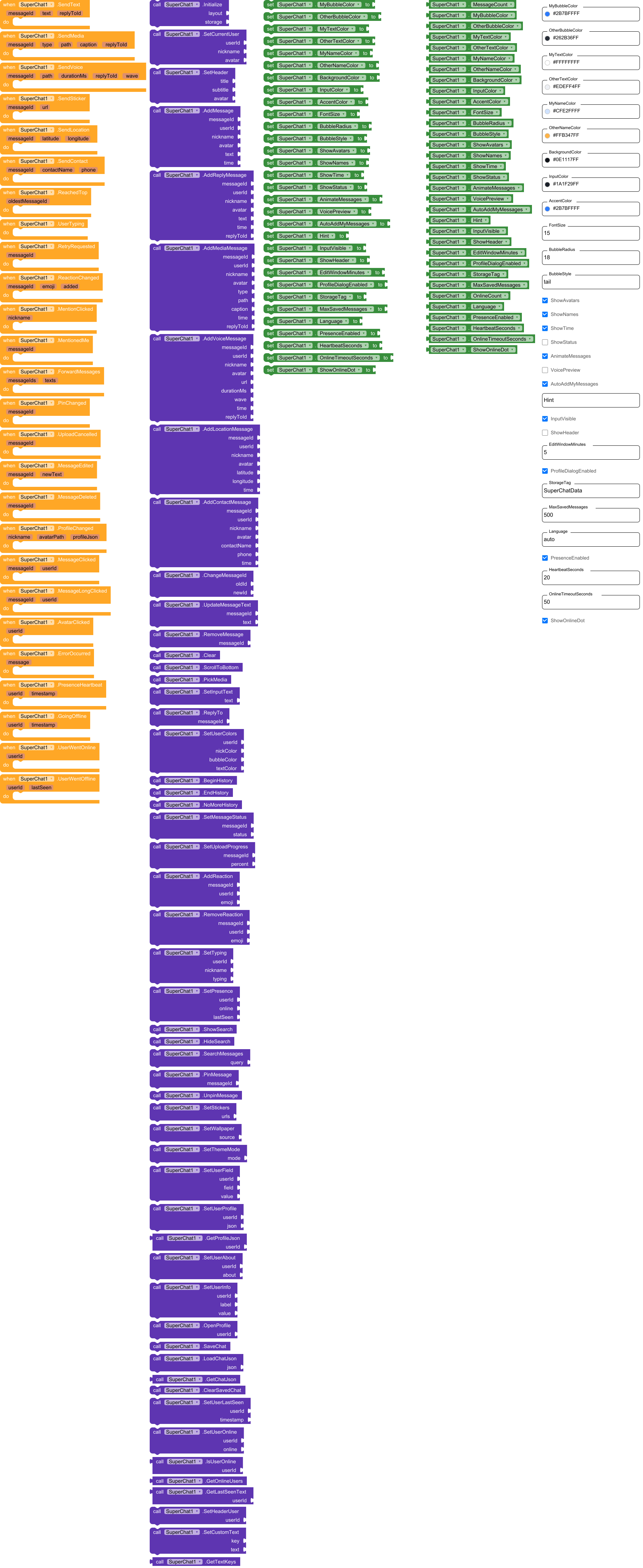
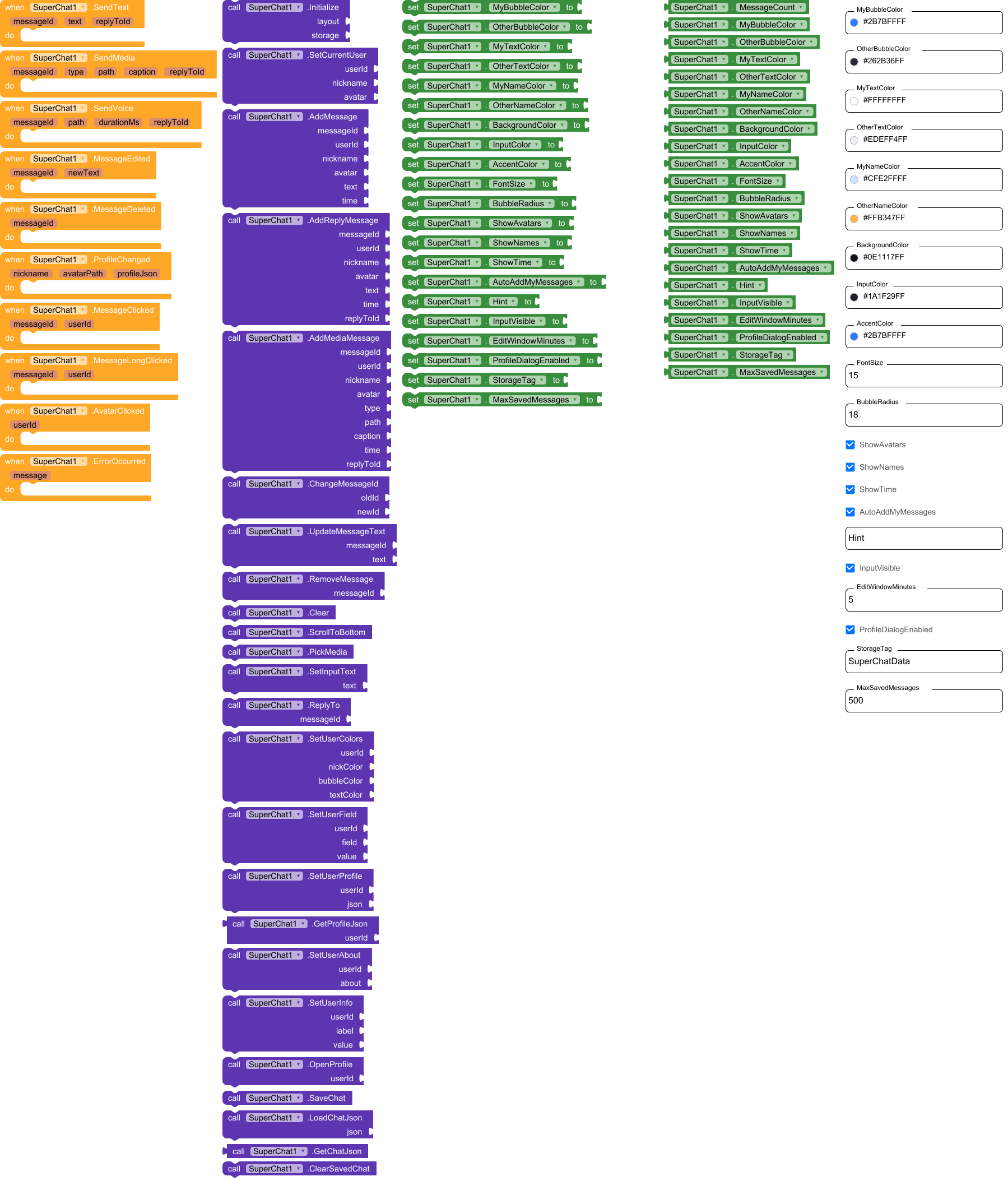
SuperChat has total 10 events.
1. SendText
User pressed send with text. replyToId is empty if it is not a reply. Send it to your server and (if AutoAddMyMessages is off) call AddMessage.
| Parameter | Type |
|---|---|
| messageId | text |
| text | text |
| replyToId | text |
2. SendMedia
User attached a file. type: image, video, audio or file. path: local file to upload.
| Parameter | Type |
|---|---|
| messageId | text |
| type | text |
| path | text |
| caption | text |
| replyToId | text |
3. SendVoice
User recorded a voice message. path: local .m4a file to upload.
| Parameter | Type |
|---|---|
| messageId | text |
| path | text |
| durationMs | number |
| replyToId | text |
4. MessageEdited
The author edited his message (within the edit window). Update it on your server.
| Parameter | Type |
|---|---|
| messageId | text |
| newText | text |
5. MessageDeleted
The author deleted his message. Delete it on your server.
| Parameter | Type |
|---|---|
| messageId | text |
6. ProfileChanged
The user changed his profile (nickname set once, new avatar file, status, age, interests…). avatarPath is a local file: upload it. profileJson: all profile fields as text; save it on your server and give it to others with SetUserProfile.
| Parameter | Type |
|---|---|
| nickname | text |
| avatarPath | text |
| profileJson | text |
7. MessageClicked
Message bubble was tapped.
| Parameter | Type |
|---|---|
| messageId | text |
| userId | text |
8. MessageLongClicked
Message bubble was long-pressed.
| Parameter | Type |
|---|---|
| messageId | text |
| userId | text |
9. AvatarClicked
Avatar was tapped (the profile window opens too if ProfileDialogEnabled).
| Parameter | Type |
|---|---|
| userId | text |
10. ErrorOccurred
Error (no permission, cannot read file, storage problem…).
| Parameter | Type |
|---|---|
| message | text |
Methods:
SuperChat has total 24 methods.
1. Initialize
Puts the chat into the given arrangement (its width is set to Fill parent; use a NON-scrollable arrangement with Fill parent height). storage: plug TinyDB1 (chat is restored automatically), or FirebaseDB / CloudDB (chat is saved there; in their GotValue event call LoadChatJson), or any text (e.g. “local”) to keep the chat in an internal file. Call it once in Screen.Initialize, after SetCurrentUser.
| Parameter | Type |
|---|---|
| layout | component |
| storage | any |
2. SetCurrentUser
Who is ‘me’: messages with this userId are shown on the right as mine. avatar: url, file path or app asset name. If nickname is not empty it is locked (nickname can be set only once); if empty, the user is asked for a nickname in the profile window. A nickname / avatar the user set himself in the profile is restored from the saved chat.
| Parameter | Type |
|---|---|
| userId | text |
| nickname | text |
| avatar | text |
3. AddMessage
Adds a text message. A link to a photo / video / audio / YouTube in the text is shown as a player right in the bubble. time: any text, empty = current time; or a number of milliseconds since 1970 (then the time is formatted automatically and the edit window counts from it). avatar: url, file path or app asset name. A message with an id that already exists is ignored.
| Parameter | Type |
|---|---|
| messageId | text |
| userId | text |
| nickname | text |
| avatar | text |
| text | text |
| time | text |
4. AddReplyMessage
Same as AddMessage, but the message answers another message (replyToId = id of that message): a quote is shown on top of the bubble.
| Parameter | Type |
|---|---|
| messageId | text |
| userId | text |
| nickname | text |
| avatar | text |
| text | text |
| time | text |
| replyToId | text |
5. AddMediaMessage
Adds a message with attachment. type: image, video, audio (voice) or file. path: url or file path. caption may be empty. replyToId may be empty. time: see AddMessage.
| Parameter | Type |
|---|---|
| messageId | text |
| userId | text |
| nickname | text |
| avatar | text |
| type | text |
| path | text |
| caption | text |
| time | text |
| replyToId | text |
6. ChangeMessageId
Changes the id of a message (for example when the server confirmed a message that was shown with a local id).
| Parameter | Type |
|---|---|
| oldId | text |
| newId | text |
7. UpdateMessageText
Changes the text of a message (use it when somebody else edited a message).
| Parameter | Type |
|---|---|
| messageId | text |
| text | text |
8. RemoveMessage
Removes a message by id.
| Parameter | Type |
|---|---|
| messageId | text |
9. Clear
Removes all messages from the screen (and from the saved chat).
10. ScrollToBottom
Scrolls the chat to the last message.
11. PickMedia
Opens the phone file picker (photo, video, audio, any file).
12. SetInputText
Puts text into the input field.
| Parameter | Type |
|---|---|
| text | text |
13. ReplyTo
Starts a reply to the message (same as the reply icon under it).
| Parameter | Type |
|---|---|
| messageId | text |
14. SetUserColors
Sets colors for one user (any color; use transparent/None to keep default): nickname color, bubble color, message text color.
| Parameter | Type |
|---|---|
| userId | text |
| nickColor | number |
| bubbleColor | number |
| textColor | number |
15. SetUserField
Sets one profile field of a user. field: nick, avatar, status, about, age, gender (m / f), city, work, interests (comma separated), contacts.
| Parameter | Type |
|---|---|
| userId | text |
| field | text |
| value | text |
16. SetUserProfile
Sets the whole profile of a user from JSON (the same text that the ProfileChanged event gives you). Only the fields that are present are changed.
| Parameter | Type |
|---|---|
| userId | text |
| json | text |
17. GetProfileJson
Returns the profile of a user as JSON text (to save it on your server).
- Return type:
text
| Parameter | Type |
|---|---|
| userId | text |
18. SetUserAbout
Sets the ‘About’ text shown in the user’s profile window.
| Parameter | Type |
|---|---|
| userId | text |
| about | text |
19. SetUserInfo
Adds or changes an extra row in the user’s profile window (for example label ‘Car’, value ‘Lada’).
| Parameter | Type |
|---|---|
| userId | text |
| label | text |
| value | text |
20. OpenProfile
Opens the profile window of a user (same as tapping the avatar).
| Parameter | Type |
|---|---|
| userId | text |
21. SaveChat
Saves the chat right now (it is also saved automatically after every change).
22. LoadChatJson
Restores the chat from text. Use it in the GotValue event of FirebaseDB / CloudDB (check that the tag equals StorageTag) and with any text from your own server.
| Parameter | Type |
|---|---|
| json | text |
23. GetChatJson
Returns the whole chat (messages, profiles) as one text.
- Return type:
text
24. ClearSavedChat
Deletes the saved chat from the storage (messages on screen stay).
Designer:
SuperChat has total 21 designer properties.
1. MyBubbleColor
- Input type:
color - Default value:
2B7BFF
2. OtherBubbleColor
- Input type:
color - Default value:
262B36
3. MyTextColor
- Input type:
color - Default value:
FFFFFF
4. OtherTextColor
- Input type:
color - Default value:
EDEFF4
5. MyNameColor
- Input type:
color - Default value:
CFE2FF
6. OtherNameColor
- Input type:
color - Default value:
FFB347
7. BackgroundColor
- Input type:
color - Default value:
0E1117
8. InputColor
- Input type:
color - Default value:
1A1F29
9. AccentColor
- Input type:
color - Default value:
2B7BFF
10. FontSize
- Input type:
non_negative_float - Default value:
15
11. BubbleRadius
- Input type:
integer - Default value:
18
12. ShowAvatars
- Input type:
boolean - Default value:
True
13. ShowNames
- Input type:
boolean - Default value:
True
14. ShowTime
- Input type:
boolean - Default value:
True
15. AutoAddMyMessages
- Input type:
boolean - Default value:
True
16. Hint
- Input type:
string
17. InputVisible
- Input type:
boolean - Default value:
True
18. EditWindowMinutes
- Input type:
integer - Default value:
5
19. ProfileDialogEnabled
- Input type:
boolean - Default value:
True
20. StorageTag
- Input type:
string - Default value:
SuperChatData
21. MaxSavedMessages
- Input type:
integer - Default value:
500
Setters:
SuperChat has total 21 setter properties.
1. MyBubbleColor
My bubble color.
- Input type:
number
2. OtherBubbleColor
Other users’ bubble color.
- Input type:
number
3. MyTextColor
My message text color.
- Input type:
number
4. OtherTextColor
Other users’ text color.
- Input type:
number
5. MyNameColor
My nickname color.
- Input type:
number
6. OtherNameColor
Other users’ nickname color.
- Input type:
number
7. BackgroundColor
Chat background color.
- Input type:
number
8. InputColor
Input field and dialogs color.
- Input type:
number
9. AccentColor
Accent color (send button, voice play button, profile banner).
- Input type:
number
10. FontSize
Message text size.
- Input type:
number
11. BubbleRadius
Bubble corner radius.
- Input type:
number
12. ShowAvatars
Show avatars.
- Input type:
boolean
13. ShowNames
Show nicknames.
- Input type:
boolean
14. ShowTime
Show message time.
- Input type:
boolean
15. AutoAddMyMessages
If true, my sent messages appear in the chat immediately. Turn off if you add them yourself after the server confirms.
- Input type:
boolean
16. Hint
Input field hint (empty = default).
- Input type:
text
17. InputVisible
Show the input bar (hide it for read-only chat).
- Input type:
boolean
18. EditWindowMinutes
How many minutes the author can edit his message.
- Input type:
number
19. ProfileDialogEnabled
Open the profile window when an avatar is tapped.
- Input type:
boolean
20. StorageTag
Tag (key) under which the chat is saved in the storage. Use a different tag for every chat / user.
- Input type:
text
21. MaxSavedMessages
How many last messages are kept in the saved chat.
- Input type:
number
Getters:
SuperChat has total 22 getter properties.
1. MessageCount
Number of messages in the chat.
- Return type:
number
2. MyBubbleColor
My bubble color.
- Return type:
number
3. OtherBubbleColor
Other users’ bubble color.
- Return type:
number
4. MyTextColor
My message text color.
- Return type:
number
5. OtherTextColor
Other users’ text color.
- Return type:
number
6. MyNameColor
My nickname color.
- Return type:
number
7. OtherNameColor
Other users’ nickname color.
- Return type:
number
8. BackgroundColor
Chat background color.
- Return type:
number
9. InputColor
Input field and dialogs color.
- Return type:
number
10. AccentColor
Accent color (send button, voice play button, profile banner).
- Return type:
number
11. FontSize
Message text size.
- Return type:
number
12. BubbleRadius
Bubble corner radius.
- Return type:
number
13. ShowAvatars
Show avatars.
- Return type:
boolean
14. ShowNames
Show nicknames.
- Return type:
boolean
15. ShowTime
Show message time.
- Return type:
boolean
16. AutoAddMyMessages
If true, my sent messages appear in the chat immediately. Turn off if you add them yourself after the server confirms.
- Return type:
boolean
17. Hint
Input field hint (empty = default).
- Return type:
text
18. InputVisible
Show the input bar (hide it for read-only chat).
- Return type:
boolean
19. EditWindowMinutes
How many minutes the author can edit his message.
- Return type:
number
20. ProfileDialogEnabled
Open the profile window when an avatar is tapped.
- Return type:
boolean
21. StorageTag
Tag (key) under which the chat is saved in the storage. Use a different tag for every chat / user.
- Return type:
text
22. MaxSavedMessages
How many last messages are kept in the saved chat.
- Return type:
number
The update will add the ability to run HTML code in the chat.
com.superchat.aix (128.2 KB)
The extension was created with the help of:  FAST
FAST