Is that a way to get FCM TOKEN or OneSignal player id or make sign in with google without using any component because merging any two of these make the apk export failed or the firebase authentication component does not work
Can you sent exactly why your export getting failed? can you send build.log
this log happens when I try to use FSA extension with onesignal and If I use firebase authentication instead of FSA the apk exported but auth component does not work while OneSignal in the project
Kodular is unable to compile this project.
The compiler error output was
[ReadBuildInfo] Starting Task
[ReadBuildInfo] Task succeeded in 0.004 seconds
[LoadComponentInfo] Starting Task
[LoadComponentInfo] INFO: Generating assets...
[LoadComponentInfo] Component assets needed, n = 7
[LoadComponentInfo] INFO: Generating activities...
[LoadComponentInfo] Component activities needed, n = 10
[LoadComponentInfo] INFO: Component "com.sunny.fs.FSA" does not specify activityMetadata
[LoadComponentInfo] Component activity metadata needed, n = 0
[LoadComponentInfo] INFO: Generating broadcast receivers...
[LoadComponentInfo] INFO: Component "com.sunny.fs.FSA" does not specify broadcastReceivers
[LoadComponentInfo] INFO: Component "com.sunny.fs.FSA" does not specify contentProviders
[LoadComponentInfo] INFO: Generating libraries...
[LoadComponentInfo] INFO: Component "com.sunny.fs.FSA" does not specify libraries
[LoadComponentInfo] Libraries needed, n = 76
[LoadComponentInfo] INFO: Component "com.sunny.fs.FSA" does not specify metadata
[LoadComponentInfo] Component metadata needed, n = 0
[LoadComponentInfo] INFO: Generating Android minimum SDK...
[LoadComponentInfo] INFO: Generating native libraries...
[LoadComponentInfo] INFO: Component "com.sunny.fs.FSA" does not specify native
[LoadComponentInfo] Native Libraries needed, n = 0
[LoadComponentInfo] INFO: Generating permissions...
[LoadComponentInfo] usesLocation = False
[LoadComponentInfo] Permissions needed, n = 29
[LoadComponentInfo] INFO: Component "com.sunny.fs.FSA" does not specify queries
[LoadComponentInfo] INFO: Component "com.sunny.fs.FSA" does not specify services
[LoadComponentInfo] INFO: Component "com.sunny.fs.FSA" does not specify xmls
[LoadComponentInfo] Component xmls needed, n = 0
[LoadComponentInfo] INFO: Generating component broadcast receivers...
[LoadComponentInfo] INFO: Component "com.sunny.fs.FSA" does not specify broadcastReceiver
[LoadComponentInfo] Task succeeded in 0.004 seconds
[CheckDeprecatedComponents] Starting Task
[CheckDeprecatedComponents] Task succeeded in 0.017 seconds
[CheckComponentRequirements] Starting Task
[CheckComponentRequirements] Task succeeded in 0.0 seconds
[VerifyExtensions] Starting Task
[VerifyExtensions] Task succeeded in 0.194 seconds
[GenerateBuildId] Starting Task
[GenerateBuildId] INFO: Skipping Build ID generation for App with no required components.
[GenerateBuildId] Task succeeded in 0.0 seconds
[RetrieveGamAdUnit] Starting Task
[RetrieveGamAdUnit] INFO: Skipping Ad Unit ID retrieval for app with no required components.
[RetrieveGamAdUnit] Task succeeded in 0.0 seconds
[PrepareAppIcon] Starting Task
[PrepareAppIcon] INFO: Creating mipmap dirs...
[PrepareAppIcon] INFO: Generating icons...
[PrepareAppIcon] Generating icons for mipmap-mdpi
[PrepareAppIcon] Generating icons for mipmap-hdpi
[PrepareAppIcon] Generating icons for mipmap-xhdpi
[PrepareAppIcon] Generating icons for mipmap-xxhdpi
[PrepareAppIcon] Generating icons for mipmap-xxxhdpi
[PrepareAppIcon] Task succeeded in 0.249 seconds
[XmlConfig] Starting Task
[XmlConfig] INFO: Creating animation xml
[XmlConfig] Creating zoom_enter.xml
[XmlConfig] Creating fadeout.xml
[XmlConfig] Creating slide_v_exit.xml
[XmlConfig] Creating fadein.xml
[XmlConfig] Creating zoom_exit.xml
[XmlConfig] Creating slide_v_enter.xml
[XmlConfig] Creating zoom_exit_reverse.xml
[XmlConfig] Creating slide_v_enter_reverse.xml
[XmlConfig] Creating zoom_enter_reverse.xml
[XmlConfig] Creating slide_enter_reverse.xml
[XmlConfig] Creating slide_exit.xml
[XmlConfig] Creating hold.xml
[XmlConfig] Creating slide_enter.xml
[XmlConfig] Creating slide_v_exit_reverse.xml
[XmlConfig] Creating slide_exit_reverse.xml
[XmlConfig] INFO: Creating colors xml
[XmlConfig] INFO: Creating styles xml
[XmlConfig] INFO: Creating provider_path xml
[XmlConfig] INFO: Creating network_security_config xml
[XmlConfig] INFO: Generating adaptive icon file
[XmlConfig] INFO: Generating round adaptive icon file
[XmlConfig] INFO: Generating adaptive icon background file
[XmlConfig] INFO: Creating fragment xml
[XmlConfig] INFO: Creating listview xml
[XmlConfig] INFO: Creating listview-21 xml
[XmlConfig] INFO: Creating drawable xml
[XmlConfig] INFO: Creating drawable-21 xml
[XmlConfig] INFO: Creating strings xml
[XmlConfig] Task succeeded in 0.001 seconds
[CreateManifest] Starting Task
[CreateManifest] INFO: Reading project specs...
[CreateManifest] VCode: 1
[CreateManifest] VName: 1.0
[CreateManifest] Custom Package Name: com.letsgoo.myappp
[CreateManifest] Min SDK 21
[CreateManifest] INFO: Writing screen 'io.kodular.bem4335.d.Screen2'
[CreateManifest] INFO: Writing screen 'io.kodular.bem4335.d.Screen1'
[CreateManifest] Task succeeded in 0.0 seconds
[AttachNativeLibs] Starting Task
[AttachNativeLibs] Task succeeded in 0.0 seconds
[AttachAarLibs] Starting Task
[AttachAarLibs] Task succeeded in 0.155 seconds
[AttachCompAssets] Starting Task
[AttachCompAssets] Task succeeded in 0.002 seconds
[MergeResources] Starting Task
[MergeResources] Task succeeded in 0.191 seconds
[SetupLibs] Starting Task
[SetupLibs] Task succeeded in 0.0 seconds
[RunAapt] Starting Task
[RunAapt] Task succeeded in 0.63 seconds
[GenerateClasses] Starting Task
[GenerateClasses] INFO: Source File: io/kodular/bem4335/d/Screen2.yail
[GenerateClasses] INFO: Source File: io/kodular/bem4335/d/Screen1.yail
(compiling io/kodular/bem4335/d/Screen2.yail to io.kodular.bem4335.d.Screen2)
(compiling io/kodular/bem4335/d/Screen1.yail to io.kodular.bem4335.d.Screen1)
(compiling /tmp/runtime8297274108134452862.scm to com.google.youngandroid.runtime)
[GenerateClasses] Task succeeded in 4.853 seconds
[RunD8] Starting Task
[RunD8] ERROR: Your project contains extensions that conflict with internal libraries.
[RunD8] INFO: Help: You can either remove the conflicting extensions OR add "-d8fix" at the end of your app's version name to fix this automatically.
[RunD8] INFO: Note: "-d8fix" might result in unexpected behaviour in some cases.
[RunD8] ERROR: Classes and conflicting external packages:

    "com.google.android.gms.auth.api.signin.GoogleSignInAccount": ["com.sunny.fs"]
    [RunD8] ERROR: d8 failed.
    [RunD8] Task errored in 0.917 seconds
.Hi dear,
You could use the native web component together with the REST APIs of either one.
How? Can you please send any method of taking the fcm token or oneSignal player id by web and rest api? or even signing in with google
Next time before creating a topic make sure you have read what’s the error is saying or suggest, if go back and read it now you find this line, where it definitely indicates where the problem is
You can either
I know where the problem is just why I made this topic to search for alternative that working without extensions or components.. try to read the post and my replies again to understand what I’m saying
Maybe you should explain it better
Now can you please explain what’s your goal is? Without mentioned problems your encountering.
The goal is very simple.. I want to use firebase authentication and do puch notifications without conflicting or errors
Hi dear,
Since I’m not an expert in OneSignal, I’m not entirely sure which functions you need, but as I mentioned, by following the REST API documentation I believe you can do everything you need.
I’m leaving you a very simple project with some createUser and viewUser commands to help you understand better how to proceed.
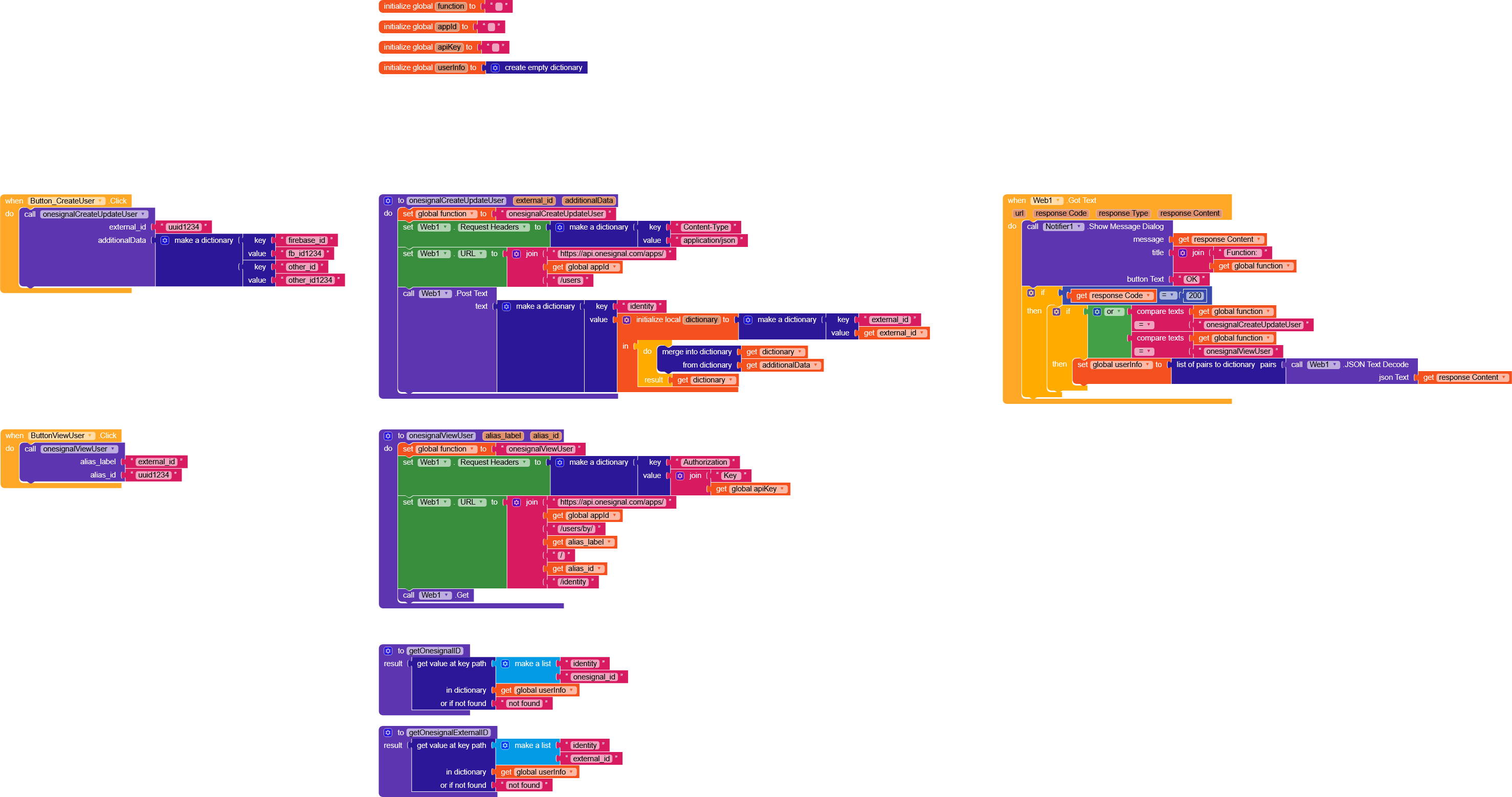
OneSignalREST.aia (5.7 KB)
Tip
I recommend this site, which allows you to convert curl to blocks very easily.
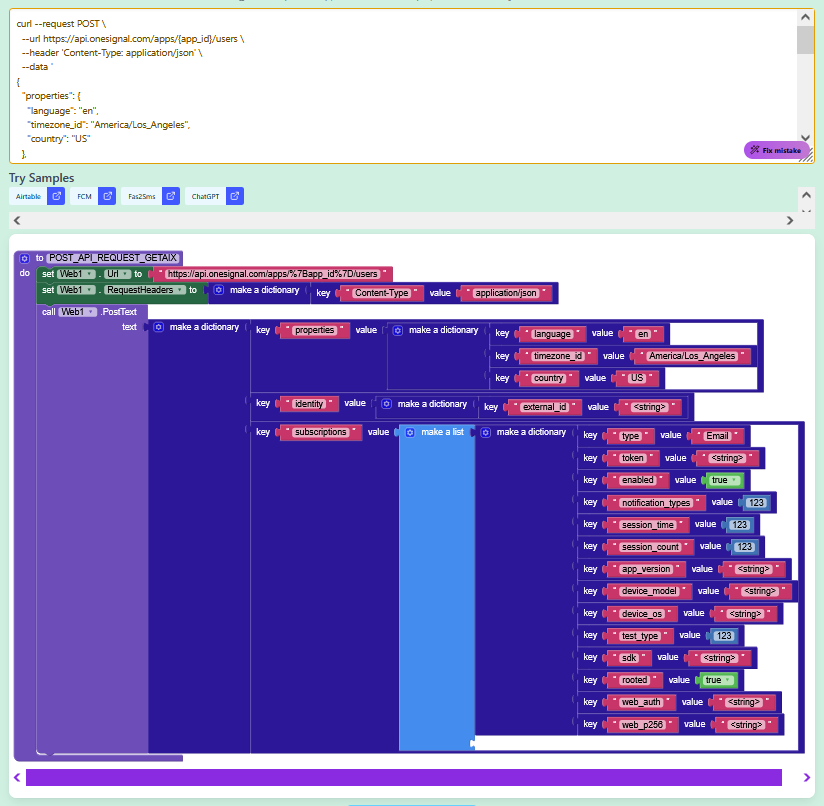
Unfortunately OneSignal doesn’t accept method overrides, so I haven’t found a way to use the  method, and as a result you won’t be able to reproduce those functions.
(CreateAlias can be replaced by createUser by repeating the fields that are already present)
Thank you for your effort but I need a way to get the player id first..
Use the OneSignal component

if I add oneSignal component to the project the firebase authentication component stop working.. this is the main problem
What type of Autho are you using email and password or Google sign in?
Both email and password and Google login as well
if you mean onesignal_id, you receive it in the response both when you use CreateUser and when you use ViewUser
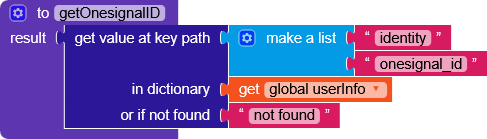
No this one will bring the id if it exists but I need the playerid first or fcm token to register the user first in one signal then this block will work
So what about google sign in .. anyone know how to do it by web.. I face a problem in that too because I can’t make a right deep link to complete this step
Firebase Sign-Up (Email + Password)
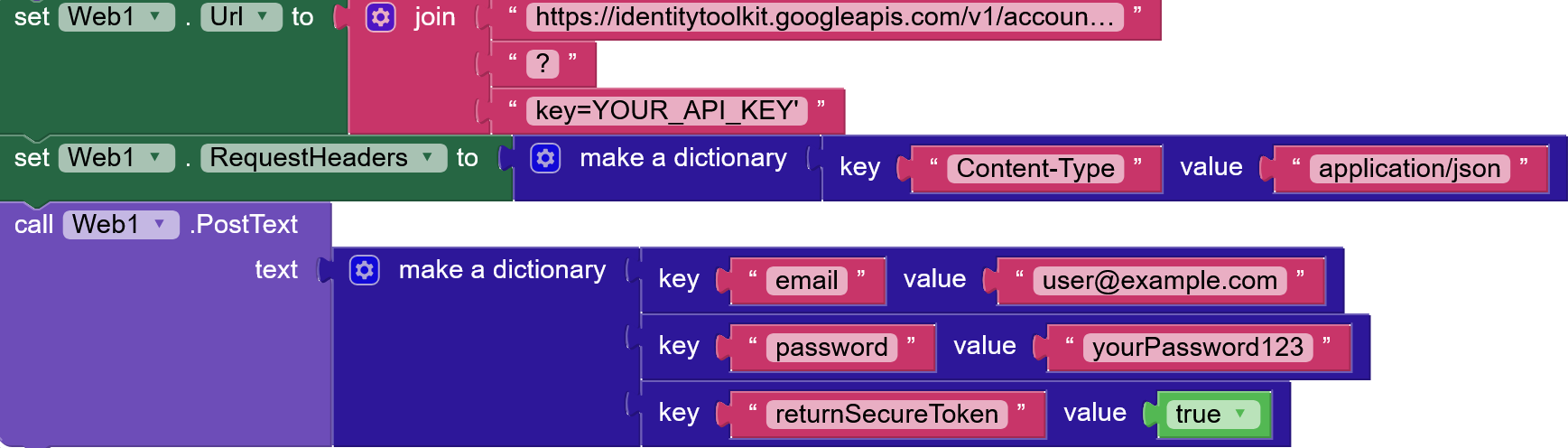
ResponceContent contains
{
“idToken”: “JWT_TOKEN”,
“email”: “user@example.com”,
“refreshToken”: “REFRESH_TOKEN”,
“expiresIn”: “3600”,
“localId”: “USER_UID”
}
Firebase Login (Sign-In)
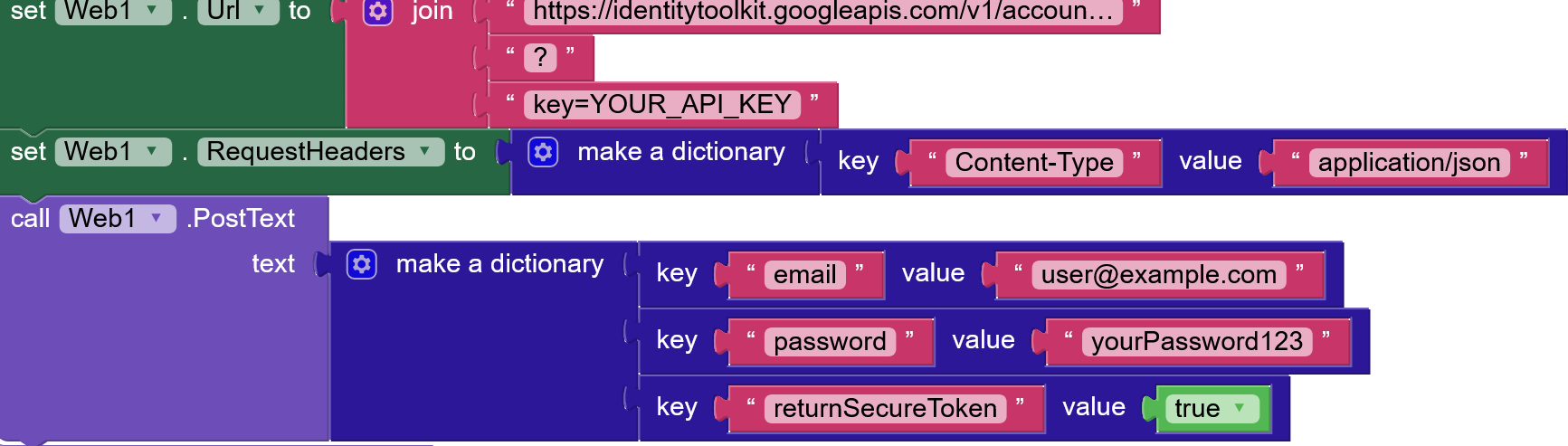
Firebase Password Reset (Send Reset Email)
All response can be handled here

1 Like
If you want a very detailed guide, I recommend this one by Tim, which explains all the possible operations.
1 Like