I’m developing a movie application. I’m opening videos with WebViewer, but they’re not going full screen. The notification bar and navigation keys remain visible. I’ve tried adjusting the screen settings, but it didn’t work.
Shift from WebView to native player component/extension, else onScreemRotationChanged, if it’s landscape true, then set navigation and status bar show to false
Since we already know Dogukan and that he’s not very experienced  let’s also clarify that to check the orientation you need to verify whether the screen height is greater or smaller than the width, and you can do this using these blocks.
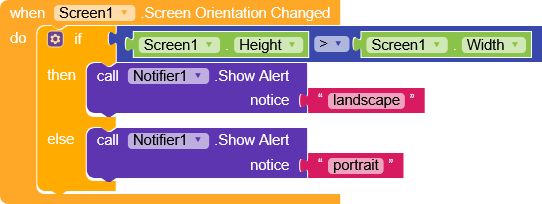
I know it’s a bit counterintuitive, but the blocks should be used this way.
When you rotate the phone, Kodular triggers the event, but since at that moment the screen is still in its initial state, the code works the opposite way.
 I installed the blocks you mentioned. When the video opens, a Landscape message appears, and when I exit, a Portrait message appears. However, the notification panel, etc., is still visible.
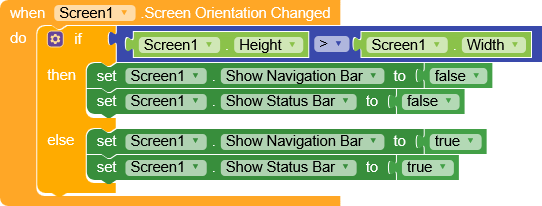
I created the blocks, opened the video. It wasn’t visible at first, but when I touched the screen, it reappeared and wouldn’t go away. When I close and reopen the video, the same thing happens; it’s hidden initially, but reappears when I touch the screen.
I don’t think this issue is related to these blocks.
Was it working correctly before you added them?
No, it was working the same way before I added it, and it’s working the same way after I added it.When I open the video, the notification panel etc. doesn’t appear, but it reappears when I touch the screen. The same thing happens when I exit and re-enter the video; it doesn’t appear initially, but reappears when I touch it and doesn’t disappear.
So, has the issue you opened the topic about been resolved?
As for the video, unfortunately since you can’t provide the link, it’s difficult to understand what isn’t working 
I opened this topic for this reason: it doesn’t appear initially, but only when I touch the screen does it reappear and stay there. I think I forgot to mention this when I started the thread.
Example Video Link
https://vidfast.pro/movie/299536
No problem,
However I tried doing this simple test and everything works correctly.
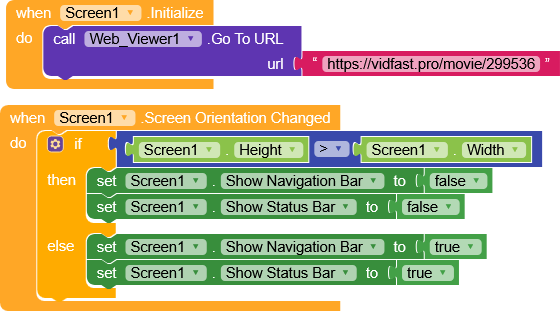
There was an annoying SSL error, though, which I fixed simply by using the CustomWebView extension.
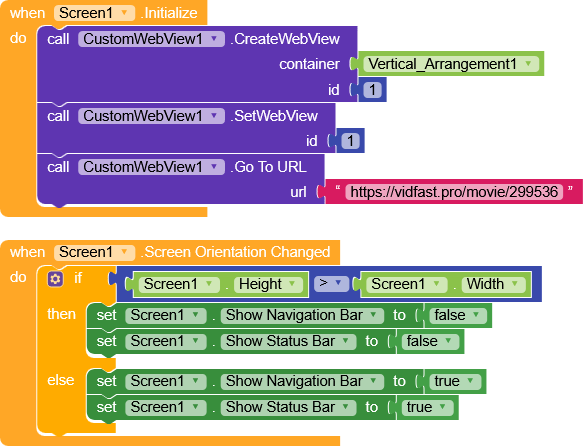
Will using CustomWebViewer fix this problem? If you have time, I can send you my .aia file.
Honestly, I’m not sure because I don’t fully understand where the error comes from, but the simplest thing to do is to try
CWV_Test.aia (234.3 KB)
Alright, dear.
Here is my AIA file (I deleted the Firebase URL section, just so you know).
TESTFilm.aia.zip (220.2 KB)
You know, I didn’t experience any of the issues you reported, everything works correctly for me 
Could you try to explain better or record your screen while the error occurs?
What I’m talking about is this: I click on this video, and even though the panel is initially hidden, if I accidentally touch the screen, it reappears and doesn’t go away.
That’s strange that they’re not visible even at startup, did you disable the Navigation and Status bar in the designer?
That’s the expected behavior
Not it’s not strange, when app is playing a media and the bars are hidden, if you touch/click anywhere, the bars must be visible.


Add a clock that will check rotation and decide to hide the bars or show them in mill secons, simple 
Could you please create an example block and send me a screenshot?
Yes, I disabled it.