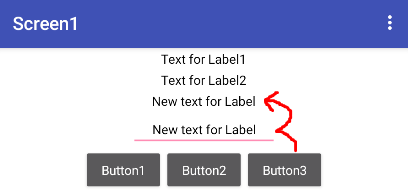
I have a label and I want the text to change when a different button is pressed.
Note that I’m using a block.
Procedure
How can I do that?
I have a label and I want the text to change when a different button is pressed.
Note that I’m using a block.
Procedure
How can I do that?
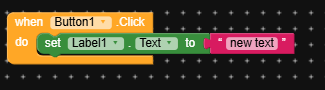
No, that’s not it. I mean, I have multiple text options and multiple buttons, and the text changes with each button press. I want to use the block I mentioned instead of repeating the blocks.
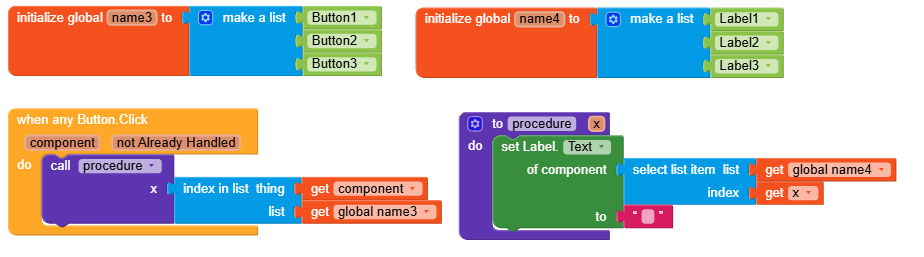
use either dictionary or two global list.
use when any button clicked event
now use either dictionary or selct list item list (index is in list block) to get desired text based on teh button click
I want to summarize all of this in this block. Procedure
Yes, that’s what I need. I have a question regarding the block in the letter X. If we place more than one separate block in it, how do I distinguish between the first and second blocks, and what do I add inside the block where there is an empty space in the button?
Can you create a file and send it here?
I think it’s quite simple to make from the image 
Merry Christmas though
In this block instead of label user must use the text lists so that depending upon the button click index he will show the text in the lable. Also here no need of procedure,
When any button clicked
Set lable text to select list item from the global text list, index (index is in the list thing get component get globalButtonList )
Sometimes I don’t understand how blocks work unless I see a file containing them and test them to see how they function. I’m a beginner in this field, and although I’ve been here with you for years, I only know a little… Best regards.
Apology if my response sounds rude but that’s the only best way for u to learn Kodular
Hi everyone,
I’ll jump in as well, let’s see if I can add some more information.
Based on your first request,
I’d suggest proceeding like this:
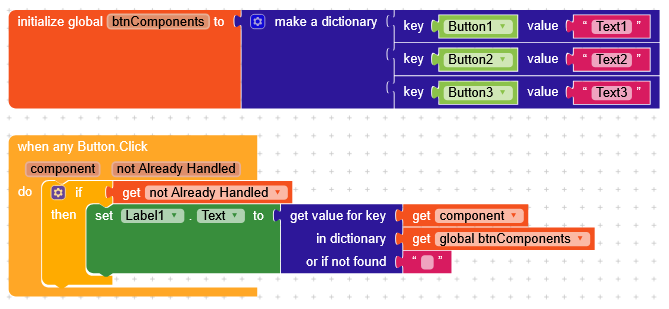
create a dictionary (it’s more convenient and uses only one variable) with
key = Button Component
value = Some text
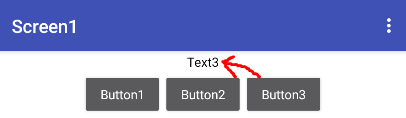
When you click any button (that hasn’t already been handled), you look up the component in the dictionary and set the label to that value.
If instead I have to base it on this,
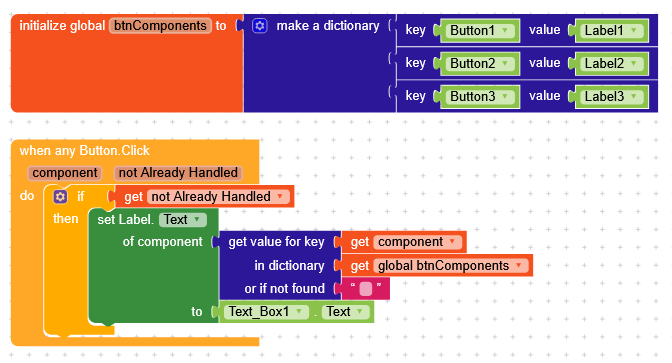
I’d tell you to still create a dictionary but with
key = Button component
value = Label component
When you click a button, you’ll set the text of the label corresponding to that button in the dictionary to the value of textBox.Text (you can also replace it with a predefined text, but you should explain better what you want to achieve).
I was about to ask the same question, but I was waiting for him maybe he should explain if it fit his goal, anyways were here for any assistance/hands as a community

Thank you so much. You helped me a lot. I wish you all the best.